
Krea2 Multi-LoRA Composer
Token-aware spatial Multi-LoRA composition and transparent supersampling for Krea 2 in ComfyUI.
Nodes (2)
Krea2 Multi-LoRA Composer for ComfyUI
Compose multiple Krea 2 character LoRAs in one coherent image with token-aware spatial routing and transparent supersampling.
Standard LoRA stacking applies every identity adapter everywhere. With two character LoRAs, that often produces hybrid faces, duplicated identities, missing subjects, or one character inheriting another character's traits. Krea2 Multi-LoRA Composer assigns each LoRA and subject phrase to an editable region while preserving one shared Krea 2 generation.
Example result
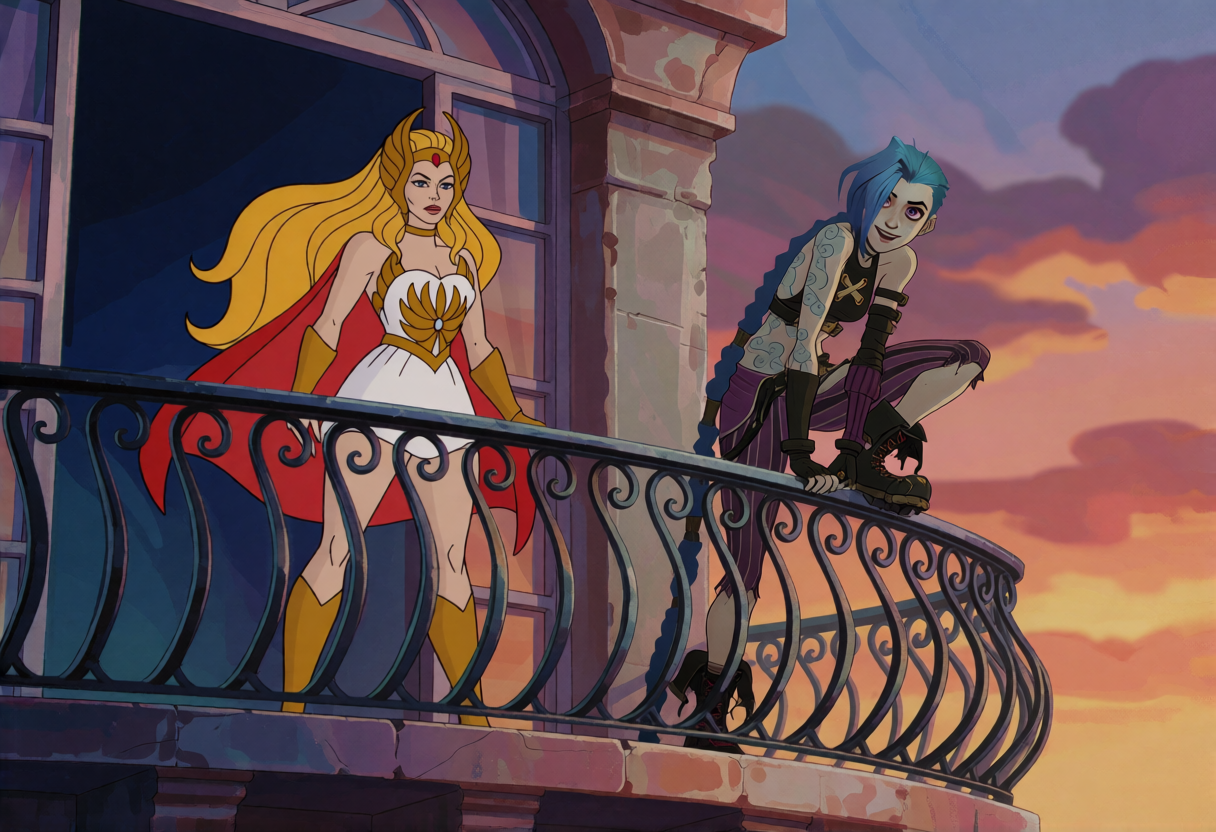
Two independently routed character LoRAs rendered in one coherent composition. This is an AI-generated demonstration using independently obtained LoRAs; no LoRA weights are included in this repository. The depicted characters belong to their respective rights holders. This project is unaffiliated with and is not endorsed by those rights holders.
What is included
Krea2 Multi-LoRA Composer
- One self-contained editor for 1–5 character LoRAs
- Searchable LoRA selection for large libraries
- Exact aspect-ratio placement canvas with draggable and resizable regions
- Per-character trigger, description, strength, and denoising schedule
- Spatial adapter-delta routing: a character LoRA contributes zero outside its region
- Optional Canvas LoRA for the unboxed area or the entire image
- Subject-token isolation and regional attention bias to reduce identity collisions
- Shared scene prompting for coherent lighting, interaction, props, and background
- Portable JSON scene export, file import, and clipboard import
- Standard latent output plus original width, height, and supersampling metadata
Krea2 Multi-LoRA SuperSampler
- Familiar KSampler controls with Krea 2 Turbo-friendly defaults
- Samples the Composer's larger internal latent
- VAE-decodes the working render
- Automatically downsizes to the original canvas with Lanczos, bicubic, area, or bilinear filtering
- Returns the final image, high-resolution latent, working image, and diagnostics
Requirements
- A current ComfyUI build with native Krea 2 support
- Krea 2 Raw or Turbo
- The matching Krea 2 CLIP and VAE
- Character LoRAs trained for Krea 2
- Python 3.10 or newer
No additional Python packages are required beyond a working ComfyUI installation.
Installation
Clone the repository into ComfyUI/custom_nodes:
git clone https://github.com/lokitsar/ComfyUI-Krea2-MultiLoRA-Composer.git
Restart ComfyUI and hard-refresh the browser.
Basic workflow
Krea 2 model ──────┐
Krea 2 CLIP ───────┤
                    ├─ Krea2 Multi-LoRA Composer
                    │       ├─ model ───────────────┐
                    │       ├─ conditioning ────────┤
                    │       ├─ latent ──────────────┤
                    │       └─ supersample_plan ────┤
Krea 2 VAE ─────────────────────────────────────────┤
empty conditioning ─────────────────────────────────┤
                         Krea2 Multi-LoRA SuperSampler ─ image ─ Save Image
Connect:
- The Krea 2 model and CLIP to the Composer.
- Composer
modelto SuperSamplermodel. - Composer
conditioningto SuperSamplerpositive. - Composer
latentto SuperSamplerlatent_image. - Composer
supersample_planto SuperSamplersupersample_plan. - The Krea 2 VAE to SuperSampler
vae. - Empty conditioning to SuperSampler
negative. Krea 2 Turbo does not use negative prompting, but the sampler input remains compatible with ComfyUI's KSampler interface. - SuperSampler
imageto Preview Image or Save Image.
Composer workflow
- Set the target width and height.
- Select the number of characters and choose Set + reset.
- Pick one Krea 2 LoRA per character.
- Enter the exact training trigger and describe only that character in its row.
- Write shared setting, camera, lighting, and common-object instructions in Scene prompt.
- Drag each colored region around its intended character. Drag the lower-right handle to resize it.
- Keep regions separated initially. Use the smallest region that still covers the intended character.
- Start at LoRA strength
1.0, schedule0.0–1.0, feather0.08, and overlap policynearest. - Optionally open Canvas LoRA to give the environment a separate LoRA or rendering style.
The Composer creates the final positive prompt automatically and exposes it as an output.
Canvas LoRA
Canvas LoRA is optional and disabled by default. It uses the same searchable selector, trigger, description, strength, and denoising schedule as a character row, but it does not have a draggable box.
- Unboxed area only builds the Canvas LoRA mask as
1 − union(character masks). The Canvas LoRA contributes to scenery outside every enabled character box and fades beneath the character LoRAs at feathered edges. - Entire canvas applies the Canvas LoRA across the full image as a base style while the character LoRAs remain regionally routed on top.
Use Unboxed area only when a style or environment LoRA should not directly alter the boxed characters. Keep character boxes reasonably tight: scenery located inside a box is intentionally excluded from the Canvas LoRA. Use Entire canvas when consistent rendering style matters more than strict style isolation.
LoRA contributions are combined during one diffusion pass rather than generated as sequential image layers. A strongly character-trained Canvas LoRA can still try to introduce its subject into the unboxed scene; its training quality, captions, trigger, strength, and seed continue to matter.
Transparent supersampling
supersample_scale controls the internal render canvas while leaving the requested output size unchanged:
| Scale | Internal pixel cost | Suggested use |
| --- | ---: | --- |
| 1.0 | 1.00× | Fast testing and ordinary generation |
| 1.25 | 1.56× | Recommended first likeness improvement |
| 1.5 | 2.25× | More facial working resolution |
| 2.0 | 4.00× | High VRAM cost; use selectively |
At 1.25, a 1216 × 832 composition is sampled internally at 1520 × 1040 and automatically returned at
1216 × 832. A normal KSampler connected to the Composer's latent will return the larger working resolution;
use the Multi-LoRA SuperSampler for automatic final sizing.
Recommended Krea 2 Turbo starting point:
- Steps:
8 - CFG:
1.0 - Sampler:
euler - Scheduler:
simple - Denoise:
1.0 - Downscale:
lanczos
Prompt responsibilities
Use the scene prompt for:
- Camera direction and framing
- Global geometry
- Background and common objects
- Lighting, time, and atmosphere
- Relationships shared by multiple characters
Use each character description for:
- The exact trigger
- Identity-specific appearance
- Clothing and pose
- The character's interaction with shared objects
- The rendering style belonging only to that character
Use the Canvas LoRA description for:
- The Canvas LoRA's exact trigger, when it has one
- Environment-specific rendering style
- Texture, medium, or setting language that should stay outside the character boxes
Krea 2 Turbo should be prompted positively. Do not place negative-prompt instructions in the positive scene or character fields.
Scene JSON
share_prompt_json contains:
- Target canvas and internal supersampling plan
- Scene prompt and composed positive prompt
- Optional Canvas LoRA settings and coverage mode
- LoRA paths, triggers, descriptions, and strengths
- Normalized and pixel placement coordinates
- Character schedules and router controls
- Validation warnings
Use Import JSON for a saved file or Paste JSON for clipboard text. Existing
krea2_character_router_share_v1 files remain supported; the format identifier is intentionally unchanged for
backward compatibility.
How routing works
The Composer combines three mechanisms:
- Adapter-delta routing masks each character LoRA's image-token contribution to its assigned region.
- Token isolation applies character text-fusion contributions to the matching subject phrase and suppresses them on competing subject phrases.
- Attention bias encourages each subject phrase to attend to its own image region and suppresses it outside that region.
The base model remains responsible for global coherence. When enabled, Canvas LoRA adds a separately routed adapter contribution to either the unboxed scene or the entire image.
Limitations
- Regions are 2D. A foreground character and a face printed on a poster behind that character occupy the same coordinates, so both can inherit the region's identity.
- Shared Krea attention remains global. The node strongly separates direct adapter contributions but cannot make every base-model interaction local.
- LoRA quality, trigger accuracy, training captions, seed, pose, and face size still affect likeness.
- Heavy region overlap creates genuine ambiguity.
nearestdivides overlapping tokens by region center. - Unboxed Canvas LoRA cannot affect scenery behind a character when that scenery occupies the same rectangular box. Tight boxes reduce this excluded area.
- A Canvas LoRA trained primarily on one character may introduce that character or its features into the background even when the boxed identities remain isolated.
- Supersampling improves working resolution but does not guarantee identity accuracy and increases VRAM use.
Backward compatibility
The visible project and node names changed in version 0.4.0, but the internal ComfyUI node identifiers remain:
Krea2CharacterRouterKrea2SupersampledKSampler
Existing workflows and exported scene JSON therefore continue to load.
Version 0.5.0 appends an optional hidden Canvas LoRA configuration widget. Older workflows load it disabled,
and older krea2_character_router_share_v1 scene files import without modification.
Development
python -m pip install -e ".[dev]"
python -m pytest -q
ruff check .
The routing implementation is tested independently from CUDA inference. Real-image results should still be validated across seeds and LoRA pairs.
Roadmap
- Optional face and full-region identity refinement
- Padded high-resolution character refinement
- Face-focus subregions for scenes containing posters or background faces
- Experimental pose-control integration when stable Krea 2 pose Control-LoRAs become available
Acknowledgements
The token-separation and attention-routing direction was informed by FreeFuse. This project is an independent ComfyUI implementation designed around Krea 2's native model structure and LoRA APIs.
Krea 2 is developed by Krea AI.
License
MIT