
ComfyUI Node HUD
Adds a smart I/O status dock to stacked nodes for cleaner layouts.
ComfyUI Node HUD 🛠️
Stop the spaghetti. Keep the data.
A lightweight UI extension for ComfyUI that adds a smart "Heads-Up Display" (HUD) to your nodes. It allows you to stack nodes behind one another to clean up your workspace, while still seeing exactly what is happening inside the stack via a sleek, tinted-glass dock.
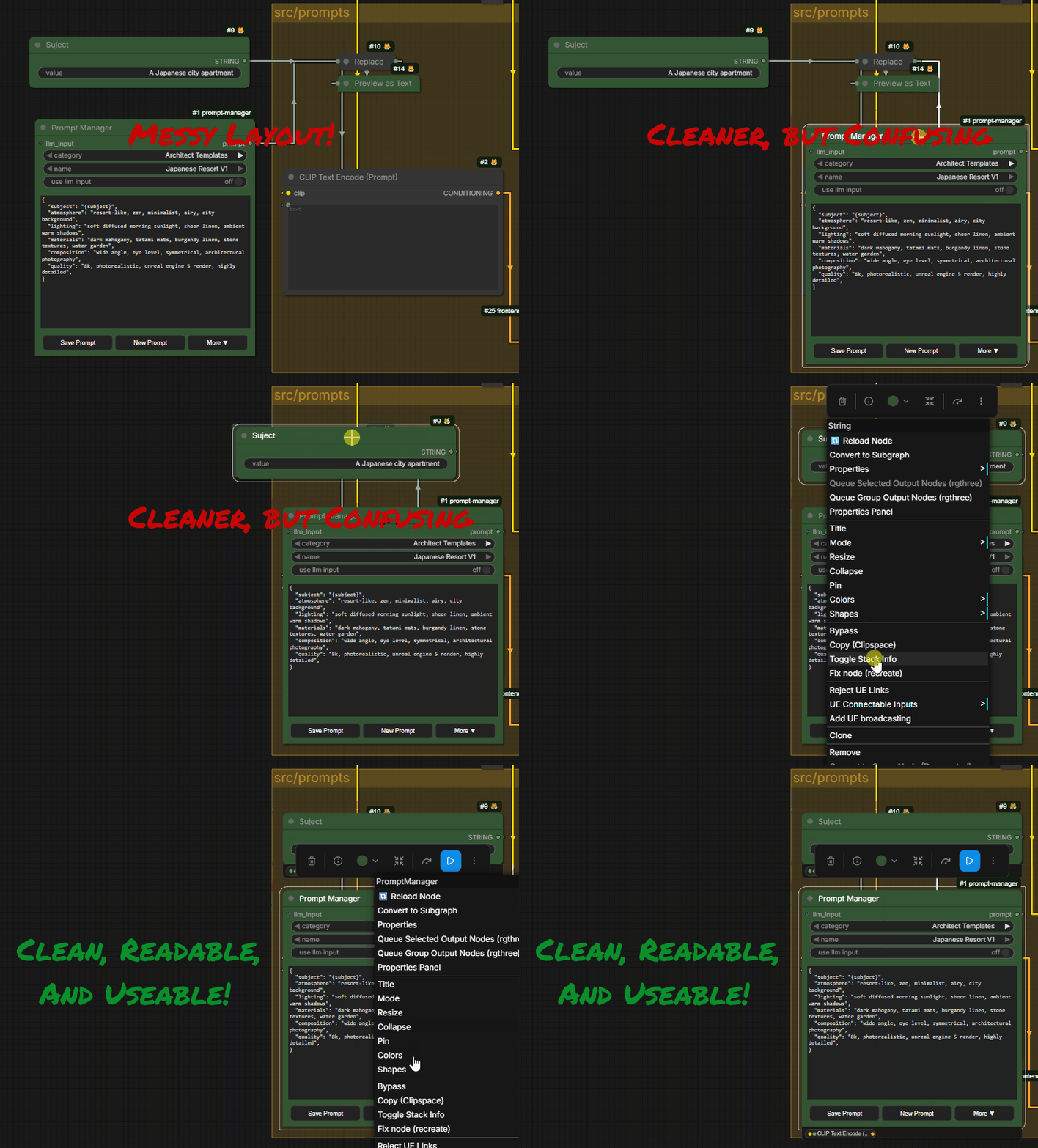
✨ Features
1. Hiding Nodes
Hide utility nodes (like String Primitives, Notes, or multiple LoRAs) behind a single "Parent" node. Clean Layout Dock detects these hidden nodes and generates a live status bar attached to the bottom of the parent.
2. Smart I/O Indicators 🚦
No more guessing if a hidden node is connected. The dock displays Smart Dots that visualize the data flow:
- Left Dots (Inputs): Shows active incoming connections.
- Right Dots (Outputs): Shows active outgoing data.
- Color Coded: The dots match ComfyUI's standard wire colors:
- 🟣 Purple: Model
- 🟡 Yellow: CLIP
- 🔴 Red: VAE
- 🌸 Pink: Latent
- 🔵 Blue: Image
- 🟢 Green: String / Text
3. Live Status Feedback
The dock updates in real-time to reflect the state of your nodes:
- Active: Green text / Standard border.
- Muted: Gray border & dimmed text.
- Bypassed: Purple border.
- Disconnected: If a node has no active inputs or outputs, a red error dot 🔴 appears.
4. "Tinted Glass" UI
The dock uses a semi-transparent dark background (85% opacity) to ensure readability without feeling "heavy" or blocking the grid entirely.
📥 Installation
Method 1: Manager (Coming Soon)
Once indexed, you can install this via the ComfyUI Manager.
Method 2: Manual Install
- Navigate to your ComfyUI
custom_nodesdirectory:cd ComfyUI/custom_nodes/ - Clone this repository:
git clone https://github.com/loficoding/ComfyUI-Node-HUD.git - Restart ComfyUI.
🖱️ Usage
- Stack Your Nodes: Drag utility nodes (like Primitive or Note) physically behind a larger "Parent" node (like Prompt Manager or KSampler).
- Activate the Dock:
- Right-click the Parent Node.
- Select "Toggle Stack Info" from the menu.
- That's it! The dock will appear. If you move the nodes out from behind the parent, the dock updates instantly.
🎨 Color Legend
| Color | Meaning | | :--- | :--- | | 🟣 | Model (Checkpoint / LoRA) | | 🟡 | CLIP (Conditioning) | | 🔴 | VAE | | 🌸 | Latent | | 🔵 | Image | | 🟢 | String / Text | | 🔴 (Solid) | Error / Disconnected |
🤝 Contributing
This extension is pure JavaScript. Feel free to submit PRs for new features or styling tweaks!
📄 License
MIT License.