
Comfy-DeepSeekAPI
ComfyUI nodes for DeepSeek API: chat (text + images + web tools), web search, and account balance
Comfy-DeepSeekAPI
English | 中文
Install
- Copy the Comfy-DeepSeekAPI folder into ComfyUI/custom_nodes/
- Set the environment variable DEEPSEEK_API_KEY (create one at https://platform.deepseek.com/api_keys)
- Restart ComfyUI
Requires a ComfyUI version with V3 nodes (comfy_api.latest).
Node titles, descriptions and tooltips follow ComfyUI's interface language (English / 中文).
Usage
Three nodes under Add Node → DeepSeekAPI:
| Node | What it does | Outputs | |---|---|---| | DeepSeek Model API | Chat + image understanding (up to 5 images via images) + optional web tools | text / sources / json | | DeepSeek Search API | Web search; the query syntax is built from the filter widgets | text / json | | DeepSeek Balance API | Account balance | text / json |
Defaults are tuned for lowest cost and latency: wire images and hit Run for image understanding; just edit the default query in the search node.
Example
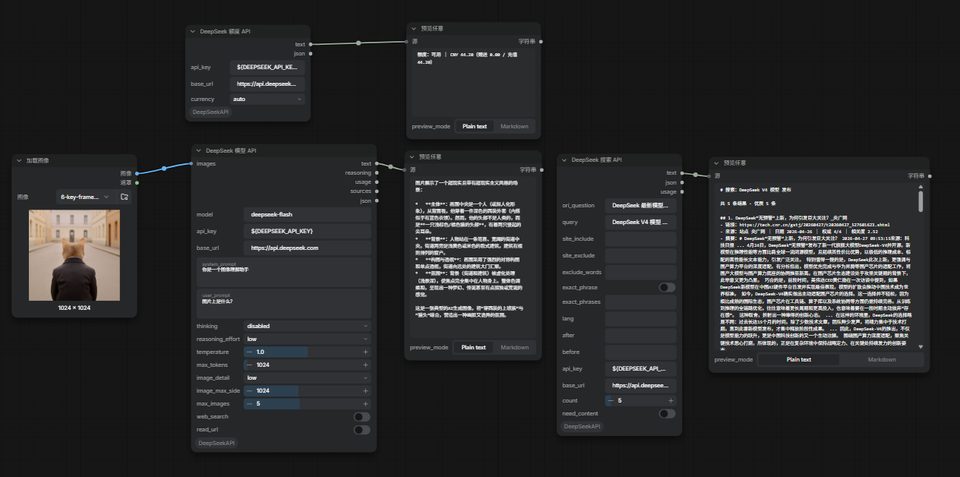
Workflow file: example_workflows/Comfy-DeepSeek-API.json
Open it from Workflow → Browse Templates, or drag the JSON file onto the canvas.
Sponsor
If this plugin saves you time, buy me a coffee ☕
| Alipay | WeChat Pay |
|---|---|
|  |
 |
Special thanks to DeepSeek for the stable and easy-to-use API.
中文
安装
- 把 Comfy-DeepSeekAPI 文件夹放进 ComfyUI/custom_nodes/
- 设置环境变量 DEEPSEEK_API_KEY(在 https://platform.deepseek.com/api_keys 创建)
- 重启 ComfyUI
需要支持 V3 节点的 ComfyUI 版本(comfy_api.latest)。
节点标题、描述与 tooltip 跟随 ComfyUI 的界面语言(中文 / English)。
使用
三个节点,都在 Add Node → DeepSeekAPI 下:
| 节点 | 作用 | 输出 | |---|---|---| | DeepSeek 模型 API | 文本对话 + 图片识别(images 可接多张)+ 可选联网 | text / sources / json | | DeepSeek 搜索 API | 网页搜索,语法由筛选控件自动拼 | text / json | | DeepSeek 额度 API | 查询账户余额 | text / json |
默认参数已按最省钱、最快设好:接上图片点 Run 就是图像理解;搜索节点把默认查询词改掉即可用。
示例
工作流文件:example_workflows/Comfy-DeepSeek-API.json
可从 Workflow → Browse Templates 打开,或直接把 JSON 拖进画布。
支持这个项目
如果它帮你省了时间,欢迎请我喝杯咖啡 ☕
| 支付宝 | 微信支付 |
|---|---|
| | |
特别鸣谢 DeepSeek 提供稳定、好用的 API 服务。