
ComfyUI Extension
ComfyUI-SaveAsICO
ComfyUI node which allows you to save generated images as .ICO files.
levicki/ComfyUI-SaveAsICO
Nodes—
On cloudLocal install
Stars0
Updateda day ago
Readme
ComfyUI-SaveAsICO
ComfyUI-SaveAsICO is a simple ComfyUI node which allows you to save generated images as .ICO files.
Features
- Saves a multi-size .ICO file with full alpha transparency (frames are stored as PNG, supported since Windows Vista)
- Offers three size presets:
- Application: 64, 128, 256
- Favicon: 16, 32, 48
- Windows: 16, 24, 32, 48, 64, 128, 256
- Downscales each smaller size directly from the 256x256 source using Lanczos resampling
- Saves a 256x256 .PNG next to each .ICO, which is also shown as the node preview
- Supports batches, saving one .ICO and one .PNG per image
- Supports the filename prefix tokens
%width%,%height%,%year%,%month%,%day%,%hour%,%minute%,%second%, and%batch_num% - Passes the input images through to its output for further processing
Installation
Activate the virtual environment your ComfyUI runs in, then clone the repository into the custom_nodes folder and install the requirements:
cd ComfyUI/custom_nodes
git clone https://github.com/levicki/ComfyUI-SaveAsICO
pip install -r ComfyUI-SaveAsICO/requirements.txt
Requirements
- Input image must have alpha transparency
- Input image must be 256x256 pixels in size
Example Workflow
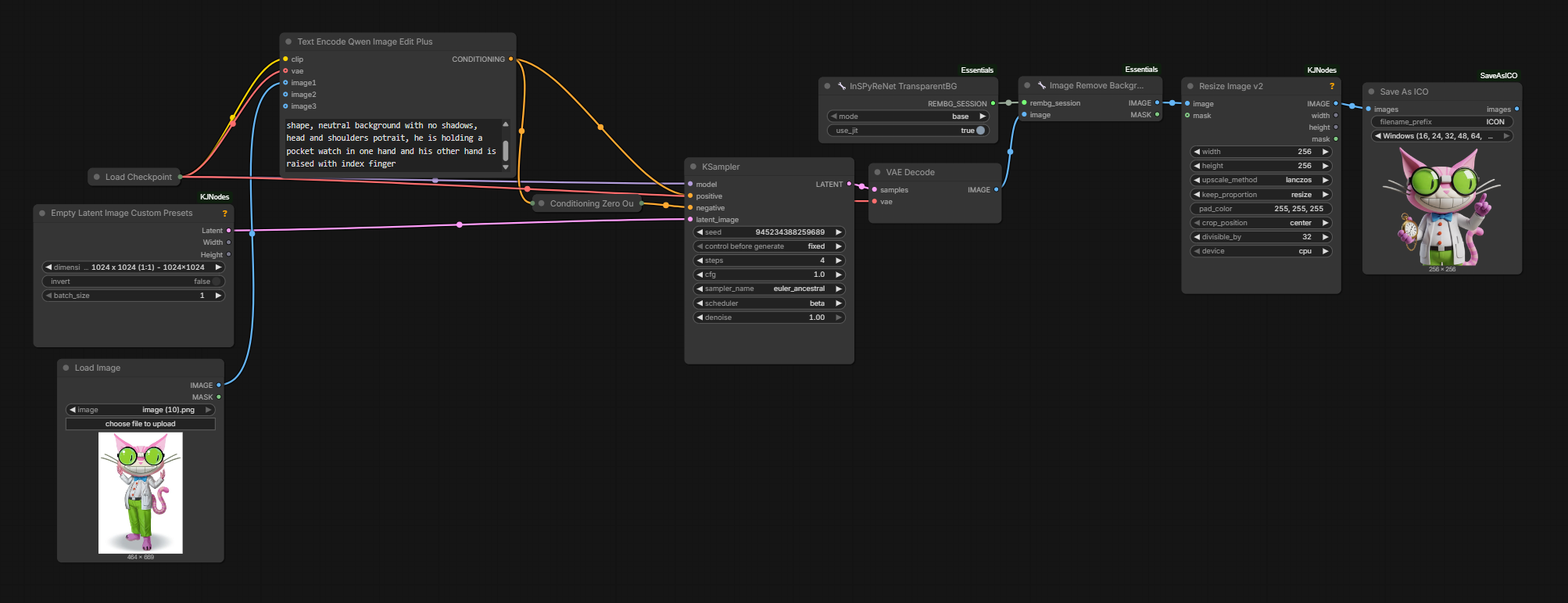
Recommended models
- Qwen Image 2.1 (by prompting with
This is an RGBA image with transparency. <YOUR PROMPT>. The image has alpha channel and the background is transparent.) - Qwen Image Edit + InSPyReNet TransparentBG + Image Remove Background (both from ComfyUI-Essentials)