
Touch Tooltips
Long-press tooltips for ComfyUI widgets and sockets on touch devices.
comfyui-touch-tooltips
Long-press tooltips for ComfyUI widgets, sockets, and node titles on touch devices.
Part of a family of mobile-first ComfyUI usability packs, built on comfy-modal-kit (gallery-loader, model-gallery, prompt-editor, sampler-info, touch-connect, touch-numeric, touch-resize): touch-friendly gestures and HTML popovers that replace clunky native LiteGraph interactions, additive and non-clobbering.
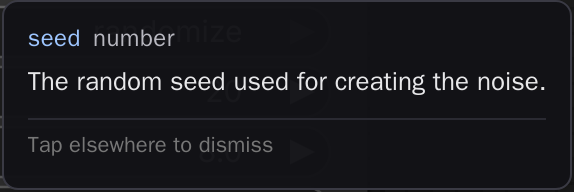
Long-press a widget, socket, or node title on a touch device to read its tooltip.
Install
From the Comfy Registry (ships the prebuilt web/dist/), or from source:
cd <ComfyUI>/custom_nodes
git clone https://github.com/laurigates/comfyui-touch-tooltips
cd comfyui-touch-tooltips
bun install
bun run build      # emit web/dist/ (generated, git-tracked; ComfyUI serves it)
Restart ComfyUI; hard-refresh the browser tab (Ctrl+Shift+R / Cmd+Shift+R).
What it does
On a desktop you hover a widget to read its tooltip. On a touch device there is no hover, so that metadata is invisible. This pack restores it: a long-press (hold, then lift, with less than ~10px of finger movement) on the LiteGraph canvas hit-tests whatever was under your finger — a node widget, an input/output socket, or a node title — and surfaces a popover with that element's existing tooltip metadata (its label, type, and tooltip text). Tap away or press Escape to dismiss it.
The press has an upper bound as well as a lower one: hold for roughly 450–600ms and lift. ComfyUI's own touch support opens LiteGraph's context menu for a press it measures as longer than 600ms, so this pack declines those presses outright — hold longer and you get the native context menu, with no tooltip competing for the same spot. Nothing here suppresses that menu; the two gestures simply occupy different halves of one press.
The popover reads metadata that is already there (widget options, INPUT_TYPES
specs, socket and node-def tooltips); it never fabricates text. When an element
has no tooltip, the popover says so ("(no tooltip)") rather than showing
nothing. It is touch-only by default so mouse hover behaves exactly as
before.
Compatibility
- ComfyUI: modern Vue frontend (
comfyui-frontend-package >= 1.40) for the canvas pointer-event model (app.canvas,convertEventToCanvasOffset,graph.getNodeOnPos). - Frontend changes (JS/CSS) take effect on browser hard-refresh — no restart.
License
MIT — see LICENSE.