
Touch Resize
Big corner grab-handles for resizing ComfyUI nodes and groups on touch devices.
comfyui-touch-resize
Big corner grab-handles for resizing ComfyUI nodes and groups on touch devices.
Part of a family of mobile-first ComfyUI usability packs, built on comfy-modal-kit (gallery-loader, model-gallery, prompt-editor, sampler-info, touch-connect, touch-numeric, touch-tooltips): touch-friendly gestures and HTML modals that replace clunky native LiteGraph interactions, additive and non-clobbering.
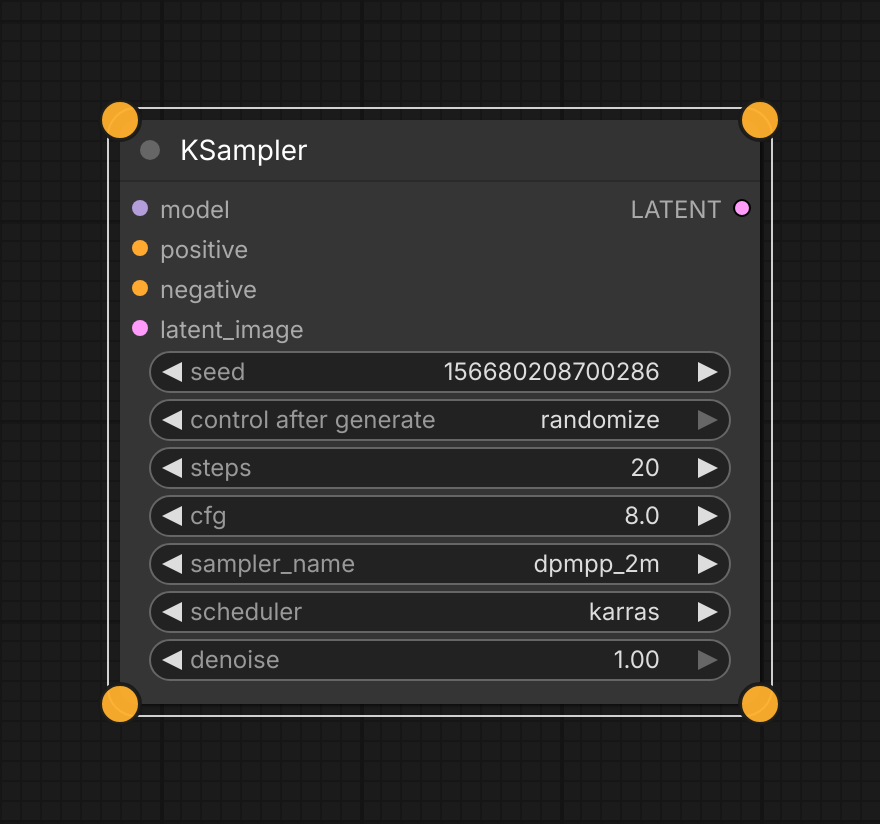
Select a node and four amber grab handles appear at its corners. Drag one to resize. Everything in this shot is drawn by the pack — nothing is illustrated.
Install
cd <ComfyUI>/custom_nodes
git clone https://github.com/laurigates/comfyui-touch-resize
Restart ComfyUI; hard-refresh the browser tab (Ctrl+Shift+R / Cmd+Shift+R).
What it does
Select a node or group and the pack paints four big amber circles at its corners. Drag one to resize — the opposite corner stays anchored, so the item grows from the corner you grabbed rather than from its origin.
- Sized for fingers, not cursors. The circles are drawn at a constant on-screen size regardless of zoom, and their touch target is nearly twice the drawn radius (~36px across) so they stay hittable at any zoom level.
- Nodes and groups. Handles trace the item's visible outline — for a node that includes its title bar, which keeps them clear of the input and output slots. After a group resize its node membership is recomputed, so moving it still carries the right nodes.
- Single selection only. Handles appear when exactly one item is selected. A rubber-band selection of ten nodes would otherwise paint forty circles and leave "which item does this handle resize?" unanswerable.
- Respects LiteGraph's own rules. Pinned items (which LiteGraph forbids moving or resizing) and collapsed nodes get no handles.
- Additive, no-op fallback. The pack writes only
posandsize, both already serialized. Ifapp.canvasor the pointer model is absent it does nothing, so the native corner-handle resize and canvas zoom keep working.
Escape, or switching away from the window, ends a drag in progress. Bringing a second finger down during a drag abandons the resize and hands the gesture to ComfyUI's own two-finger pinch-zoom.
There are no custom nodes, widgets, or modals — this is a frontend-only canvas affordance layer.
Why handles instead of a pinch gesture
Versions up to 0.1.x used a two-finger pinch on a selected node. It was replaced because that interaction is structurally at odds with how LiteGraph consumes pointer events:
A pinch cannot be recognized until the second finger lands, by which time
the first finger's pointerdown has already reached LiteGraph and opened a
node-drag or canvas-pan transaction. Everything after that was damage control —
suppressing the move stream, intercepting wheel, and trying to hand the
half-open transaction back on release. The canvas could still end up "stuck in
two-finger mode", recovering only when you switched apps.
That stuck state had a specific cause. ComfyUI's built-in
Comfy.SimpleTouchSupport keeps a global count of active touches and patches
LGraphCanvas.processMouseDown to return early whenever that count is non-zero.
The old suppression layer swallowed touchstart but deliberately let touchend
through, so the count drifted negative — which is also non-zero — and the
canvas stopped responding to taps until visibilitychange reset it. That is
exactly the app-switch recovery that was observed.
A corner handle is hit-tested on the very first pointerdown, so that event
is suppressed before LiteGraph opens any transaction, and there is no half-open
state to recover from. The pack now touches only the pointer-event stream and
never the touch events, so that count stays balanced. Roughly half the source
went away with the gesture.
Compatibility
- ComfyUI: modern Vue frontend (
comfyui-frontend-package >= 1.40) for the canvas pointer-event model (app.canvas,ds.scale/ds.offset). - Handles are drawn on the canvas, so they are not visible when the
experimental Nodes 2.0 setting (
Comfy.VueNodes.Enabled, DOM-rendered nodes) is on. It defaults to off for self-hosted installs. - Frontend changes (JS/CSS) take effect on browser hard-refresh — no restart.
License
MIT — see LICENSE.