
Prompt Editor
Full-screen touch editor for multiline prompt widgets: weight steppers, embedding/LoRA insert palette, and a token counter.
comfyui-prompt-editor
Full-screen touch editor for multiline prompt widgets: weight steppers, embedding/LoRA insert palette, and a token counter.
Part of a family of mobile-first ComfyUI usability packs — touch-friendly HTML modals that replace clunky native LiteGraph controls, detected by widget name, additive and non-clobbering. All share
@laurigates/comfy-modal-kit(the modal shell, fuzzy primitives, and the cross-pack field-provider registry this editor consumes). Siblings: gallery-loader, model-gallery, sampler-info, touch-numeric, touch-connect, touch-resize, touch-tooltips.When a sibling provider pack (e.g. touch-numeric's seed keypad, sampler-info's fuzzy sampler list) is installed alongside this editor, the all-fields modal mounts that richer inline control per matching widget and falls back to its built-in control when none is registered.
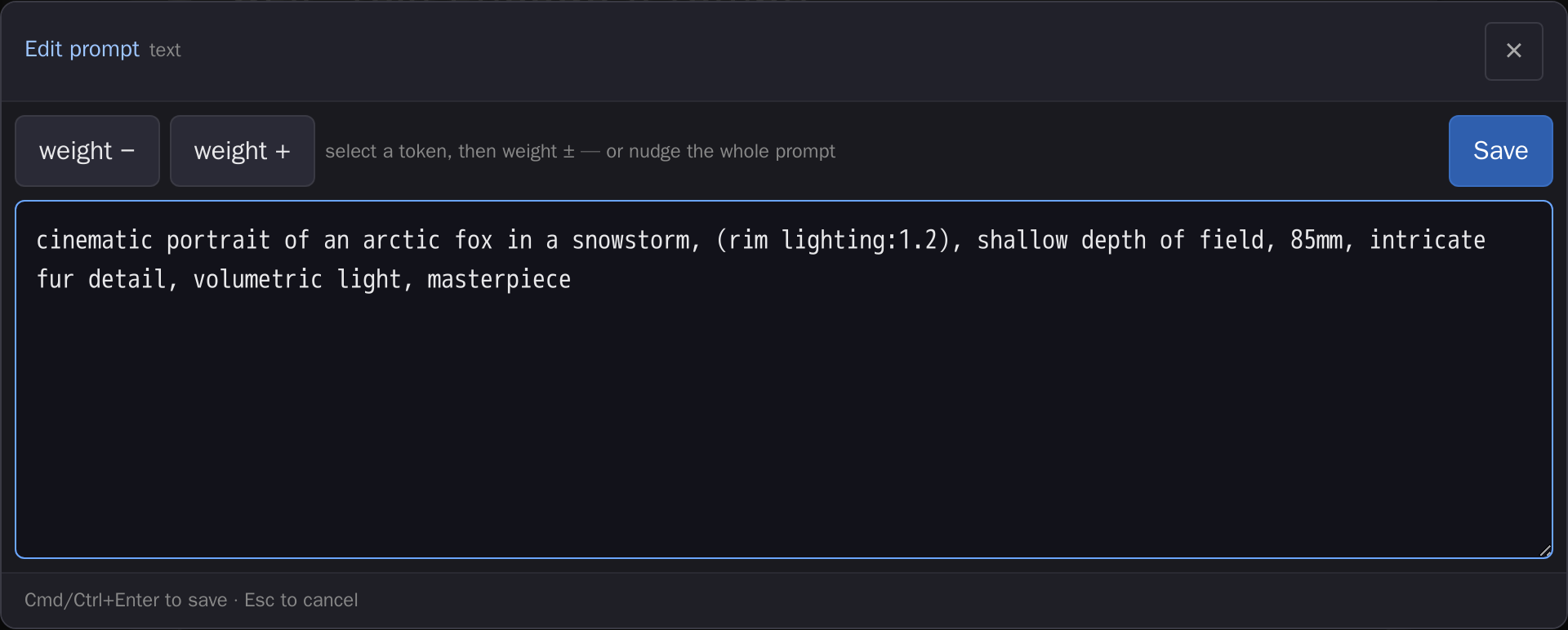
The full-screen editor over any multiline prompt widget: per-token weight steppers and a roomy textarea, committed back with Cmd/Ctrl+Enter.
Install
cd <ComfyUI>/custom_nodes
git clone https://github.com/laurigates/comfyui-prompt-editor
Restart ComfyUI; hard-refresh the browser tab (Ctrl+Shift+R / Cmd+Shift+R).
What it does
Tapping any multiline text widget (or the appended ⤢ Edit fields button)
opens a full-viewport, touch-first HTML modal — the all-fields node editor — in
place of the keyboard-occluded on-canvas sliver. The modal renders a control for
every editable widget on the node — multiline and single-line STRING,
INT/FLOAT, combos, and booleans — with the tapped widget focused and scrolled
above the soft keyboard.
- Per-token weight steppers on each multiline prompt field: ± buttons bump
the
(token:1.1)weight of the word under the caret without hand-typing parentheses. - Embedding / LoRA insert palette for quickly dropping
embedding:/<lora:>tokens into the prompt. - Token counter so you can see prompt length at a glance.
- When a sibling provider pack is installed (e.g. touch-numeric's seed keypad, sampler-info's fuzzy sampler list), the matching field mounts that richer inline control and falls back to the built-in one otherwise.
rgthree Power Lora Loader
The editor renders one card per LoRA row — the on/off toggle, the filename, and touch strength steppers (one, or model + clip when the node's Show Strengths property is set to Separate Model & Clip). It also makes reachable the three things rgthree gates behind a right-click context menu and a LiteGraph menu:
- Tap the filename to pick from a card grid, when comfyui-model-gallery is installed — searchable, with trigger words and training metadata for the chosen file. Without that pack the filename stays an editable text box, exactly as before.
- ↑ / ↓ / ⨯ per row to reorder and remove, and ➕ Add LoRA to append one.
Row changes apply immediately (and flush any pending field edits), because they change the very list the modal is rendering — Cancel does not undo them. Everything else still writes back only on Save.
Write-back is per-field and additive: only widgets whose value actually changed are committed (Cmd/Ctrl+Enter or the Save button), so a cancelled edit leaves the serialized workflow byte-for-byte unchanged. If any field fails to write back, a copyable error popup lists the affected fields.
Compatibility
- ComfyUI: modern Vue frontend (
comfyui-frontend-package >= 1.40) for thewidget.onPointerDowninterception hook. - Frontend changes (JS/CSS) take effect on browser hard-refresh — no restart.
License
MIT — see LICENSE.