
Output Swap
Drag one output onto another to take over its downstream links — reroute a connection's source without hunting for the target input.
comfyui-output-swap
Drag one output onto another to take over its downstream links — reroute a connection's source without hunting for the target input.
Part of a family of mobile-first ComfyUI usability packs (gallery-loader, sampler-info): touch-friendly gestures and HTML modals that replace clunky native LiteGraph interactions, additive and non-clobbering.
Install
cd <ComfyUI>/custom_nodes
git clone https://github.com/laurigates/comfyui-output-swap
cd comfyui-output-swap
bun install
bun run build      # emit web/dist/ (served by ComfyUI)
Restart ComfyUI; hard-refresh the browser tab (Ctrl+Shift+R / Cmd+Shift+R).
What it does
Redirecting a connection's source normally means hunting down the downstream node — often scrolled off-screen — grabbing the wire there, and dragging it back. This pack lets you do it from the source end instead.
Drag one output onto another node's output slot of the same type. The dragged output takes over all of that output's downstream links — every input it fed is re-homed to the dragged source — and the old output is left disconnected. (An input holds only one link, so each re-home cleanly replaces the old one.)
If the dragged node has a matching free input, it is also spliced into the
stream — the taken-over output is wired into it, giving target → dragged → everything the target used to feed. Dropping a filter or upscaler onto a
loader's output puts it in the middle of the chain in one gesture, instead of
leaving its input dangling.
The splice is deliberately cautious, because guessing wrong would silently rewire a graph you didn't ask to touch. It only happens when:
- the dragged node has exactly one input of a compatible type —
image1/image2pairs are ambiguous, so those fall back to a plain takeover; - that input is empty — it will never displace a connection you already made;
- neither slot is a wildcard (
*) type — reroutes and "any" switches would otherwise match everything; - and the result would not create a cycle.
Otherwise you get the plain takeover. Hold Alt while dropping to skip the splice for one gesture (when you want the old branch left dangling and out of the execution path), or turn it off entirely with the Also splice the dragged node into the stream setting, under Settings → Touch Tools → Output Swap.
While you drag, a hover affordance shows exactly what will happen: a cyan ring on the takeover-target output, dashed cyan wires to each downstream input, a ring on each of those (possibly off-screen) input endpoints, and — when the splice applies — a finer-dashed wire back into the input it will fill. Dropping anywhere that isn't an output slot does nothing special — native behavior runs — and the whole feature toggles off via the Output swap setting.
Additive and fail-soft: it hooks the canvas connection event without clobbering
other extensions, coexists with quick-connections (Circuit Board Lines), and
only ever moves the links you asked it to.
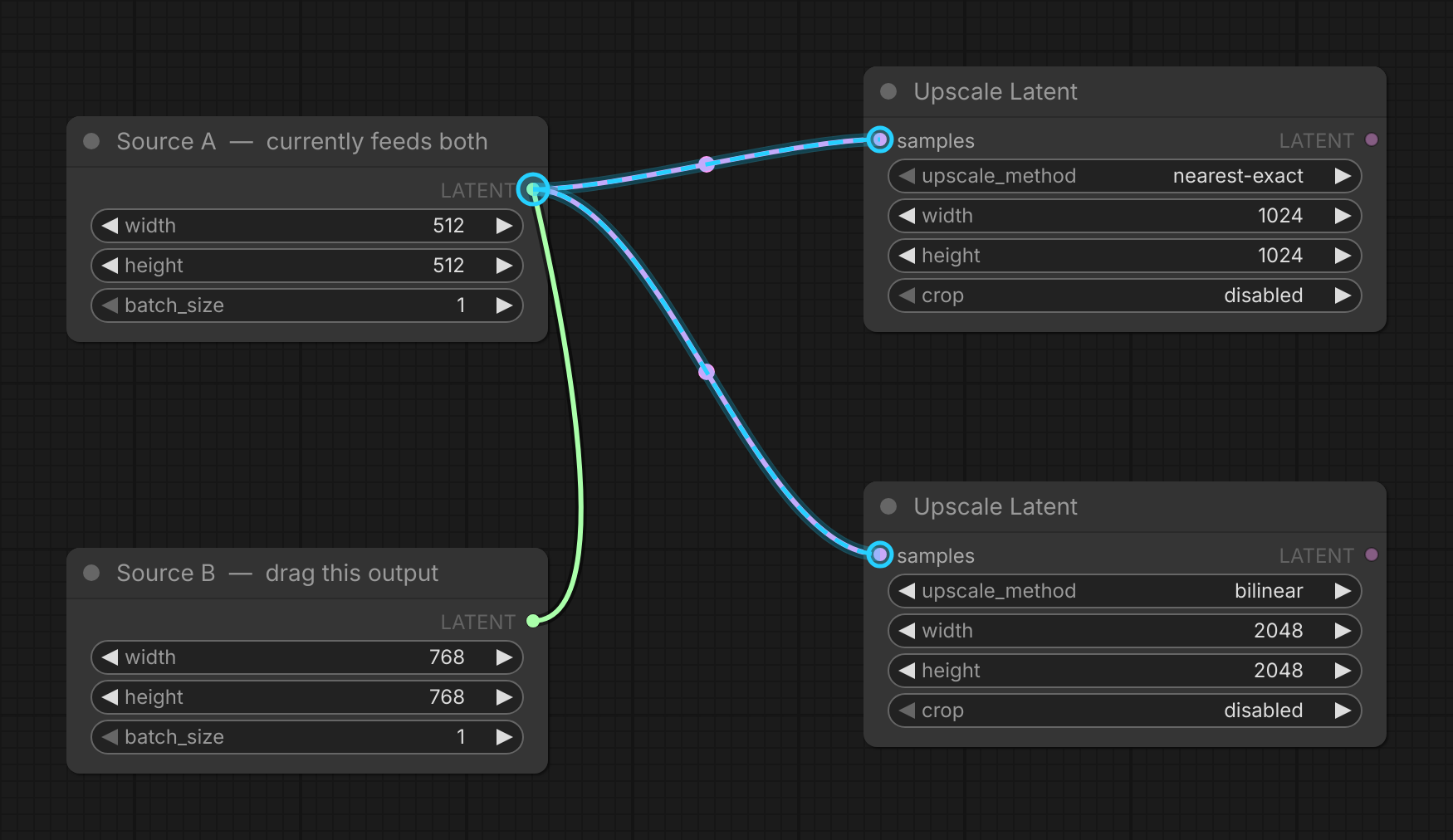
Mid-drag from Source B's output onto Source A's: the cyan ring marks the takeover target, and the dashed cyan wires trace every downstream input that is about to be re-homed — each ringed at its far end, so targets scrolled off screen are still accounted for. Releasing here moves both links to Source B and leaves Source A's output empty.
Compatibility
- ComfyUI: modern Vue frontend (
comfyui-frontend-package >= 1.43) for thecanvas.linkConnectorevent API the swap hooks. Verified against 1.45.x. - Coexists with
quick-connections(Quick Connections / Circuit Board Lines). - Frontend changes take effect after
bun run build+ a browser hard-refresh — no ComfyUI restart.
License
MIT — see LICENSE.