
Model Gallery
Touch-first card-grid picker with preview thumbnails for the folder-backed model combos (LoRA, checkpoint, VAE, ControlNet, UNet, CLIP, upscale).
Nodes (1)
comfyui-model-gallery
Touch-first card-grid picker with preview thumbnails for the folder-backed model combos (LoRA, checkpoint, VAE, ControlNet, UNet, CLIP, upscale).
Part of a family of mobile-first ComfyUI usability packs built on the shared
@laurigates/comfy-modal-kit— gallery-loader, prompt-editor, sampler-info, touch-numeric, touch-connect, touch-resize, touch-tooltips: touch-friendly HTML modals that replace clunky native LiteGraph controls, detected by widget name, additive and non-clobbering.Via the kit's cross-pack field-provider registry (v0.4.0) this pack also registers the gallery as an inline control, so an editor built on the kit (e.g. prompt-editor) can mount the model picker directly in a field row — not only on canvas tap. See ADR-0002.
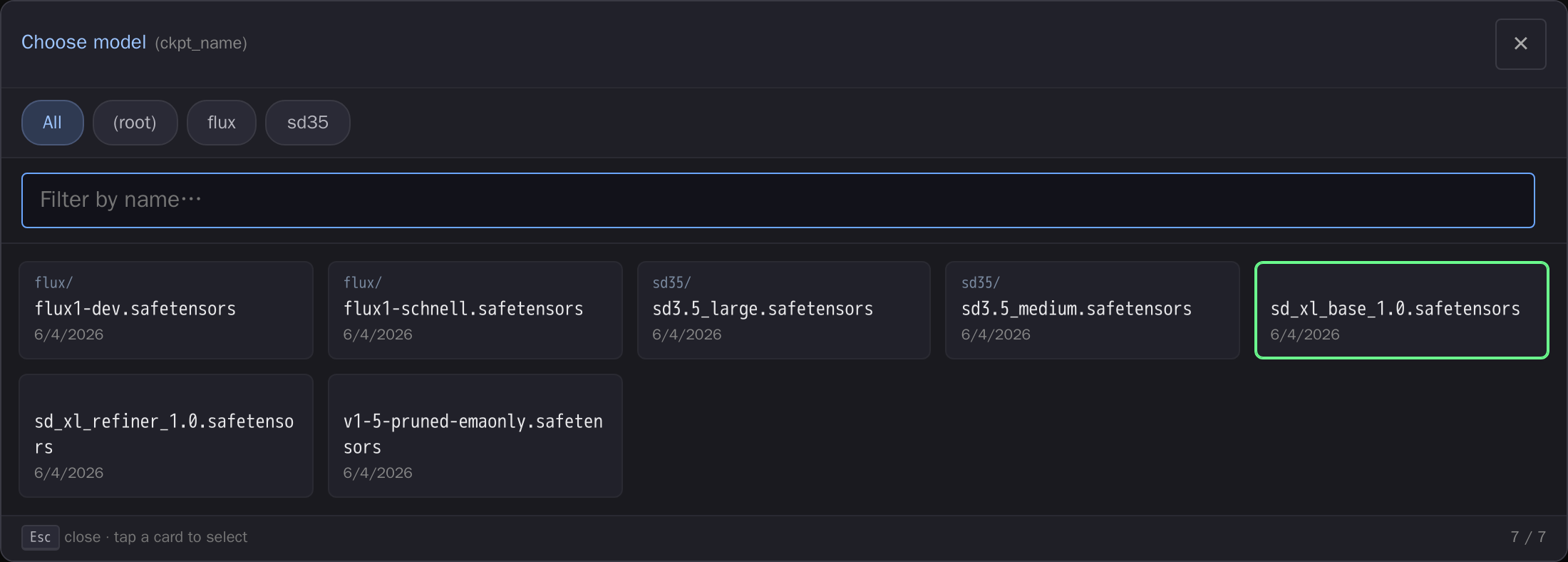
The card-grid picker over a ckpt_name combo: subfolder filter chips,
fuzzy name filter, and the current value highlighted. (Screenshot uses
placeholder model names.)
Install
cd <ComfyUI>/custom_nodes
git clone https://github.com/laurigates/comfyui-model-gallery
Restart ComfyUI; hard-refresh the browser tab (Ctrl+Shift+R / Cmd+Shift+R).
What it does
Detects folder-backed model combos by widget name (ckpt_name,
lora_name, vae_name, control_net_name, unet_name, clip_name*,
upscale_model, …) and replaces the native LiteGraph dropdown with a
touch-first card grid: subfolder filter chips, fuzzy name filter, mtime, and
the current value highlighted. The exact combo string is written back verbatim
so serialized workflows never churn.
Model info
Each card is annotated with what the model is, in two layers:
- Filename corpus (instant, offline, every file type) — base-architecture
family + notable-model badges and a one-line summary, matched by pattern
against the filename (
web/data/models.json). Works for.ckpt/.pth/GGUF and files with no embedded metadata. The same info also feeds the fuzzy filter (searchsdxl,anime,upscale, …) and the widget's hover/long-press tooltip for the current value. - Embedded metadata (authoritative, on demand) — tap a card's ⓘ to
read the
.safetensorsheader (base model, precision/params, rank/alpha, trained resolution, and the most-frequent training tags). Served by the/model_gallery/metabackend endpoint, which parses only the file header (no tensors) using bundled libs and resolves paths solely throughfolder_paths— it never reads an arbitrary path.
The corpus is heuristic — a hint, not a guarantee; embedded metadata wins when present. Both are additive: a file with no match just shows its bare name.
Where the grid shows up
Three surfaces, in increasing indirection — all optional, all falling back cleanly to the native control when a sibling pack isn't installed:
- On the canvas. Tapping a matched
*_namecombo opens the grid as a modal. - Inline in a node editor. The pack registers a
FieldProviderwith@laurigates/comfy-modal-kit, so comfyui-prompt-editor's all-fields modal mounts the grid in place of a bare<select>for those same combos. - Anywhere a host knows a folder category but has no combo widget. The pack
also registers a
ModelPicker, keyed on thefolder_pathscategory (loras,checkpoints, …) rather than on a widget name.
The third exists for rgthree's Power Lora Loader: its LoRA rows are
self-drawing custom widgets whose value is an object with no values array, so
they match neither of this pack's widget-name predicates. A host editing such a
row can now ask for "a picker for loras" and get the full card grid, plus an
optional compact metadata strip (base architecture, rank/alpha, copy-on-tap
trigger words) for the file already chosen. All metadata knowledge stays inside
this pack — the host mounts an opaque element.
The set of pickable categories is derived from the widget-name map itself, so adding a widget mapping automatically makes its category pickable and the two cannot drift.
LoRA details
LoRAs carry more in their header than any other model type, and the detail fold surfaces it:
- Trigger words — the tokens the LoRA was captioned with
(
ss_trained_words/modelspec.trigger_phrase), as chips you tap to copy straight into a prompt, plus Copy all. They also appear in the widget's hover/long-press tooltip for the selected LoRA, so you can read them without opening the picker. Frequency-ranked dataset tags (ss_tag_frequency) are shown separately below them — a statistic, not a declared trigger. - Topology — rank, alpha and the effective weight scale (α / r), the
adapter implementation (
networks.lora,lycoris.kohya, …), CLIP skip, and the base checkpoint it was trained against. - Training — optimizer, learning rates (UNet / text encoder), steps, epochs, dataset image counts and aspect-ratio bucket count.
- Civitai — a link to the model page when a download helper injected
civitai_model_id/civitai_version_id. The link is yours to click; the pack itself makes no outbound request.
All of this is optional in the file format: LoRAs trained with kohya/sd-scripts or Musubi Tuner carry most of it, while raw diffusers or minimalist scripts often carry none. Missing fields are simply omitted — never guessed.
Compatibility
- ComfyUI: modern Vue frontend (
comfyui-frontend-package >= 1.40) for thewidget.onPointerDowninterception hook. - Frontend changes (JS/CSS) take effect on browser hard-refresh — no restart.
License
MIT — see LICENSE.