
storyboard
A ComfyUI node set for creating and managing visual storyboards. Includes nodes for markdown rendering, image composition, and storyboard sequence management.
Nodes (5)
The Easiest Way to Keep Notes in a ComfyUI Graph
Stop Guessing What Your Workflow Is Actually Passing
The Two Knobs OpenAI Chat GPT Keeps Hidden
Set the Key Once, Stop Pasting It Everywhere
Drop GPT-4o Straight Into a ComfyUI Workflow
ComfyUI Storyboard
This custom node for ComfyUI provides a markdown renderer to display formatted text and notes within your workflow.
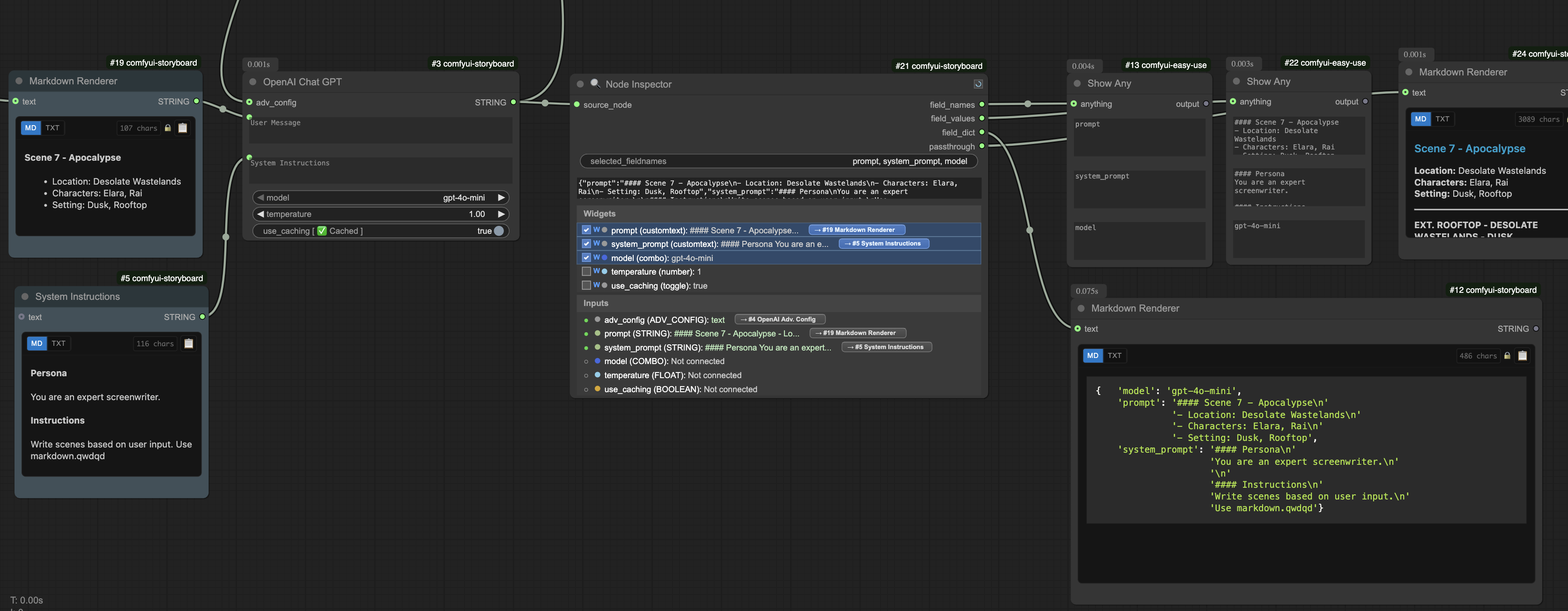
Features
📝 Markdown Renderer Node
- Universal input acceptance - Handles strings, lists, dictionaries, and complex objects
- Intelligent formatting - Auto-detects content type and applies appropriate rendering
- Code syntax highlighting - Built-in highlighting with automatic language detection
- Smart code block detection - No triple backticks required for standalone code
- Pretty-print formatting - Enhanced dictionary and object visualization
- Deduplication logic - Automatically removes duplicate content from list inputs
🔍 Node Inspector Node
- Real-time inspection - Live monitoring of connected node states and values
- Multi-level tracking - Traces values through complex upstream connection chains
- Interactive UI - Hover effects, scrollable interface, and clickable navigation
- Connection inheritance - Visual indicators showing which widgets inherit from inputs
- Smart navigation - Click-to-navigate to parent nodes with smooth viewport animation
- Dual output modes - Provides both structured data (lists/dicts) and passthrough outputs
- Type visualization - Color-coded socket types and connection state indicators
- Segmented display - Separate informational and selectable sections for optimal UX
🤖 OpenAI Chat GPT Node
- Smart caching system - Automatically caches identical requests to avoid redundant API calls
- Visual cache status - Real-time indicator showing "New", "Cached", or "Error" states
- Multi-model support - Full GPT-4, GPT-3.5 model family with temperature controls
- Advanced configuration - JSON response formatting, seeded generation, custom parameters
- Integrated API key management - Secure configuration file handling
- Error resilience - Graceful error handling with informative status messages
🚀 Workflow Benefits
- Debug-friendly - Comprehensive inspection and visualization capabilities
- Performance optimized - Smart caching reduces API costs and latency
- Developer-focused - Enhanced debugging and development workflow tools
- Production-ready - Robust error handling and state management
TypeScript Development Guide
This project now uses TypeScript for frontend development, following the same build mechanism as rgthree-comfy.
Setup
-
Install dependencies:
npm install -
Build the project:
python __build__.py
Project Structure
src_web/- TypeScript source filesnodes/- Node-specific frontend codecommon/- Shared utilitiestypings/- TypeScript type definitionsscripts_comfy/- Dummy files for ComfyUI imports
web/- Compiled JavaScript output (auto-generated)
Development Workflow
- Make changes to TypeScript files in
src_web/ - Run
python __build__.pyto compile - The build script will:
- Copy non-TS files from
src_web/toweb/ - Compile TypeScript files to JavaScript
- Fix import paths for ComfyUI compatibility
- Process any SCSS files (if present)
- Copy non-TS files from
TypeScript Configuration
The project uses:
- ES2019 target for compatibility
- ESNext modules
- Strict type checking (with
noImplicitAnydisabled for easier migration) - Path mappings for ComfyUI types
Adding New Files
-
Create new
.tsfiles insrc_web/ -
Import ComfyUI modules using:
import { app } from "scripts/app.js"; import { ComfyWidgets } from "scripts/widgets.js"; -
Use the build script to compile
Tips
- The build script supports
--fixflag to automatically add.jsextensions to imports - Type definitions for ComfyUI are provided by
@comfyorg/litegraphand@comfyorg/comfyui-frontend-types - Custom type definitions can be added to
src_web/typings/index.d.ts