
LoRA Power-Merger ComfyUI
An extension for merging LoRAs. Offers a wide range of LoRA merge techniques (including dare) and XY plots. XY plots require efficiency nodes.
Nodes (25)
Per-LoRA block control before you merge
Merge the 'meaty' mid-range weights, skip the noise
Merge LoRAs by dropping most of the weights, then rescaling
Prune adaptively, keep the big changes, drop the small ones
The double-block / single-block dial
The geometrically honest average for N LoRAs
Per-block weights, txtfusion included
Apply your merged LoRA to model and CLIP — PM Apply LoRA
See which blocks of a LoRA actually matter — round-robin block sampling
The node that turns a pile of LoRAs into one merged LoRA
Scale different blocks of a LoRA differently — PM LoRA Modifier
Sweep merge parameters visually instead of guessing — the merge dial-testing node
The stacker with a search bar — PM LoRA Power Stacker
Shrink a LoRA's rank (and file size) with SVD — PM Resize LoRA
Save your merged LoRA to disk — PM Save LoRA
Grab one LoRA out of a stack by index
The node that gets LoRAs ready to merge — PM LoRA Stack Decompose
Load every LoRA in a folder into one stack, strengths included
Compare every LoRA in a stack in one run — no rebuilding the graph
Pull in only the weights where two LoRAs already agree
SLERP's more flexible sibling for two-LoRA merges
Merge by variance, not by averaging — the adaptive method
Smooth merges without the washed-out middle
Add one adapter's learning onto another
TIES for stacking several LoRAs without the interference
LoRA Power-Merger ComfyUI
Advanced LoRA merging for ComfyUI with Mergekit integration, supporting 8+ merge algorithms including TIES, DARE, SLERP, and more. Features modular architecture, SVD decomposition, selective layer filtering, and comprehensive validation.
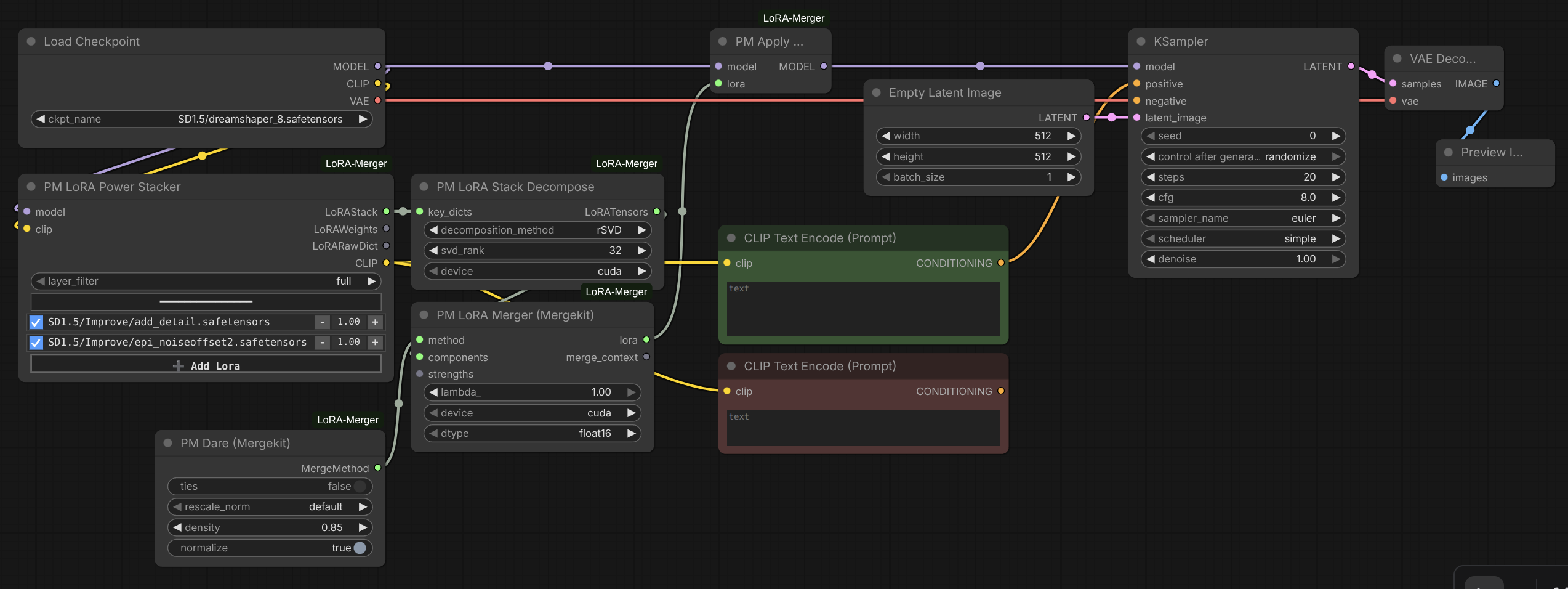
This is an enhanced fork of laksjdjf's LoRA Merger with extensive refactoring and new features. Core merging algorithms from Mergekit by Arcee AI.
Features
- 8+ Merge Algorithms: Task Arithmetic, TIES, DARE, DELLA, Breadcrumbs, SLERP, and more
- Native Delta-Space GTA: The task-arithmetic family (Task Arithmetic, TIES, DARE, DELLA, Breadcrumbs) merges full dense deltas and refactors back into a LoRA via randomized SVD with dynamic rank — a self-contained implementation with VRAM bounded for large DiT/Flux layers
- Mergekit Integration: SLERP, NuSLERP, NearSwap, SCE, and Karcher come from Arcee AI's Mergekit library
- 6 Architecture Support: SD1.5, SDXL, DiT, Flux, Wan 2.2, Qwen Image Edit, and zImage with automatic detection
- Spectral Norm Regularization: Prevent layer dominance with advanced weight normalization
- SVD Support: Full, randomized, and energy-based SVD decomposition with dynamic rank selection
- Intelligent Search: Real-time searchable LoRA selection in Power Stacker for large collections
- Modular Architecture: Clean separation of concerns with focused, single-responsibility modules
- Selective Layer Merging: Architecture-agnostic filters (attn-only, mlp-only, attn-mlp, custom)
- Comprehensive Validation: Runtime type checking and structured error reporting
- Thread-Safe Processing: Parallel processing with device-aware workload distribution
Installation
cd ComfyUI/custom_nodes
git clone https://github.com/YourUsername/LoRA-Merger-ComfyUI.git
cd LoRA-Merger-ComfyUI
pip install -r requirements.txt
Requirements:
- PyTorch
- Mergekit (
git+https://github.com/arcee-ai/mergekit.git) - lxml
Quick Start
Basic Two-LoRA Merge
- Stack LoRAs with PM LoRA Stacker or PM LoRA Power Stacker
- Decompose using PM LoRA Stack Decompose
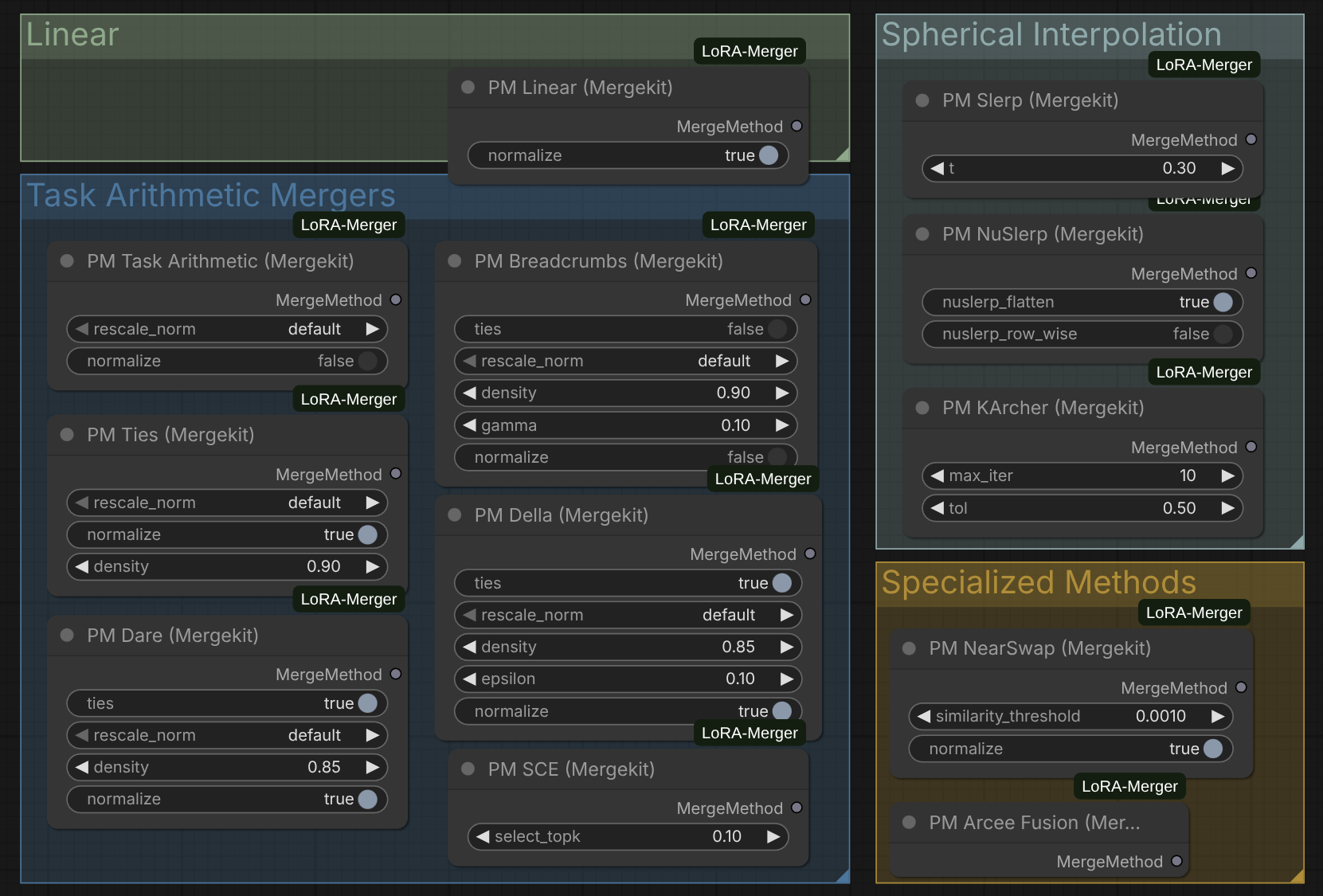
- Choose a merge method (e.g., PM TIES, PM DARE)
- Merge with PM LoRA Merger
- Apply with PM LoRA Apply or save with PM LoRA Save
Node Reference
Core Workflow Nodes
PM LoRA Stacker
Combine multiple LoRAs into a stack for merging. Dynamically adds connection points as you connect LoRAs.
Inputs:
lora_1,lora_2, ...lora_N: LoRABundle inputs (unlimited)
Output:
LoRAStack: Dictionary mapping LoRA names to their patch dictionaries
PM LoRA Stacker (Directory)
Load all LoRAs from a directory automatically with unified strength control.

Parameters:
model: The diffusion model the LoRAs will be applied todirectory: Path to folder containing LoRA filesstrength_model: General model strength applied to all LoRAs (default: 1.0, range: -10.0 to 10.0)strength_clip: General CLIP strength applied to all LoRAs (default: 1.0, range: -10.0 to 10.0)layer_filter: Preset filters ("full", "attn-only", "mlp-only", "attn-mlp") for architecture-agnostic layer selectionsort_by: "name", "name descending", "date", or "date descending"limit: Limit number of LoRAs to load (default: -1 for all)
Features:
- Unified strength control: Set model and CLIP strength once for all LoRAs in directory
- Automatic loading: No need to manually connect multiple LoRA loaders
- Flexible sorting: Order by filename or modification date, ascending or descending
- Layer filtering: Apply filters during loading for selective merging
Outputs:
LoRAStack: Dictionary mapping LoRA names to their patch dictionariesLoRAWeights: Strength values for each LoRALoRARawDict: Raw LoRA state dictionaries for CLIP weights
PM LoRA Stack Decompose
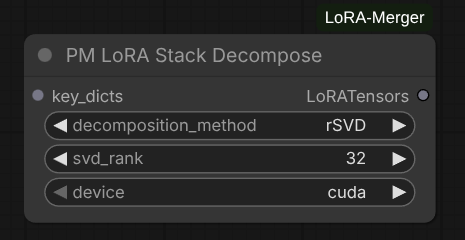
Decompose LoRA stack into (up, down, alpha) tensor components for merging.
Features:
- Hash-based caching: Skips expensive decomposition if inputs unchanged
- Architecture detection: Automatically identifies SD vs DiT LoRAs
- Layer filtering: Apply preset or custom layer filters
Parameters:
key_dicts: Input LoRAStackdecomposition_method: Choose from Standard SVD, Randomized SVD, or Energy-Based Randomized SVDsvd_rank: Target rank for decomposition (0 for full rank)'device: Processing device ("cpu", "cuda")
Outputs:
components: LoRATensors (decomposed tensors by layer)
PM LoRA Merger
Main merging node. Runs the native delta-space path for the GTA family and Mergekit for the rest. Processes layers in parallel with thread-safe progress tracking.
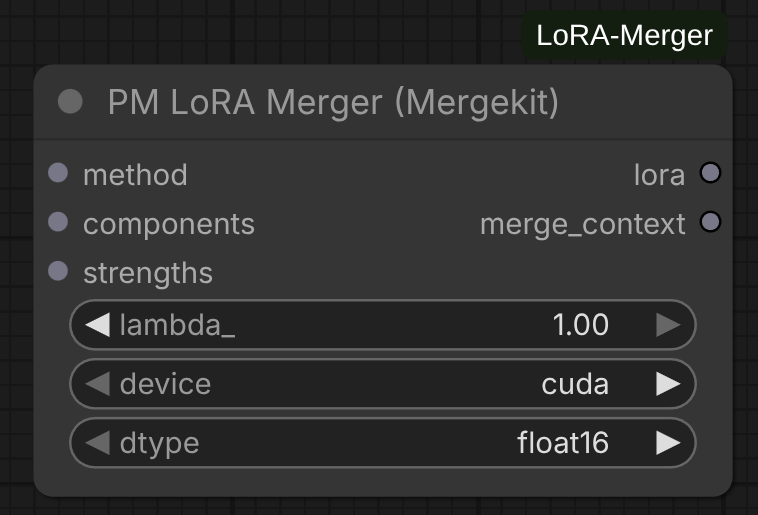
Parameters:
merge_method: MergeMethod configuration from method nodescomponents: Decomposed LoRATensors from decompose nodestrengths: LoRAWeights from decompose nodeoutput_scale: Global scale (0-1) applied to the final merged result (default: 1.0)spectral_norm_scale: Spectral-norm regularization target; 0 disables (default: 0.0)merge_clip: Whether to merge CLIP (text-encoder) layers (default: True)device: Processing device ("cpu", "cuda")dtype: Computation precision ("float32", "float16", "bfloat16")refactor_method: How the merged dense delta is decomposed back into a LoRA, for the GTA family only (energy_rSVD= randomized SVD with dynamic rank retaining 99% of the delta's energy, recommended;rSVD= randomized SVD at the fixed max input rank)
Features:
- Delta-space GTA merge: For the GTA family (Task Arithmetic, TIES, DARE, DELLA, Breadcrumbs) each UNet layer is merged as a full dense delta and refactored back into a LoRA via
refactor_method— a native implementation, no Mergekit dependency on this path - Device-aware parallelism: ThreadPoolExecutor with up to 8 workers; GTA merges on CUDA run single-worker to bound peak VRAM (large DiT/Flux layers)
- Comprehensive validation: Input structure, tensor shapes, strength presence
- Smart strength application: Uses strength_model for UNet, strength_clip for CLIP layers
Output:
- Merged LoRA as LoRAAdapter state dictionary
PM LoRA Apply
Apply merged LoRA to a model.
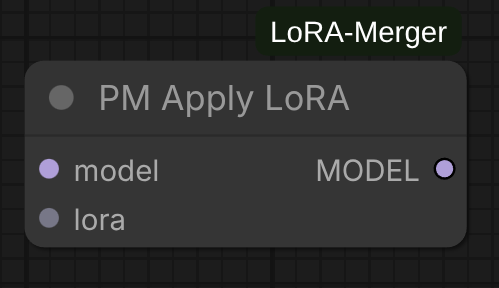
Inputs:
model: ComfyUI model to patchlora: Merged LoRA from merger
Outputs:
model: Patched model
PM LoRA Save
Save merged LoRA to disk in standard format. This will also save the original clip weights if present.
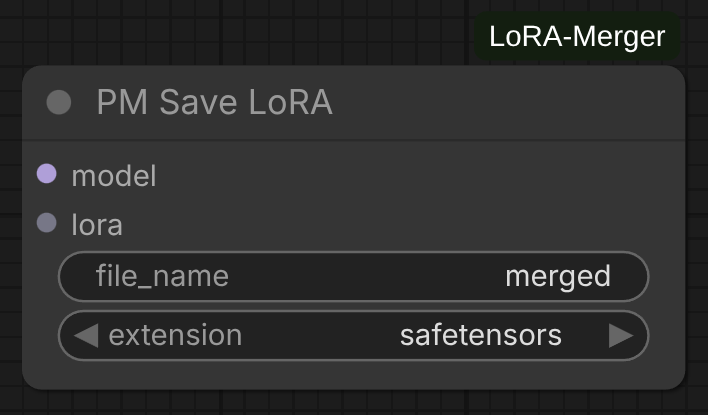
Parameters:
lora: Merged LoRA to savefilename: Output filename (without extension)
Merge Method Nodes
Each method node configures algorithm-specific parameters. Connect to the merge_method input of PM LoRA Merger.
The GTA family — Task Arithmetic, TIES, DARE, DELLA, Breadcrumbs — runs a native delta-space implementation (no Mergekit on this path) and shares three controls:
sign_consensus(bool): elect one sign per weight element by magnitude-weighted majority and keep only agreeing contributions (the_tiesvariant); off = plain weighted combine (_linear). Exposed on DARE/DELLA/Breadcrumbs (default False); always on for TIES; never for Task Arithmetic.average_weights(bool, default False): OFF = additive sum (strengths act as gains — matches ComfyUI's native LoRA stacking). ON = weighted average (÷ sum of contributing weights; strengths act as ratios, so two LoRAs at 1.0 land at ~50%). Turn ON only to blend/interpolate.rescale_norm(default/l1/l2/linf/none): restore a norm after sparsification.
Note:
sign_consensuswas formerlyties,average_weightswas formerlynormalize, and its default changed from ON to OFF. ThePM Linearnode was removed — it was identical to Task Arithmetic at defaults; use PM Task Arithmetic.
PM TIES
Trim, Elect Sign & Merge — magnitude-sparsify each delta, then sign consensus (always on).
Parameters:
density(float, default 0.9): fraction of largest-magnitude weights to keeprescale_norm,average_weights(default False)
Reference: TIES-Merging Paper
PM DARE
Drop And REscale — random (magnitude-agnostic) sparsification.
Parameters:
sign_consensus(bool, default False)density(float, default 0.85): probability of keeping each weightrescale_norm,average_weights(default False)
Reference: DARE Paper
PM DELLA
Magnitude-weighted stochastic pruning (a soft TIES): larger-magnitude weights are more likely kept.
Parameters:
sign_consensus(bool, default False)density(float, default 0.85)epsilon(float, default 0.1): half-width of the keep-probability ramp (density ± epsilon by within-row magnitude rank)rescale_norm(defaults to l1),average_weights(default False)
PM Breadcrumbs
Keep the mid-magnitude band — drop both the smallest (noise) and the largest (outliers).
Parameters:
sign_consensus(bool, default False)density(float, default 0.9): fraction retained in the middle bandgamma(float, default 0.1): fraction of largest-magnitude weights to droprescale_norm,average_weights(default False)
PM SLERP
Spherical Linear Interpolation for smooth model interpolation.
Parameters:
t(float): Interpolation factor (0.0-1.0, default: 0.5)
Note: SLERP requires exactly 2 LoRAs. For multiple LoRAs, use PM NuSLERP or PM Karcher.
PM NuSLERP
Normalized Spherical Linear Interpolation for multiple models.
Parameters:
normalize(bool): Normalize result to unit sphere (default: True)
PM Karcher
Karcher mean on the manifold (generalized SLERP for N models).
Parameters:
max_iterations(int): Maximum optimization iterations (default: 100)tolerance(float): Convergence threshold (default: 1e-6)
PM Task Arithmetic
Plain weighted combine of task vectors (no trim, no sign vote). With average_weights off this reproduces how ComfyUI natively stacks LoRAs (W + Σ strengthᵢ·Δᵢ).
Parameters:
rescale_norm(default/l1/l2/linf/none)average_weights(bool, default False)
PM SCE (Selective Consensus Ensemble)
Selective consensus with threshold-based parameter selection.
Parameters:
threshold(float): Consensus threshold (default: 0.5)
PM NearSwap
Nearest neighbor parameter swapping.
Parameters:
distance_metric("cosine" or "euclidean"): Distance measure
Delta-space +
average_weights(v2.4.0): SLERP, NuSLERP, Karcher and NearSwap now merge in delta space (like the GTA family), reconstructing the full LoRA delta instead of merging the up/down factors separately. Each also exposesaverage_weights(default OFF = additive, so stacked LoRAs keep full magnitude; ON = normalized average/blend). For these interpolation methods, per-LoRA strength controls magnitude only — blend position comes from the method's own parameter (SLERPt, NearSwap threshold).
Utility Nodes
PM LoRA Modifier
Apply block-wise scaling to LoRA weights for fine-grained control over different network layers.
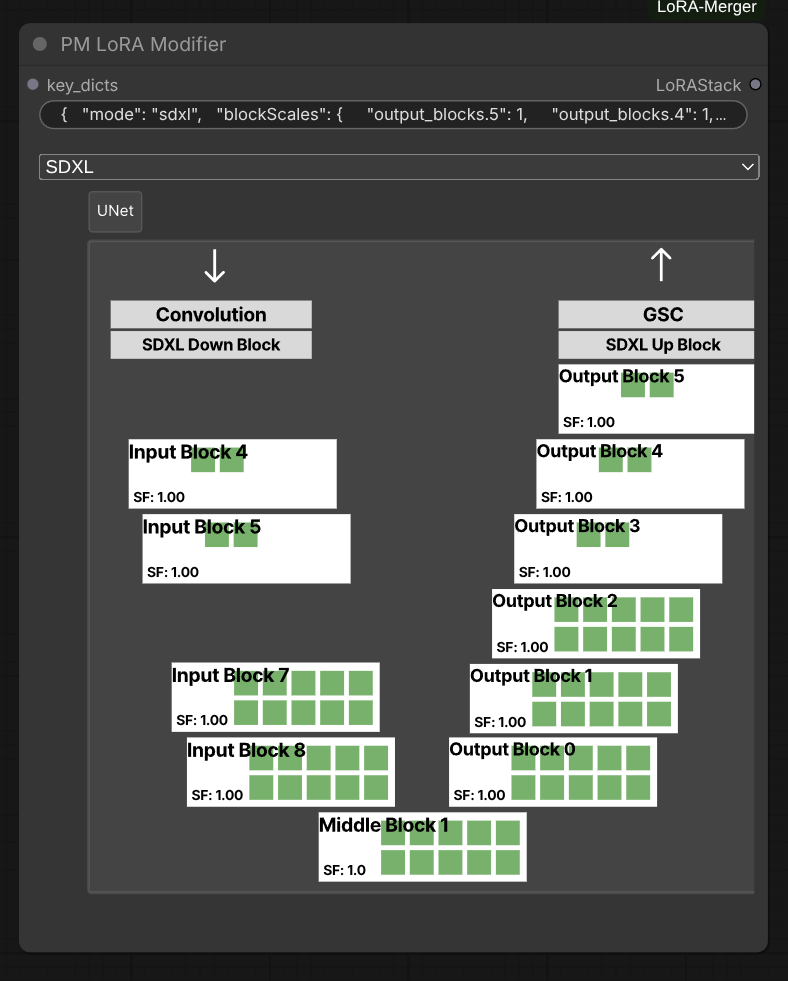
Inputs:
key_dicts: LoRAStack to modifyblocks_store: JSON string containing block scale configuration
Features:
- Block-wise scaling: Apply different scale factors to different blocks (input_blocks, middle_block, output_blocks)
- Architecture support: Automatically detects and handles both SD/SDXL and DiT architectures
- Per-layer control: Scale individual attention, MLP, or specific sub-blocks
- Non-destructive: Creates modified copy without altering original LoRA
Block Scale Format:
The blocks_store parameter expects a JSON string with the following structure:
{
  "mode": "sdxl_unet",
  "blockScales": {
    "input_blocks.0": 1.0,
    "input_blocks.1": 0.8,
    "middle_block.1": 1.2,
    "output_blocks.0": 0.9
  }
}
Supported Architectures:
"sdxl_unet": Stable Diffusion XL UNet blocks"sd_unet": Stable Diffusion UNet blocks"dit": Diffusion Transformer blocks
Use Cases:
- Layer-Blocked Weights (LBW): Implement custom block weight schemes
- Selective emphasis: Boost or reduce specific layer contributions
- Fine-tuning merged results: Adjust specific blocks after merging
- Architecture-specific tuning: Different scaling for different model parts
Output:
- Modified LoRAStack with scaled weights
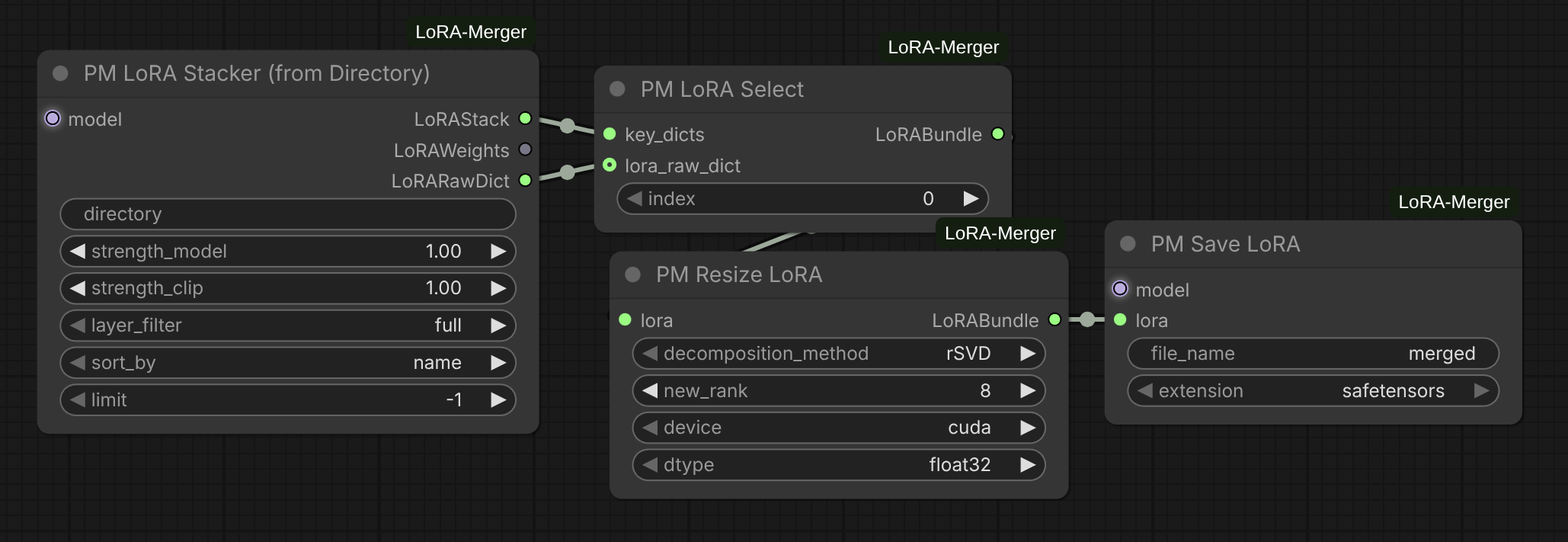
PM LoRA Resizer
Resize all layers in a LoRA to a different rank using tensor decomposition methods.
Parameters:
lora(LoRABundle): Input LoRA to resizedecomposition_method: Decomposition strategy for rank adjustment"SVD": Full singular value decomposition (slow but optimal)"rSVD": Randomized SVD (fast, recommended for most cases)"energy_rSVD": Energy-based randomized SVD (best for DiT/large LoRAs)
new_rank(int): Target rank for all layers (default: 16, range: 1-128)device: Processing device ("cuda" or "cpu")dtype: Computation precision ("float32", "float16", "bfloat16")
Features:
- Layer-by-layer processing: Resizes each layer independently using
adjust_tensor_dims - Smart optimization: Skips layers already at target rank
- Format compatibility: Handles standard LoRA format (skips LoHA/LoCon and DoRA)
- Metadata preservation: Maintains original lora_raw (CLIP weights), strength values, and updates name to include new rank
- Contiguous tensors: Ensures all output tensors are contiguous for safetensors compatibility
- Progress tracking: Real-time progress bar during processing
- Memory efficient: Automatic CUDA cache cleanup after processing
Output:
- LoRABundle with all layers resized to target rank, named as
{original_name}_r{new_rank}
Use Cases:
- Reduce LoRA file size by lowering rank
- Standardize ranks across multiple LoRAs before merging
- Fine-tune model capacity vs. quality tradeoff
- Prepare LoRAs for resource-constrained environments
Note: Uses asymmetric singular value distribution (all S values in up matrix), which differs from the symmetric distribution used in lora_decompose.
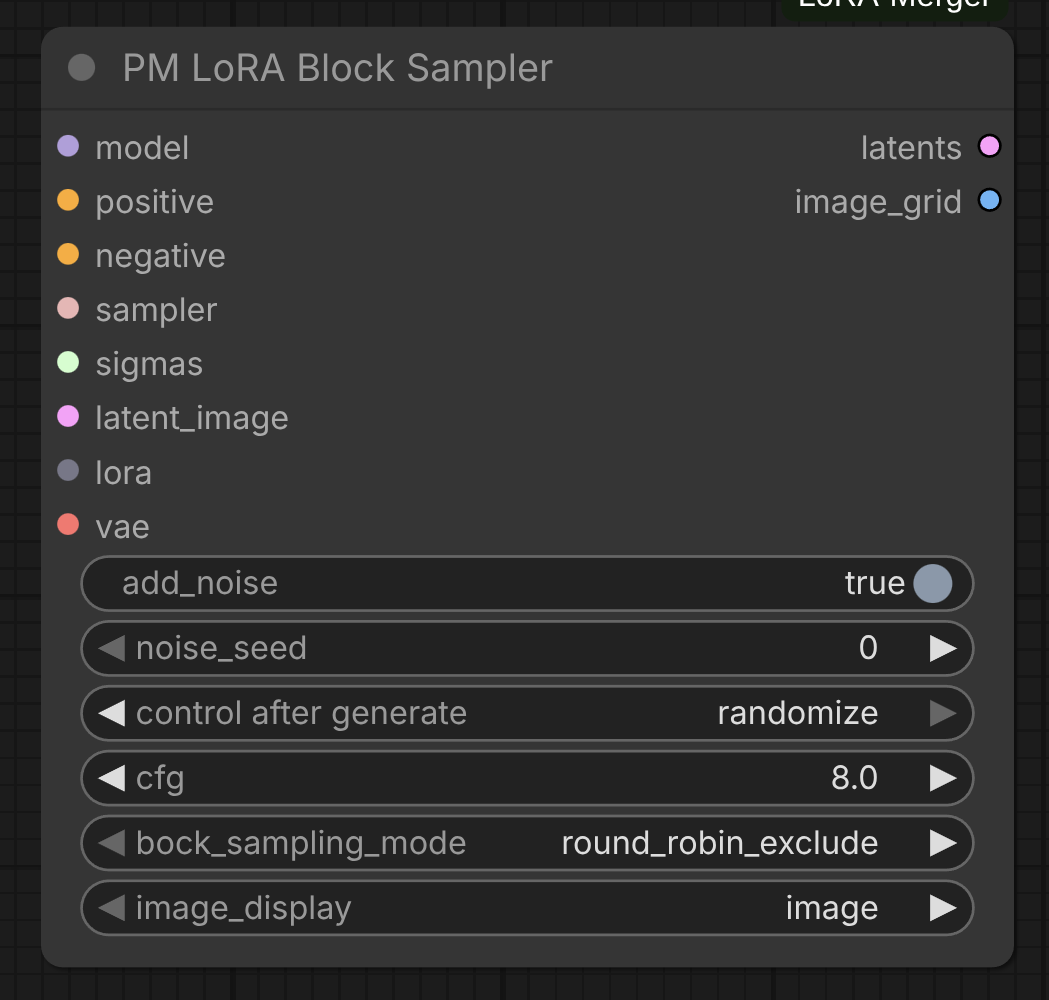
PM LoRA Block Sampler
Sample different block configurations for layer-wise experiments.
Parameters:
model: The diffusion model the LoRAs will be applied topositive: Positive conditioningnegative: Negative conditioningsampler: ComfyUI sampler to usesigmas: Sigma schedule for samplinglatent_image: Initial latent imagelora: LoRABundle to sample fromvae: VAE model for decodingadd_noise: Boolean if to add noise to latent imagenoise_seed: Seed for noise generationcontrol_after_generate: Select control strategy after generationblock_sampling_mode: Sampling mode for blocks ("round_robin_exclude", "round_robin_include")image_display: Whether to display generated images or display the differential image in comparison to the base image
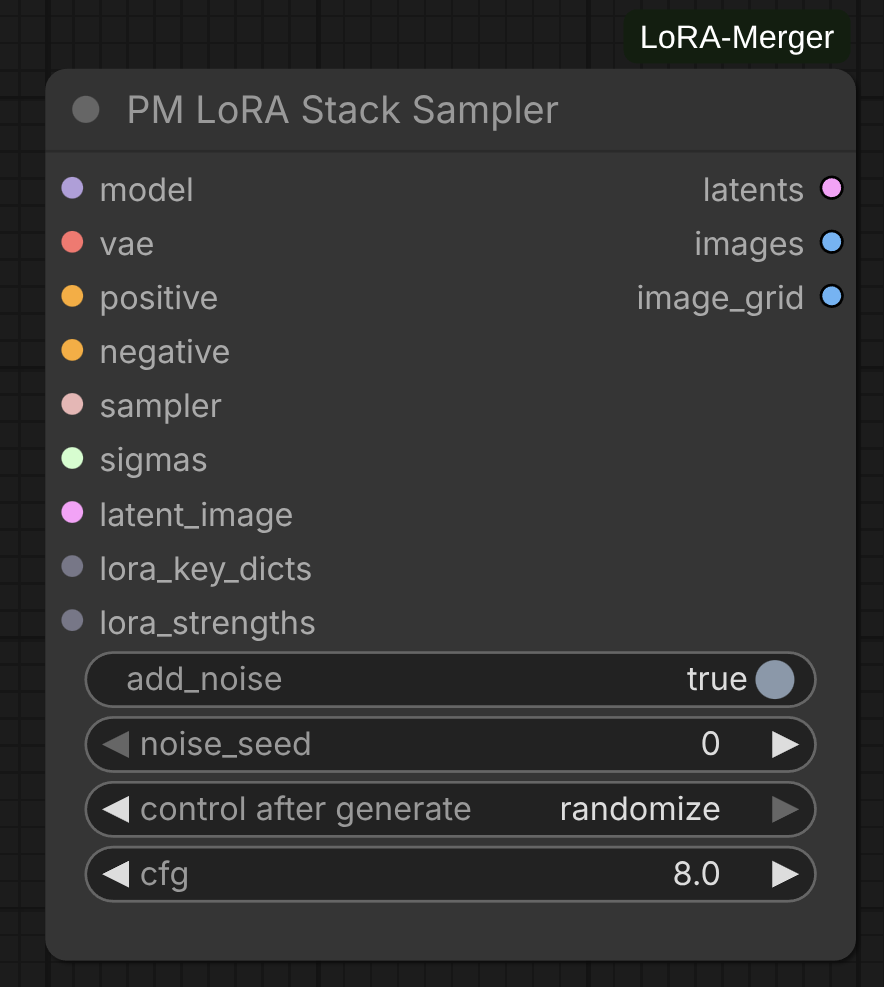
PM LoRA Stack Sampler
Iteratively sample images using each LoRA from a stack individually, generating comparison grids.
Parameters:
model: The diffusion model the LoRAs will be applied tovae: VAE model for decoding latents to imagesadd_noise: Whether to add noise to latent image (default: True)noise_seed: Random seed for noise generation (0 to 2^64-1)cfg: Classifier-free guidance scale (default: 8.0, range: 0.0-100.0)positive: Positive conditioning promptnegative: Negative conditioning promptsampler: ComfyUI sampler to use (e.g., KSampler, DPM++)sigmas: Sigma schedule for noise levelslatent_image: Initial latent image to denoiselora_key_dicts: LoRAStack from decompose or stacker nodeslora_strengths: LoRAWeights containing strength values for each LoRA
Features:
- Individual LoRA sampling: Applies each LoRA from the stack separately to generate comparison images
- Automated image annotation: Each generated image is labeled with the LoRA name and strength
- Dual output format:
- Individual annotated images with LoRA metadata
- Organized image grid (LoRAs on X-axis, batches on Y-axis)
- Text wrapping: Long LoRA names are automatically wrapped for readability
- Batch support: Handles multiple images per LoRA (batch dimension on Y-axis of grid)
Outputs:
latents: Concatenated latents for all sampled imagesimages: Individual annotated images as separate outputsimage_grid: Combined grid view with all samples organized by LoRA and batch
Use Cases:
- LoRA comparison: Visually compare the effect of different LoRAs with identical settings
- Stack validation: Verify that all LoRAs in a stack are working correctly before merging
- Style exploration: Test multiple style LoRAs to choose the best for your project
- Parameter tuning: Compare LoRAs at different strength values (set in stacker node)
Workflow Example:
LoRA Stacker → LoRA Stack Decompose → LoRA Stack Sampler → Image Grid
   (3 LoRAs)                            (with model, VAE, prompts)
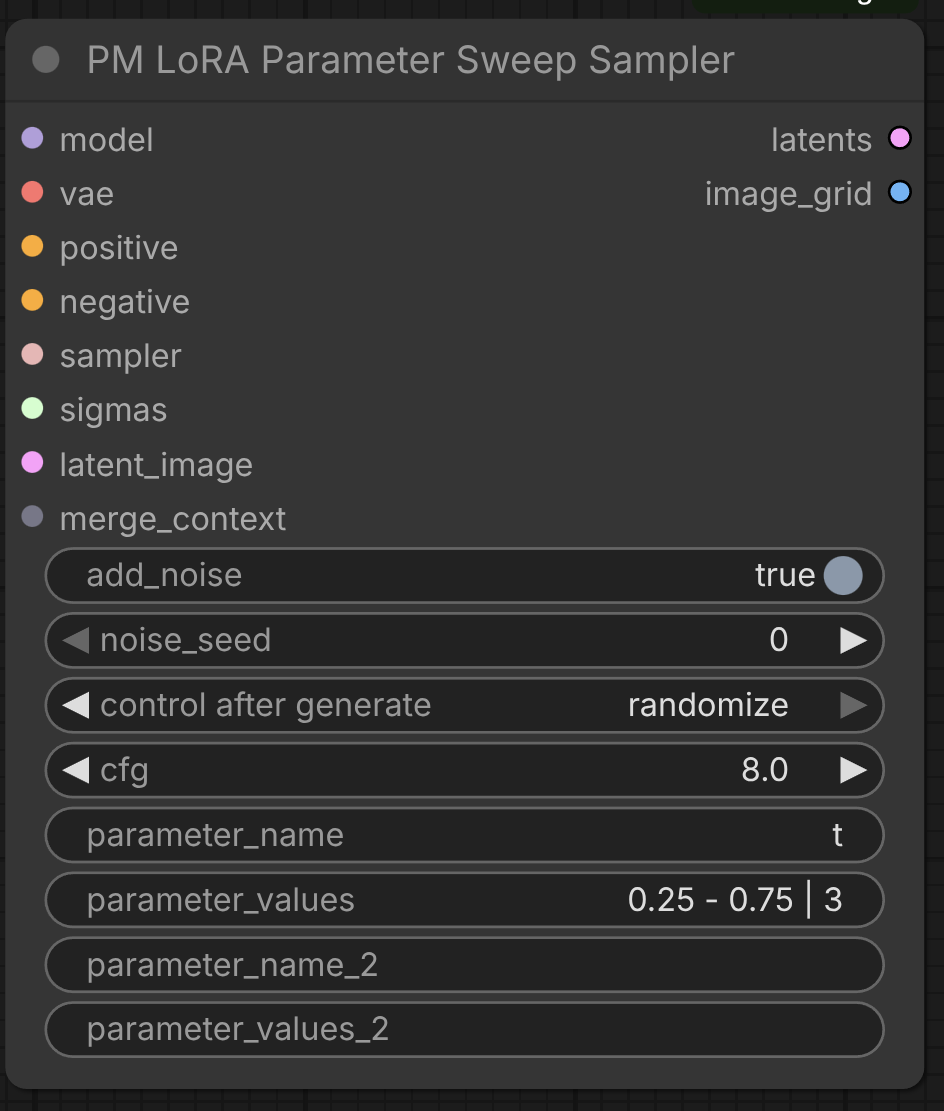
PM Parameter Sweep Sampler
Systematically sweep through merge parameter values to find optimal settings visually.
Parameters:
model: The diffusion model the merged LoRAs will be applied tovae: VAE model for decoding latents to imagesadd_noise: Whether to add noise to latent image (default: True)noise_seed: Random seed for noise generation (0 to 2^64-1)cfg: Classifier-free guidance scale (default: 8.0, range: 0.0-100.0)positive: Positive conditioning promptnegative: Negative conditioning promptsampler: ComfyUI sampler to usesigmas: Sigma schedule for noise levelslatent_image: Initial latent image to denoisemerge_context: MergeContext output from PM LoRA Merger nodeparameter_name: Name of the merge parameter to sweep (e.g., "t", "density", "average_weights", "sign_consensus")parameter_values: Parameter values to test (see formats below)parameter_name_2: Optional second parameter for 2D sweeps (leave empty for 1D)parameter_values_2: Second parameter values (same formats as parameter_values)
Parameter Value Formats:
The parameter_values and parameter_values_2 fields support multiple input formats:
-
Linspace format:
"min - max | num_points"- Example:
"0.25 - 0.75 | 3"→ [0.25, 0.5, 0.75] - Evenly spaces num_points between min and max
- Example:
-
Step format:
"min - max : step"- Example:
"0.25 - 0.75 : 0.25"→ [0.25, 0.5, 0.75] - Increments from min to max by step size
- Example:
-
Explicit format:
"val1, val2, val3"- Example:
"0.25, 0.5, 0.75"→ [0.25, 0.5, 0.75] - Comma-separated list of specific values
- Example:
-
Single value:
"0.5"- Example:
"0.5"→ [0.5] - Tests a single parameter value
- Example:
-
Boolean parameters: Auto-detected
- If parameter is boolean (e.g., "average_weights"), automatically uses [False, True]
parameter_valuesinput is ignored for boolean parameters
Features:
- Single parameter mode: Sweep one parameter across multiple values (1D grid)
- Dual parameter mode: Sweep two parameters for n × m comparison (2D grid)
- Automatic boolean handling: Boolean parameters auto-expand to [False, True]
- Image annotation: Each sample labeled with parameter name and value(s)
- Progress tracking: Real-time progress bar shows overall completion
- Safety limits: Maximum 64 images to prevent excessive computation
- Merge method agnostic: Works with any merge method (SLERP, TIES, DARE, etc.)
Outputs:
latents: Stacked latents for all parameter combinationsimage_grid: Annotated comparison grid (horizontal for 1D, rows×cols for 2D)
Use Cases:
SLERP Interpolation Sweep:
parameter_name: "t"
parameter_values: "0.0 - 1.0 | 5"
→ Tests t=[0.0, 0.25, 0.5, 0.75, 1.0] to find optimal interpolation point
TIES Density Optimization:
parameter_name: "density"
parameter_values: "0.5, 0.7, 0.9"
→ Compares sparse (0.5), medium (0.7), and dense (0.9) merges
DARE Drop Rate Analysis:
parameter_name: "density"
parameter_values: "0.5 - 0.95 : 0.15"
→ Tests density=[0.5, 0.65, 0.8, 0.95] to balance efficiency vs quality
Boolean Parameter Testing:
parameter_name: "average_weights"
parameter_values: "" (ignored)
→ Automatically tests [False, True] to compare additive sum vs weighted average
2D Parameter Sweep (Dual Mode):
parameter_name: "density"
parameter_values: "0.5, 0.7, 0.9"
parameter_name_2: "k"
parameter_values_2: "16, 32, 64"
→ Generates 3 × 3 = 9 images testing all combinations
Workflow Example:
LoRA Stack → Decompose → Method Node (SLERP) → Merger (with MergeContext output)
                                                     ↓
                                              Parameter Sweep Sampler
                                              (sweep "t" from 0 to 1)
                                                     ↓
                                              Annotated Image Grid
Notes:
- Use MergeContext output from PM LoRA Merger instead of the LoRA output
- Each parameter combination creates a new merge + sampling operation
- Parameter names must match the merge method's settings (check method node inputs)
- For invalid parameter names, the node provides a list of available parameters in the error message
- 2D sweeps create grids where rows = first parameter values, columns = second parameter values
Power Stacker Node
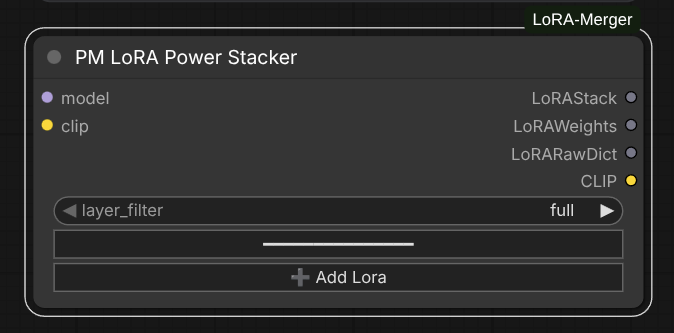
PM LoRA Power Stacker
Advanced stacking with per-LoRA configuration, dynamic input management, and intelligent search.
Features:
- Dynamic LoRA inputs: Add unlimited LoRAs with individual strength controls via widget UI
- Intelligent search bar: Click on any LoRA name to open a searchable dropdown with real-time filtering
- Per-LoRA strengths: Separate strength_model and strength_clip for each LoRA
- Architecture detection: Automatically identifies all 6 supported architectures (SD, DiT, Flux, Wan, Qwen, zImage)
- Layer filtering: Architecture-agnostic preset filters (full, attn-only, mlp-only, attn-mlp)
- CLIP integration: Automatically applies all LoRAs to CLIP model and preserves CLIP weights in outputs
Search Bar Usage:
- Click "➕ Add Lora" to add a new LoRA slot
- Click on the LoRA name field to open the searchable dropdown
- Type to filter: Real-time search filters the list as you type
- Select: Click a LoRA from the filtered results to select it
- Enable/disable: Toggle individual LoRAs on/off with the checkbox without removing them
Benefits:
- Fast LoRA selection: Quickly find LoRAs in large collections (hundreds of files)
- No manual typing: Avoid typos by selecting from filtered list
- Visual feedback: See all matching LoRAs instantly as you type
- Efficient workflow: Add multiple LoRAs quickly without scrolling through long lists
SVD and Decomposition
The project includes a comprehensive tensor decomposition system with multiple strategies:
Decomposition Methods
Standard SVD
Full singular value decomposition for exact low-rank approximation.
Use case: High accuracy, small to medium tensors
Randomized SVD
Fast approximate SVD using randomized linear algebra.
Use case: Large tensors where speed is critical
Energy-Based Randomized SVD
Adaptive SVD that automatically selects rank based on energy threshold.
Use case: Automatic rank selection with quality guarantees
Error Handling
All decomposers include:
- GPU failure fallback: Automatically retries on CPU if GPU decomposition fails
- Zero matrix detection: Gracefully handles degenerate cases
- Shape validation: Automatic reshape for 2D/3D/4D tensors (conv and linear layers)
- Numerical stability: Epsilon regularization for near-singular matrices
Layer Filtering
Selective merging allows targeting specific layer types with architecture-agnostic presets that work seamlessly with both Stable Diffusion and DiT (Diffusion Transformer) LoRAs.
Preset Filters
"full": All layers (no filter)"attn-only": Only attention layers- SD: attn1, attn2
- DiT: attention
"mlp-only": Only MLP/feedforward layers- SD: ff
- DiT: mlp, feed_forward
"attn-mlp": Attention + MLP layers combined- SD: attn1, attn2, ff
- DiT: attention, mlp, feed_forward
Custom Filters
You can also create custom filters by providing a set of layer component names:
from src.utils import LayerFilter
filter = LayerFilter({"attn1", "proj_in", "proj_out"})
filtered_patches = filter.apply(lora_patches)
Use Cases:
- Style transfer: Use
"attn-only"to merge only attention mechanisms for composition/style - Detail merging: Use
"mlp-only"to merge only feedforward layers for textures/details - Balanced merging: Use
"attn-mlp"to exclude projection and normalization layers - Full merge: Use
"full"to merge all layer types
Spectral Norm Regularization
Spectral norm regularization prevents any single layer from dominating the merge due to large weight magnitudes, leading to more stable and balanced merges.
What is Spectral Norm?
The spectral norm of a matrix is its maximum singular value, representing the Lipschitz constant of the linear transformation. In the context of LoRA merging, it measures how much a layer can amplify or attenuate signals.
How It Works
The regularization process uses per-layer clipping:
- Computes the spectral norm (max singular value) for each weight tensor using power iteration
- For each layer: if spectral norm > target, scale the layer down to the target
- Layers already below the target are preserved unchanged
This prevents outlier layers from having excessive magnitude while preserving the overall LoRA effect for layers with reasonable magnitudes. Unlike global scaling (which would reduce all layers proportionally), per-layer clipping only affects layers that exceed the target.
Usage
from src.utils.spectral_norm import apply_spectral_norm

# Apply spectral norm regularization to LoRA weights
regularized_lora = apply_spectral_norm(
    lora_patches,
    scale=1.0,        # Target maximum spectral norm
    num_iter=10,      # Power iteration count (higher = more accurate)
    device=device
)
Scale Parameter Guidelines
- 0.1-0.5: Conservative scaling, prevents overfitting, good for merging many LoRAs
- 1.0: Neutral scaling, standard normalization
- 2.0-5.0: Allows stronger effects, useful for emphasizing specific LoRAs
Benefits
- Stability: Prevents numerical instability from extreme weight values
- Balance: Ensures all layers contribute proportionally to the merge
- Quality: Reduces artifacts from weight magnitude mismatches
- Flexibility: Works with any merge method (TIES, DARE, SLERP, etc.)
Architecture Support
The system automatically detects LoRA architecture and applies appropriate decomposition and filtering strategies. Currently supports 6 major architectures:
Stable Diffusion (SD1.5 / SDXL)
UNet architecture with underscore-separated naming:
- UNet blocks:
down_blocks,up_blocks,mid_block - Attention layers:
attn1(self-attention),attn2(cross-attention) - Feed-forward:
fflayers - CLIP text encoder:
text_modellayers - Key pattern:
lora_unet_down_blocks_0_attentions_0_transformer_blocks_0_attn1_to_q
DiT (Diffusion Transformer)
Flat transformer with dot-separated naming:
- Transformer layers:
diffusion_model.layers.N - Attention:
attention(qkv projections) - MLP:
mlp,feed_forward - Positional encoding: Learned position embeddings
- Key pattern:
diffusion_model.layers.13.attention.qkv.weight
Flux
Modern architecture with dual-block structure:
- Double blocks:
double_blocks(parallel image/text processing) - Single blocks:
single_blocks(unified processing) - Image attention:
img_attn_proj,img_attn_qkv - Text attention:
txt_attn_proj,txt_attn_qkv - Image MLP:
img_mlp_0,img_mlp_2 - Text MLP:
txt_mlp_0,txt_mlp_2 - Key pattern:
lora_unet_double_blocks_0_img_attn_proj.alpha
Wan 2.2
Transformer with dot-separated naming and dual attention:
- Transformer blocks:
diffusion_model.blocks.N - Self attention:
self_attn.q,self_attn.k,self_attn.v - Cross attention:
cross_attn.q,cross_attn.k,cross_attn.v - Feed-forward:
ffn(w1, w2, w3) - Key pattern:
diffusion_model.blocks.0.cross_attn.q.lora_A.weight
Qwen Image Edit
Transformer blocks with attention and dual MLPs:
- Transformer blocks:
transformer_blocks.N - Attention:
.attn.(to_k, to_q, to_v, add_k_proj, add_q_proj, add_v_proj) - Image MLP:
img_mlp - Text MLP:
txt_mlp - Key pattern:
transformer_blocks.0.attn.to_k.alpha
zImage
Pure DiT architecture with adaptive layer normalization:
- Transformer layers:
diffusion_model.layers.N - Attention:
attention.to_k,attention.to_q,attention.to_v - Feed-forward:
feed_forward(w1, w2, w3) - Adaptive LayerNorm:
adaLN_modulation(unique to zImage) - Key pattern:
diffusion_model.layers.0.attention.to_k.lora_A.weight
Architecture Detection
The layer filter system automatically detects architecture on LoRA load and logs the result:
Detected Wan 2.2 architecture (400 keys)
Detected Flux architecture (584 keys)
Detected Qwen Image Edit architecture (272 keys)
This enables architecture-agnostic preset filters ("attn-only", "mlp-only", "attn-mlp") to work seamlessly across all supported architectures.
Changelog
2.4.0
Delta-space merging for every method, a VRAM overhaul that makes large Flux/DiT merges viable on 8 GB cards, and clearer widget names.
Breaking changes — saved workflows need attention:
PM Linearnode removed. In the delta-space pipeline it was identical to Task Arithmetic at default settings, with fewer knobs. Saved workflows using it will load it as an undefined node — replace with PM Task Arithmetic, which produces identical output at defaults. Thelinearmerge mode itself is kept.- Widget renames on the merge method nodes:
ties→sign_consensus,normalize→average_weights,lambda_→output_scale. Renamed widgets lose their saved values and fall back to defaults. average_weightsnow defaults to OFF. ON computes a weighted average (÷ Σ weights), which silently halves stacked LoRAs. Native ComfyUI stacks additively (W + Σ strengthᵢ·Δᵢ), so additive is now the default. Merges that relied on the old normalizing behavior need it switched back on.PM Block Selectorno longer takes alora_stackinput. Selectors chain through index-based configs instead; reconnect existing chains.
Added
- Delta-space interpolation: SLERP, NuSLERP, Karcher, NearSwap and SCE
reconstruct the full LoRA delta and merge there, instead of merging the
up/down factors separately — which injected meaningless
up_i @ down_jcross-terms. For these methods, per-LoRA strength now controls magnitude only; blend position comes from the method's own parameter. average_weightstoggle on SLERP, NuSLERP, Karcher and NearSwap.- Native delta-space GTA family (Task Arithmetic, TIES, DARE, DELLA, Breadcrumbs): a self-contained sparsify + sign-election + merge implementation that refactors back into a LoRA via randomized SVD with dynamic rank.
offload_modelstoggle on PM LoRA Merger (default on): evicts resident DIT/CLIP/VAE from VRAM before a CUDA merge. ComfyUI reloads them lazily.refactor_methodwidget to pick the merged-delta → LoRA refactor strategy.
Fixed
- OOM and hard segfaults merging large Flux layers on 8 GB cards, from several directions: randomized SVD for the refactor, a streaming merge instead of stacking (~2× lower peak), serializing the delta-space path on CUDA, chunked della sparsify bounded by both rows and element count, and GPU-histogram thresholds replacing full argsorts for magnitude/outlier/top-k selection. The histogram avoids both the OOM and the ~300× slowdown of a host-side fallback that made TIES and Breadcrumbs unusable.
- Memory-frugal Karcher and SCE that consume the delta list in place rather than making ~3N full-tensor copies.
- Saving a merged LoRA no longer fails on transposed or sliced tensor views that safetensors refuses to serialize.
- LoRA shape validation missed incompatible up/down ranks on the first (or only) LoRA in a stack.
src.decompositionexported aQRDecomposerthat did not exist, making the package unimportable.
Internal
- Test suite runs without a ComfyUI installation: 238 tests via
pytest tests/, up from 61 reachable before. See RUN_TESTS.md.
2.3.0
Sampler fixes — the three sampler nodes (Block Sampler, Stack Sampler, Parameter Sweep Sampler) were audited against ComfyUI's reference SamplerCustomAdvanced and brought back in line with it:
- Block Sampler — live previews: the sampling callback now feeds decoded latent previews to the progress bar, so previews appear during sampling instead of only at the end.
- Block Sampler — correct decoded images: the denoised
x0is now passed throughmodel.process_latent_out(...)before VAE decoding. Previously the raw (model-internal) latent was decoded directly, producing washed-out depth-map / diff-like images instead of real images. - Block Sampler — latent packing: per-block latents are now combined with
torch.catinstead oftorch.stack, fixing a spurious extra dimension that brokevae.decode. - All samplers — Dual Model CFG support: the guider is now rebuilt around the LoRA-patched model while preserving its exact subclass and state (via a shared
rebuild_guider_with_patcheshelper). This fixesDualModelGuider("Dual Model CFG Guider"), whose separate unconditional model was previously dropped — the uncond pass incorrectly ran on the patched positive model, producing wrong results.DualCFGGuider(cfg1/cfg2) state is preserved too. - Stack & Sweep Samplers — unified progress bar: both now use a single progress bar spanning every sampling step across all iterations (with live previews), instead of a bar that reset on each LoRA/parameter step.
License
MIT License
Copyright (c) 2024 LoRA Power-Merger Contributors
Permission is hereby granted, free of charge, to any person obtaining a copy of this software and associated documentation files (the "Software"), to deal in the Software without restriction, including without limitation the rights to use, copy, modify, merge, publish, distribute, sublicense, and/or sell copies of the Software, and to permit persons to whom the Software is furnished to do so, subject to the following conditions:
The above copyright notice and this permission notice shall be included in all copies or substantial portions of the Software.
THE SOFTWARE IS PROVIDED "AS IS", WITHOUT WARRANTY OF ANY KIND, EXPRESS OR IMPLIED, INCLUDING BUT NOT LIMITED TO THE WARRANTIES OF MERCHANTABILITY, FITNESS FOR A PARTICULAR PURPOSE AND NONINFRINGEMENT. IN NO EVENT SHALL THE AUTHORS OR COPYRIGHT HOLDERS BE LIABLE FOR ANY CLAIM, DAMAGES OR OTHER LIABILITY, WHETHER IN AN ACTION OF CONTRACT, TORT OR OTHERWISE, ARISING FROM, OUT OF OR IN CONNECTION WITH THE SOFTWARE OR THE USE OR OTHER DEALINGS IN THE SOFTWARE.
Credits
- Original LoRA Merger by laksjdjf
- Mergekit by Arcee AI
- TIES-Merging: Paper
- DARE: Paper
- ComfyUI by comfyanonymous