
ComfyUI-ForgeAPI
Lightweight custom nodes that integrate ComfyUI with ForgeUI-style samplers and provide convenient ControlNet and LoRA stack helpers.
Nodes (3)
Twenty ControlNet slots, preprocessed on Forge's side — the adapter that keeps pose and edge control in your graph
Pick LoRAs from Forge's own library without hand-typing a single tag
Forge Sampler is a local bridge, not a cloud call — drive SD WebUI Forge from a ComfyUI graph
🚀 ComfyUI — ForgeAPI Nodes
Lightweight custom nodes that integrate ComfyUI with ForgeUI-style samplers and provide convenient ControlNet and LoRA stack helpers.
✨ Included nodes
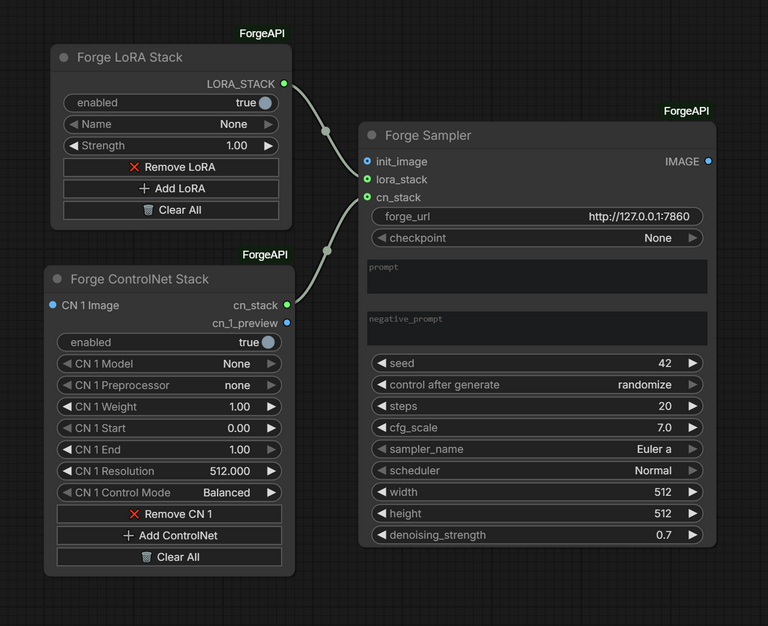
- 🧪 ForgeAPI Sampler — sampler node that calls a Forge/ForgeUI-compatible image-generation API using your prompt and options.
- 🧩 ControlNet Forge Stack — builds ControlNet configuration and helper inputs for the sampler (see
controlnet_forge_stack.pyandweb/controlnet_forge_stack.js). - 🧵 LoRA Forge Stack — builds and normalizes LoRA configuration for the sampler and automatically handles ForgeUI's random LoRA hashes (see
lora_forge_stack.pyandweb/lora_forge_stack.js).
🛠️ Prerequisites
- Install and run ForgeUI from here so the sampler can connect.
- The nodes expect a running Forge/ForgeUI server at
http://127.0.0.1:7860(default). Otherwise the nodes won't even load loras/controlnets. Verify by opening that address in your browser.
If your ForgeUI/ComfyUI instance runs on a different host or port, update the sampler node settings or network config accordingly.
⚙️ Installation
- Copy the
ComfyUI-ForgeAPIfolder into your ComfyUIcustom_nodesdirectory. - Restart ComfyUI / ForgeUI so the new nodes are discovered and loaded.
🧭 Usage
- Add the
ForgeAPI Samplernode to your graph and enter your API key and model options in the node UI. - (Optional) Add
ControlNet Forge Stackand/orLoRA Forge Stackto build the corresponding inputs and connect them into the sampler node. - Connect prompt and image inputs as usual, then execute the graph.
- The sampler run for txt2img by default and switches to img2img automatically, if image input is populated.
Typical flow:
- Prompt/input nodes →
ForgeAPI Sampler - Optional: image/control inputs →
ControlNet Forge Stack→ForgeAPI Sampler - Optional: LoRA configs →
LoRA Forge Stack→ForgeAPI Sampler
🔎 LoRA note
The LoRA Forge Stack node automatically resolves ForgeUI's random LoRA hash identifiers and maps them to stable references so you do not need to manually manage those hash strings. This makes importing and switching LoRAs seamless when using ForgeUI-generated identifiers.
🔧 Configuration tips & troubleshooting
- If nodes don't appear after install: confirm the folder is placed in
ComfyUI/custom_nodes/ComfyUI-ForgeAPIand restart the app. - If the sampler reports API/connectivity errors: verify ForgeUI is running at
http://127.0.0.1:7860and your API key (if required) is correct. - If LoRA behaviour looks odd: the LoRA node is designed to normalize ForgeUI hashes—double-check LoRA source paths and allow the node to resolve mappings.