
Trajectory Forcing
Coarse-to-fine generation and interactive latent-token editing from Trajectory Forcing, as ComfyUI nodes. Needs CUDA 12 and its own Python environment -- read the README on GitHub before installing.
Nodes (21)
Did the edit do anything, or was it the seed?
The frozen decoder that makes every rung of the ladder a picture
Give a region someone else's identity
Where the four-level trajectory is actually sampled
The whole 'prompt' is one class label
See the structure edits act on, for almost free
How a 16×16 token grid becomes something you can paint on
The receipt for a trajectory — and the quickest way to reproduce one
Bring a saved trajectory back, GPU time and all
Where the JAX model, the compile, and the 2 GB downloads all land
The semantic parts that edits actually operate on
The node that makes an edit real
The pictures that survive the cache clear
Keep the trajectory that every comparison depends on
The numbers that outlive the browser tab
Move a region's boundary without changing what it is
The difference between a batch button and an experiment
Set operations for the parts you paint separately
Edit targets you can write down, paste, and reproduce
The paint stroke that becomes a token selection
The sanity check that stops Trajectory Forcing edits from doing nothing
ComfyUI-TrajectoryForcing
Coarse-to-fine image generation you can look inside, edit, and re-sample, as a node graph.








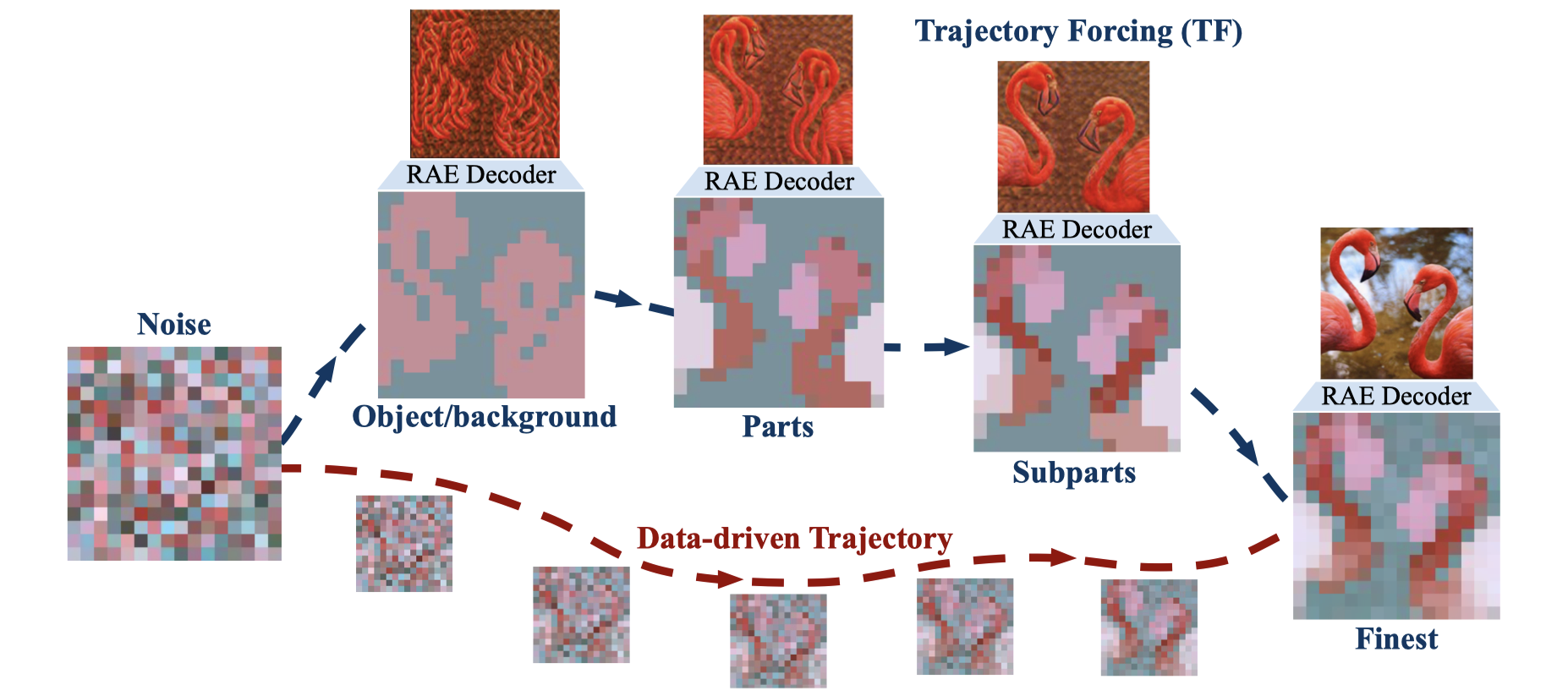
<sub>From the Trajectory Forcing paper (Kocabas et al., ECCV 2026). Each box along the top is a TF_LEVELS socket you can preview, edit, and resume from.</sub>
Trajectory Forcing builds an image in four passes through a hierarchical DINOv2 latent space: object and background, then parts, then subparts, then the finest tokens. One network evaluation each. The RAE decoder is frozen and works at any point in that space, so every intermediate level decodes to a picture.
That turns generation into a DAG with visible intermediates and a feedback edge. You can edit a level, re-sample the ones above it, and keep the ones below. Which is a node graph.
New to ComfyUI? docs/GETTING-STARTED.md assumes nothing and gets you to your first edit.
Install
[!IMPORTANT] This extension usually needs its own Python environment. It runs a JAX model inside the ComfyUI process, and TrajectoryForcing's JAX stack only coexists with ComfyUI's torch on CUDA 12 at torch 2.8 or above.
requirements.txtis empty on purpose, so that a ComfyUI Manager install cannot rewrite the torch your other nodes depend on.If you install through the Manager,
install.pychecks the torch you already have. On a match it adds the JAX stack and nothing else, and you are done. On anything else it changes nothing and prints why, and the route below is the answer. Most current ComfyUI builds ship CUDA 13, whichjax 0.4.36cannot use, so expect to need this.
Let a coding agent do it
Paste this into Claude Code, Codex, Gemini CLI or whatever you use. It covers the things that are easy to get wrong here and expensive to undo.
Install the ComfyUI node pack "Trajectory Forcing" on this machine.

  repo:        https://github.com/KorayUlusan/ComfyUI-TrajectoryForcing
  registry id: comfyui-trajectoryforcing

Read that repo's README "Install" section and follow it. Before you start, check
nvidia-smi, python3.11, and 25 GB free; stop and tell me if any are missing.

Ask me first whether to use a ComfyUI I already have or build a fresh one in its
own folder, then follow only that route.

Rules:
- Never change my existing torch, and never pip install into a venv I did not
  point you at. If install.py declines, build the separate venv with
  env/setup.sh instead. Declining is a normal outcome, not an error to route
  around.
- Pass --mode remote to `comfy node install`, and run `comfy` with no
  virtualenv active.
- Pass --skip-torch-or-directml to `comfy install`. That venv only runs the
  Manager, and the PyTorch index currently fails on a fresh venv's pip with
  "inconsistent Name" / "No matching distribution found for flit_core". If you
  see that anywhere else, `pip install -U pip` in that venv first.

If this is a cluster login node (sinfo/sbatch exist, nvidia-smi finds no GPU),
do not try to run ComfyUI here and do not treat the missing GPU as a failed
install. Install only, then ask me for the partition and QOS, put them in .env
as TF_PARTITION and TF_QOS, and tell me to launch with ./run_comfyui_slurm.sh.

Stop once ComfyUI is serving, or once the install is done on a login node.
Report the URL, the ComfyUI directory, the venv path, and the command to start
it again. Do not open a workflow, run a graph, submit a job, or download model
weights: those cost GPU time and happen on first use anyway.
Already running ComfyUI
Manager → search Trajectory Forcing → Install. Or:
comfy node install --mode remote comfyui-trajectoryforcing
What happens on the next restart
The nodes register, then install.py reports one of two things: it added the
JAX stack and you are ready, or it changed nothing and printed why. If it
declined, build a separate environment with the route below. Either way your
existing ComfyUI is left exactly as it was.
Starting from nothing
Everything lands under one directory you pick, and nothing is written outside
it. Change TF_HOME to taste.
export TF_HOME="$PWD/comfy-tf"

python3.11 -m venv "$TF_HOME/cli"
"$TF_HOME/cli/bin/pip" install comfy-cli
"$TF_HOME/cli/bin/comfy" --workspace "$TF_HOME/ComfyUI" \
    install --nvidia --skip-torch-or-directml
"$TF_HOME/cli/bin/comfy" --workspace "$TF_HOME/ComfyUI" \
    node install --mode remote comfyui-trajectoryforcing

cd "$TF_HOME/ComfyUI/custom_nodes/comfyui-trajectoryforcing"
COMFY_DIR="$TF_HOME/ComfyUI" COMFY_VENV="$TF_HOME/venv" bash env/setup.sh
COMFY_DIR="$TF_HOME/ComfyUI" COMFY_VENV="$TF_HOME/venv" ./run_comfyui.sh
Rather than repeating those two variables, put them in a .env: copy
.env.example and edit. Every script here reads it.
Model code and weights are fetched on first use. Nothing else to download.
[!TIP]
--mode remoteis not optional. ComfyUI-Manager ships a cached node list inside its own wheel, and a package newer than that wheel is simply not in it, so the install fails withnot found inand no explanation.Also run
comfywith no virtualenv active. It resolves$VIRTUAL_ENVahead of--workspace, so from an activated shell it installs into that environment and ignores the flag.
--skip-torch-or-directmlis there for two reasons. That workspace venv only drives ComfyUI-Manager, since the server runs from the venvenv/setup.shbuilds, so a second copy of torch in it is wasted. And it avoids the PyTorch wheel index, which currently breaks a fresh venv's stock pip:has inconsistent Name: expected 'typing-extensions', but metadata has 'typing_extensions' ERROR: No matching distribution found for flit_core<4,>=3.11pip discards the wheel, falls back to the sdist, and that index has no build backend to build it with.
env/setup.shis unaffected: it upgrades pip before installing anything.
| | |
|---|---|
| GPU | NVIDIA, 8 GB VRAM minimum (12 GB comfortable) |
| OS | Linux. Windows via WSL2 only, since jax[cuda12] has no native-Windows wheels |
| Disk | ~11 GB environment plus ~13 GB weights |
| Python | 3.11 |
From scripts/measure_resources.py on an H100, for the full editing workflow
(5.3 GiB host RAM):
| stage | VRAM | |---|---| | model loaded | 2.5 GiB | | + first generate (compiles XLA) | 4.6 GiB | | + RAE decoder built | 6.6 GiB | | full edit, two trajectories held | 6.6 GiB |
That is TrajectoryForcing's share only. On an 8 GB card, keep this the only model in the graph.
</details> <details> <summary><b>On a Slurm cluster</b></summary>./run_comfyui_slurm.sh # allocates a GPU, streams the log, Ctrl-C cancels
It uses srun rather than sbatch, so quitting does not strand an allocation.
ComfyUI binds the compute node, so the script also bridges the login node's
localhost:PORT to it with ncat. That way you need no SSH hop to the compute
node. From your laptop:
ssh -N -L 8188:localhost:8188 <user>@<login-node>
Or nothing at all under VS Code Remote.
Set TF_PARTITION, TF_QOS and TF_TIME in .env. There are no defaults,
because a partition name is a property of your cluster (sinfo -s,
sacctmgr show qos format=name).
Batch jobs go through ./slurm/submit.sh slurm/gpu_smoke.sbatch, which passes
those two on the command line. #SBATCH lines cannot read a variable, so they are
the one setting a job file cannot carry portably.
Updating
Manager → Update, or:
comfy node update --mode remote comfyui-trajectoryforcing
Update the ComfyUI node pack "Trajectory Forcing" on this machine, if there is
anything to update.

  repo:        https://github.com/KorayUlusan/ComfyUI-TrajectoryForcing
  registry id: comfyui-trajectoryforcing

First find the existing install and tell me where it is. Then compare the
version in its pyproject.toml against the newest at
https://api.comfy.org/nodes/comfyui-trajectoryforcing/versions

If they already match, say "already on <version>, nothing to do" and stop. Do
not update, re-fetch, rebuild, or tidy anything. Being already current is the
expected answer most of the time and is a complete, successful result.

If there is a newer version: back up .env, note the current TF_REPO_COMMIT and
env/requirements.txt so you can tell what changed, then run `comfy node update`
with --mode remote and `comfy` run with no virtualenv active.

Afterwards run `python -m tf_nodes.doctor` from the extension directory, using
the venv that runs ComfyUI, and show me the output. Read it as a report, not a
to-do list: rows marked "note" are usually normal, and the tool says so.
Two things need me:
- TrajectoryForcing naming a commit different from the pin. Ask before deleting
  the checkout to re-fetch it.
- env/requirements.txt having changed. Ask before rebuilding the venv; setup.sh
  will not touch an existing one.

An update that reports no changes is finished, not stuck. Do not delete or
rebuild anything without asking, do not start ComfyUI, run a graph, or download
weights.
An update leaves two things alone, because changing either would mean touching something you set up yourself.
The pinned TrajectoryForcing commit. tf_repo() returns the first checkout
it finds and never compares it to TF_REPO_COMMIT, so if a release moves the
pin, your existing checkout stays where it is. Re-fetching model code under
someone without asking would be worse. Nothing announces the difference either
way, so ask:
python -m tf_nodes.doctor # the TrajectoryForcing row names both commits
To take the new pin, delete the checkout inside the extension and restart ComfyUI, which re-fetches it:
rm -rf TrajectoryForcing # only if it was auto-fetched; not a $TF_REPO of your own
The venv. env/setup.sh refuses to touch one that already exists, because a
half-resolved mix of the JAX and torch pins is far harder to diagnose than a
rebuild. If env/requirements.txt changed, remove the venv and re-run it.
Your .env and the auto-fetched TrajectoryForcing/ both live inside the
extension directory, so keep a copy of .env if you are about to remove and
reinstall rather than update in place.
To find out whether there is anything to update, compare the installed version against the newest published one:
grep '^version' pyproject.toml
curl -s https://api.comfy.org/nodes/comfyui-trajectoryforcing/versions \
  | python3 -c "import json,sys; print(json.load(sys.stdin)[0]['version'])"
Configuration: the .env file
Nothing has to be set if ComfyUI, the venv and this extension are where
env/setup.sh puts them. Everything else lives in one gitignored file that every
script here sources: where your ComfyUI is, which venv to run, which Slurm
partition to ask for, where the weights already are.
cp .env.example .env
Every line is written KEY="${KEY:-default}", so anything exported on the
command line still wins: WORK=/scratch ./run_comfyui.sh.
| variable | default | set it when |
|---|---|---|
| WORK | $HOME | ComfyUI, venv and caches live elsewhere. The rest derive from it. |
| COMFY_DIR | $WORK/ComfyUI | your ComfyUI is elsewhere |
| COMFY_VENV | $WORK/.venvs/comfyui-tf | you built the venv elsewhere |
| TF_REPO | found, else fetched | you have a TrajectoryForcing checkout to reuse |
| TF_RAE_ROOT | $TF_REPO/checkpoints/rae | you already have the 2 GB decoder |
| TF_PARTITION TF_QOS TF_TIME | none | any Slurm cluster |
| TF_XLA_MEM_FRACTION | unset | sharing the GPU with a large torch model |
| TF_NO_AUTO_FETCH | unset | you never want the TrajectoryForcing fetch attempted |
| TF_NO_AUTO_DEPS | unset | install.py should not touch your environment |
TF_ENV_FILE points somewhere other than ./.env, which is how you keep one
file per cluster.
The model code is imported from upstream rather than copied, so this always runs
against their implementation. On startup the extension looks for a checkout in
order ($TF_REPO, a sibling directory, then inside itself) and fetches one only if
it finds none. An existing checkout always wins, which also avoids re-downloading
the 2 GB RAE decoder that lives inside it.
The fetch is pinned to a commit (TF_REPO_COMMIT in tf_nodes/locate.py) rather
than to main. This extension calls TF's API, so an upstream change is a change
here, and it should arrive with a deliberate bump instead of on a stranger's first
install.
It happens at ComfyUI startup rather than first generate, because the loader's
config dropdown and the ImageNet class list are built from the checkout while node
schemas are defined. Set TF_NO_AUTO_FETCH=1 to turn it off.
If the fetch cannot happen, whether from no network, no git, or a clone that
got half way, the nodes still register and the reason goes to ComfyUI's log. Only
running one fails, with the same message. A missing checkout is not a broken
install.
Weights, both resolved on first use:
| what | where |
|---|---|
| flow checkpoint | ComfyUI/models/trajectory_forcing/, from a dropdown. auto downloads TF_L_edit. |
| RAE decoder | TrajectoryForcing/checkpoints/rae/, reused if present |
Workflows
|  |
|  |
|---|---|
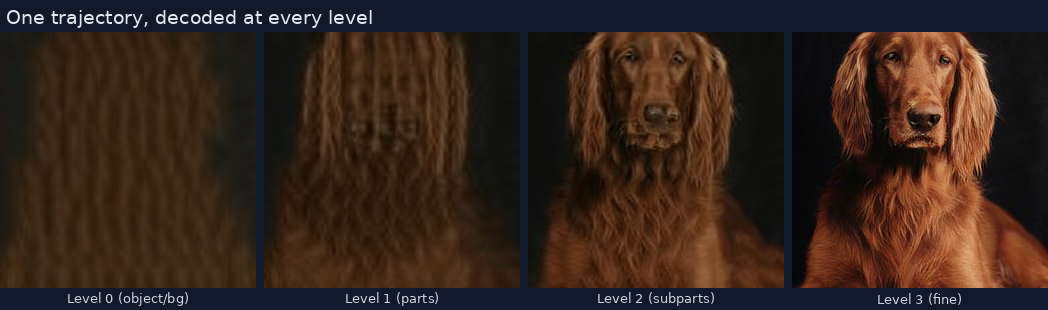
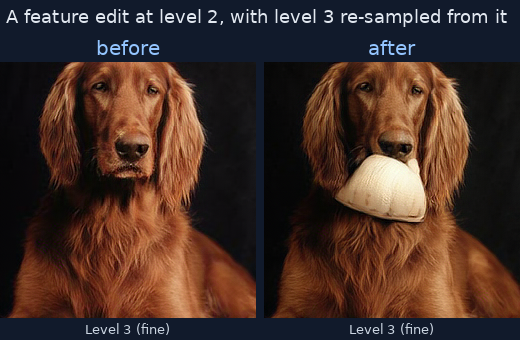
| One trajectory, all four levels | Before and after an edit at level 2 |
|
|---|---|
| One trajectory, all four levels | Before and after an edit at level 2 |
Five examples, each self-documenting on the canvas. Walkthrough: example_workflows/README.md.
| | what | runs as-is |
|---|---|---|
| 01-generate-and-decode | the method, no editing | ✅ |
| 02-feature-edit-coords | change a region's content | ✅ |
| 03-feature-edit-painter | the same, with a brush | two runs by design |
| 04-shape-edit | move a region's boundary | ✅ |
| 05-sweep-seeds | one edit across four seeds, tabulated | ✅ |
Nodes
Under TrajectoryForcing in the node menu. They are searchable by what they do, so "paint", "mask", "diff", "region" and "seed" all find the right one.
Generate and look
| node | | |---|---| | TF Load Pipeline | Loads the flow model and RAE decoder. Cached for the process, with a progress bar across restore, compile and decoder build. | | TF ImageNet Class | Class by name, id out. | | TF Generate | Samples one trajectory. Outputs every level. | | TF Decode Levels | RAE-decodes all levels, the final one, or one you name. | | TF Latent Preview (PCA) | The token grid as PCA false colour. Much cheaper than decoding, and it shows the structure edits act on. | | TF Levels Info | Shape, class, seed, edit history. | | TF Compare Levels | What changed between two trajectories, per level and per token, as a table and a heatmap. |
Choose what to edit
Edits act on regions of a 16×16 token grid, which no ComfyUI mask tool knows about. So TF Level Canvas renders a paintable level, core Painter supplies the brush, and TF Tokens From Mask converts the result back to tokens.
| node | |
|---|---|
| TF Level Canvas | One level as a 512px canvas, with the grid, region boundaries and current selection drawn on. Feed it to Painter. |
| TF Region Map | Clusters tokens into connected regions by cosine similarity. These are the R in the paper's edits. Wire its level output into the edit node so the two cannot drift. |
| TF Tokens From Mask | Painted mask to tokens. Wire a region map in to snap a rough stroke to whole regions. |
| TF Tokens From Coords | Click a 16×16 grid on the node, or type row,col (7,6:9 is a run). Both write the same text field, so a selection stays quotable in a writeup. |
| TF Tokens Combine | Union, intersect, difference, invert. |
| TF Tokens Preview | Draw a selection on its own, to check what a mask resolved to. |
Edit and resume
Both edits reduce to the paper's one primitive, z̃ᵢ = f_src for the selected
tokens, and differ only in where f_src comes from. Neither samples anything.
TF Resume From Level is what propagates the change.
| node | |
|---|---|
| TF Feature Edit | Target tokens take a feature from elsewhere, either the same trajectory or a second one. region mean is the paper's f_src; token cycle copies token-for-token. |
| TF Shape Edit | Hands boundary tokens to a neighbouring region, so its extent changes and its content does not. |
| TF Resume From Level | Re-samples every level above l*. Levels below are untouched, because sampling is Markov in the level index and an edit only propagates upward. |
| TF Sweep Edit | The whole chain, once per value of one axis, with everything else pinned. See below. |
| TF Save / Load Levels | A trajectory to and from .npz, with class, seed and history. |
| TF Save Report | Sweep and compare tables to .md, stamped with the run that produced them. |
| TF Save Images | Pictures to .png beside them, with class, seed and history in the PNG metadata. |
-1 means "decide for me". A few advanced widgets take it, each labelled
(-1 = auto), and the node reports what it chose:
resume from level 2 (auto: the level the edit wrote to); class 213 (auto: the
trajectory's own); seed 592
Every node shows its own result in its body: the edit summary, the region count, the selection, the comparison table. Nothing needs a preview node to be read.
Measurements are text, not sockets. Tokens changed, peak distance, sweep spread
and region counts all live in the node body and in the report string. ComfyUI's
suggestion index skips ordinary INT and FLOAT inputs, so a drag from a number
output dead-ends in an empty menu. An output that is a socket, like a region
map's level or a class id, exists because a widget elsewhere receives it.
Several frames arrive as one image. ComfyUI pages a multi-image output behind a
small 1/4 button, so four decoded levels would look like level 0 alone. Anything
meant to be seen together is stitched into a contact sheet instead. sheet_layout
(advanced) switches back to a batch, which is the only shape SaveImage writes as
one file per frame.
About half of all widgets sit behind ComfyUI's advanced toggle. Turn on Settings → Always show advanced widgets to see everything.
</details> <details> <summary><b>Sweeping</b>: what makes it an experiment and not a batch button</summary>TF Sweep Edit runs feature edit, resume and measure once per value of one axis
(seed, level, strength), with everything else pinned, so no two arms differ
in two ways at once.
Every arm gets its own baseline: the same trajectory resumed at the same level with the same seed and no edit. Re-sampling from an edited canvas is still sampling, so without that baseline "the image changed a lot" cannot be told apart from "the seed changed a lot", and a seed sweep mostly measures the seed.
The spread across arms is the number to read. It is the mean pairwise cosine distance at the final level. Near zero means the edit decides the outcome, so a single-seed result was trustworthy. Large means the seed does, and it was not.
Wire a TF Region Map into regions and it sweeps a shape edit instead. A map
describes one level, so seed and strength stay available and level is
refused with that reason.
Sweeping l* is the one axis that cannot hold everything fixed, because a selection snapped to one level's regions is not a whole region at another. The node keeps the token set fixed, which is what "the same edit at every level" has to mean, and says so in the report instead of refusing.
arm_limit (advanced) refuses to start at all if a mistyped 0-1000 would hold
the GPU.
Most nodes need no pipeline wire. A trajectory carries the pipeline that made
it. The socket is there as an override, and for a trajectory restored by TF Load
Levels, which has none.
A selection remembers which level's regions it was snapped to, and the edit nodes refuse it at a different one. Every level shares the same token grid, so without that check the edit lands on the wrong region and nothing says so.
</details>Troubleshooting
If anything about the install is in doubt, ask it directly:
python -m tf_nodes.doctor
It reports python, torch and its CUDA major, the GPU, the JAX stack, where
TrajectoryForcing was found and whether it matches the pin, which weights exist,
free disk, and any note the installer left. Every row that is not ok carries
the one command that fixes it. Run it from the extension directory with the same
interpreter ComfyUI uses. Paste the output into a bug report; a screenshot of it
is much less use.
It will not import JAX or download anything while answering. Add --devices to
have JAX enumerate the GPUs, but not inside a running ComfyUI: that initialises
the backend, which cannot be undone in the process.
Discarding ... typing_extensions-4.16.0-py3-none-any.whl ...
  has inconsistent Name: expected 'typing-extensions', but metadata has 'typing_extensions'
ERROR: Could not find a version that satisfies the requirement flit_core<4,>=3.11
ERROR: No matching distribution found for flit_core<4,>=3.11
Not this extension, and not your machine. download.pytorch.org/whl/... serves a
wheel whose internal Name: does not match the index's normalised spelling; an
older pip discards it, falls back to the source distribution, and that index has
no build backend to build it with. Because it is passed as --index-url there is
no PyPI to fall back to either.
Upgrade pip in whichever venv is doing the install, then retry:
<that venv>/bin/pip install -U pip
env/setup.sh already does this before it installs anything, so the venv that
runs the model is unaffected. It bites the ComfyUI workspace venv, which
comfy install creates and immediately installs into. That is why the route
above passes --skip-torch-or-directml and keeps torch out of it entirely.
Wire TF Compare Levels to the before and after trajectories. It reports tokens changed per level. If that is zero, check the what was selected preview, since most often the selection is not where you thought. If the levels above the edit look stale, TF Resume From Level has not run.
</details> <details> <summary><b>An edit did something, but was it the edit or the seed?</b></summary>One before/after pair cannot separate them. TF Sweep Edit on the seed axis
runs the same edit across seeds against a no-edit baseline for each, and reports
the spread. Workflow 05 is that graph, ready to run.
The selection was snapped to a different level's region map. Point TF Region Map
at the level you are editing, or wire its level output into the edit node.
That widget exists only in ComfyUI's new node rendering. Go to Settings, search "Node 2.0", enable it, then reload the page. TF Level Canvas detects this and says so in its body.
</details> <details> <summary><b>Warnings at startup</b></summary>Three appear on every run and all are benign. They are deliberately not suppressed, because silencing third-party warnings is how a real one gets missed later.
| warning | why it is harmless |
|---|---|
| Tensorflow library not found... | flax falls back to plain Python IO. Only gs:// paths are lost, and every weight here is local. |
| You need pytorch with cu130 or higher... | ComfyUI's quantisation kernels, which nothing here uses. torch stays on cu128 to share a CUDA major with jax[cuda12]. |
| The given NumPy array is not writable... | The RAE decoder wrapping a read-only latent. It only reads it. |
JAX and torch share the card, and comfy.model_management cannot see JAX's
allocations. TF_XLA_MEM_FRACTION=0.3 caps JAX and passes ComfyUI a matching
--reserve-vram.
Every session writes comfyui-*.log and bridge-*.log to outputs/comfyui_logs/
and keeps the last 20 of each. run_comfyui_slurm.sh prints both paths on exit.
The terminal stream is gone the moment the window is, so these are what remain.
Three quick ones. Could not find the TrajectoryForcing checkout: set TF_REPO.
CUDA is not available: check nvidia-smi, and that the venv was built on this
machine. Address already in use: ss -ltnp | grep 8188 names the process.
Contributing
Bugs in these nodes are related to this repository, not TrajectoryForcing. Please report them here.
Architecture, tests and sharp edges: CONTRIBUTING.md.
Citation
These nodes were built in collaboration with the Trajectory Forcing authors. If you find this work useful, please consider citing:
@Inproceedings{kocabas2026trajectoryforcing,
  author    = {Kocabas, Merve and Gao, Gege and Schölkopf, Bernhard and Geiger, Andreas},
  title     = {Trajectory Forcing: Structure-First Generation with Controllable Semantic Trajectories},
  booktitle = {Proceedings of the European Conference on Computer Vision (ECCV)},
  year      = {2026},
}
<sub>MIT licensed. Not affiliated with or endorsed by Comfy Org.</sub>