
ComfyUI Extension
ComfyUI-EasyPromptVLM
A single ComfyUI node: image in → prompt text out, via any llama.cpp VLM.
konstruktisintez/ComfyUI-EasyPromptVLM
Nodes—
On cloudLocal install
Stars1
Updated3 months ago
Readme
ComfyUI-EasyPromptVLM
A single ComfyUI node: image in → prompt text out, via any llama.cpp VLM. Model family and chat template are detected automatically from the GGUF — no chat handler selection. Made for personal use, as is. Linux only.
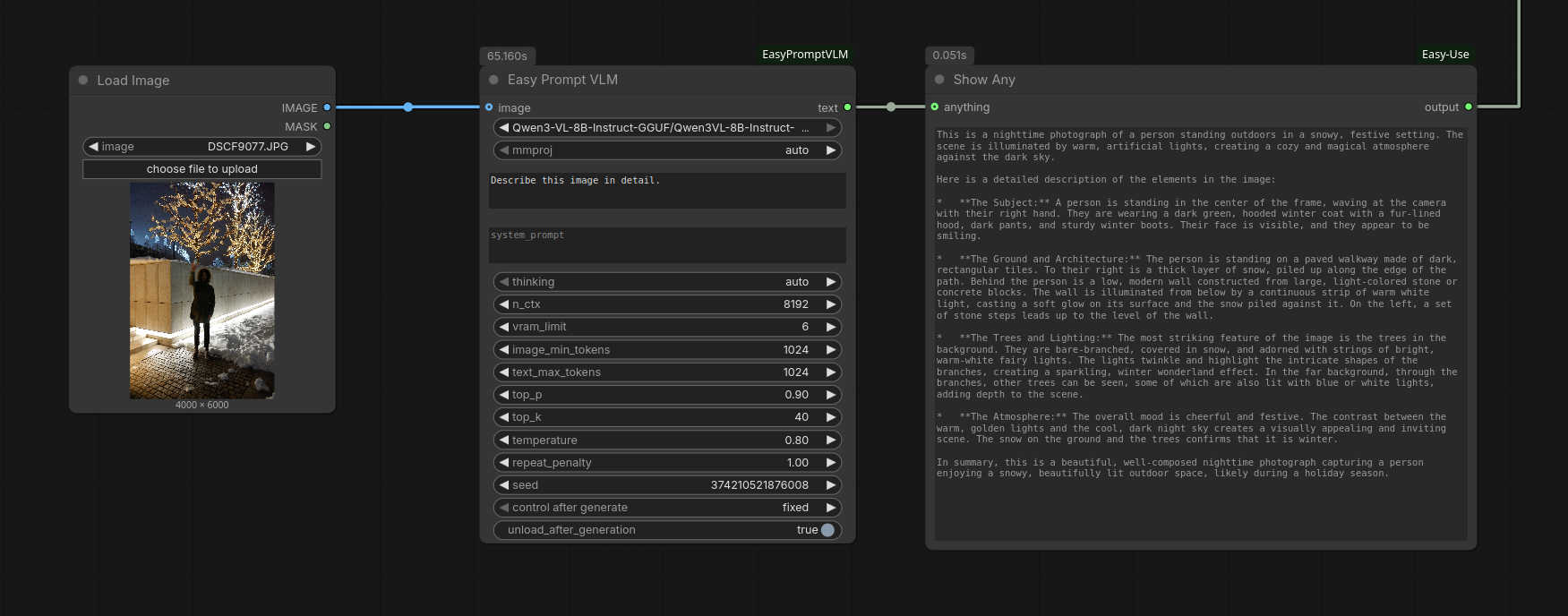
Install
- Install a llama-cpp-python wheel from the JamePeng fork into ComfyUI's environment — pick your CUDA (release tag) and Python (
cp314= 3.14):pip install --force-reinstall https://github.com/JamePeng/llama-cpp-python/releases/download/v0.3.41-cu131-linux-20260708/llama_cpp_python-0.3.41+cu131-cp314-cp314-linux_x86_64.whl - Copy this folder into
ComfyUI/custom_nodes/. - Copy models into
ComfyUI/models/EasyPromptVLM/(subfolders OK), mmproj next to the model — withmmproj: autoit's picked up automatically:models/EasyPromptVLM/Gemma-4-e2b/Gemma-4-e2b_q4_0.gguf models/EasyPromptVLM/Gemma-4-e2b/Gemma-4-e2b_mmproj-f16.gguf
How it works
The node reads the GGUF header (general.architecture + file name) and picks the matching MTMD chat handler (Qwen3-VL, Gemma3/4, MiniCPM, GLM, LLaVA, etc.), falling back to the model's own embedded chat template for unknown families. Before loading it asks ComfyUI to free enough VRAM, and it frees llama.cpp back when ComfyUI needs the memory (or immediately, with unload_after_generation). Reasoning blocks are always stripped from the output.
Troubleshooting
- "Failed to create llama context" / OOM — model + KV cache don't fit in VRAM. Set
vram_limita few GB below your GPU (offloads part of the layers to CPU), lowern_ctx, or take a smaller quant. On failure the node retries once with llama.cpp logs enabled, so the exact reason shows in the console. image_min_tokens— only works on dynamic-resolution models (Qwen-VL family): higher = more image detail, slower. Fixed-resolution models (Gemma) reject it; the node detects that and retries without it, so leaving it non-zero just costs a reload.thinking— Qwen3-VL toggles reasoning cleanly at template level. Gemma4 E2B/E4B can't be toggled and always think; the node strips the thought channel from the output and, when thinking is off, injects a "final answer only" instruction into the system prompt.