
raylight
Enable true multi gpu capability in Comfy UI using XDiT XFuser and FSDP managed by Ray
Nodes (73)
The Data Parallel Conditioning List
N generations, one run
A different starting latent for every GPU
The Data Parallel Noise List
Your sampler, your sigmas, N GPUs
The fully modular Data Parallel sampler
AddNoise, but on the Ray cluster
The no-CFG guider, for the CFG=1 generation
Pick your sigma curve, on the cluster
The beta scheduler your LTX model is quietly begging for
Your old friend CFG, distributed
Stop your CFG output from looking radioactive
The overshoot-correction nobody documents
The 'please empty my VRAM' node
Apply ControlNet on the Ray cluster
Load ControlNet onto every GPU, without the serialization tax
Two positives, one negative, two scales
Nudge the first frame of your LTX video
Skip the attention that doesn't change
The 0.5% nudge that sharpens things up
The frequency-scaling guidance trick that sharpens wan output
The config node for LTX's multimodal guider, one modality at a time
The node that turns your GPUs into one big one
The Ray init node for people with a second GPU AND opinions
The shutdown button that saves your ComfyUI restart
Your normal LoRAs, but inside the multi-GPU pipeline
The enhancer that sharpens LTX video by borrowing high-frequency energy
The sampling switch that lets LTX extend video forward
Guidance that uses a broken attention to make things better
Extend LTX video backward
The detail-boosting node that made LTX videos stop looking soft
The node that lets LTX chew long videos it couldn't fit in VRAM
Pin LTX color and lighting to a reference, one denoising step at a time
Forcibly tame LTX latent statistics to a target mean and std
Give LTX a voice to match — reference audio as identity guidance
The two sigma shifts that make MiniMax H3 behave
Force the compute dtype on a distributed model
Amplify (or kill) the noise your sampler starts from
The shift knob that fixes flow-matching samplers, now on all your GPUs
Re-map a model's noise schedule without retraining it
Patch Your Ray Workers to Continuous v-Prediction Sampling
The Sampling-Type Switch Every Distilled Workflow Needs
Shift the Schedule, Save Your Flux Runs
Give LTX Video Its Shift — and Let It See Your Latent
The One-Knob Shift Node for SD3-Family Models
Stable Cascade's Quiet Shift Patch for Ray Workers
The Multimodal Guider for LTX-2's Video+Audio Generation
Get Your Negative Prompt Back on Distilled Models
Detail Without a Negative Prompt
Keep High CFG From Exploding Into Burn
Rescale Your CFG Result Back to Normal Size
The Fast Sampler That Cuts Steps Without the Quality Hit
Convert a Sampling Percent to a Real Sigma Value
Decode Massive SeedVR2 Latents Across Multiple GPUs
Get Composition Back Without the Double-Pass Cost
The Set-and-Forget Variant
LTX Video's Detail Fix, Now on Ray Workers
Schedule Your Guidance Like a Pro
The Set-and-Forget Quality Bump
Skip the Redundant Steps and Sample Faster
TSR for Raylight
Free speed, if you can stand the warmup
Where every Raylight workflow starts
The last node in every Raylight graph
The quiet helper behind Raylight's ControlNet path
VideoLinearCFGGuidance (Ray)
VideoTriangleCFGGuidance (Ray)
Raylight's everything-at-once sampler
Data-parallel power with a custom schedule
The most flexible sampler Raylight ships
The workhorse of Raylight sequence parallel
Full control of your Raylight sampling, manually
The guider-driven custom sampler
Raylight
Raylight. Using Ray Worker to manage multi GPU sampler setup. With XDiT-XFuser and FSDP to implement parallelism.
"Why buy 5090 when you can buy 2x5070s"-Komikndr
UPDATE
<details><summary><strong>Click to expand changelog</strong></summary>- Prevent materialized view FSDP using direct DTensor class instead of sugarcoated PyTorch handler thanks to https://github.com/StanLukuvka for insight.
- BETA Qwen 2.1 Image USP.
- Fix bug with PDD Lora Minimax.
- Custom attention implementation that can run on top of USP (such example is Minimax SLA)
- Minimax SLA thanks to https://github.com/Karmabu.
- LTX 2.5
- Wan Animate 2
- Minimax H3
- Fix Dist VAE
- Add More ComfyUI - Raylight model model helper parity
- Add Bernini R support
- Add Comfy Aimdo support, can be disable with
--disable-dynamic-vram - [BETA] Add LTXV Custom nodes expansion with Raylight compatibility
- DP Latent Noise List, FSDP, and DP improvement, added by avtc
- Add WanT2V Causal
- Experimental : ControlNet support, by avtc
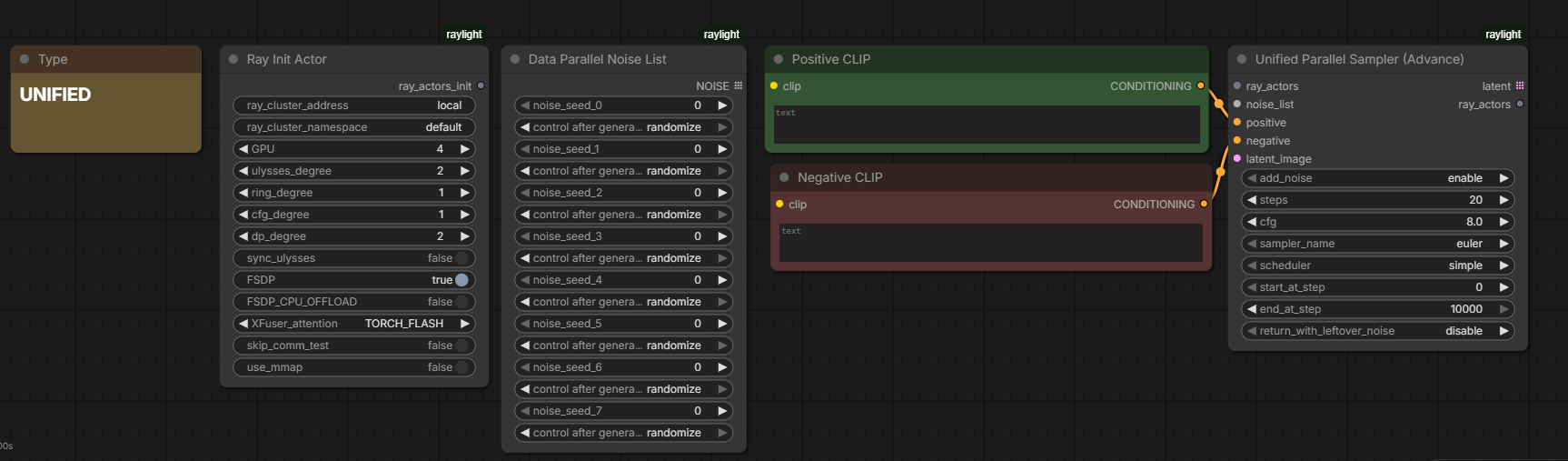
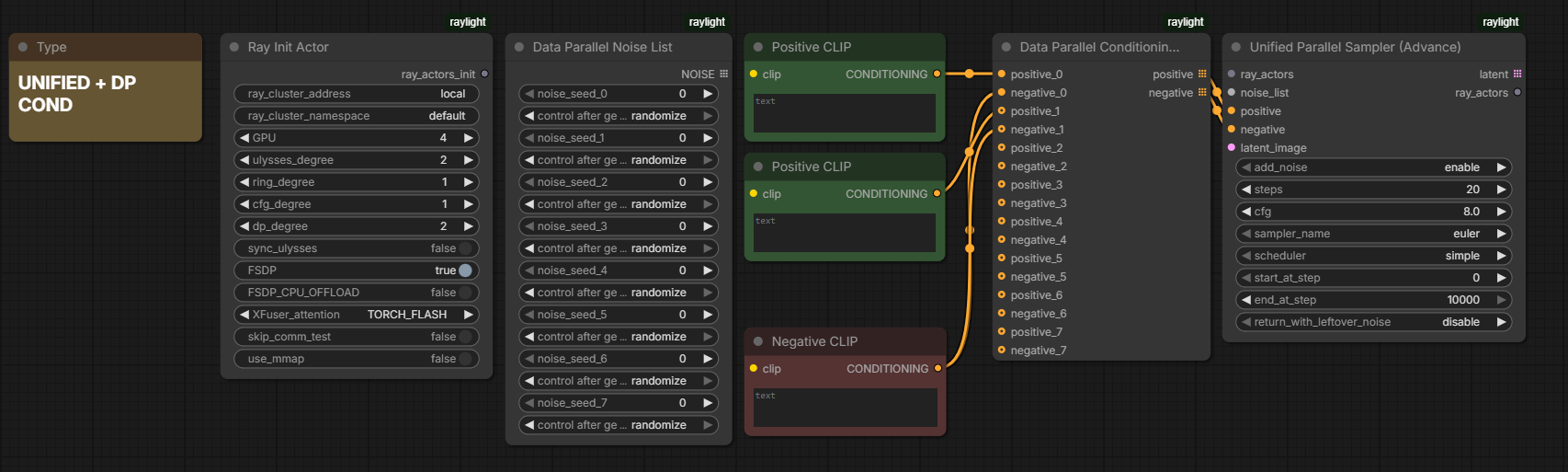
- Experimental : Unified Parallel sampler, now all parallel type can be use at the same time, USP x DP x CFG x FSDP
- ERNIE and Anima support
- GPU Selector: add
GPU_SELECTinput toRayInitializerAdvancedto restrict Ray workers to specific GPUs (for example0,1,2, or leave empty for all GPUs), credit to avtc - Multi-Prompt DP: add
DPConditioningListnode for per-GPU conditioning in Data Parallel mode, credit to avtc mmapoption for reduce RAM, with GGUF variant implementation by avtc- Docs: add developer docs for FSDP, USP, CFG, and expansion modules
- Now TensorCoreFP8 and NVFP4 works in FSDP2, check on CK-Distributed
- LTX-2/ LTX2.3 USP
- Kandinsky5 model
- Fix FSDP error cause by Ray cannot pickle None type return by
comfy.supported_models_base.BASE.__getattr__ - TeaCache and EasyCache added thanks to rmatif
- Flux2, Hunyuan 1.5 USP, FSDP
- Fix broken tqdm progress bar
- AMD ROCm Aiter attention
- Z Image, Lumina, Model USP FSDP
- SDXL and SD 1.5 supported through CFG
- New parallelism, CFG. Check models note below about Flux or Hunyuan
- Qwen Image fix for square dim
- Hunyuan Video support for FSDP and USP
- Chroma/Radiance support for FSDP and USP
- GGUF added thanks to City96, only in USP mode, not in FSDP
- Reworked the entire FSDP loader. Model loading should now be more stable and faster, as Raylight no longer kills active workers to reset the model state. Previously, this was necessary because Comfy could not remove FSDP models from VRAM, which caused memory leaks.
- No need to install FlashAttn.
- SageAttn is now supported.
- Full FSDP support for Wan, Qwen, Flux, and Hunyuan Video.
- Full LoRA support.
- FSDP CPU offload, analogous to block swap/DisTorch.
Table of Contents
- Raylight
- UPDATE
- Documentation
- What exactly is Raylight
- Raylight vs MultiGPU vs ComfyUI Worksplit vs ComfyUI-Distributed
- RTM and Known Issues
- Operation
- Tested GPU
- Supported Models
- Scaled vs Non-Scaled Models
- Attention
- Example Wan
- Benchmark
- Installation
- Support Me
Documentation
For developers and advanced users, see the docs folder for detailed guides on USP, CFG, FSDP, and expansion modules.
- Top most head is
dev, pr merge intodevor any custom branch name e.gkomikndr:raylight/feat-something<-john_doe:raylight/feat-something, DONT MERGE INTO MAIN - If commit message contain "Partial: " it meaant the code is finished, tested on single worker, but not yet being tested in parallel setup.
What exactly is Raylight
Raylight is a parallelism node for ComfyUI, where the tensor of an image or video sequence is split among GPU ranks. Raylight, as its partial namesake, uses Ray to manage its GPU workers. Introduction to Raylight on Youtube
<img width="834" height="1276" alt="image" src="https://github.com/user-attachments/assets/6a79e980-1111-4e31-b6cb-7b6ff35eb766" />So how does it split among the ranks? It uses Unified Sequence Parallelism (USP), embedded inside XDiT, a core library of Raylight that splits and allgathers tensors among GPU ranks.
Unfortunately, although it splits across GPUs, each GPU must still load the full model weight. And let's be honest, most of us do not have a 4090 or 5090. In my opinion, buying a second 4070 is monetarily less painful than buying a 5090. This is where FSDP comes in. Its job is to split the model weights among GPUs.
TLDR: Raylight is multi-GPU nodes for Comfy, USP for splitting the work, and FSDP for splitting the model weights.
Raylight vs MultiGPU vs ComfyUI Worksplit branch vs ComfyUI-Distributed
-
MultiGPU Loads models selectively on specified GPUs without sharing workload. Includes CPU RAM offloading, which also benefits single-GPU users.
-
ComfyUI Worksplit branch Splits workload at the CFG level, not at the tensor level. Since most workflows use
CFG=1.0like Wan with Lora, this approach provides limited use cases. -
ComfyUI-Distributed Distribute jobs among workers. Run your workflow on multiple GPUs simultaneously with varied seeds. Easily connect to local/remote/cloud worker like RunPod.
-
Raylight Provides both tensor split in sequence parallelism (USP), CFG parallelism and model weight sharding (FSDP). Your GPUs will 100% being used at the same time. In technical sense it combine your VRAM. This enables efficient multi-GPU utilization and scales beyond single high-memory GPUs (e.g., RTX 4090/5090).
RTM and Known Issues
- Scroll further down for the installation guide.
- Models without new ComfyUI quantization usually can be sharded using FSDP.
- If there is an error about NCCL installation, install
nvidia-nccl-cu12==2.28.9:
Raylight uses this NCCL library instead of the NCCL bundled with PyTorch.pip install nvidia-nccl-cu12==2.28.9 - By default, Ray workers use NCCL's normal transport selection, so P2P and shared-memory
transports remain available when supported. Set the following variables to 1 only for
troubleshooting to disable those transports if NCCL initialization or watchdog failures occur:
Raylight can run with these settings, but they may hurt performance. Treat them as a sanity check to confirm whether Raylight can run, not as recommended defaults.export NCCL_P2P_DISABLE=1 export NCCL_SHM_DISABLE=1 - Raylight has not been tested with InfiniBand or RoCE. If your system uses either, adjust
NCCL networking settings as needed. For systems without InfiniBand/RDMA, this can be used
for troubleshooting:
export NCCL_IB_DISABLE=1 - Ray workers remove
backend:cudaMallocAsyncfrom their inheritedPYTORCH_CUDA_ALLOC_CONFby default. This avoids allocator-related OOMs during NCCL collectives while leaving the ComfyUI host process unchanged. To preservecudaMallocAsyncin Ray workers:
Other allocator options, such asexport RAYLIGHT_KEEP_CUDA_MALLOC_ASYNC=1expandable_segments:True, are preserved. - Example WF just open from your comfyui menu and browse templates
- GPU Topology is very important, not all PCIe in your motherboard is equal.
- VRAM leakage, when using Ring > 1 instead of Ulysses. Solution : just increase Ulysses degree for now.
- The PyTorch NCCL version will be replaced to
2.28.9to fix issues with FP8 communication. - The PyTorch version will be
2.8.1due to relaxeddtypeconstraints when using FSDP. You can still use2.7.1or earlier. However, FSDP will not be function correctly in those versions.
Operation
Mode
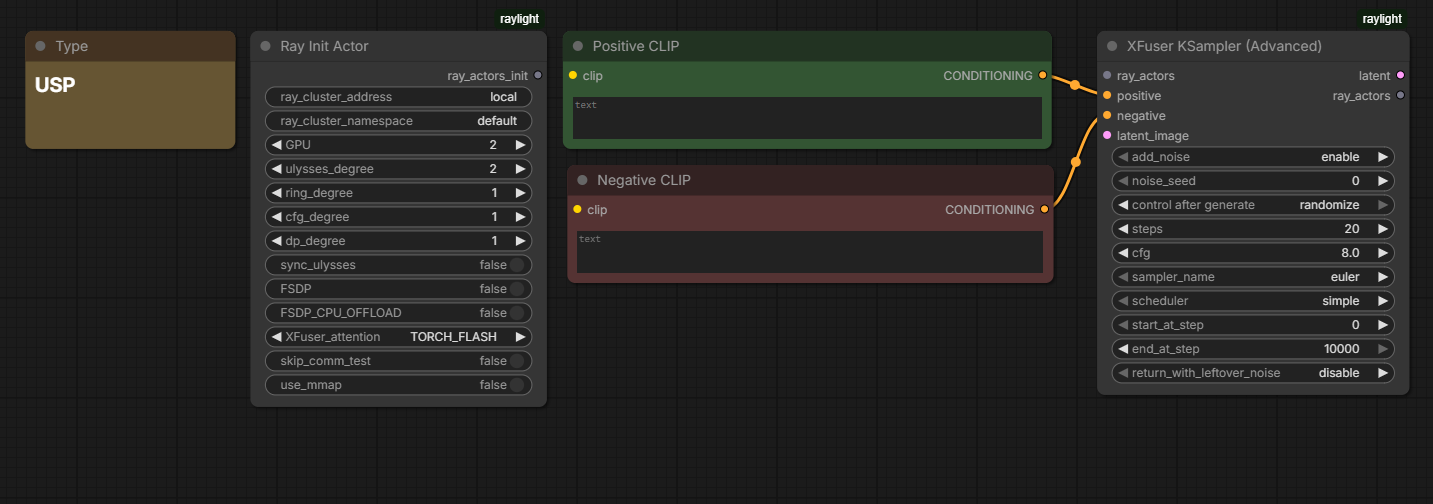
Sequence Parallel This mode splits the sequence among GPUs, the full model will be loaded into each GPU. Use the XFuser KSampler to increase the Ulysses degree according to the number of your GPUs, while keeping the Ring degree at 1 for small systems.
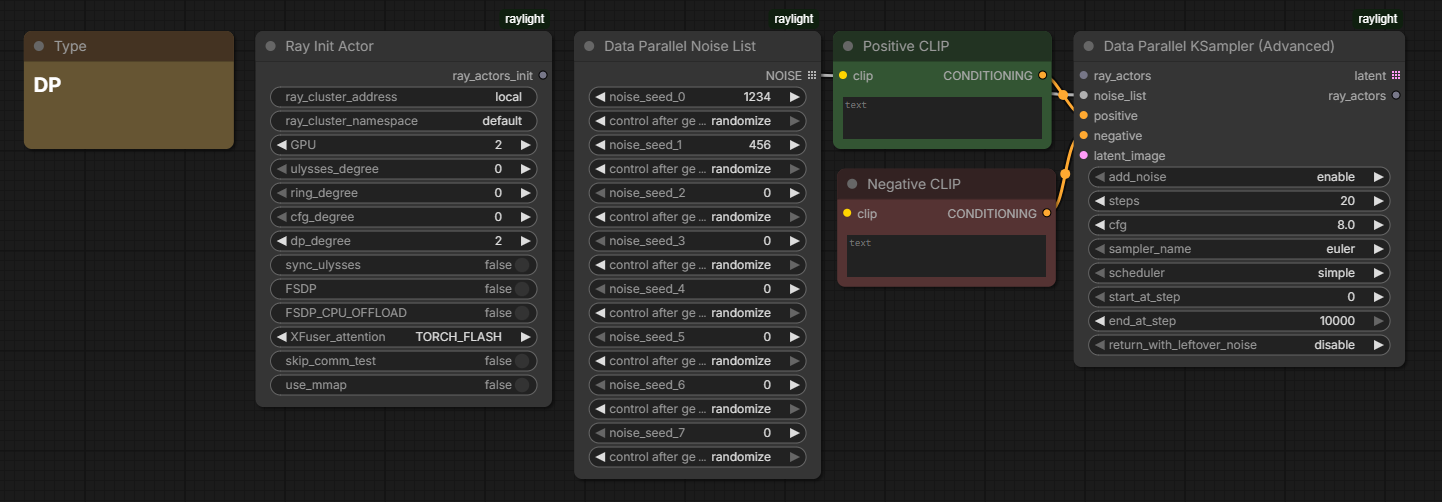
Data Parallel
The full sequence will be processed independently on each GPU.
Use the Data Parallel KSampler. There are two options, enable FSDP, or disable all options in Ray Init Actor.
By disabling them, it will run in DP mode. Both FSDP and DP modes must have the Ulysses and Ring degrees set to
0.
FSDP will shard the weights, but each GPU will still work independently, as the name suggests, Fully Sharded (Weight) Data Parallel.
Data parallel also can use different prompt per generation using Conditional List
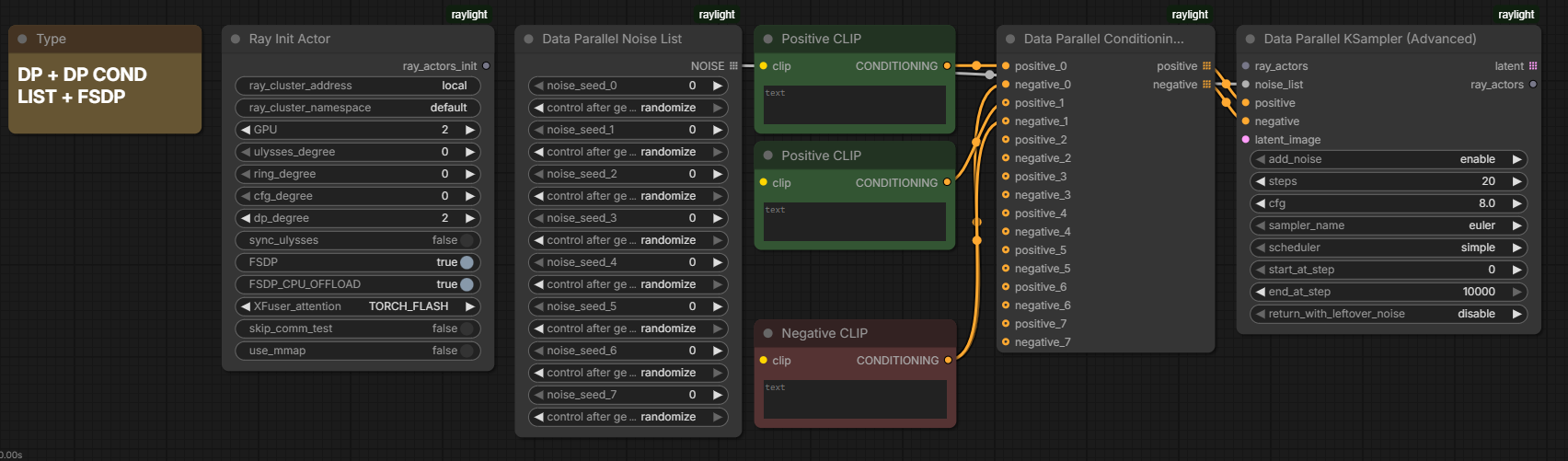
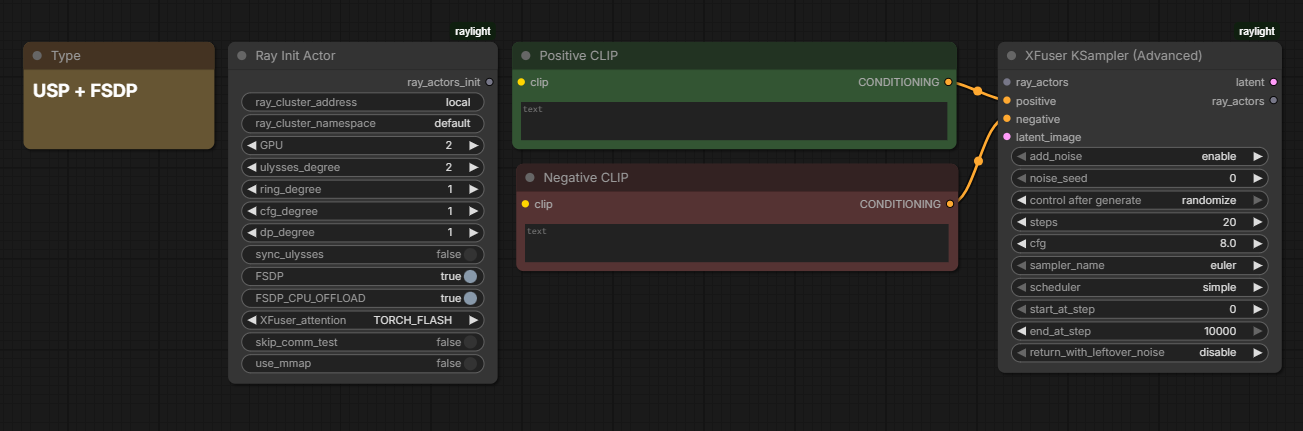
Sequence + FSDP Activate FSDP, and set the Ulysses degree to the number of GPUs. Use the XFuser KSampler.
Unified Parallel This is experimental mode where all type of parallel group can work at a sime time, USP, FSDP, DP, CFG.
Side Notes
- Rule of thumb, if you have enough VRAM, just use USP, if not, enable the FSDP, and if that is still not enough, enable also the FSDP CPU Offload.
- FSDP CPU Offload is intended for systems with very low VRAM, though it will come with a performance hit work akin to DisTorch from MultiGPU.
- From
1.6.0version Raylight will piggy back on ComfyUI Aimdo for non FSDP workload. To disable Aimdo add cli--disable-dynamic-vram
GPU Architectures
NVidia
- Volta : Use latest Yunchang libs, check notes below.
- Turing: Same as Volta
- Ampere: Tested
- Ada Lovelace: Tested
- Blackwell: Tested
AMD
- MI3XX : User confirmed working on 8xMI300X using ROCm compiled PyTorch and Flash Attention 2.
- MI210 : Personally tested and working on MI210 using ROCm compiled PyTorch and builtin
torch.nn.Functional.SDPA
Intel
- Arc Pro B60 : Using LLM Scaler.
Supported Models
Wan | Model | USP | FSDP | CFG | |-------------------|-----|------|-----| | Wan2.1 14B T2V | ✅ | ✅ | ✅ | | Wan2.1 14B I2V | ✅ | ✅ | ✅ | | Wan2.2 14B I2V | ✅ | ✅ | ✅ | | Wan2.2 14B I2V | ✅ | ✅ | ✅ | | Wan2.1 1.3B T2V | ✅ | ✅ | ✅ | | Wan2.1 1.3B AR | ✅ | ❌ | ✅ | | Wan2.2 5B TI2V | ✅ | ✅ | ✅ | | Wan2.1 Vace | ✅ | ❌ | ✅ | | Wan2.1 Bernini R | ✅ | ❌ | ✅ | | Wan2.2 I2V Hi-Lo | ✅ | ✅ | ✅ | | Wan2.2 T2V Hi-Lo | ✅ | ✅ | ✅ | | Wan2.2 SVI | ✅ | ✅ | ✅ |
Flux | Model | USP | FSDP | CFG | |-------------------|-----|------|-----| | Flux Dev | ✅ | ✅ | ❌ | | Flux Kontext | ✅ | ✅ | ❌ | | Flux Krea | ✅ | ✅ | ❌ | | Flux 2 | ✅ | ✅ | ❌ | | Flux ControlNet | ✅ | ✅ | ❌ |
Chroma | Model | USP | FSDP | CFG | |-------------------|-----|------|-----| | Chroma | ✅ | ✅ | ✅ | | Chroma Radiance | ✅ | ✅ | ✅ | | Chroma ControlNet | ✅† | ✅† | ✅ |
Qwen | Model | USP | FSDP | CFG | |-----------------------|-----|------|-----| | Qwen Image/Edit | ✅ | ✅ | ✅ | | Qwen Image 2.1 (BETA) | ✅ | ❌ | ❓ | | ControlNet | ✅ | ✅ | ✅ |
Z Image, Lumina 2 | Model | USP | FSDP | CFG | |-------------------|-----|------|-----| | Z Image | ✅ | ✅ | ✅ | | Lumina 2 | ✅ | ✅ | ✅ |
Hunyuan Video | Model | USP | FSDP | CFG | |-------------------|-----|------|-----| | Hunyuan Video | ✅ | ✅ | ❌ | | Hunyuan 1.5 | ✅ | ✅ | ❌ | | ControlNet | ✅† | ✅† | ❌ |
Kandinsky5 | Model | USP | FSDP | CFG | |-------------------|-----|------|-----| | Kandinsky5 I2V | ✅ | ❓ | ❌ | | Kandinsky5 T2V | ✅ | ❓ | ❌ |
LTX-2 | Model | USP | FSDP | CFG | |----------|-----|------|-----| | LTX-2 | ✅ | ❓ | ❌ | | LTX-2.3 | ✅ | ❓ | ❌ | | LTX-2.5 | ✅ | ❓ | ❌ |
ERNIE-Image | Model | USP | FSDP | CFG | |--------------------|-----|------|-----| | Ernie Image | ✅ | ✅ | ✅ | | Ernie Image Turbo | ✅ | ✅ | ✅ |
Anima | Model | USP | FSDP | CFG | |--------------------|-----|------|-----| | Anima Preview3 | ✅ | ✅ | ❌ |
Minimax | Model | USP | FSDP | CFG | |--------------------|-----|------|-----| | H3 Ref2VA | ✅ | ✅ | ❌ | | H3 FL2VA | ✅ | ✅ | ❌ |
UNet | Model | USP | FSDP | CFG | |--------|-----|------|-----| | SD1.5 | ❌ | ❌ | ✅ | | SDXL | ❌ | ❌ | ✅ |
Legend:
- ✅ = Supported
- ❌ = Not currently supported.
- ✅† = Code-ready, awaiting ControlNet model weights.
- ❓ = Logically supported, awaiting for testing.
- T = Text
- I = Image
- A = Audio
- V = Video
Notes:
- Non standard Wan variant (Phantom, etc...) is not tested
- CFG parallel for Flux, Hunyuan, is technically supported by Raylight, but since these models do not support conditional batches (CFG = 1), enabling it has no effect.
- Chroma and Hunyuan Video ControlNet support is implemented in the USP/FSDP code paths but no ControlNet model weights are currently available in ComfyUI to test with.
- Only one ControlNet model per workflow is supported. To apply the same model with different images or strengths, use multiple Apply ControlNet (Ray) nodes connected to a single Load ControlNet (Ray) node.
Attention
| Attention Variant | Time (s) | |----------------------|----------| | sage_fp8 | 10.75 | | sage_fp16_cuda | 11.00 | | sage_fp16_triton | 11.17 | | flash | 11.24 | | torch | 11.36 |
Notes:
- Tested on Wan 2.1 T2V 14B 832x480 33 frame 2 RTX 2000 ADA
Wan T2V 1.3B
<img width="1918" height="887" alt="image" src="https://github.com/user-attachments/assets/57b7cdf5-ebd5-4902-bccd-fa7bbfe9ef8b" />https://github.com/user-attachments/assets/40deddd2-1a87-44de-98a5-d5fc3defbecd
Wan T2V 14B on RTX 2000 ADA ≈ RTX 4060 TI 16GB
<img width="1117" height="716" alt="Screenshot 2025-08-20 125936" src="https://github.com/user-attachments/assets/b2ea1621-4be1-4925-8f4a-3ff9542c6415" />Qwen Image 20B on RTX 2000 ADA ≈ RTX 4060 TI 16GB , 4x Playback speed up
https://github.com/user-attachments/assets/d5e262c7-16d5-4260-b847-27be2d809920
5090 vs RTX 2000 ADA
| Model | Model dtype | Parallelism (when applicable) | CFG | Steps | Resolution (W x H x Frame) | 1× RTX 2000 ADA (s/it) | 2× RTX 2000 ADA (s/it) | 5090 (s/it) | |--------|-------------|-----------------------------|-----|--------|-----------------------------|-------------------------|-------------------------|--------------| | SD 1.5 | FP32 | CFG Parallel = 2 | 7 | 20 | 512 × 512 | 0.11 | 0.05 | 0.003 | | SDXL | FP16 | CFG Parallel = 2 | 8 | 20 | 720 × 1024 | 0.33 | 0.19 | 0.004 | | Wan 2.1 1.3B T2V LX2V | BF16 | Ulysses = 2 | 1 | 4 | 480 × 832 × 33 | 2.70 | 1.65 | 0.46 | | Wan 2.1 14B T2V LX2V | FP8 E4M3 | Ulysses = 2 | 1 | 4 | 480 × 480 × 33 | 9.23 | 5.18 | 3.05 | | Wan 2.1 14B T2V LX2V (FSDP) | FP8 E4M3 | Ulysses = 2 | 1 | 4 | 480 × 640 × 81 | OOM | 22.51 | 3.05 | | Flux | FP8 E4M3 | Ulysses = 2 | 1 | 20 | 1024 × 1024 | 2.22 | 1.26 | 0.29 | | Chroma | FP8 E4M3 Scaled | Ulysses = 2 | 3.5 | 25 | 1024 × 1024 | 5.14 | 3.24 | 0.35 | | Chroma Radiance | FP8 E4M3 Scaled | Ulysses = 2 | 3.5 | 25 | 1024 × 1024 | 8.11 | 4.32 | 0.51 | | Hunyuan Video T2V | GGUF Q4 | Ulysses = 2 | 1 | 20 | 480 × 832 × 33 | 13.21 | 7.69 | 2.06 | | Qwen Image (FSDP) | FP8 E4M3 | Ulysses = 2 | 2.5 | 20 | 1024 × 1024 | OOM | 5.68 | 0.98 |
Notes:
- RTX 2000 ADA ≈ RTX 4060 Ti in performance.
- All benchmarks were executed using ComfyUI native workflows, with no Kijai wrapper involved.
- Wan 2.1 14B T2V (FSDP) is only applicable to dual RTX 2000 ADA:
- Single RTX 2000 ADA: OOM
- 5090: does not require FSDP
- Results represent the average of 5 runs, after warm-up.
- All speeds are normalized to seconds per iteration (s/it).
For models reporting iterations per second, we compute
1 / (it/s)to convert. - RTX 2000 ADA topology: P2P is supported but runs over SYS path (NUMA cross-socket), meaning no NVLink is present and peer bandwidth is reduced.
Installation
Manual
- Clone this repository under
ComfyUI/custom_nodes. cd raylight- Install dependencies: your_python_env - pip install -r requirements.txt
- Install
pip install nvidia-nccl-cu12==2.28.9, this is only needed if you are using FSDP with fp8 models with Nvidia GPUs - Install FlashAttention 2 (optional):
- Option A (NOT recommended due to long build time): pip install flash-attn --no-build-isolation
- Option B (recommended, use prebuilt wheel):
For Torch 2.8:
wget https://github.com/mjun0812/flash-attention-prebuild-wheels/releases/download/v0.3.14/flash_attn-2.8.2+cu128torch2.7-cp311-cp311-linux_x86_64.whl -O flash_attn-2.8.2+cu128torch2.7-cp311-cp311-linux_x86_64.whl
For other versions, check: https://github.com/mjun0812/flash-attention-prebuild-wheels/releases/pip install flash_attn-2.8.2+cu128torch2.7-cp311-cp311-linux_x86_64.whl`
- Attention backend can be install like any other libs e.g: SageAttn, AITER, FA3 (optional)
- Restart ComfyUI.
ComfyUI Manager
- Find raylight in the manager and install it.
Windows
-
After numerous testing, it still does not work on out of the box PyTorch, however if you want to try:
-
First, build NCCL for Windows.
-
Recommended steps:
- Manually clone the Raylight repo
- Switch to the
devbranch for now - Inside the top-most Raylight folder (where
pyproject.tomlexists), run:
..\..\..\python_embeded\python.exe -m pip install -r .\requirements.txt ..\..\..\python_embeded\python.exe -m pip install -e . -
Advice, just run in WSL, and symlink your ComfyUI model dir from windows to WSL.
Support
PayPal Thanks for the support :) (I want to buy 2nd GPU (5060Ti) so i dont have to rent cloud GPU) RunPod