
ComfyUI Extension
ComfyUI TinyPNG
A ComfyUI custom node for compressing images via TinyPNG API.
knottttt/comfyui-tinyPNG
Nodes1
On cloudLocal install
Categoryimage/TinyPNG
Stars0
Updated6 months ago
Readme
ComfyUI TinyPNG
A ComfyUI custom node for compressing images via the TinyPNG API.
Features
- Compress image batches in ComfyUI (
IMAGE) - TinyPNG smart resize methods:
scale,fit,cover,thumb - Optional metadata preserve:
copyright,creation,location - Returns compression stats text (
info)
Installation
Install with ComfyUI Manager
- Open
ComfyUI Manager->Extension Manager. - Search
ComfyUI TinyPNGorcomfyui-tinypng. - Install and restart ComfyUI.
Manual install
cd ComfyUI/custom_nodes
git clone https://github.com/knottttt/comfyui-tinyPNG.git
cd comfyui-tinyPNG
pip install -r requirements.txt
Restart ComfyUI.
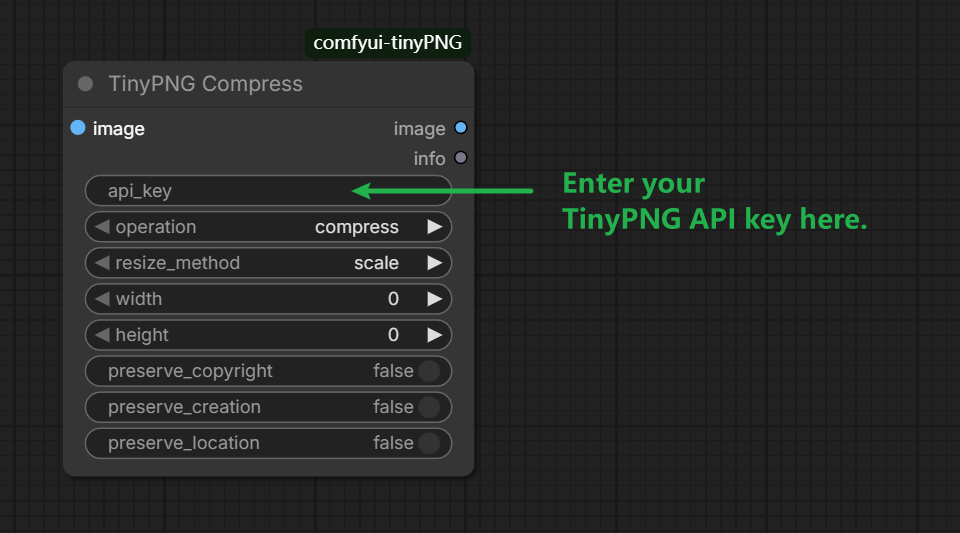
Usage
- Add node:
TinyPNG Compress - Required: TinyPNG API key from https://tinypng.com/developers
operation=compressfor compression onlyoperation=smart_resizewithresize_methodfor TinyPNG resizing
Screenshot
Acknowledgements
- This project is inspired by and references TinyGUI.
License
MIT. See LICENSE.