
ComfyUI-KKMLMF-Nodes
Comfyui提示词工具编辑和翻译节点
Nodes (4)
ComfyUI KKMLMF Nodes
Interactive prompt/tag editor node for ComfyUI, with optional local translation powered by Tencent Hy-MT2-1.8B (GGUF via llama.cpp).
Built on the modern comfy_api.latest / ComfyExtension (V3) node API — requires a recent ComfyUI.
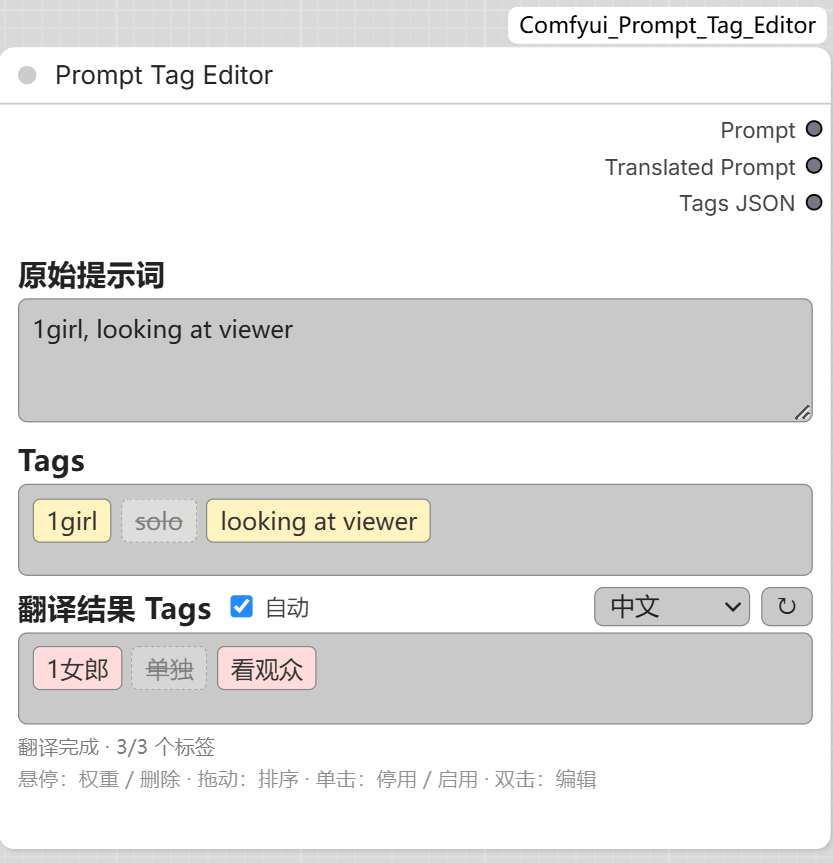
Features
- Prompt textarea kept in sync with tag chips (comma-separated)
- Tag chips with hover popup: adjust weight and delete without retyping
- Double-click a chip to edit its text
- Press-and-drag to reorder tags (dragging starts immediately on movement)
- Single click a chip to disable / re-enable it — disabled tags stay in the list (grayed out) but are excluded from the prompt and outputs
- Translated tag chips with per-language cache; untranslated chips shown dashed
- Auto-translate toggle: missing translations are filled automatically after edits
- Chinese (CSV) language option (default): translates tags by looking them up in the dataset CSVs — instant, no model, and switching to it unloads the translation model; tags with no dataset entry show red "untranslatable"
- Underscore → space toggle: when on, every
_in the prompt (typed, pasted or inserted from suggestions) becomes a space - 8 model-backed target languages: Chinese / Japanese / Korean / English / French / German / Spanish / Russian (loaded on demand, as before)
- Lazy-loaded
Hy-MT2-1.8B-Q4_K_MGGUF, full GPU offload (n_gpu_layers=-1), batched request with per-item fallback and translation cache
Outputs
| Output | Content |
|---|---|
| Prompt | Serialized prompt with weights, e.g. (white dress:1.2), long hair |
| Translated Prompt | Comma-separated translations |
| Tags JSON | Full tag list (text / translation / weight / disabled) as JSON |
Install
Via ComfyUI-Manager (recommended)
Custom Nodes Manager → search KKMLMF or Prompt Tag Editor → Install.
Manual
cd ComfyUI/custom_nodes
git clone https://github.com/kkmlimingfeng/ComfyUI-KKMLMF-Nodes
Restart ComfyUI.
Translation model
The node works without the model; only the translate button needs it.
On first use, Hy-MT2-1.8B-Q4_K_M.gguf (~1.1 GB) is downloaded automatically
to ComfyUI/models/text_translation/Hy-MT2-1.8B-GGUF/ — from Hugging Face,
with hf-mirror.com as a fallback. The editor status line shows download
progress while it runs.
Manual placement also works — put the GGUF here (any *.gguf in that folder
is accepted, Q4_K_M preferred):
ComfyUI/
  models/
    text_translation/
      Hy-MT2-1.8B-GGUF/
        Hy-MT2-1.8B-Q4_K_M.gguf
- Hugging Face: https://huggingface.co/tencent/Hy-MT2-1.8B-GGUF
- China mirror: https://hf-mirror.com/tencent/Hy-MT2-1.8B-GGUF
requirements.txt intentionally lists no hard dependency: llama-cpp-python is imported lazily so the editor works even without it.
GPU offload needs a CUDA-enabled llama-cpp-python build. Recommended: grab a
prebuilt wheel matching your CUDA toolkit (cu124 / cu128 / ...) and Python
version (cp310 / cp311 / cp312 / ...) from
https://github.com/JamePeng/llama-cpp-python/releases, then:
pip install llama_cpp_python-<version>+cu128-cp312-cp312-win_amd64.whl
Alternatives:
# CUDA build via the official wheel index
pip install llama-cpp-python --extra-index-url https://abetlen.github.io/llama-cpp-python/whl/cu128

# CPU-only build (works everywhere, slower)
pip install llama-cpp-python
Usage
- Add the node from KKMLMF-Nodes → Prompt Tag Editor (or type prompt directly).
- Edit tags as chips; type in the textarea to add tags.
- Hover a chip → popup with title / weight / delete.
- Toggle 自动 (auto) to translate automatically after edits, or press the ↻ button.
- Connect the outputs to downstream nodes.