
ComfyUI Image Feeder
A ComfyUI custom node for looping through images in a folder with a visual library UI and playback controls.
ComfyUI Image Feeder
A ComfyUI custom node for looping through images in a folder with a visual library UI and playback controls.
Screenshots
Node
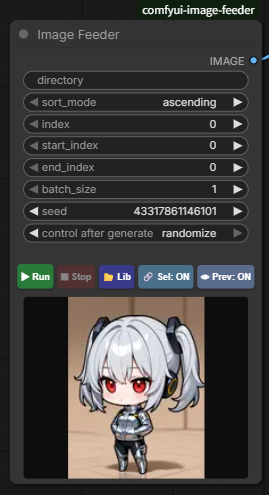
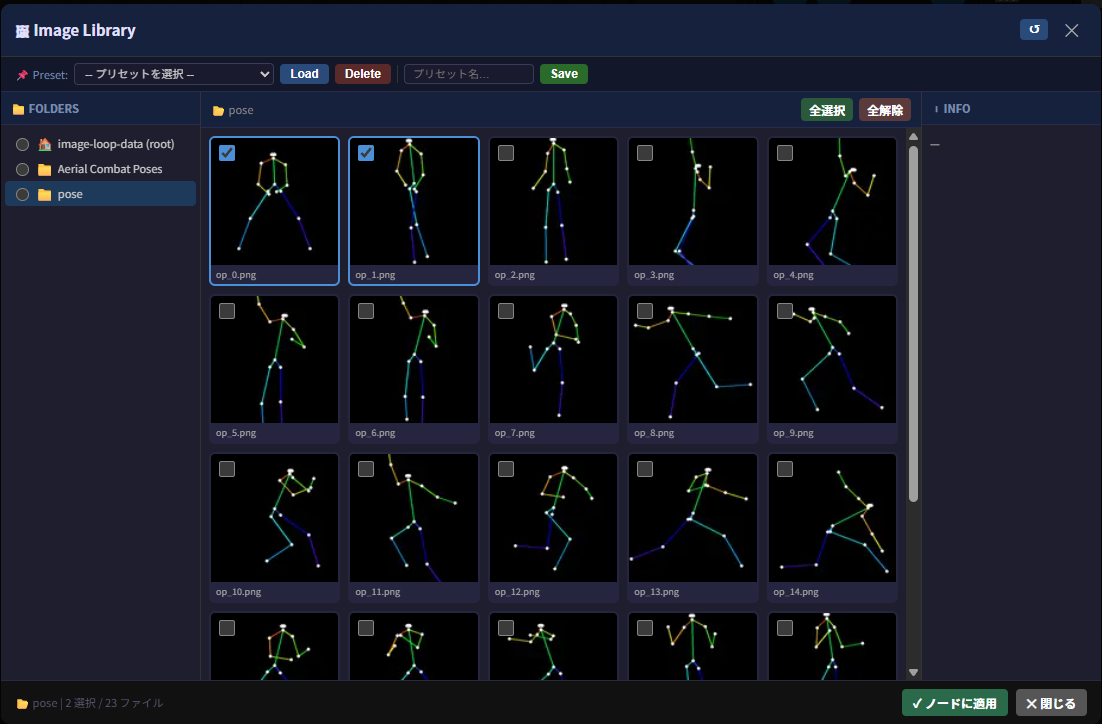
Image Library
Features
-
Image Library (Lib):
- Open the library via the 📂 Lib button to preview images and select loop targets individually using checkboxes.
- 3-pane UI (folder tree / image grid / file info) for efficient image management. Sub-folders are supported.
- Preset support to save and reload folder + selection state.
-
Playback Controls:
- ▶ Run: Resets the index and starts the automatic loop.
- ⏹ Stop: Stops the automatic loop.
- 🔗 Sel ON/OFF: Toggles between using only library-selected images or all images in the folder.
- 👁 Prev ON/OFF: Toggles the image preview panel below the buttons. The preview updates automatically with each execution.
-
Flexible Sorting & Range:
- Sort modes:
ascending/descending/random. - Range control via
start_index/end_index.
- Sort modes:
-
Batch Output & Auto-Resize:
- Outputs multiple images at once according to
batch_size. - If the final batch has fewer remaining images than
batch_size, the last image is repeated to fill the batch (no wrap-around to the start). - Automatically resizes images to match the first image's resolution when sizes differ.
- Outputs multiple images at once according to
-
i18n Support:
- UI language is automatically detected from the browser's language setting.
- Supported: English / 日本語 / 中文(简体)
Installation
- Clone or copy this folder into ComfyUI's
custom_nodesdirectory. - Start (or restart) ComfyUI. The
Image Feedernode will appear under theimagecategory.
Image Placement
Place images in the following directory structure:
ComfyUI/
└── user/
    └── default/
        └── image-loop-data/        ← root folder
            ├── pose_collection/    ← subfolders supported
            │   ├── img001.png
            │   └── img002.png
            └── sample.png
- Enter the relative path from
image-loop-datain the node'sdirectoryfield. - Leave blank to use the root of
image-loop-data. - Security: Access outside the
image-loop-datafolder is blocked to prevent path traversal.
Parameters
| Parameter | Description |
| --- | --- |
| directory | Subfolder name under image-loop-data. Leave blank for root. |
| sort_mode | ascending (natural order) / descending / random |
| index | Current load position. Updated automatically during loop. |
| start_index | Start of the load range. |
| end_index | End of the load range (0 = until last). |
| batch_size | Number of images to output at once. |
| seed | Seed for reproducible random sorting. |
| use_selection | Whether to use library selection (toggle via node button). |
Notes
- Filenames with numbers (e.g.
img1.png,img10.png) are sorted correctly using natural sort. - Symbolic links are excluded for security.
- After selecting images in the library, press Apply to Node to apply the selection.
- Supported formats:
.png/.jpg/.jpeg/.webp/.bmp/.tif/.tiff - Multiple Image Feeder nodes can run independently in the same workflow.
- If a queue error occurs during the loop, the Run button is automatically re-enabled.