
ComfyUI-Workflow-Studio
Workflow management and generation UI plugin. Browse, organize, and execute workflows with auto-generated parameter editing, AI prompt assistant (Ollama), JSON syntax highlighting, Eagle integration, and multi-language support (EN/JA/ZH).
Nodes (2)
ComfyUI-Workflow-Studio
A comprehensive workflow, asset management, and generation UI plugin for ComfyUI.
📁 Management — organize all your assets in one studio
- Workflow, model, image, and prompt management
- AI-powered prompt writing assistance, translation, and tag generation
- File drop & Gallery-linked metadata viewing — inspect and reuse generation settings instantly
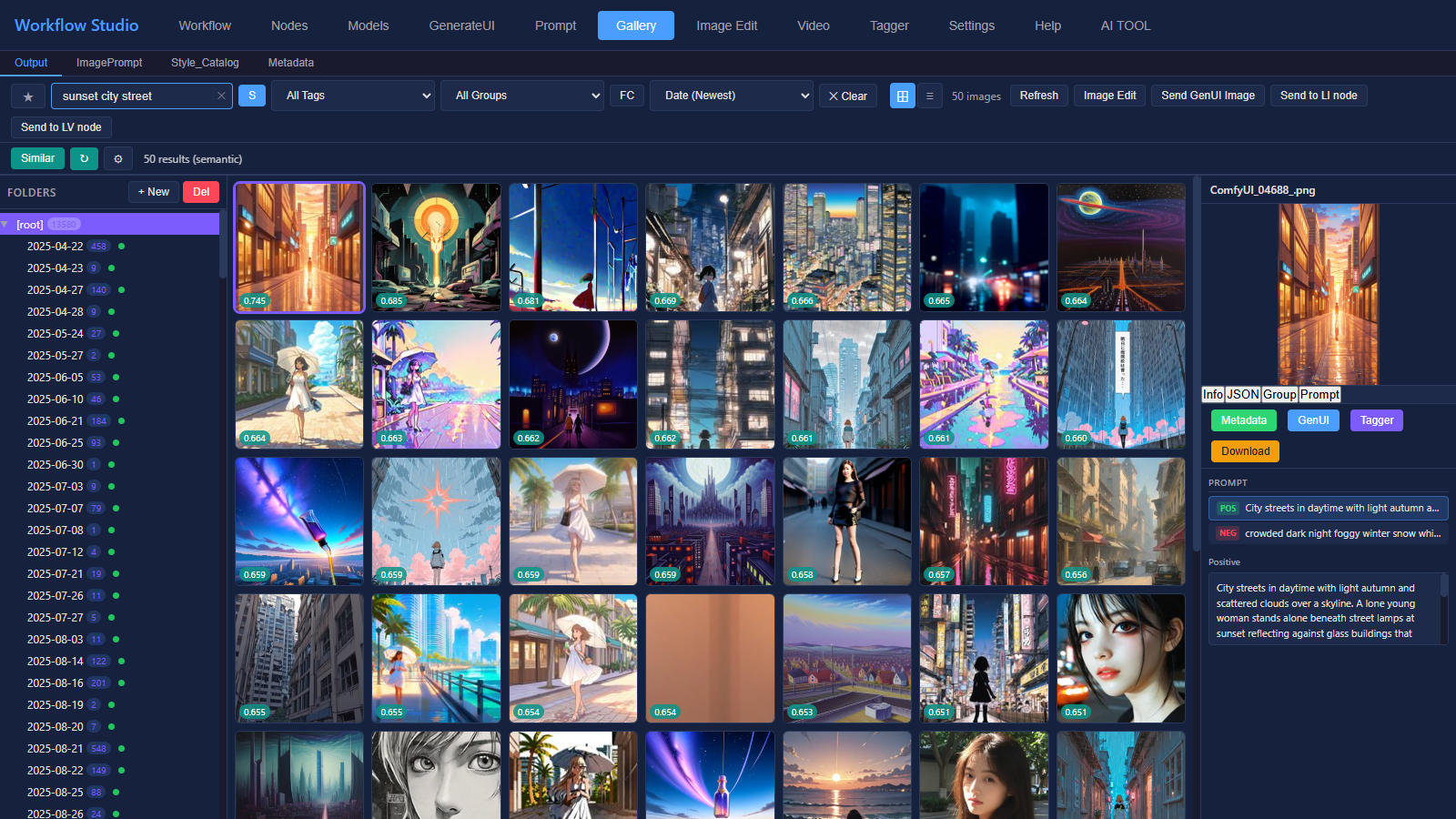
- Semantic image search in the Gallery — find images by describing them, or list images similar to a selected one
⚡ GenerateUI — a productivity-focused generation tab connected to every other tab
- Batch generation across models, samplers, prompts, and workflows
- Image Feeder for continuous folder-based generation
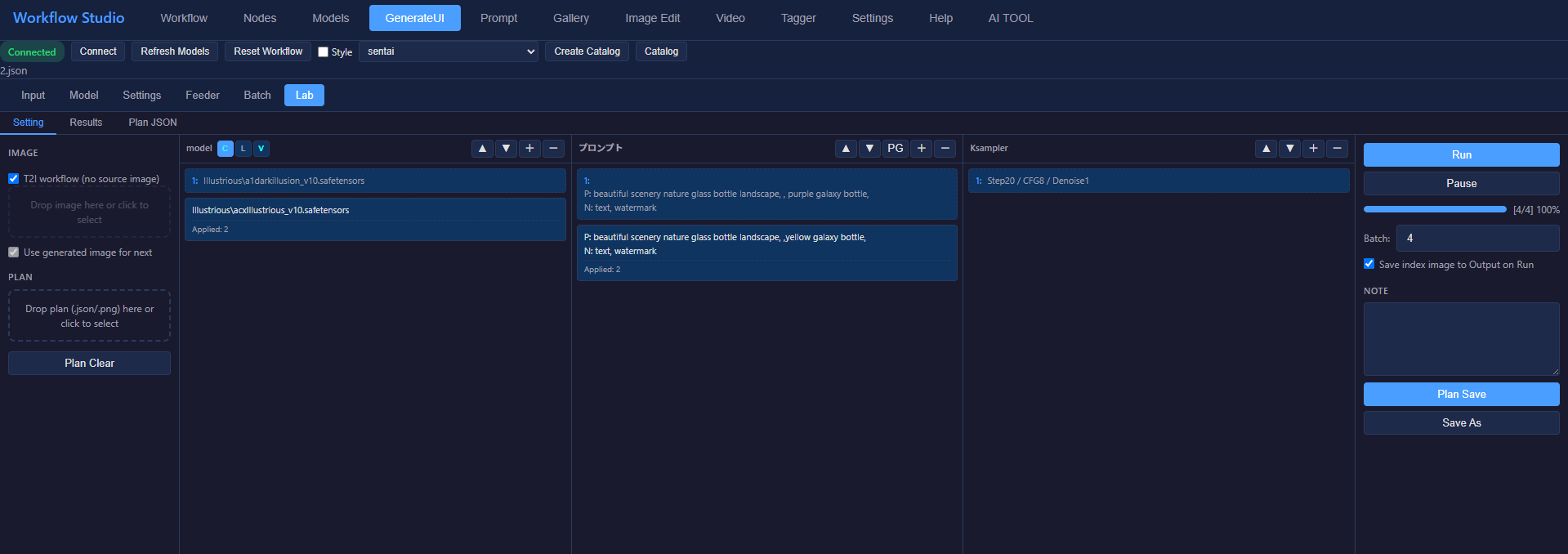
- Lab: experimental I2I batch generation with independent per-iteration keyframes for Model (Checkpoint/LoRA Single/VAE)/Prompt/KSampler
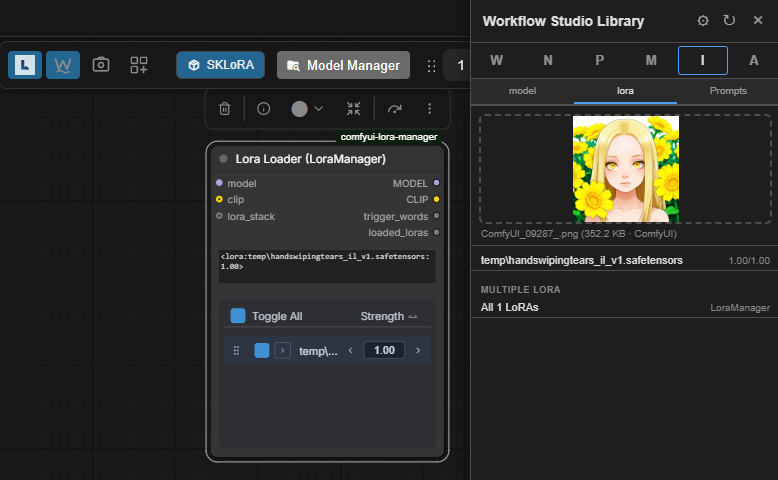
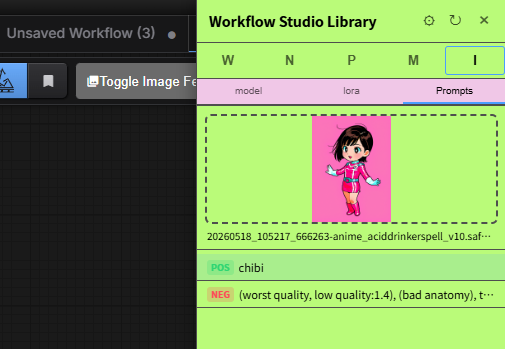
📚 Workflow Studio Library — a multi-function side panel for smooth ComfyUI integration
- Drag & drop models, nodes, prompts, and workflows straight onto the canvas
- Send to Canvas: click "Send to Canvas" (Workflow tab) or "Copy & Send Canvas" (Gallery tab) to send the workflow directly to the ComfyUI canvas — UI and API formats both supported
- View metadata from images / JSON, then drop the detected models and prompts onto the canvas
- Built-in AI tools (translation and more)


Screenshots
| Workflow Tab | Models Tab |
| :-------------------------------------: | :---------------------------------: |
| 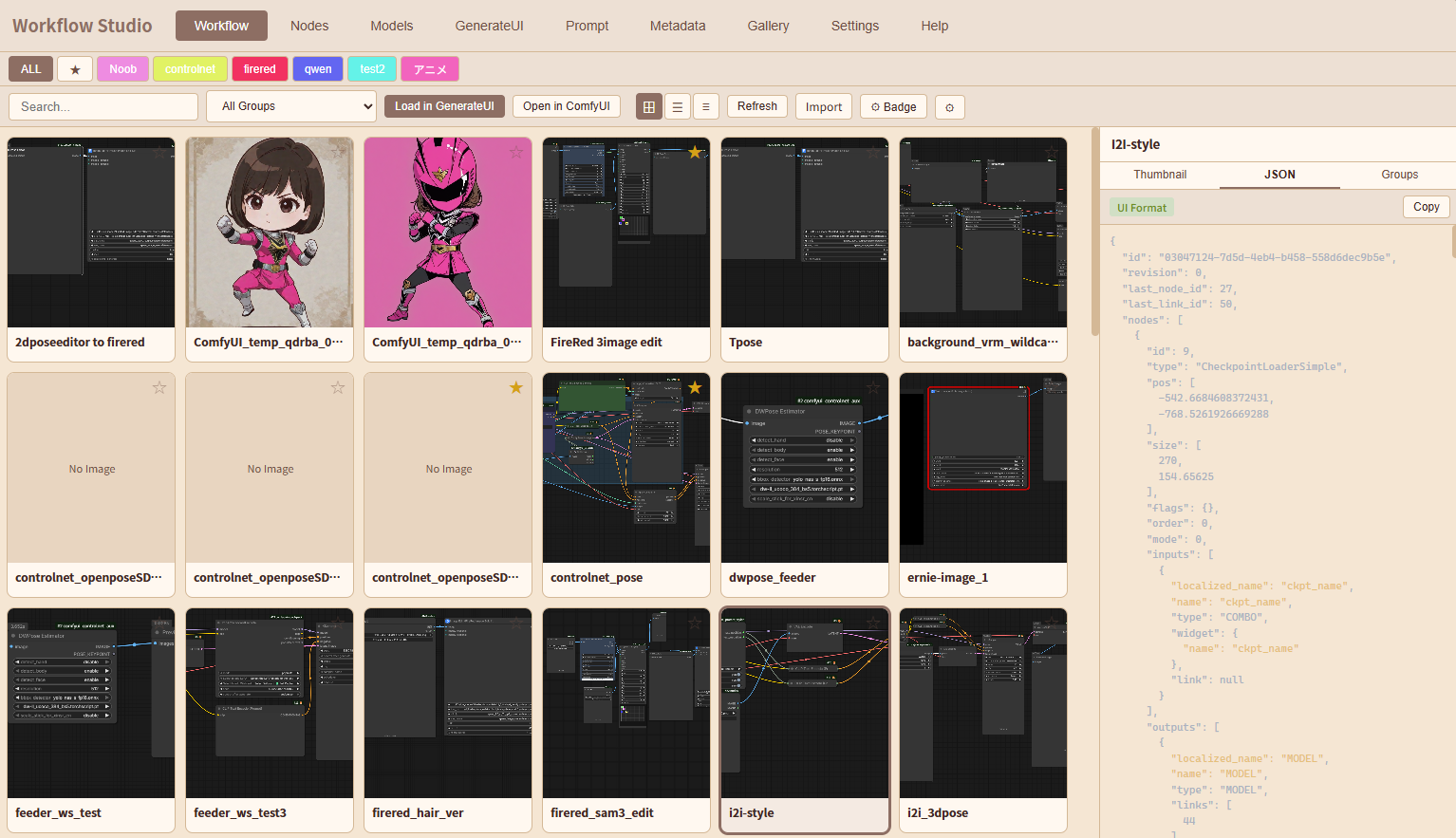 |
| 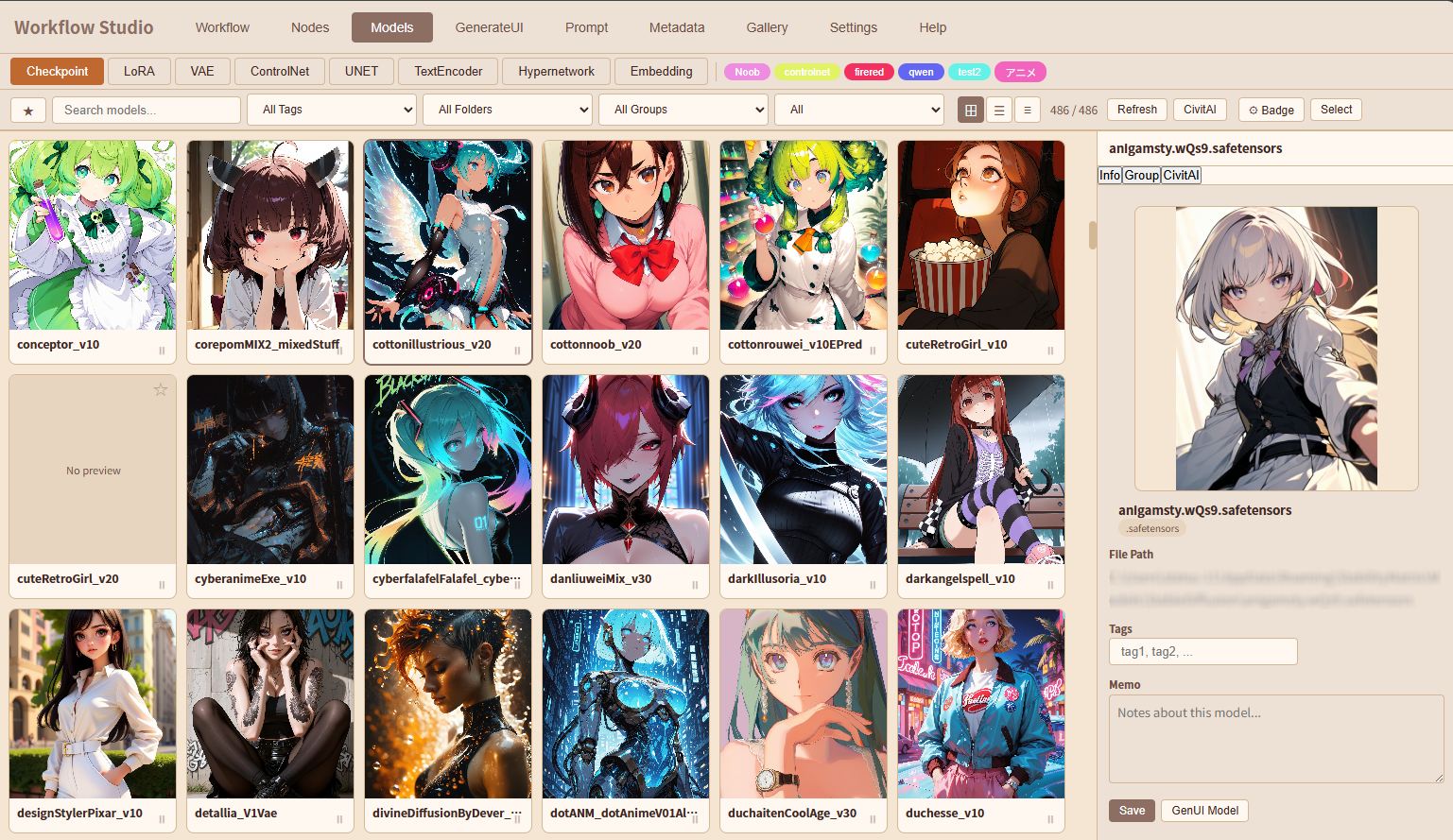 |
|
| Prompt Input Assistance | GenUI Batch |
| :----------------------------------------------------------: | :-------------------------------------: |
| 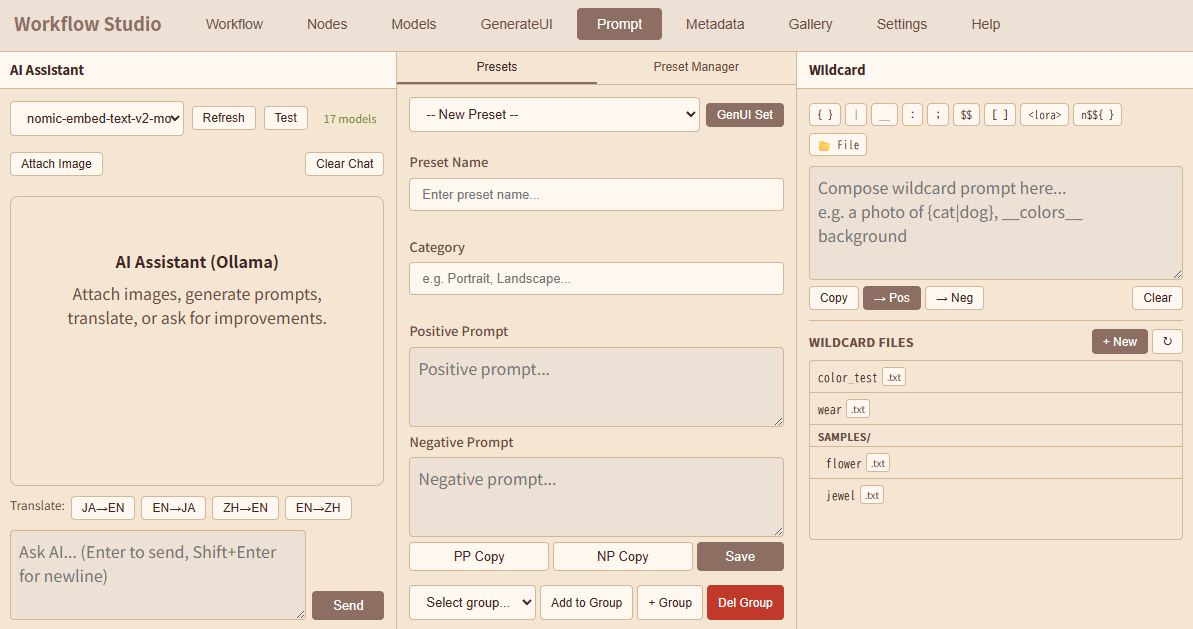 |
| 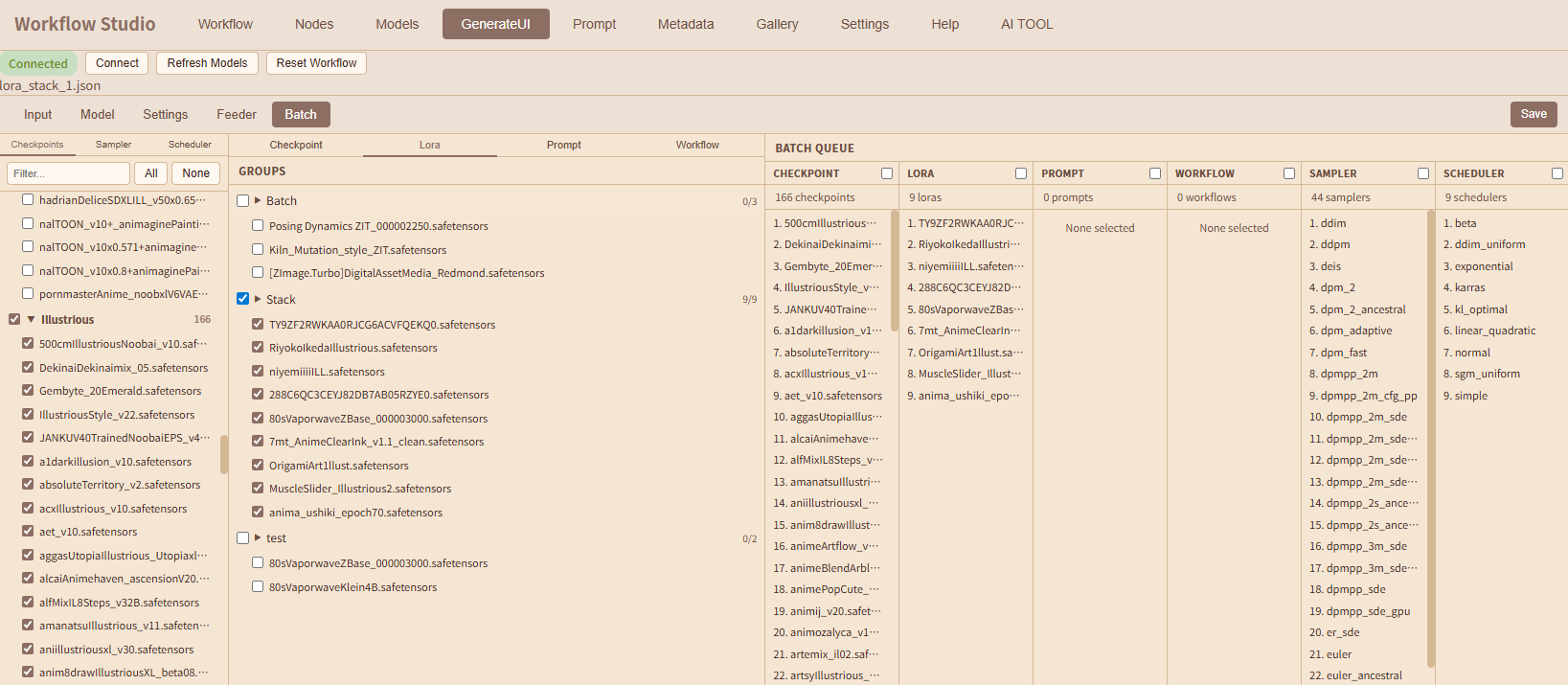 |
|
| Top Bar | Image Edit Tab |
| :----------------------------: | :--------------------------------------: |
|  |
|  |
|
| WS Library | Library Information |
| :----------------------------------: | :---------------------------------------------------: |
|  |
|  |
|
| Video Tab | AI TOOL Tab |
| :----------------------------------: | :--------------------------------------: |
| 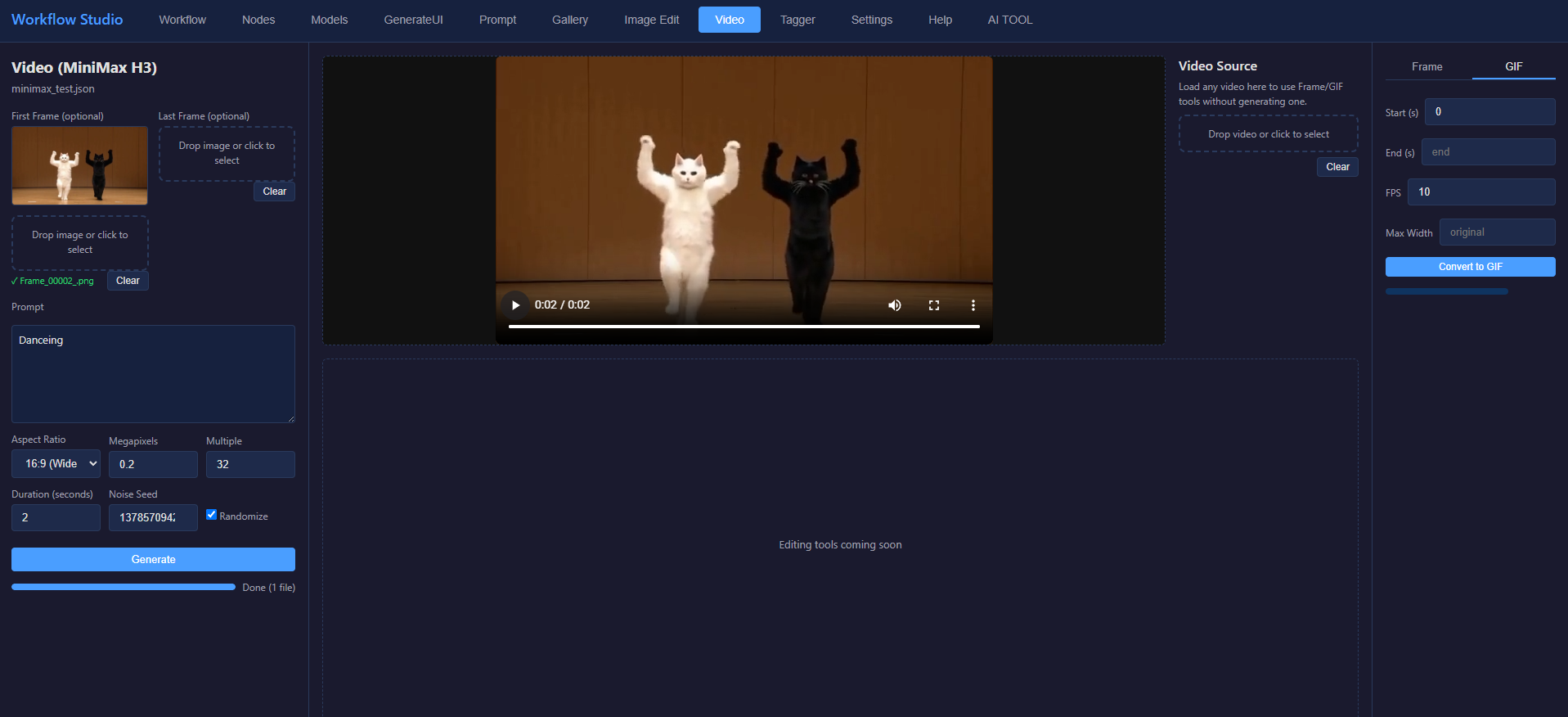 |
| 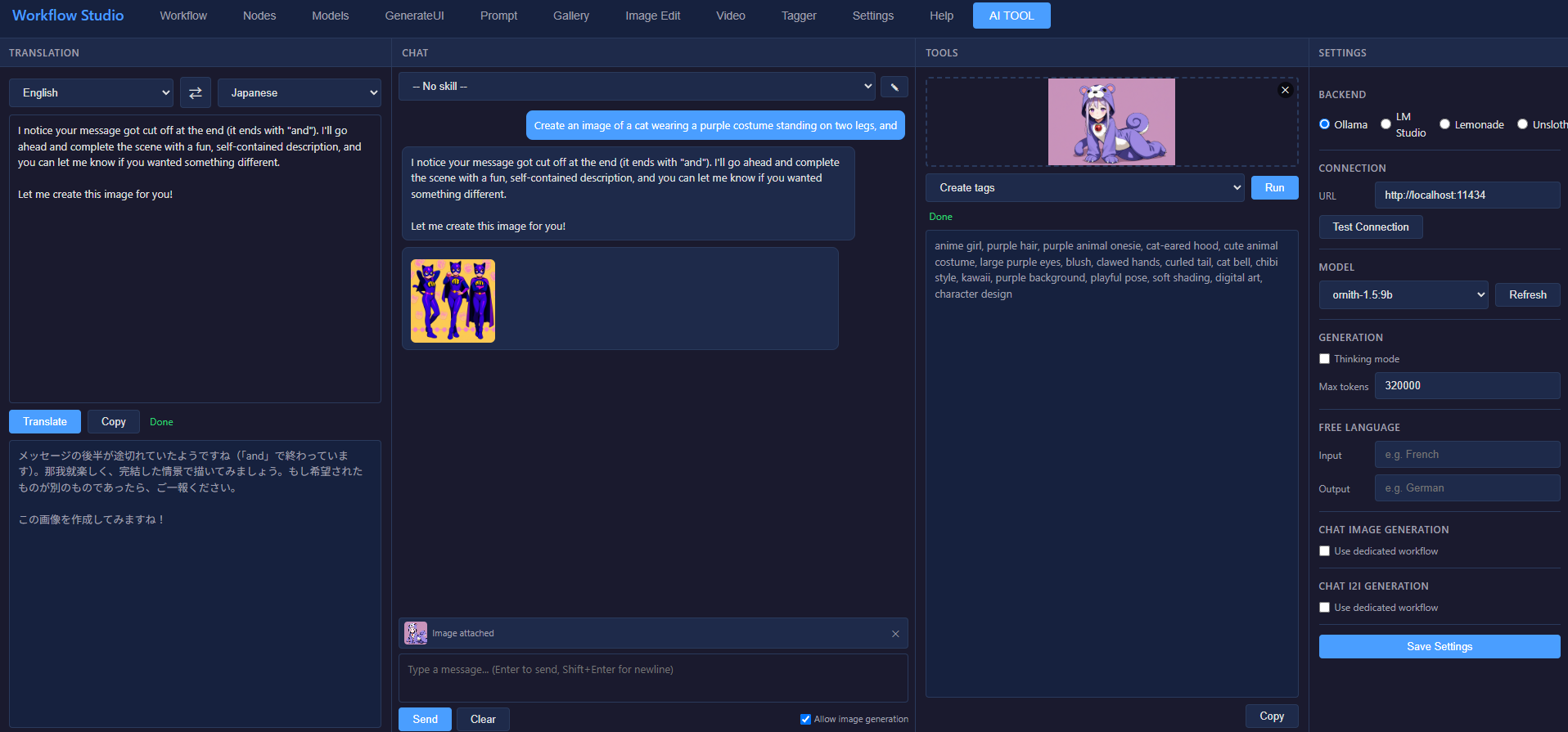 |
|
| Video Tab - Edit | Video Tab - Asset |
| :----------------------------------: | :-----------------------------------: |
| 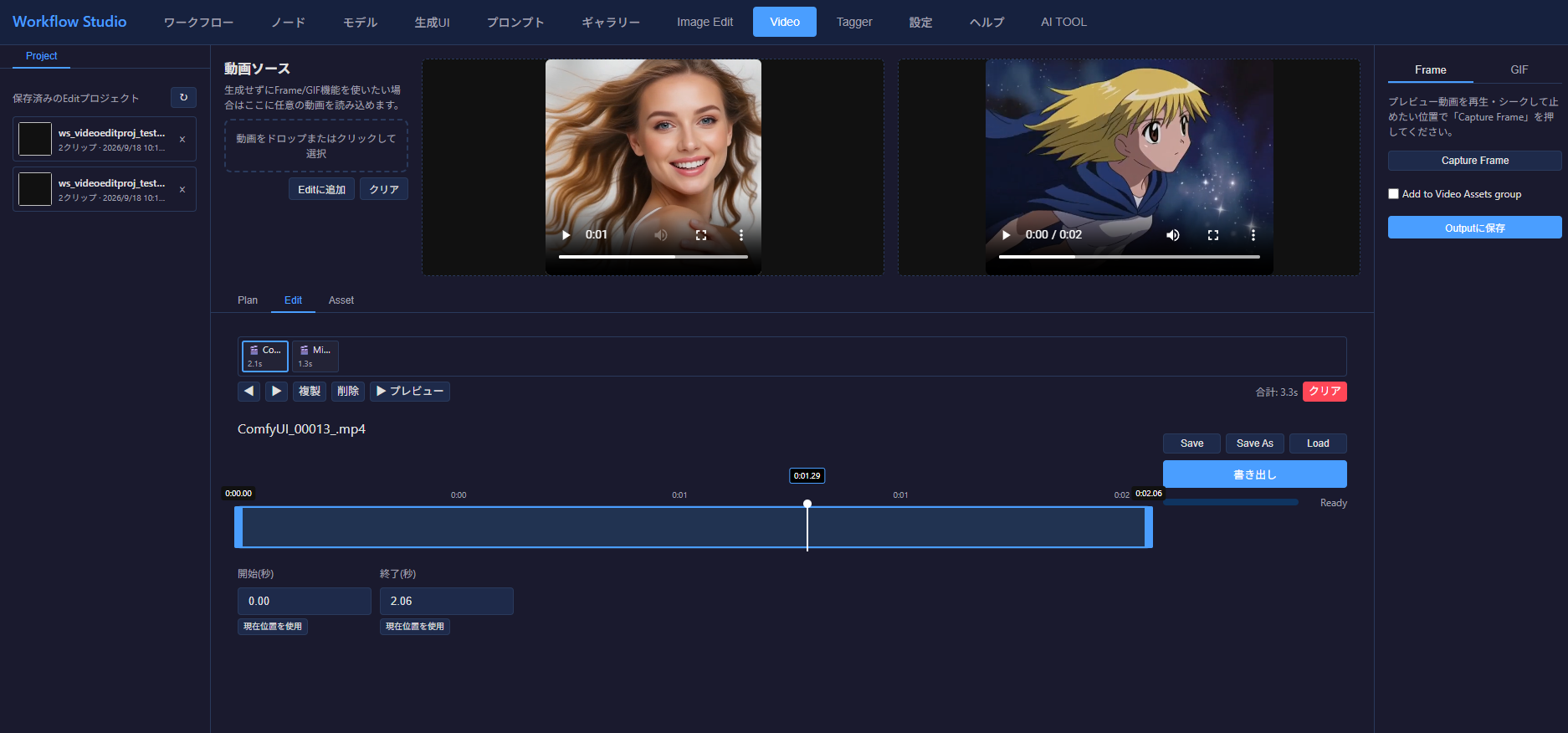 |
| 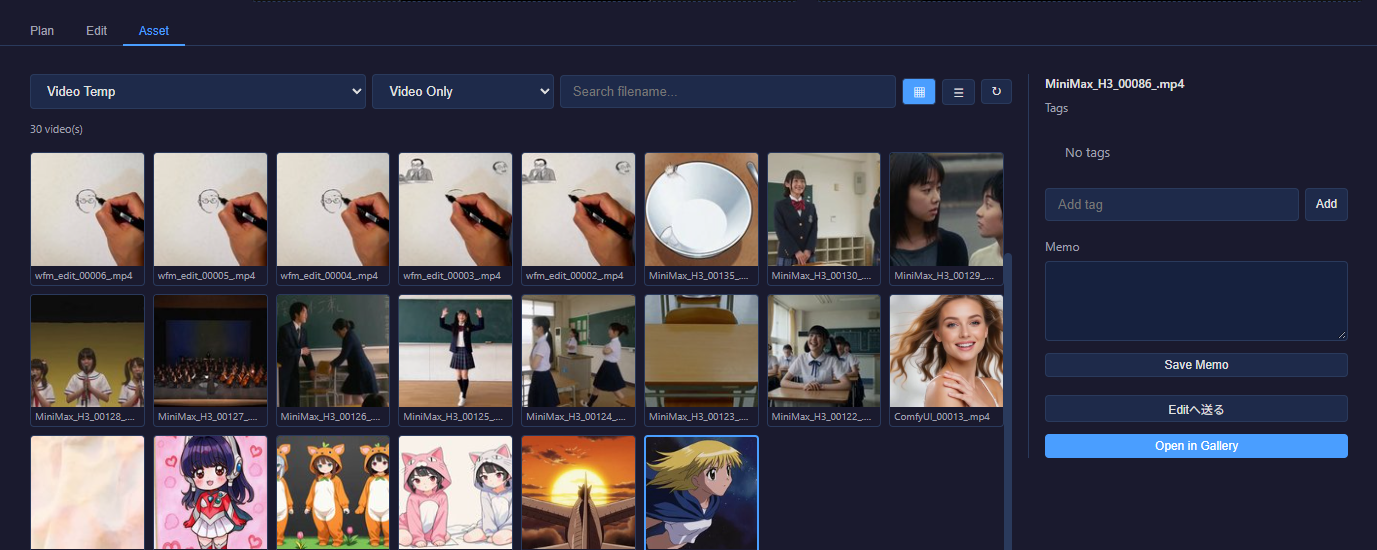 |
|
| Lab Tab | Lab Index Image |
| :--------------------------------: | :------------------------------------------: |
|  |
|  |
|
| Gallery Tab - Semantic Search ("sunset city street") |
| :-----------------------------------------------------------------: |
|  |
|
Features
<details> <summary><h3>Workflow Tab</h3></summary>- Thumbnail / Table views — switch between view modes to browse your workflow library
- Thumbnail side panel — preview workflow canvas snapshots in the side panel
- Badge filtering — filter by user-defined badges (free labels you assign to each workflow)
- Search — full-text search across workflow names and metadata
- Side panel tabs — Thumbnail preview, JSON viewer with syntax highlighting, and Group management
- Badge management — add, rename, delete badges with custom colors shared with the Models tab (⚙ Badge button)
- AI summary — generate workflow descriptions using Ollama
- Import / Export — import workflows from files or clipboard; Send to Canvas button sends the selected workflow directly to the ComfyUI canvas (UI and API formats both supported)
- Side panel toolbar buttons (v0.5.0) — selecting a card shows three buttons in the top toolbar: Load in GenerateUI, Load in Video (loads a MiniMax H3 Image-to-Video, LTX-2.5 (Text/Image/First&Last-Frame to Video), or Wan2.2 (Text to Video) workflow into the Video tab (LTX-2.5/Wan2.2 support: v0.5.4); shows an error toast for workflows that don't contain a supported node), and Send to Canvas; the detail modal's duplicate copies of these three buttons were removed in favor of this single toolbar location
- Default view setting — persist your preferred view mode (Thumbnail / Table)
- Search clear (✕) — inline ✕ button appears inside the search box whenever text is entered; click to clear immediately
- Clear all filters (✕ Clear) — rightmost toolbar button; resets search text, group filter, and badge filter (ALL) in one click
- Sort (v0.7.2) — Date (Newest/Oldest) / Name (A-Z/Z-A) dropdown next to the group filter, persisted via localStorage — same pattern as the Gallery tab's sort control
- GenerateUI Check (v0.7.13) — tells whether a workflow will run in GenerateUI before you load it. The side panel shows the format badge (UI / API / App) and two ✅ / ⚠ / ❌ result badges below the workflow name, checked automatically on selection; the detail modal shows the format badge, a GenerateUI Check button and the same badges below the title. Hover a badge for the reasons. Conversion runs the same UI→API conversion as GenerateUI: ❌ for unsupported formats, conversion errors or node types not installed in this ComfyUI (the prompt would be rejected), ⚠ for values not available here (models, LoRAs, images…) — UI-format workflows get them silently replaced with the first choice, API-format workflows are sent as-is and rejected by ComfyUI's validation. Operability is the share of nodes with settings that GenerateUI's fields expose (✅ 80%+ / ⚠ 50%+ / ❌ below), listing the nodes you'd still have to change in the node graph. Results aren't saved; a check takes about 20 ms once ComfyUI's node list (
/object_info) is cached (the first one after opening the page waits about 10 s for it; the detail modal prefetches it). The Decision Model was evaluated for the operability rating but couldn't tell good and bad workflows apart, so it is rule-based
- One-click capture — click the camera button in ComfyUI's top bar to snapshot the current workflow canvas
- Auto-save as thumbnail — the snapshot is saved directly to the workflow data folder as a PNG thumbnail
- Embedded workflow metadata — workflow JSON is embedded in the PNG (tEXt chunk), compatible with ComfyUI's drag-and-drop import
- Auto-import — the captured workflow is automatically imported and appears in the Workflow tab
- 6-tab layout — Input / Model / Settings / Feeder / Batch / Lab tabs; Input, Model, and Settings each include a Raw JSON column on the right for instant preview and direct editing
- Save button — located at the right end of the subtab row; opens a filename dialog (default: current workflow name) and saves the current workflow as a
.jsonfile to the Workflow tab via the import API; hidden while the Batch or Lab subtab is active (v0.4.6), since those work on workflow copies / their own Plan files rather than the currently loaded workflow- Default-workflow snapshot fix (v0.4.8) — overwriting the loaded workflow under a filename that's currently set as the auto-load Default workflow (Settings tab, see below) now also refreshes that cached snapshot; previously only the file on disk was updated, so the old (pre-edit) version — including any checkpoint no longer installed — kept reappearing after every page reload until the default was re-set by hand
- Input tab — Prompt and Image inner tabs (drag-and-drop upload); Prompt tab shows Positive Prompt and Negative Prompt textareas, plus an Embeddings selector at the bottom (Filter + Select + Weight input + Paste button); Paste inserts
(embedding:Name:weight)at the cursor position of the last focused textarea (defaults to Positive when neither is focused); Raw JSON (540px) in the right column- Revert button (v0.3.70) — a ↺ button next to each Apply button reverts the textarea to the node's currently applied value (the reverse of Apply)
- Emphasis weight editing (v0.3.70) — select text (or just place the cursor on a word/parenthesis block) and press Ctrl+↑/↓ to adjust
(text:weight)by ±0.05, A1111/native-ComfyUI style; parentheses are removed automatically when the weight returns to 1.0 - Mask slot for inpainting (v0.3.71) — LoadImage slots whose MASK output feeds an inpaint node (e.g.
VAEEncodeForInpaint) show an additional Mask drop zone; when a mask is set, image + mask are composited into a single RGBA upload (mask baked into the alpha channel) matching ComfyUI's native alpha→MASK extraction — no extra nodes required - Placeholder Image + Clear (v0.3.97) — each LoadImage card gets a Clear button (resets that card's pending selection/preview back to empty; doesn't touch the workflow node itself) and a Placeholder button; a collapsible Placeholder Image section (collapsed by default) at the top of the Image sub-panel configures one shared default — Color mode (set Width/Height/Color, generates a solid-color PNG on the fly) or Image mode (drop one default image, reused as-is) — remembered across sessions; clicking a card's own Placeholder button immediately replaces just that card's image with the configured default, so multiple LoadImage cards can each be replaced individually with one click
- Model tab — Checkpoint, VAE, Diffusion Model (UNETLoader / UnetLoaderGGUF / LoaderGGUF), and Text Encoder (CLIPLoader / DualCLIPLoader / ClipLoaderGGUF / DualClipLoaderGGUF — single clip: type + device; dual clip: two clip selectors + type + device) are always shown; ControlNet and Hypernetwork (with Strength field) are collapsed by default (v0.3.98) since they're used less often — click their header to expand; LoRA (Single/Stack tabs) has its own column; all selectors have a filter; Raw JSON on the right
- Highlight color (v0.3.98) — the label of each model type above, plus the LoRA column header, turns a distinct color (default bright green, customizable in the Settings tab) when the loaded workflow actually contains that type of node; stays visible even while ControlNet/Hypernetwork are collapsed, so relevance is visible without expanding
- LoRA Stack Group toggle (v0.3.92) — for
Lora Loader (LoraManager)nodes, a Use Stack Group checkbox next to the Single/Stack tabs switches what the Stack tab shows and edits: OFF (the default whenever a workflow is loaded) displays and edits the LoRAs actually configured in the workflow's own Lora Manager node — correctly showing every LoRA it holds, not just the first one; ON switches to the LoRA group registered in the Models tab instead; toggling either direction clears the node's LoRA list first, then loads it from the newly selected source, and switching back to OFF restores exactly the list that was present when the workflow was loaded - Native Load LoRA nodes (v0.8.4) — ComfyUI v0.40's
Load LoRA (Model)/Load LoRA (Text Encoder)pair (each node holds up to 20 rows of LoRA / strength / enabled) is detected and edited like the other LoRA nodes: Single / Stack Apply, the Models tab "Apply", the LoRA batch, Lab and the Bypass button write both nodes together (the Model node takes Str M, the Text Encoder node takes Str C); Stack Apply writes the whole Stack group as rows, and the Metadata tab / side-panel I tab list their LoRAs. API-format workflows only for now — ComfyUI frontend 1.55.17 cannot add rows to these nodes in its own graph editor, so UI-format workflows carry nowidgets_valuesfor them yet - LoRA Bypass button (v0.4.4) — a ⛔ toggle next to the Refresh Stack group button in the LoRA column header; forces the target LoRA node's strength to 0 (
strength_model/strength_clipfor a standard LoraLoader, or every entry'sstrength/clipStrengthfor a Lora Manager node — its LoRA list stays intact, not replaced) without touching the actual ComfyUI node's mode; click again to restore the exact values that were there before toggling; targets whichever node Single/Stack Apply default to (the workflow's Lora Manager node if it has one, else the first LoRA node); clicking a Single or Stack Apply button clears the bypass state so it can't silently reassert itself later
- Settings tab — KSampler and Latent Image side by side at 50% width each; Raw JSON on the right
- Always-visible Raw JSON — edit the API-format JSON directly from any tab with syntax highlighting; Apply button reloads the workflow; built-in search bar (always shown) finds all matches as you type with count display (
3/12); navigate with ↑/↓ buttons or Enter / Shift+Enter; Escape or ✕ clears; current match highlighted in orange, other matches in yellow - Bypass/Mute node handling (v0.3.75) — loading a UI-format workflow with Bypass-mode nodes now reroutes their wires to the upstream source (matching same-type input/output slots, recursively through chained bypasses) instead of leaving a dangling reference that failed validation; Mute-mode nodes are excluded without rerouting, same as ComfyUI itself; when either is present, a note listing the affected nodes appears above the Raw JSON search bar in the Input/Model/Settings tabs
- One-click generation — queue prompts to ComfyUI without leaving the studio
- Seed control — randomize, lock, or manually set seeds; seed input and mode selector stacked vertically for readability
- Workflow seed mode (v0.8.3) — the mode selector's new Workflow option generates with the loaded workflow's own seed as-is (no override), e.g. to reproduce a Gallery image with its original seed; falls back to the Seed field only if the workflow has no literal seed input. Seed overrides no longer leak back into the loaded workflow (generation now works on a deep copy), so Workflow mode still sees the original seed after Random runs
- Style selector — checkbox and dropdown next to the Reset Workflow button; enable to apply a Fooocus-style JSON to positive and negative prompts at generation time; style files (
*.json) are loaded fromuser/default/Workflow-Studio/style/; the style's{prompt}placeholder is replaced with the original prompt text, or the style is appended if no placeholder exists;negative_promptis appended to the existing negative prompt; styles are applied to a per-generation copy and do not modify the loaded workflow- Wildcards inside a Style now expand (v0.4.7) — an A1111-style
__wildcard__reference written into a Style's Positive/Negative prompt is expanded at generation time just like one typed directly into GenerateUI; the Style text is merged into the prompt before wildcard expansion runs (previously the order was reversed, so a Style's own wildcard references were sent to ComfyUI unexpanded)
- Wildcards inside a Style now expand (v0.4.7) — an A1111-style
- Create Catalog / Catalog buttons (v0.3.95) — next to the Style dropdown. Create Catalog generates one preview image per Style checked in the Batch tab's Style sub-tab (using the currently loaded workflow, typically T2I), then saves each result into a chosen
ws_style_catalogsubfolder named after the Style (existing files with the same name are overwritten); a modal lets you create a new destination folder or pick an existing one — separate folders are useful for grouping catalogs by checkpoint or by purpose. Catalog jumps straight to the Gallery tab's Style_Catalog sub-tab to browse the results (see below)- Don't keep a copy in the Output folder (v0.3.96) — checkbox in the Create Catalog modal; each generation still writes a normal file to the Output folder first (the workflow's own Save Image node always does that), but once its copy has been saved into the catalog folder, checking this deletes that Output-folder original right away — keeps a large catalog run (e.g. every Style at once) from flooding the Output folder with near-duplicate files; if a style's catalog copy fails to save, its Output file is left alone rather than deleted
- Batch type selector — check one of the column header checkboxes in the Batch Queue pane (Checkpoint / Lora / Prompt / Workflow / Sampler / Scheduler / Style) to activate that batch type; only one type can be active at a time; the Batch panel below Generate shows the active type, progress, and Pause/Resume/Stop controls
- Batch tab (v0.3.18) — dedicated 3-pane layout for assembling the batch queue:
- Left pane — 4 tabs: Checkpoints (file-tree; Filter / All / None), Sampler (KSampler sampler list), Scheduler (KSampler scheduler list), Style (flat list of all styles from
Workflow-Studio/style/; All / None buttons) - Center pane — group-based selection with inner tabs (Checkpoint | Lora | Prompt | Workflow); Checkpoint/Lora groups come from the Models tab, Prompt groups from the Prompt tab, Workflow groups from the Workflow tab — check a group to add all its members, expand ▶ to select individually
- Right pane (Batch Queue) — 7 columns: Checkpoint / Lora / Prompt / Workflow / Sampler / Scheduler / Style; each column header has an enable checkbox (radio behavior: only one at a time); count shown per column; Style batch applies each selected style sequentially to a workflow copy
- Lora batch prompt sync (v0.3.69) — for each selected LoRA, its syntax (
<lora:name:strength_model:strength_clip>) and CivitAI trained words are automatically appended to the Positive prompt (rebuilt from the original prompt each time, not accumulated), then restored to the pre-batch state when the batch completes or is stopped; if a selected LoRA is not yet recognized by ComfyUI's model list, a warning toast suggests a Refresh or restart
- Left pane — 4 tabs: Checkpoints (file-tree; Filter / All / None), Sampler (KSampler sampler list), Scheduler (KSampler scheduler list), Style (flat list of all styles from
- UI-to-API conversion — automatic conversion supporting subgraphs (nested workflows), COMBO types, and display-only node exclusion; improved analysis covers SDXL multi-hop CONDITIONING chains, CLIPTextEncodeSDXL, SDXLPromptStyler, KSamplerAdvanced, and Guider-based "Advanced Sampling" workflows (
SamplerCustomAdvanced/SamplerCustom+CFGGuider/DualCFGGuider/BasicGuider+RandomNoise+KSamplerSelect+*Scheduler— Flux.2 Klein, LongCat, Boogu, HiDream E1, etc.)- MultiType widget-value bug fix (v0.5.4) — a node input declaring a comma-joined MultiType (e.g. LTX-2.5's
LTXVEmptyLatentAudio.frame_rate: "FLOAT,INT") was silently dropped from the widget list instead of being recognized as a scalar widget, which shifted every subsequent widget's value onto the wrong input (surfaced asLTXVEmptyLatentAudio.batch_sizereceivingframe_rate's value and video generation failing with "Expected size 1 but got size 25")
- MultiType widget-value bug fix (v0.5.4) — a node input declaring a comma-joined MultiType (e.g. LTX-2.5's
- Video workflow support (v0.5.2) — loading a MiniMax H3 (or other all-in-one video-generation) workflow now works from GenerateUI too, not just the dedicated Video tab: the Input tab's Prompt field picks up its
promptwidget, the Image tab picks up its LoadImage-basedfirst_framethe same way any other I2I workflow does, and generation runs with a longer timeout since video generation takes much longer than a still image; the result preview shows the generated mp4 inline (<video>) instead of trying to render it as an image- LTX-2.5 / Wan2.2 support (v0.5.4) — these follow ComfyUI's regular node-graph pattern rather than an all-in-one node, so they needed their own detection: Positive/Negative Prompt now traces through LTX-2.5's
LTXVDualCFGGuider/LTXVConditioningnodes to the actual prompt text, and the Settings tab's Latent Image section recognizes Wan2.2'sEmptyHunyuanLatentVideoand LTX-2.5'sEmptyLTXVLatentVideo(width/height/batch size, plus an added Length (frames) field) instead of showing "No EmptyLatentImage node found"; the extended generation timeout now also triggers off aSaveVideo/CreateVideonode anywhere in the graph, not just an all-in-one node
- LTX-2.5 / Wan2.2 support (v0.5.4) — these follow ComfyUI's regular node-graph pattern rather than an all-in-one node, so they needed their own detection: Positive/Negative Prompt now traces through LTX-2.5's
- Eagle integration — auto-save generated images to Eagle with metadata
- Qwen Image 2.1 support (v0.7.3) —
TextEncodeQwenImage21(the unified T2I/Edit encoder used by Comfy-Org's Qwen-Image-2.1 workflow templates) is now recognized: itsprompt/negative_promptwidgets populate the Input tab's Positive/Negative Prompt textareas and are editable like any other prompt node; itsresolution(a pixel-budget int, not width/height) is exposed for Raw JSON editing. No extra work was needed for the model's up to 10 reference images (image_1…image_10, used for image editing) — each one arrives as an ordinary LoadImage node, so it already gets its own card in the Input tab's Image sub-panel via the existing generic LoadImage detection - Ming Image support (v0.7.5) —
TextEncodeMingImageEdit(singlepromptwidget, up to 8 optionalimages.image_Nreference inputs; role taken from the sampler/guider wiring, so the empty-prompt negative instance in layer-decomposition workflows shows as Negative) andEmptyQwenImageLayeredLatentImage(Latent panel;layerskept as-is) are recognized in GenerateUI, and Gallery/Metadata/sidepanel I tab now show their prompts as Positive. The Sampler field is disabled (N/A) when the SAMPLER input comes from a node withoutsampler_name(e.g.SamplerLCM). Fix: top-level nodes whose widgets are converted to wired inputs (e.g.EmptyLatentImagewidth/height fed byGetImageSize) keep those values inwidgets_values; they were not stripped outside subgraphs, shifting later values (batch_sizebecame1024, KSamplersteps/cfgmisread). Also:BasicGuider'sconditioningis treated as positive, and a linked text input wins over the stale widget text in UI-format metadata
Two independent modes selectable via [Image Loop] / [Gallery] toggle buttons at the top of the left pane (persisted in localStorage).
Image Loop mode — requires the comfyui-image-feeder custom node.
- ImageFeeder node control — select the target node from a dropdown auto-populated from the loaded workflow; edit all node parameters (Directory, Sort Mode, Index, Start/End Index, Batch Size, Seed, Use Selection) and Apply to the workflow
- Image library — 3-pane layout: folder tree (left) browsing
user/default/image-loop-data/, image grid with checkbox selection (center), preview panel with resolution and file size (right) - Selection management — check individual images; All / None buttons for the current folder; selected files are reflected in
selected_fileson Apply - Presets — save the current directory + selection as a named preset; load or delete presets (server-side persistence via
image-feeder-presets.json) - Continuous Run loop — Run / Stop buttons below the presets; After gen mode controls index behavior after each generation:
- Loop — advance index and wrap back to 0 when all images are exhausted (runs indefinitely)
- Increment — advance index and auto-stop when all images are consumed
- Fixed — always use the same index
- Index sync — after each generation the node returns
next_indexvia WebSocket (image_loop_node_sync); the Index field updates automatically - Seed — Run loop uses the right-pane seed setting (Random / Fixed / Increment / Decrement); the node's own Seed field only affects random sort order
Gallery mode (v0.3.42) — no external plugin required; uses the built-in WFS_GalleryFeeder custom node.
- WFS_GalleryFeeder node — reads images directly from a Gallery group and outputs them one at a time; inputs:
group_name,index,sort_mode(filename_asc / filename_desc / random),seed - Node & group selector — pick the WFS_GalleryFeeder node from the loaded workflow and choose which Gallery group to feed images from;
__Feeder__group is auto-created on first open - Image grid — center pane shows all images in the selected group; click any image to update the Index to that position
- After Gen modes — Loop (wrap at end and continue indefinitely), Increment (stop automatically when last image is reached), Fixed (always use the same index)
- Run / Stop controls — left pane Run / Stop buttons manage the generation loop; After Gen combo (loop / increment / fixed), ▶ Run, and ■ Stop widgets are also available directly on the WFS_GalleryFeeder node in the ComfyUI canvas (
gallery_feeder_extension.js)
An experimental batch generator: runs the workflow currently loaded in GenerateUI N times, letting Model (Checkpoint/LoRA Single/VAE) / Prompt / KSampler each change independently starting at a chosen iteration — unlike the Batch tab's single-axis queue, every column keeps its own list of change points. Never mutates the loaded workflow; every iteration runs on a fresh clone. Works with both I2I and T2I workflows (v0.3.90).
- Setting / Results / Plan JSON sub-panels — Setting: image drop zone + 3 keyframe columns + run controls; Results: source image and up to 9 generated thumbnails (click to enlarge); Plan JSON: the current plan as raw editable JSON (v0.3.88)
- Per-column keyframes — Checkpoint, LoRA, VAE, Prompt, and KSampler each hold their own fully independent list of
{iteration, value}keyframes; +/− per column adds/removes the last keyframe (iteration #1 is fixed and can't be removed); any keyframe other than #1 can also be deleted individually from inside its own edit modal (v0.3.93), not just the last one; click a cell to edit its value, the iteration it starts applying from, and a "revert to #1's setting" checkbox; the effective value at iteration N is the latest keyframe with iteration ≤ N, carried forward until the next one changes it; lowering the Batch count below an existing keyframe's iteration doesn't delete or renumber it — a warning toast appears and it just stays dormant until Batch count is raised again (v0.3.93) - Model column — Checkpoint / LoRA Single / VAE (v0.4.2, redesigned v0.4.3) — Checkpoint and VAE (and now LoRA) share one visual "Model" column; a
[C][L][V]toggle in its header picks which of the three independent keyframe lists the shared cell list, its own +/-, and its edit modal currently operate on — each behaves exactly like its own column (same as Prompt/KSampler), just sharing the Model column's screen space, so adding, removing, editing, reverting, or bypassing a keyframe while viewing one never touches the other two. Each toggle button lights up the same highlight color as GenerateUI's Model tab (configurable in Settings) when the loaded workflow actually contains that node type. A field left blank in a later keyframe's edit modal shows "(inherits: ...)" instead of "(workflow default)" when an earlier keyframe in that same list already set something. LoRA support is Single only (no Stack, matching the experimental scope of this tab); if a LoRA is set but the loaded workflow has no LoRA node at all, Run warns once and skips it rather than auto-inserting one — unlike VAE (which does auto-inject a VAELoader when missing), wiring in a LoraLoader would require rewiring the Checkpoint's model/clip outputs through it - Empty state when no matching node exists (v0.4.5) — Checkpoint/LoRA/VAE each show "No matching node in this workflow" instead of a keyframe list when the loaded workflow has no node that column could actually override, and the column's +/− is disabled too, so no dead "(workflow default)" keyframe row can be created in the first place; VAE still counts as usable whenever a Checkpoint node exists, since its baked-in VAE can still be overridden via auto-injected VAELoader as above
- Wildcards (v0.3.93) — Prompt keyframes' Positive/Negative text supports the same A1111-style
__name__syntax as the main GenerateUI prompt fields; each keyframe is expanded fresh right before that iteration runs, so reusing the same keyframe across iterations can still draw a different random line each time - Prompt cell extras (v0.3.88, refined in v0.3.89, v0.3.93, and v0.3.97) — Get from GenerateUI fills Positive/Negative from the workflow currently loaded in GenerateUI; Get from Image extracts a prompt from the image currently loaded in Lab's own Image drop zone (same detection as the Metadata tab; no separate file picker); Get from Previous (v0.3.97) copies both Positive and Negative wholesale from the keyframe immediately before this one in the same column (e.g. editing #3 copies #2's prompt; not shown on keyframe #1, which has no earlier row); Clear (v0.3.97) empties both fields; Style row — an Apply button merges whichever style is currently selected in GenerateUI's own top-bar Style dropdown into the Positive/Negative text below, comma-separated after any existing text (never clears it) and works regardless of that top-bar's own Style enable checkbox; a checkbox next to it tracks on/off and shows the applied style's name beside itself (not on the button) — unchecking only clears that name label, the already-merged text stays and is yours to edit/delete by hand
- Keyframe #1 live-reflect (v0.3.97) — in every column, keyframe #1 shows the currently loaded workflow's own live setting instead of a blank placeholder — for the Model column this covers Checkpoint and VAE only, LoRA is never live-reflected since there's no reliable way to infer "the" active LoRA back out of a workflow node — both in its grid cell (dashed border) and pre-filled into its edit modal, for as long as it hasn't been explicitly saved with an override; saving it — even unchanged — locks that value in as a real override and the dashed/live styling goes away; switching to the Lab subtab always refreshes this against whatever is currently loaded in GenerateUI
- Bypass checkbox (v0.3.97) — available on every keyframe including #1; skips that row entirely when picking which setting applies at a given iteration, as if it didn't exist, so whatever was active before it keeps running instead; Lab-internal only, never touches the actual ComfyUI node's mode; disables that row's value fields and its Revert checkbox while checked (mutually exclusive with Revert); the cell shows an amber "⏭ Bypassed" label, taking priority over both the Revert and live-reflect display
- LoRA node bypass & prompt injection (v0.4.4) — inside the LoRA keyframe's own edit modal, two checkboxes independent of the row-level Bypass above: Bypass LoRA node forces that keyframe's
strength_model/strength_clipto 0 at apply-time — the behavioral equivalent of ComfyUI's node Bypass (mode:4), since the workflow used here is already API-format with nomodeconcept; Apply LoRA syntax + trigger words to Positive prompt appends<lora:name:strengthModel:strengthClip>plus that LoRA's cached CivitAI trigger words to the Positive prompt, comma-separated, at apply-time — the same format GenerateUI's own Model tab Apply button writes. Switching keyframes (a different LoRA, this checkbox turned off, or the row Bypassed) always strips exactly what the previous iteration injected before adding anything new, so a batch never accumulates every LoRA it has used; the prompt checkbox is disabled automatically while Bypass LoRA node is checked - T2I workflow support (v0.3.90) — a T2I workflow (no source image) checkbox in the Image pane skips the source-image requirement and never touches a LoadImage node, so workflows with no image input (e.g. plain
EmptyLatentImagetxt2img) can also use the Model/Prompt/KSampler keyframes; the Image drop zone and "Use generated image for next" are greyed out (not cleared) while it's on; saved with the plan ast2i_mode - Use generated image for next — optional checkbox that chains iterations: from iteration 2 onward the previous iteration's first output image is fed back in as the I2I source instead of the original dropped image, using ComfyUI's
"name [type]"annotated-filename reference (no re-upload needed); disabled together with the Image drop zone in T2I mode - Workflow recall (v0.3.90) — every saved plan records the filename of the workflow that was loaded in GenerateUI at save time (
workflow_filenamein the Plan JSON); after loading a plan, an Open Workflow button appears next to it — click to load that exact workflow file back into GenerateUI (asks for confirmation first, since it replaces whatever is currently loaded) - Plan files — Plan Save (silently overwrites the loaded plan) / Save As (always asks for a new name) / Plan Clear; plans are stored as
ws_labplan_<name>.jsoninuser/default/Workflow-Studio/lab_plan/(thews_labplan_prefix is added automatically, v0.3.90 — type just the plain name when prompted), alongside an auto-generatedws_labplan_<name>.pngindex image (a 3-per-row contact sheet of up to 9 result thumbnails) - Plan Load — same drag-and-drop / click-to-browse drop zone as the Image slot; drop a plan's
.json(read directly in the browser) or any of its index-image.pngs — since v0.3.91 every index image carries the full plan embedded in it directly (see below), so it's read straight from the file with no server round-trip; older index images without that embedding fall back to fetching a same-named.jsonfrom the server - Plan JSON tab (v0.3.88) — view/edit the current plan as raw JSON (same shape saved to disk); Refresh re-reads it from the Setting tab, Apply to Setting parses your edits and writes them back into the Setting tab's columns/note/batch/chain-image/source-image/results — the same effect as loading that JSON as a plan file, without saving it first
- Save index image to Output on Run (v0.3.90, on by default since v0.3.93) — checkbox in the run controls; when checked, every completed Run also builds the same contact-sheet index image used for Plan files and saves it directly into ComfyUI's own Output folder as
Lab_index_<counter>_.png(auto-numbered like a normal generated image, right alongside the images that Run just generated); independent of Plan Save, which always writes its own copy next to the plan file regardless of this checkbox; saved with the plan assave_index_on_run - Index images are self-contained plan files (v0.3.91) — every index-image PNG, whether from Plan Save/Save As or from Save index image to Output on Run, carries the entire plan embedded directly in the file as a PNG
wfm_lab_planchunk; this is what lets the Output-folder copy above work as a Plan Load source even though it has no matching.jsonanywhere - Eagle integration — every image Lab generates is auto-saved to Eagle the same way as GenerateUI's own Generate button, if enabled in the Settings tab; the Output-folder index image above is included too (v0.3.90) once saved
- Select vs. edit, and keyframe reordering (v0.4.8) — a single click on a keyframe cell now only selects it (blue outline); double-click to open its edit modal as before. Each column's header (Model / Prompt / KSampler) also gets ▲ / ▼ buttons that swap the selected keyframe with its immediate neighbor, reordering keyframes without retyping them; keyframe #1 (the live-reflecting baseline) can never move, and nothing can be swapped into its slot
- PG — apply a Prompt tab preset group (v0.4.8) — a PG button on the Prompt column header opens a picker for the Prompt tab's Table-view preset groups (the same groups the Batch tab's checklist uses); choosing one replaces the entire Prompt column with one keyframe per preset in that group's order, starting at #1 (#1 is overwritten, not appended after). If the group has more presets than the current Batch count, Batch count is raised automatically to fit (capped at 50, the Batch input's own limit); anything still beyond that shows the existing "keyframes beyond Batch count" warning instead of being dropped
- Video workflow support (v0.5.2) — loading a MiniMax H3 (or other all-in-one video-generation) workflow into GenerateUI and running Lab now works end to end: the Prompt column writes to its
promptwidget, the KSampler column auto-hides (same "no matching node" treatment as Model sub-columns) since the sampler wired internally is a fixed part of the model's own preset rather than something meant to be tuned per keyframe, the Results grid plays mp4 results inline, and the contact-sheet index image draws each video result's last frame instead of failing silently onto a black square - Use generated image for next, now video-aware (v0.5.2) — when a Run's output is a video, the "Use generated image for next" chain extracts its last frame client-side (canvas) and uploads it as the next iteration's source image, instead of trying to feed the raw mp4 into a LoadImage node
- 3-column layout — AI Assistant (left), Presets/Preset Manager tab-panel (center), Wildcard/Style support (right)
- AI chat assistant — generate and refine prompts interactively using Ollama, LM Studio, Lemonade, or Unsloth (multi-backend: v0.5.4)
- ⚙ Settings modal (v0.5.4) — replaces the old central Settings-tab panel; opens a dedicated modal (Backend / Connection / Model / Generation / Unload / Save) scoped to this tab only, saved under its own
localStoragekey so it stays independent of the Tagger tab's VLM settings; Thinking mode and Max tokens apply to every chat request, and an Unload button frees the selected model from Ollama/LM Studio/Lemonade (Unsloth has no such API and is shown as unsupported)
- ⚙ Settings modal (v0.5.4) — replaces the old central Settings-tab panel; opens a dedicated modal (Backend / Connection / Model / Generation / Unload / Save) scoped to this tab only, saved under its own
- Image attachment — attach reference images for vision-capable models
- Translation — JA/EN/ZH translation buttons for multilingual prompt creation
- Prompt presets — save/load reusable prompt templates (positive & negative) with category support
- Preset Manager — browse all presets, favorites, and group-based filtering with search
- Group management — create groups, assign/remove presets, delete groups from the Presets panel
- Clipboard copy — copy positive/negative prompts individually (PP Copy / NP Copy)
- GenUI Set — apply preset prompts directly to the GenerateUI interface
- Wildcard/Style tab bar (v0.3.96) — the right pane switches between the wildcard tools below and a Style manager (same pane, two modes)
- Wildcard input toolbar — one-click buttons to insert
{|},{n$|},__|__,<lora::1:LBW=;>and other wildcard syntax; wraps selected text when applicable - Wildcard file manager — create, view, and edit
.txt/.yamlwildcard files stored inuser/default/Workflow-Studio/wildcard/; click a filename in the file picker to insert__filename__at cursor - Style manager (v0.3.96) — create, edit, and delete registered Styles (the same ones used by GenerateUI's Style dropdown, the Batch tab, and the Style Catalog), using the same list→editor CRUD pattern as the Wildcard file manager above; each entry has a Name, a Positive prompt (supports the
{prompt}placeholder, or appends if omitted), and an optional Negative prompt- Source-file badge & in-place editing — each list entry shows its defining file as a small badge next to its name (e.g.
sdxl_styles_diva.json); renaming a style keeps its position in that same file rather than moving it; a name must be unique across all styles - New styles go to a dedicated file — created via + New, a style is appended to its own
custom.jsoninside the style folder, so the bundled style packs are never modified directly - + Add to this file — while editing an existing style, this button clears the form for a brand-new entry that gets appended to that same file instead of the default
custom.json— the way to add a style into one of the bundled packs - Saving, renaming, or deleting a style immediately refreshes GenerateUI's Style dropdown, the Batch tab's checklist, and the Style Catalog's name list — no reload needed
- Source-file badge & in-place editing — each list entry shows its defining file as a small badge next to its name (e.g.
- Form / Table toggle (v0.4.6) — two top-level tabs at the top of Prompt Tab: Form is the one-item-at-a-time editor described above; Table shows the same Presets / Wildcards / Style data all at once as editable spreadsheets, useful once there are more than a handful of items to manage
- Table view — Presets / Presets Group / Wildcards / Style (v0.4.6) — four sub-tabs, each an editable table built from the exact same data as the Form tab above (changes on either side stay in sync)
- Row selection & bulk delete — every table shares a left-most auto-numbered # column; click a number to select that row (multiple at once), then use the toolbar's Delete button to remove every selected row in one confirm, or Deselect to clear the selection — replacing per-row delete buttons, which were too easy to misclick
- Double-click to edit in a modal — double-clicking a row's number opens a larger prompt-editing modal instead of the small in-table textarea; Presets/Style show Positive/Negative toggle buttons above one shared textarea (switching preserves unsaved text on the other side), Wildcards shows just the file content; Save writes back and closes the modal, Close discards changes
- Wildcard syntax toolbar in the Presets modal (v0.4.7) — the same
{|}/__|__/<lora>/ file-picker toolbar as the Form tab's Wildcard composer appears above the Presets modal's textarea, since that's where a wildcard reference typically ends up; not shown in the Wildcards or Style modals (the Wildcard modal edits the raw file content itself, and Style prompts have no such wildcard-composer connection)
- Wildcard syntax toolbar in the Presets modal (v0.4.7) — the same
- + New row — the toolbar's + New ... button adds a blank editable row with small ✓ (Add) / ✕ (Cancel) icons in place of its number
- Presets table — ★ (favorite) and B (Batch group) columns work as toggle switches, same as the Form tab's Preset Manager; the toolbar's BC button clears the whole Batch group at once; PP Copy / NP Copy copy the single selected row's positive/negative prompt to the clipboard; a group select + Add to Group control bulk-adds every selected preset to a chosen group in one click — searching/selecting from the table itself (rather than a long per-group preset picker) keeps group assignment usable once there are many presets
- ★ / B sort toggles (v0.4.7) — toolbar buttons next to the search box bring favorited and/or batch-selected presets to the top of the list; both can be enabled together (★ takes priority, B breaks ties), and everything else keeps its original relative order; toggling a row's own ★/B while a sort is active re-sorts immediately
- Presets Group table — create, rename, and delete groups, with each group's members shown as removable badges; the reserved Batch group is not listed here — it's managed entirely through the Presets table's B column and BC button instead
- Wildcards table — same files as the Form tab's Wildcard file manager above; editing the File path or the Ext dropdown renames the file (saves the content under the new name, then removes the old file)
- Style table — same styles as the Form tab's Style manager above, editable inline the same way as Presets
- + Add to this file (v0.4.8) — select exactly one row whose File badge isn't
custom.jsonto enable this toolbar button, bringing the Form tab's same-file-add capability (above) to the Table view too; it adds a blank row targeting that same file (shown as a badge in the File column even before saving); custom.json entries and multi-row selections leave it disabled — use the regular + New Style button for those instead
- + Add to this file (v0.4.8) — select exactly one row whose File badge isn't
- 2-column layout — left column for all settings; right column shows the Theme panel fixed in place (sticky)
- Collapsible sections — all settings organized in accordion panels for a clean layout
- Theme selection — 13 built-in themes with visual swatch preview (Dark, Pop, Minimalist, Cyberpunk, Glassmorphism, Neumorphism, Retro Pixel, Pastel, Brutalism, Earthy, Material, Monotone, Corporate)
- Theme customization — override colors (background, surface, text, primary, accent), add background patterns (horizontal/vertical/diagonal stripes, polka dot, checkerboard, custom SVG tiling with color/opacity/scale/gap controls), and select from 16 fonts including Japanese display fonts (Google Fonts)
- Workflows directory — configure which folder to scan for workflows
- Gallery output directory — configure which output folder the Gallery tab scans for images
- Eagle connection — set Eagle API endpoint for auto-save
- CivitAI Host — choose which site opens when clicking a model link:
civitai.com(SFW only) orcivitai.red(unrestricted); saved tosettings.jsonand synced tolocalStoragefor the Models tab to use without extra fetches - CivitAI API Key — optional Bearer token for authenticated CivitAI access; stored in
settings.json(excluded from data exports); environment variableCIVITAI_API_KEYtakes priority if set - Default workflow — set a workflow to auto-load on startup
- Default Checkpoint (v0.3.73) — optional checkbox to force every checkpoint loader node's model to a chosen default whenever a workflow is loaded into GenerateUI; a safeguard against generation errors or garbled images from a stale/mismatched checkpoint saved in the workflow file
- ~~AI Assistant Settings~~ (removed in v0.5.4) — the central Ollama backend/URL/model panel that used to live here was replaced by a ⚙ Settings button + modal directly in the Prompt tab and the Tagger tab, each with its own independent configuration (backend, URL, model, Thinking mode, Max tokens, and a model Unload button) — see those tabs below; the AI TOOL tab's own Settings pane is unaffected
- VRAM Management (Ollama) (v0.7.13) — right before every image generation from Workflow Studio (GenerateUI, Lab, batches, Video, AI TOOL chat generation — anything that goes through its queue), unload the models Ollama has loaded so ComfyUI has free VRAM. Before generating: Do nothing (default) / Unload only as much as needed when free VRAM is below a target (biggest model first, one at a time, stopping once the target is reached) / Unload everything every time; Target free VRAM (GB) for the second mode; Unload all now button. Free VRAM is measured with
nvidia-smi(plus ComfyUI's own unused torch cache), because ComfyUI's free-VRAM figure may not change when Ollama loads a model; non-NVIDIA GPUs fall back to ComfyUI's value. Targets Ollama on localhost — the default127.0.0.1:11434plus the AI TOOL / Prompt / Tagger AI settings and the Decision Model when they use Ollama (other hosts only viaWFS_ALLOWED_BACKEND_HOSTS); LM Studio etc. and ComfyUI's own models are not touched. A toast reports what was unloaded, an unreachable target or a failure; generation continues either way. Running a workflow from the ComfyUI canvas itself is not covered. Server route:POST /api/wfm/vram/prepare(JSON only). Ported from ComfyUI Comic Creator - Video Playback Volume (v0.5.4) — the video preview's volume is remembered here and shared across every video player in the plugin (Video tab, Gallery tab), instead of resetting to maximum whenever a different video is opened
- Data Management — export core settings/metadata/prompts/CivitAI cache to a single JSON file; import to restore data (useful when migrating or reinstalling); API keys are excluded from exports for security
- Full Backup (ZIP) (v0.5.2) — additionally covers what the JSON bundle can't represent: folder-based data (AI Skills, Lab Plans, Video Plans, Video Edit projects, Style presets) and the Tagger SQLite database; two opt-in checkboxes can also include ComfyUI's default workflows folder (
user/default/workflows) and the Impact Pack's wildcard folder in the export — both of those are export-only and stored under an_external/prefix in the ZIP that Restore always skips, since auto-overwriting files a different plugin/ComfyUI core manages would be unsafe; copy them back by hand if needed. A third opt-in checkbox (v0.7.6) bundles the clips/BGM/sounds/overlay clips that saved Video Edit projects reference in ComfyUI's input folder (the project JSON only stores references) under_video_edit_media/; unlike_external/, these are restored into the input folder, never overwriting a file that already exists there. Restoring overwrites existing files; restart ComfyUI afterward for either restore path
- Full Backup (ZIP) (v0.5.2) — additionally covers what the JSON bundle can't represent: folder-based data (AI Skills, Lab Plans, Video Plans, Video Edit projects, Style presets) and the Tagger SQLite database; two opt-in checkboxes can also include ComfyUI's default workflows folder (
- Text Size — one slider (10–28 px) adjusts font size for all prompt and chat textareas at once: Generate UI positive/negative prompts, AI Assistant chat input, Preset prompts, Wildcard prompt and file editor, and Metadata prompt full preview; takes effect immediately and saved with Save Settings
- RAW JSON Colors — customize the 6 syntax highlight colors for the Raw JSON editor in Generate UI: Default Text (base), Name/Scheduler (yellow), Title (pink), Width/Height (green), Prompt/Text (cyan), Image/File (red); changes apply immediately on color pick; Reset Defaults restores the original scheme; saved to
localStorageunderwfm_settings.jsonColorsand applied on startup - GenerateUI Model Tab Highlight (v0.3.98) — pick the color used to mark Checkpoint/VAE/Diffusion Model/Text Encoder/ControlNet/Hypernetwork labels and the LoRA column header in GenerateUI's Model tab when the loaded workflow actually contains that type of node; default bright green; changes apply immediately, Reset Defaults restores it; saved to
localStorageunderwfm_settings.modelTabActiveColor; the same color and mechanism also drives the Video tab's field highlighting (v0.5.4, see above) - Wildcard Integration — link the WFS wildcard directory to ComfyUI-Impact-Pack's
wildcards/directory (directory junction on Windows, symlink on other OS); existing WFS wildcard files are automatically migrated; requires ComfyUI-Impact-Pack - G'MIC-Qt Integration — set the path to
gmic_qt.exefor the Image Edit Filter tool; download G'MIC-Qt Standalone fromgmic.eu/download.html(Windows:gmic_qt-win64.zip), extract anywhere, then enter the full path togmic_qt.exeand click Save - Language — English / Japanese / Chinese
-
Output / ImagePrompt / Style_Catalog / Metadata sub-tabs (v0.3.94, v0.3.95, v0.4.6) — four sub-tabs at the top of the Gallery tab: Output (the image browser described below), ImagePrompt and Style_Catalog (separate visual libraries — see their own sections below), and Metadata (embeds the full Metadata tab — see its own section below)
-
Image browser — browse ComfyUI output images (Thumbnail / Table views) with server-side scanning optimized for 6,000+ image libraries
-
Folder tree root label (v0.3.90) — the root entry in the folder tree is labeled simply [root], no longer suffixed with the scanned folder's own directory name (which could be a misleading, environment-specific name — e.g. StabilityMatrix installs where the output folder is a symlink named
Text2Img— even though the folder holds every kind of generated output, not just text-to-image results) -
Thumbnail / Table views — switch view modes; Favorites column shown leftmost in Table view
-
Folder management — create subfolders ("+ New") or delete the selected folder with all contents ("Del") from the folder tree header
-
File operations — move or delete individual images from the detail panel's Info tab; bulk Move To..., Export, and Delete File from the multi-select bar
-
Download (v0.5.0) — a dedicated orange Download button in the detail panel's action-button row (next to Tagger); replaces the old preview-image hover overlay, which blocked video playback controls
-
MP4 video support (v0.5.0) —
.mp4files are browsable, previewable (detail panel with native<video controls>, lightbox, and Compare), and included in favorites/tags/groups/move/delete/export alongside images; server-side thumbnails are generated from the first video frame via PyAV (falls back to a placeholder if PyAV/ffmpeg decoding isn't available); a small ▶ badge overlays video thumbnails in the grid -
MP4 embedded metadata (v0.5.1) — the Prompt and JSON tabs now also work for
.mp4files: reads theworkflow/promptcontainer tags ComfyUI'sSaveVideowrites into the mp4 (via PyAV server-side), including all-in-one video-generation nodes that carry their prompt directly on apromptinput rather than a separateCLIPTextEncode-style node (e.g.MiniMaxH3ImageToVideo) -
WebM support (v0.7.14) —
.webmfiles get the same treatment as.mp4everywhere above (browsing, thumbnails, dimensions/duration, embedded workflow/prompt metadata, favorites/tags/groups/move/delete/export, Compare, Comic Creator video send): all the video-specific code paths go through PyAV, which handles both containers identically, so no format-specific logic was needed beyond recognizing the extension -
Embedded metadata reading fixes (v0.8.0) — PNG chunks appended after
IEND(ComfyUI-Custom-Scripts writesworkflowthere) are now read;.webpfiles expose their EXIFworkflow/promptto the Prompt and JSON tabs; images without a ComfyUI workflow (A1111 / Forge / Fooocus) show theirparametersprompts in the Prompt tab; API-formatImageMetadataLoRALoaderLoRAs are listed in the Metadata tab and the side-panel I tab -
Audio support (v0.8.0) —
.wav/.mp3/.ogg/.m4a/.flac/.opusfiles are browsable alongside images and videos (for ComfyUI music generation output): thumbnails are waveform images generated server-side (PyAV, cached), the detail panel / lightbox / Compare show the waveform with a built-in audio player (shared volume setting with videos), the Info tab shows the duration, and the Prompt / JSON tabs read theprompt/workflowtags that SaveAudio-type nodes embed (FLAC / MP3 / Opus); favorites, tags, groups, move, delete, and export work as for other files, while image-only actions (PSD export, Edit Layers) skip audio; in the Video tab's Asset sub-tab, audio files added to the Video Assets group appear with an "Audio Only" filter, an inline player, and Set as BGM / Add as sound buttons that feed the Edit sub-tab -
File conversion (v0.8.0) — a Convert... button in the Gallery bulk bar (shown when the selection contains audio or video) converts audio files to FLAC / MP3 / Opus / M4A / WAV, or extracts the audio track of videos, using PyAV (no system ffmpeg needed); bitrate, sample rate (44.1 / 48 kHz) and channels (mono / stereo) are selectable, output goes next to the source as a new file (
name.ext, orname_converted.extif taken). ComfyUIprompt/workflowtags (and title / artist / album tags) are carried over to formats that can hold them — WAV cannot, so they are skipped there; favorite / tags / memo / groups can be carried over, and the original can optionally be deleted after a successful conversion (with a confirmation)..oggis readable but not offered as an output (the bundled PyAV has no Vorbis encoder) -
Move To folder filter (v0.8.0) — the Move To dialog (detail panel and bulk bar) has a filter box that narrows the folder list by name or path (space = AND), Enter moves to the first match; the move toast now reads "Moved N file(s)" since audio/video files are moved too
-
Semantic Search (v0.8.2) — find images by meaning instead of keywords. The S button next to the search box turns it on: the search box then takes a free-text description (e.g. "sunset city street"), Enter searches, and results are ordered by similarity with a score badge on each thumbnail. Turning S on also shows a second toolbar row (left-aligned): Similar (lists images similar to the selected one; selecting another image keeps the list, ↻ re-runs it for the newly selected image, pressing Similar again returns to the normal list), the ⚙ settings button, and the result count. Searches cover the selected folder and its subfolders; sort and tag/group filters do not apply to semantic results
- Index window (⚙) — three tabs. Index: target folder (optionally with subfolders), "new/changed only" or "rebuild all", progress bar, stop, delete all. Model: choose with radio buttons between Gemini Embedding 2 (API; set
GEMINI_API_KEYin the plugin's.envand restart ComfyUI — the free tier exists but content sent on it may be used by Google to improve its products, beyond it the API is paid) and EmbeddingGemma 2 (runs locally, free, no key; the ~300 MB q4 ONNX model is downloaded on first use), plus vector size (Gemini 768 / 1536 / 3072, EmbeddingGemma 2 128 / 256 / 512 / 768), and for the local model the device (auto / CPU / GPU CUDA), CPU thread count (default: half the cores) and image precision (high / standard ≈2.5× faster / light ≈5× faster). Search: minimum score for similar-image results (e.g.0.6shows only images scoring 0.6 or higher), minimum score for text search, and maximum results — stored per model because score levels differ between models - Index state in the folder tree — a green dot next to a folder's image count means every image directly in that folder is indexed; the index is one shared store, so folders can be indexed one at a time. Images, plus videos / PSD via their thumbnails (audio is skipped), are embedded; changing the model, vector size or image precision requires "Rebuild all"
- Local GPU — EmbeddingGemma 2 is a port of Transformers.js' pipeline onto
onnxruntime(notransformerssupport needed). On an RTX 4070 it indexes ≈0.13 s per image with CUDA versus ≈6 s on the CPU (≈45× faster, identical vectors); to use the GPU, installonnxruntime-gpuin place ofonnxruntime(pip uninstall onnxruntime onnxruntime-gputhenpip install onnxruntime-gpu). DirectML is not supported (its vision model fails). The model is released from memory when indexing finishes
- Index window (⚙) — three tabs. Index: target folder (optionally with subfolders), "new/changed only" or "rebuild all", progress bar, stop, delete all. Model: choose with radio buttons between Gemini Embedding 2 (API; set
-
Audio waveform colors (v0.8.0) — waveform thumbnails are colored per format (MP3 blue, WAV green, FLAC amber, OGG/Opus purple, M4A rose)
-
Info tab: dimensions & duration (v0.5.1) — the detail panel's Info tab now also shows image dimensions (width×height) or video duration, in addition to filename, size, date, tags, and memo
-
Multi-select — Ctrl+click to select multiple images; Bulk Bar appears for batch operations: select group → "Add to Group" / "Remove from Group"; Favorite All / Unfavorite All; Compare (2–4 images); Move To...; Export (downloads all selected images as a ZIP file); Create PSD (v0.6.0, combines the selected images into one layered PSD file, positioned top-left on a canvas sized to the largest image); Edit as Layers (v0.6.0, opens all selected images in the Image Edit tab at once, each as its own layer); Delete File
-
Image Compare — select 2–4 images with Ctrl+click, then click "Compare" in the Bulk Bar to open a side-by-side lightbox; grid adapts to the number of selected images
-
Prompt search — text search covers filename, tags, memo, and prompt text (A1111
parametersfield cached on first detail panel open) -
Server-side filtering — filter by group, favorites, or tags with fast server-side set lookup (no full rescan)
-
Group management — create, rename, delete groups and assign/remove images using the same 4-section panel as Models tab;
__Feeder__is a reserved group (🔒 prefix) that cannot be renamed or deleted; used by the Feeder Gallery mode to define the generation queue; FC button in the toolbar clears all members without deleting the group -
Thumbnail F button — cyan overlay button (top-left of each image card) toggles the image's membership in the
__Feeder__group; cyan and always-visible when the image is in the group; visible on hover only when inactive -
Favorites — star images inline without reopening the detail panel
-
Detail panel — view filename, path, tags, groups, and metadata in a slide-out panel; four or five tabs — Info / JSON / Groups / Prompt / Nanobanana (only for
cc_nanobanana-folder images, see below) -
Prompt tab (v0.4.7) — selected by default (the most frequently checked piece of info shouldn't need an extra click); lists every positive/negative prompt candidate found in the embedded workflow with POS/NEG badges, reusing the exact same list→click→full-text UI as the Metadata tab; extracts from the API-format embedding when available rather than the UI-format one, since a workflow with independent top-level and subgraph sampling chains (e.g. Krea-2) can otherwise have some of its prompts missed; hidden entirely for images in the
cc_nanobananafolder (see Nanobanana tab below), since they carry no embedded ComfyUI workflow to extract a prompt from -
Nanobanana tab (v0.7.14) — shown only for images in a
cc_nanobananafolder (written by ComfyUI Comic Creator's Nanobanana tab) that have a matching entry in that folder'shistory.jsonlgeneration log; shows engine, model, image size, seed, timestamp, and the prompt/negative prompt actually used — the same info is also surfaced in the Metadata tab (see below) when opened from here via the Metadata button -
Gemini / Nano Banana nodes (v0.8.5) — images generated by ComfyUI's native Nano Banana nodes (
GeminiNanoBanana2V2etc., e.g. via ComfyUI Comic Creator's "ComfyUI native node" engine) are readable like any other ComfyUI image: the Metadata tab and the side-panel I tab show the prompt (in the prompt list, including the appendedNEGATIVE_PROMPT:text), the model name (under Diffusion Model, e.g.Gemini Nano Banana 2.1) and the seed; these images need no history file and are not special-cased like thecc_nanobananafolder (API-format workflows only) -
MOSS-Image in GenerateUI (v0.8.8) — the official MOSS-Image templates (Base / SFT, T2I and the bounding-box layout versions) load and run from GenerateUI; a custom (non-official) manga workflow using MOSS-Image Base with the 8-step distillation LoRA was also tested and works. The
MOSSImageLayoutPrompttext is edited as the positive prompt,CreateBoundingBoxesconverts correctly (the boxes themselves are still drawn on ComfyUI's canvas), and the Gallery Prompt tab, Metadata tab and side-panel I tab read the prompt, models and sampler settings of MOSS images. Newer frontends save subgraph widget values by name (widgets_values_named); these are now read correctly, so model names and sampler values no longer shift -
Faster GenerateUI Check / conversion (v0.8.8) — the first conversion or check used to download the full
/object_info(tens of MB, 40+ s on installs with many custom nodes); it now fetches only the node types the workflow uses (about 0.25 s) and caches them per type -
Partner API nodes in GenerateUI (v0.8.6) — workflows containing ComfyUI's partner API nodes (Nano Banana / Gemini image nodes, etc.) can be run from GenerateUI. These nodes need Comfy credentials in the
/promptrequest'sextra_data, which ComfyUI's own screen adds automatically but a separate page cannot: addCOMFY_API_KEY=...(a Comfy API key issued at platform.comfy.org) to the plugin's.envand restart ComfyUI. With it set, GenerateUI queues prompts through the plugin server (/api/wfm/partner/prompt), which adds the key only when the workflow contains an API node (api_nodein/object_info) and only for this ComfyUI instance; the key never reaches the browser, and usage is billed as Comfy credits. Without a key, an authentication error now shows how to set it up. A Gemini image node's prompt shows in the Prompt tab (reference images go throughLoadImagein the Image tab); sample:ws_nano_banana_2_1_t2i. Also fixed: UI-format → API-format conversion misalignedwidgets_valuesfor nodes whose DynamicCombo option has socket sub-inputs (Nano Banana 2.1'simages/files) or a widget right after acontrol_after_generateseed; Gallery now shows the Prompt tab forcc_nanobanana-folder images that carry embedded metadata (images made through Comic Creator's ComfyUI native node engine) -
Workflow viewer — Metadata tab displays workflow JSON from PNG embedded data (
prompt/workflowkeys) or from workflow saved by the Generate UI tab; Copy & Send Canvas button copies the JSON to the clipboard and sends the workflow directly to the ComfyUI canvas (UI and API formats both supported) -
GenUI button (renamed from "Load GenUI" in v0.5.0 for readability) — loads the embedded ComfyUI workflow from the selected image directly into the GenerateUI tab; shows a warning toast if no workflow is embedded or the format is unsupported; Metadata button is styled green, GenUI button uses the primary accent color
-
Image Edit button — toolbar button; sends the selected image directly to the Image Edit tab as the base layer; PSD files (v0.6.0) are fully decomposed into their original layers instead of being flattened into one image
-
Send GenUI Image button — toolbar button (next to Image Edit); uploads the selected image to ComfyUI and sets it as the input for the first LoadImage node in the GenerateUI tab; automatically switches to GenerateUI → Input → Image; requires a workflow with at least one LoadImage node to be loaded
-
Send to LI node button (v0.5.2) — toolbar button (next to Send GenUI Image); uploads the selected image and writes its filename into the
imagewidget of the node currently selected on the ComfyUI canvas (falling back to the first LoadImage-type node found) — same destination and cross-window bridge as the Image Edit tab's Send to LI node button (renamed from "Send to Workflow" in this same release), so both entry points now share one consistent name; requires Workflow Studio to have been opened from ComfyUI's top menu button -
Send to LV node button (v0.7.14) — toolbar button (next to Send to LI node), the video equivalent: uploads the selected video and writes its filename into the
filewidget of the node currently selected on the ComfyUI canvas, restricted to ComfyUI's native Load Video node (LoadVideo) sincefileas a widget name isn't unique enough to search for generically the wayimageis; only enabled when the selected item is a video (mp4/webm); same cross-window bridge and launch requirement as Send to LI node -
Send CC button (v0.3.69) — toolbar button, shown only when this Gallery tab is embedded as an iframe inside ComfyUI Comic Creator (a separate custom node); sends the selected image directly into Comic Creator's currently selected panel/overlay; when the selected file is an MP4 video (v0.6.3), it is routed to Comic Creator's Layout-tab Video tool instead — inserted as a new video object in the selected panel (playable, capturable to a still frame) rather than as a flattened image; sending a video while the Image tab is the intended destination is not yet supported and shows an info toast instead
-
Search clear (✕) — inline ✕ button appears inside the search box whenever text is entered; click to clear immediately
-
Clear all filters (✕ Clear) — toolbar button next to the view-mode (Thumbnail/Table) switch (v0.5.2, moved from the toolbar's rightmost position so it sits with the other display-affecting controls); resets search text, tag filter, group filter, and favorites filter in one click (sort order is preserved)
-
Workflow auto-save — images generated from the Generate UI tab have their workflow automatically saved to gallery metadata
-
Output folder configurable — set the scanned output folder from Settings tab
-
SVG file support (v0.3.77) —
.svgfiles are browsable, previewable (detail panel and lightbox), and included in favorites/tags/groups/move/delete/export alongside raster formats; served as-is with no rasterized thumbnail, since<img>scales vector graphics natively at any size -
PSD file support (v0.6.0) —
.psdfiles are browsable alongside other formats; thumbnails and full-size previews show every layer merged together (hidden layers excluded), rendered server-side viapsd-toolsand disk-cached; the underlying PSD file itself is never modified — only the Gallery preview is a flattened rendering -
Performance — server-side 256px JPEG thumbnail generation with disk cache (
data/thumb_cache/); infinite-scroll paging (50 images per page, IntersectionObserver); folder-level mtime cache (60s TTL); bulk operations use single-request API endpoints
- Visual prompt library — a Gallery sub-tab for browsing reference images and building prompts from them visually, separate from the Output browser; manages a dedicated
ws_image_promptfolder, created automatically inside the ComfyUI output directory - 3-column layout — folder tree (left) | thumbnail grid (center) | prompt builder (right); selecting any folder (including a parent category folder) recursively shows every image in its subfolders too, both in the grid and in the tree's count badges
- Prompt builder (right pane) — clicking a thumbnail previews it and its prompt text without adding it yet; + Add appends it as a removable chip under "Selected Prompts" (Clear All to reset); Save edits and persists the prompt text for that image; Final Prompt combines all chips into one comma-separated, freely-editable text; Copy sends it to the clipboard
- Plain-text prompt storage — each image's prompt lives in a
.txtsidecar file next to it (same base name, no database) — anyone can add their own entries by dropping an image + matching.txtfile into a subfolder; the Output Gallery's own detail panel reads and displays the same file when browsing intows_image_prompt - ponyxlWildcardsVault format support — if no
.txtsidecar exists, prompts are resolved on the fly from a*.yaml+thumbnails/(alsothumbnails_option2/) pack placed directly under the folder, using the same key/tag structure as Navimixu's PonyXL Wildcards Vault packs — just drop the downloaded pack folder in, no import step required - Seed data importer —
tools/import_style_prompt_seed.py(dev tool, ships no image data) pre-processes a wildcards-vault-style source folder into portable image +.txtpairs underws_image_prompt, for archiving a stable, portable copy instead of relying on the on-the-fly YAML fallback
- Visual Style picker — a third Gallery sub-tab for picking a registered GenerateUI Style (
user/default/Workflow-Studio/style/*.json) by its preview image instead of its name in a dropdown; manages a dedicatedws_style_catalogfolder, created automatically inside the ComfyUI output directory; populated by GenerateUI's Create Catalog button (see GenerateUI Tab above) - 3-column layout — folder tree (left) | thumbnail grid (center) | Positive/Negative prompt panel (right); like ImagePrompt, selecting a parent folder recursively shows every image in its subfolders
- Positive/Negative panel — clicking a thumbnail reads the Positive/Negative prompt actually embedded in that generated image (reusing the Metadata tab's extraction logic — no separate metadata store), each with its own Copy button
- Select as Style button — matches the selected image's filename (without extension) against a registered Style name and switches the GenerateUI tab's Style dropdown to it; a visual shortcut into the existing named-Style system, not a one-off apply of the embedded prompt — if the Style was renamed or deleted since the catalog image was created, a "no matching style" toast is shown instead
- Load in GenerateUI / Open in Metadata Tab buttons (v0.3.96) — read the workflow embedded in the catalog image itself (a byte-identical copy of the original output image, so it carries the same PNG metadata) and either load it straight into the GenerateUI editor or open the image in the Metadata tab — no need to hunt down the original file in the Output folder, and works even on catalog images created before this feature existed
- Double-click to enlarge (v0.3.96) — double-click a thumbnail in the center grid, or the selected-image preview in the right panel, for the same full-size lightbox view as the Output Gallery
- Now inside Gallery (v0.4.6) — this used to be its own top-level tab; it's now the fourth Gallery sub-tab, to the right of Style_Catalog — everything below works exactly the same as before
- 3-column layout — Drop zone (left) | Model info + LoRA + Prompt (center) | Settings + Nanobanana (right, v0.7.14 — LoRA and Prompt moved here from the right column, swapping places with these two new sections)
- File drop — drop a ComfyUI-generated PNG / WebP / MP4 or workflow JSON onto the drop zone (or click to open a file picker); PNG/WebP images are shown as a preview
- MP4 embedded metadata (v0.5.1) — reads the
workflow/promptcontainer tags ComfyUI'sSaveVideowrites into the mp4'smoov/udta/metabox (parsed client-side, no server round-trip); also recognizes all-in-one video-generation nodes that carry their prompt directly on apromptinput instead of a separateCLIPTextEncode-style node (e.g.MiniMaxH3ImageToVideo); WebM isn't supported here (this parser only understands MP4's ISO-BMFF container) — the Gallery tab's own video metadata reading (PyAV-based, see Gallery Tab above) covers WebM instead - Settings section (v0.7.14) — image size (width×height) and, when the embedded workflow has a KSampler-type node, its Seed / Steps / CFG / Sampler / Scheduler / Denoise values, read from the API-format embedding's named inputs (UI-format workflows are converted through the same UI→API path GenerateUI uses first)
- Nanobanana section (v0.7.14) — shown only for images from ComfyUI Comic Creator's Nanobanana tab (a
cc_nanobanana-folder image opened via the Gallery tab's Metadata button, with a matching entry in that folder'shistory.jsonllog); shows engine, model, image size, seed, timestamp, and the prompt/negative prompt actually used — since these images carry no embedded ComfyUI workflow, this section's data replaces what would otherwise be a "no metadata found" error, with the rest of the layout (Checkpoint/LoRA/Prompt/Settings) simply staying empty - Model extraction — automatically extracts Checkpoint, VAE, Diffusion Model, and Text Encoder names from the workflow; supports both standard and subgraph-based workflows (Flux.2 Dev/Klein, Qwen-Image-Edit/2511/Layered, Z-Image Base/Turbo, Ernie Image, WAN2.2, Mage-Flow, LongCat, Boogu, HiDream E1, FireRed, Krea-2 Turbo, MOSS-Image); node types covered: UNETLoader, UnetLoaderGGUF, UNETLoaderGGUF (e.g. HiDream GGUF), CLIPLoader, DualCLIPLoader, TripleCLIPLoader, QuadrupleCLIPLoader (e.g. HiDream 4-CLIP)
- LoRA extraction — lists all LoRA models with
strength_model / strength_clipvalues - Prompt extraction — lists prompts with POS / NEG badges when positive/negative can be determined; when distinction is not possible (e.g.
SamplerCustomAdvanced, intermediate nodes, cross-level connections), prompts are shown without a badge as plain Text; click any entry to view the full text below- CLIP Text Encode edit+ support (v0.3.92) —
CLIPTextEncodeEditPlusnodes are resolved using the same RAW / EDIT / front / back combination rule as the node itself, correctly merging the linkedtext1(e.g. a Lora Manager's trigger words) with the editabletext_editfield instead of showing only one side - Custom multi-output text node fix (v0.7.14) — nodes whose text output comes from a differently-named widget (e.g. ComfyUI-LiveChatStream's
response/positive/negativeoutputs, backed byresponse_text/prompt_text/negative_textwidgets) previously resolved to nothing when the API-format embedding was used, since the generic key lookup didn't recognize those widget names — LiveChatStream is now resolved by name explicitly; confirmed working with response text up to 40,000 characters
- CLIP Text Encode edit+ support (v0.3.92) —
- Prompt actions — Copy to clipboard, GenUI:P/N (set GenerateUI positive/negative prompt), Prompt:P/N (set Prompt tab preset positive/negative)
- Format support — ComfyUI PNG/WebP/MP4/JSON (standard + Flux.2 / Qwen-Image / Z-Image / Ernie Image / WAN2.2 / Mage-Flow / LongCat / Boogu / HiDream E1 / FireRed / Krea-2 Turbo / MOSS-Image subgraph workflows), SD WebUI, SD Forge, Fooocus
- Format note — supported formats and covered model types are always shown in the left column
- Node Browser — browse all installed ComfyUI nodes from
/object_infoAPI with Card/Table views - Search & Filter — full-text search, filter by category, package, tags, groups, and favorites
- Package badges — color-coded badges generated from package names
- Node detail panel — view I/O specifications, edit tags, manage groups
- Node Sets — save multiple nodes + connections as reusable sets from the ComfyUI canvas
- Right-click context menu — "Save as Node Set" option on any node in ComfyUI
- Multi-select — Ctrl+click to toggle individual nodes, Shift+click for range selection; bulk action bar appears with: add to group / remove from group / create & add group / bulk favorite / unfavorite
- Search clear (✕) — inline ✕ button appears inside the search box whenever text is entered; click to clear immediately
- Clear all filters (✕ Clear) — rightmost toolbar button; resets search text, category, package, tag, group, and favorites filter in one click
- Model Browser — browse all installed ComfyUI models (Checkpoint, LoRA, VAE, ControlNet, UNET, TextEncoder, Hypernetwork, Embedding) with sub-tab switching
- Thumbnail / Table views — switch between view modes with pagination (24 items per page); Table view includes Type and Base Model columns sourced from cached CivitAI data, displayed between the Subdirectory and Extension columns; Enable/Disable column labeled E/D
- Table column sort — click any column header to sort ascending (▲), click again for descending (▼), click a third time to clear; active column highlighted in accent color
- Search & Filter — full-text search, filter by tags, groups, and favorites
- User-defined badges — assign free-label badges to models; badge colors shared with the Workflow tab palette
- Side panel tabs — opens to CivitAI tab by default when a model is selected; Info (file path display with click-to-copy, tags, memo), Groups management, CivitAI integration
- CivitAI integration — fetch model metadata by SHA256 hash; side panel shows Type (badge), Base Model, Hash (BLAKE3/SHA256, click to copy), trained words, tags, and model page link; model link opens in the site selected in Settings (civitai.com or civitai.red)
- CivitAI panel — Info / Sample sub-tabs — Info tab shows model details (name, type, base model, hash, trigger words, tags, description); Sample tab shows all sample images (count shown in tab label); clicking any image opens the full-size version in a new tab
- CivitAI panel states — three distinct states: not yet checked (fetch button), checked but not found on CivitAI (re-check button with notice), and found (full info display); clicking the CivitAI tab always refreshes to the latest state
- Batch CivitAI fetch — one-click batch fetch using
POST /model-versions/by-hash(up to 100 models per request) with SSE progress streaming; previews are auto-saved for models without one - Detail modal — preview image, CivitAI info, thumbnail change via file upload; Delete button permanently removes the model file and all associated sidecar files (preview images,
.json,.civitai.info,.metadata.json,.cm-info.json) - GenUI Model button — apply the selected model directly to the corresponding node in GenerateUI's current workflow (Checkpoint, LoRA, VAE, ControlNet, UNET, TextEncoder, Hypernetwork); Embedding type shows GenUI PP / GenUI NP buttons instead — appends
(embedding:Name:1.0)to the Positive or Negative prompt of the loaded workflow; also accessible from the side panel nav bar and the detail modal - Group management — create, rename, delete groups and assign/remove models; groups are scoped per model type (checkpoint groups only appear in the Checkpoint tab); Checkpoint and LoRA tabs include B (Batch) and S (Stack) quick-assign buttons per card/row for one-click group membership toggle without grid re-render
- Table view memo — memo column displayed in table view for quick reference
- Preview images — auto-detect
{model_stem}.preview.pngnext to model files - Enable / Disable models — hide models from ComfyUI by renaming the file extension (
.disabledsuffix); toggle per card (⏸ button), per group (Enable All / Disable All), or filter by status (All / Enabled / Disabled) - Multi-select & bulk operations — click the green Select button to enter selection mode and check multiple models; the bulk action bar is organized in three rows:
- Group row — select an existing group and Add / Remove, or type a new name and Create & Add
- Badge row — select a badge and +Badge / −Badge to apply or remove from all selected
- File row — select a destination subfolder (or type a new folder name and create it) then Move to relocate the model file with all sidecar files; Delete Files (right end) permanently removes selected models and all associated files
- Search clear (✕) — inline ✕ button appears inside the search box whenever text is entered; click to clear immediately
- Clear all filters (✕ Clear) — rightmost toolbar button; resets search text, tag filter, folder filter, group filter, favorites filter, and status filter in one click
- 3 sub-tabs — Single / Batch / DB for single-image tagging, folder batch processing, and tag database management
- Model support — WD Tagger (ONNX, NCHW/NHWC auto-detect), SwinV2 (ONNX), DeepDanbooru (.h5, requires TensorFlow); place each model in its own subfolder under
ComfyUI/models/tagger/<model-name>/containing the.onnx+selected_tags.csv(or.h5+ label file) - Threshold sliders — General threshold (default 0.35) and Character threshold for
character:prefix tags (default 0.85); sliders update the display value in real time - VLM tagging (v0.3.38, multi-backend: v0.5.4) — optional vision model alongside WD Tagger, running on Ollama, LM Studio, Lemonade, or Unsloth through the same unified backend used by the Prompt tab; results from both models are merged into one comma-separated tag string
- ⚙ Settings modal (v0.5.4) — a Settings button (Single and Batch tabs) opens the same modal component as the Prompt tab's AI Assistant (Backend / Connection / Model / Generation / Unload), but saved under its own
localStoragekey so Tagger's VLM backend/model choice is independent of the Prompt tab's; Thinking mode and Max tokens apply to VLM requests too, and the Unload button frees the selected model (Ollama/LM Studio/Lemonade; Unsloth unsupported) — replaces the old Tagger-only direct Ollama URL/model fields
- ⚙ Settings modal (v0.5.4) — a Settings button (Single and Batch tabs) opens the same modal component as the Prompt tab's AI Assistant (Backend / Connection / Model / Generation / Unload), but saved under its own
- Single tab — drag & drop an image onto the preview area or click Upload; Gallery detail panel Tagger button opens the selected image directly here
- Single output options — (1) GenUI:P — appends tags to the GenerateUI tab's positive prompt and immediately applies to the loaded workflow; (2) Send to Prompt — appends tags to the Prompt tab's positive textarea; (3) Save to Gallery — saves tags to Gallery image metadata (requires image opened from Gallery); (4) Write to File — embeds tags into JPEG EXIF (
ImageDescription) or PNGtEXtchunk (Tagskey), other formats get a.tags.jsonsidecar; (5) Save to DB — stores in internal SQLite database - Batch tab — enter a folder path, configure WD Tagger thresholds and (via the same ⚙ Settings modal as Single) the VLM backend; output options: Save to DB (default on), Write to File (EXIF/PNG metadata), Write .txt (creates
<filename>.txtalongside each image with all tags); real-time progress bar and log; Stop cancels after the current image - DB tab — searchable SQLite database of all tagged images; click a row to open the edit panel and modify WD Tags / VLM Tags; Save updates the record, Delete removes it; Export CSV downloads all records; bulk delete (v0.5.8) — per-row checkboxes plus a header checkbox to select/deselect all, a confirmation dialog before deleting the selected records
- Dependencies — install into ComfyUI's embedded Python:
python_embedded\python.exe -m pip install -r requirements.txt; for GPU inference useonnxruntime-gpu; TensorFlow (DeepDanbooru) is optional and commented out inrequirements.txt
- Layer-based image editor — compose images with multiple layers (Image, Text, Draw, Mask types) and export the composite as PNG or a fully layered PSD
- Loading images — drag & drop onto the canvas, File Open button (renamed from Upload in v0.6.0), or send from the Gallery tab via the Image Edit toolbar button; first image becomes Layer 1 (auto-locked), subsequent images are added as new layers scaled to fit the canvas
- Open PSD button (v0.6.0, next to File Open) — loads a layered PSD file from disk and decomposes it into individual layers, restoring each layer's position, size, visibility, opacity, and blend mode; groups and non-raster layers (adjustment layers, etc.) are flattened into their rendered appearance
- Close button (v0.6.0, next to Open PSD) — closes the current document after a confirmation prompt, discarding all layers and unsaved edits and returning to the empty placeholder view
- New button — create a blank canvas with custom dimensions (WxH prompt); clears all existing layers and automatically adds an empty Layer 1 (v0.3.70)
- Tools — Select (V), Draw (B), Text (T), Shape (S), Fill (G), Mask (🎭), Blur (≈), BG Remove (⬚), Filter (★), Inpaint (🩹); tool options bar updates per active tool
- Select — click to select; drag to move; drag corner handles to resize; drag circle handle to rotate; Flip H / Flip V / Rotate angle in the options bar; double-click a text layer to re-edit its content
- Draw — freehand brush; options: color, brush size, blend mode; paints directly onto the active draw layer while all other layers remain visible; brush cursor shown as a size-accurate circle; strokes can start from outside the canvas margin and continue past the edge; pen tablet support (v0.6.2) — brush size and opacity respond to pen pressure (mouse behaves exactly as before); the canvas listens for Pointer Events so pen, touch, and mouse all work through the same code path
- Text — click to place; configure font, size, bold/italic, align, and color; placed as an exact-size text layer sized to the measured bounding box; double-click to re-edit
- Shape — drag to draw geometric shapes (Rect / Ellipse / Line / FreeLine); options: shape type, Rounded toggle (Rect/Ellipse), Fill color, Stroke color + width, Opacity; each committed shape becomes an independent draw layer; Stroke None hidden for Line/FreeLine (stroke always active)
- Fill (v0.6.2) — bucket fill; click a contiguous same-color region on the active layer to flood-fill it (scanline-based, ported from the Comic Creator plugin's Image tab); Properties pane: Mode (Solid / Gradient) — Solid: Color picker; Gradient: Shape (Linear / Radial), a draggable color-stop Ramp (click a stop to select it, drag to reposition, +/- to add/remove stops, color swatch to edit the selected stop's color), and a Direction dial (drag to set angle/radius); both Tolerance (0–255, color-match threshold) and Opacity apply to either mode; Ramp and Direction dial are pointer-event based with pointer capture, so pen tablets work the same as mouse
- Mask — 7 sub-tools for painting masks onto a dedicated mask layer; click Mask on the second row of the Layers header (renamed from "M" and moved to its own row in v0.6.0) to add a mask layer (Mask tool activates automatically); clicking a mask layer in the list also switches to the Mask tool; Tool Options bar: sub-tool buttons (Paint / Color / Alpha / Text / Vector / Shape / SAM3), Invert checkbox, Overlay color picker (default red), Blur slider (0–50 px); the overlay is only shown for the currently active mask layer, other mask layers stay hidden until selected (v0.3.70); SAM3 requires Mask Editor One (disabled when not installed); Color / Alpha / Text / Vector / Shape work without Mask Editor One; Properties pane — Paint: Mode (Add / Erase), Size (1–200 px), Hardness (0–100%); brush size responds to pen pressure on a tablet (v0.6.2, same as the Draw tool); MASK EDITOR ONE section (Paint sub-tool, visible when installed): Select opens the ABR stamp-brush library; ✕ clears back to Circle; when an image brush is active, Hardness is disabled and Spacing (5–100%), Angle (0–359°), Sz Jitter (0–100%), Rot. Jitter (on/off) appear; Edit in Mask Editor One → (v0.4.0) — sends the current canvas composite (plus the active mask layer's content, if one is selected) to a MaskEditorOne node on the ComfyUI canvas — the currently selected node if it is one, otherwise the first MaskEditorOne node found in the graph (same selection logic as Send to LI node) — and opens its full interactive editor (paint, SAM3, BiRefNet, shapes, etc.) in the ComfyUI browser tab; clicking Apply there imports the result back here as a new mask layer; requires Workflow Studio to have been launched from ComfyUI's top-menu button and at least one MaskEditorOne node to exist on the ComfyUI canvas; Properties pane — Color: click canvas to flood-select pixels by color similarity; Mode (Add / Subtract), Tolerance (0–255), Feather % (0–100); Properties pane — Alpha: extract the active layer's transparency as a mask; Threshold, Invert checkbox, Extract Alpha button; Properties pane — Text: click canvas to open a stamp overlay — enter text, set Font / Size / Bold / Italic / Align / Mode (Add / Erase), Stamp or Ctrl+Enter to apply; multi-line supported; Properties pane — Vector: click to add Catmull-Rom spline points; Enter (or click first point) closes and fills the polygon; Backspace removes the last point; Esc resets; Mode (Add / Erase); Properties pane — Shape: drag to draw Rect or Ellipse; hold Shift for square/circle; blue dashed outline preview while dragging; Mode (Add / Erase); Properties pane — SAM3: enter a text prompt, set Max candidates (3/6/9/12), click Segment; select candidate thumbnails (multi-select), Apply Selected (N) applies with current Mode; Mask layer A/S operation: A/S toggle — Add (green) composites normally, Subtract (red) cuts the mask from below; ✂ clipping mask button clips the layer below to the painted area; brush cursor shown as size-accurate circle; strokes can start from outside the canvas margin and continue past the edge
- Blur — Whole Blur: Gaussian blur to the entire active layer with intensity slider (1–50 px); Whole Mosaic: pixelation mosaic with block-size slider (5–100 px); Rect Blur / Rect Mosaic: enable the toggle then drag a rectangle on the canvas to apply blur or mosaic to that region only (blue preview for blur, orange for mosaic); Rect Blur and Rect Mosaic are mutually exclusive; all operations support Undo
- BG Remove — remove the background from the active layer; Lightweight (@imgly): runs entirely in the browser via CDN (no server required; ~40 MB model downloaded on first use); BiRefNet: high-quality removal via Mask Editor One's Python backend (requires Mask Editor One installed and
birefnet.safetensorsinComfyUI/models/background_removal/); New Layer option (default on) adds the result as a new layer above the original; when off, replaces the active layer in-place - Filter (G'MIC) — apply G'MIC-Qt filter effects to the active image layer; click Edit with G'MIC to launch G'MIC-Qt GUI; select a filter and click OK — a "G'MIC-Qt filter output" window appears; close it to save the result back as the active layer; requires G'MIC-Qt Standalone installed and path configured in Settings → G'MIC-Qt Executable Path
- Inpaint (v0.3.71) — composites the visible layers plus a Mask layer into one RGBA image (mask baked into the alpha channel) and applies it to the first inpaint-capable LoadImage node in the workflow currently loaded in GenerateUI (a node whose MASK output feeds something like
VAEEncodeForInpaint); also supports workflows built around the Mask Editor One custom node (comfyui-mask-editor-one) instead of LoadImage — image/mask are pushed via its node_id-keyed server cache andlayer_datawidget; Properties pane: Positive/Negative prompts, Grow Mask By (applied to the VAE Encode (for Inpainting) node), Denoise (applied to KSampler), Run button; Use dedicated workflow checkbox — when off, generates against the workflow currently loaded in GenerateUI; when on, pick a saved workflow from the dropdown to load, edit, and generate entirely in the background without disturbing what's shown in GenerateUI; the result image is shown back in the Properties pane when generation completes; requires a Mask layer painted first (Mask tool)
- Layer panel — layer list with visibility (👁/🚫), lock (🔒/🔓), and clipping-mask (✂) toggles; opacity slider; type icons (🖼 image / T text / ✏ draw / ⬚ mask); Layer 1 is automatically locked on first image load; header is arranged in two rows (v0.6.0) — +, ⧉ Duplicate, −, ↑, ↓ on top, Mask alone below
- Duplicate layer (⧉) (v0.6.0) — copies the active layer, including its pixels, position, size, opacity, blend mode, and visibility, and inserts the copy directly above the original as the new active layer; works on any layer type (image, draw, text, mask)
- Layer lock — locked layers show an orange bounding box and 🔒 icon on the canvas; move/resize/rotate are disabled while locked; click the 🔓 button in the layer row to unlock
- Text quality — text layers are rendered at their measured bounding-box size; resizing with the Select tool regenerates the canvas at the new display resolution so text stays sharp
- Export — Save PNG (download composite locally); Save to Gallery (saves to Gallery root folder with a timestamped default name
wfs-image-YYYYMMDDHHmmss); Save PSD (v0.6.0, downloads a layered PSD file with every layer preserved separately — position, rotation, flip, and scale are baked into each layer's pixels since PSD layers cannot store a rotation angle, while opacity, blend mode, and visibility are kept as real, editable PSD layer attributes; clipping masks are merged into their target layer since PSD's native layer-mask mechanism isn't used); Send to LI node (renamed from "Send to Workflow" in v0.5.2) — uploads to ComfyUI's input folder via/upload/image, then writes the resulting filename directly into theimagewidget of the node currently selected on the ComfyUI canvas (falls back to the first LoadImage-type node found); requires Workflow Studio to have been launched from ComfyUI's top-menu button so the ComfyUI tab is reachable; the Gallery tab's toolbar has the same button (v0.5.2, see Gallery Tab below) so a selected Gallery image can be sent the same way without going through Image Edit first - Canvas navigation — scroll-wheel zoom, Space + drag to pan; zoom indicator in the bottom bar
- Undo / Redo — Ctrl+Z / Ctrl+Y (or toolbar buttons); keyboard shortcuts: V (Select), B (Draw), T (Text), S (Shape), G (Fill), Delete (remove selected layer when 2+ exist)
- Dedicated video generation UI, independent of GenerateUI — a purpose-built tab for MiniMax H3 (Image to Video), LTX-2.5 (Text / Image / First & Last Frame to Video), and Wan2.2 (Text to Video) workflows (LTX-2.5/Wan2.2: v0.5.4); does not share state with the GenerateUI tab, and model selection (UNet/CLIP/VAE/Audio VAE) is fixed to the loaded workflow's own defaults rather than editable here
- Plan subtab (center panel, batch redesign in v0.5.5) — a plan is a sequence of timeline blocks, each a fully self-contained generation job with its own Prompt, Duration, and First/Last Image; split the timeline with + Split / + Block / Delete, then Run to generate every block in order (Pause/Cancel work mid-run) — a plan with a single block behaves exactly like the old one-shot form. First Image can be None, an explicit image, or "use previous block's last frame" (chaining — an explicit Last Image on the previous block always wins over extracting one from its generated output). Save / Save As / Clear a plan (
ws_videoplan_*.json, with a PNG contact-sheet thumbnail that embeds the full plan data so dropping the image back on works too) - Base settings row (topbar, v0.5.7) — Aspect Ratio / Megapixels / Multiple / Duration (seconds) / Noise Seed on one row — Duration always reflects the currently selected block (each block keeps its own value), the rest are plan-wide — plus a second row of model-specific fields: Width / Height (become directly editable for workflows with no Resolution Selector node, e.g. Wan2.2 and LTX-2.5's First & Last Frame to Video), Turbo Mode / Strength / Steps (MiniMax H3's turbo LoRA — Turbo Mode doubles as Wan2.2's own turbo toggle, sharing one field), and Prompt Enhance (LTX-2.5 only). Every field in both rows is enabled only when the loaded workflow actually has it — see Field highlight color below (one exception: Wan2.2's Text-to-Video variant doesn't expose Noise Seed at all, so it alone leaves that field disabled)
- Edit subtab (v0.7.0) — a lightweight clip timeline for trimming and concatenating video/image clips outside of generation: add clips via the Video Source panel's Add to Edit button or the Asset subtab's Send to Edit button, drag blocks to reorder (or use the ◀/▶ toolbar buttons), Duplicate/Delete the selected clip, Clear to empty the timeline. The trim panel for a selected video clip shows a Clipchamp-style scrubber — a time ruler, a draggable playhead synced to the Source preview, and draggable in/out handles with time badges (image clips get a simple hold-duration field instead); the playhead's own time badge sits a row above the in/out handle badges (v0.7.2) so it stays legible even when the playhead lands right on a trim point, and the scrubber has extra headroom/height and spacing from the clip name above it (v0.7.2). ▶ Preview plays every ready clip back-to-back (trimmed to its in/out points) in the result preview, and Export builds and runs the actual ComfyUI graph (trim → crop → concatenate if more than one clip → save), tagging the result into Video Temp automatically. Multi-clip exports keep each clip's own audio (v0.7.4 — previously they were always silent). Clear empties the clips and also resets the Audio section to its defaults (v0.7.4)
- Edit: Multi-track (v0.7.8) — the buttons above the timeline switch the track view: Video (blue), Overlay (blue), Text (green) and Audio (red), and the tool menu below follows it (Video: trim + crop / Overlay: overlay clips / Text: text overlays / Audio: audio settings); Save / Load / Export stay fixed on the right. Text now belongs to the timeline (absolute seconds, no longer to a clip): drag a band to move it — even across clips — or drag its edges to retime it; projects saved with clip-relative text are converted on load. Audio adds any number of + Sound... clips (sound effects, voice) that you place by dragging their bands, trim by dragging an edge, with their own start / length / volume, on top of the full-length BGM. Overlay adds picture-in-picture clips (video or image) via + Overlay clip... or the Asset subtab's Add as overlay (PinP) button, each with its own time, position (9 presets or X/Y), size and opacity, shown as dashed boxes in the previews and composited over the main video in the same pass that burns in text on Export (an overlay's own audio is not mixed). Undo/Redo and project Save/Load cover all of it, and Full Backup's "Include media used by Video Edit projects" now also bundles the sounds' and overlays' media.
- Edit: Audio / BGM (v0.7.4) — the export panel's Audio section sets the soundtrack: Keep original audio (with its own volume in dB) keeps every clip's audio aligned to its segment even across multiple clips (image clips contribute silence), and one BGM file is laid over the whole video with its own volume and start offset (a longer BGM is cut to the video length). Pick the BGM with BGM..., by dropping an audio/video file onto the Audio section, or with Set as BGM on a video in the Asset subtab (that video's audio track is used; videos without audio are rejected). Built entirely inside the export graph with ComfyUI core audio nodes (EmptyAudio / AudioMerge / AudioConcat / LoadAudio / TrimAudioDuration / AudioAdjustVolume) passed to ConcatenateVideo's
complete_audio— no extra dependencies. ▶ Preview plays the BGM alongside the clips - Edit: Text overlays (v0.7.4) — each clip can carry any number of text overlays (+ Add text under the trim panel): text, start/end seconds within the clip, size as % of frame height, color, 9-position anchor, outline, and an optional background box. They follow the clip when it's reordered, are previewed live over the Source/Result panes, and are burned in on Export as a final pass (PyAV decode → Pillow → H.264 encode, frame by frame so memory stays flat; the soundtrack is remuxed untouched). Japanese/CJK text renders with a system CJK font (Meiryo / Yu Gothic / Noto Sans JP on Windows)
- Edit: Crop (v0.7.4) — Edit crop puts a draggable/corner-resizable rectangle over the Source preview (optionally locked to 16:9 / 9:16 / 1:1 / 4:3 / 3:4); Done keeps it, Cancel restores the crop from before editing, and switching to another subtab/tab ends editing like Done. Export applies it with ComfyUI core
VideoCrop; the output size is the first video clip's cropped size, and other clips of a different size are center-fit to it. Text overlay previews are drawn relative to the cropped frame - Edit: Undo / Redo (v0.7.4) — ↶ / ↷ in the timeline toolbar (or Ctrl+Z / Ctrl+Y / Ctrl+Shift+Z outside text fields) step through edits to clips, trims, crops, text and audio settings; a deleted clip comes back without re-uploading. History resets when a project is loaded
- Edit project persistence (v0.7.2) — Save / Save As / Load buttons in the Edit subtab's export panel persist the timeline itself (clip order, trim points, and which uploaded server-side file each clip refers to — plus crops, text overlays and audio/BGM settings since v0.7.4) as a
ws_videoeditproj_*.jsonproject file; Load re-fetches and re-probes each clip from its saved server reference, so the original files need to still exist - Asset subtab (center panel, next to Plan/Edit — moved here from the sidebar in v0.7.0) — browses generated videos/images through three groups: Video Assets (a manually-curated keeper group you organize yourself, on your own schedule), Video Temp (every plan run's output lands here automatically regardless of whether the plan itself was saved — a Clear Video Temp button in the Gallery tab's detail panel empties it in one click), and All Video Assets (the union of both); a filename search box, a video/image type filter dropdown (All Types / Video Only / Image Only, v0.7.2), and a thumbnail-grid/table (▦/☰) view toggle sit above the list (v0.7.0). Selecting an item shows it in the center preview and lets you tag/memo it, Send to Edit (queues it as a clip in the Edit subtab), Set as BGM for videos (v0.7.4 — uses its audio track as the Edit BGM), jump straight to the full Gallery tab, or — for images only — Set as First Image / Set as Last Image (v0.7.0, uploads it straight into the currently-selected Plan block and switches to the Plan subtab)
- Project subtab (sidebar) — lists saved plan files while the center Plan subtab is active, or saved Edit projects while the center Edit subtab is active (v0.7.2 — thumbnail/block-or-clip-count/last-updated) — click one to load it into the matching editor, or delete it with the × button; the panel collapses back down when its own tab is clicked again, and switching Plan↔Edit while it's open refreshes the list in place
- Two center previews (v0.5.5) — the left preview shows either the video currently selected in the Asset subtab or whatever's dropped/picked in the Video Source panel to its left (Clear resets it to empty); the right preview always shows the most recently generated clip; both preview frames are a fixed height (v0.7.0) so switching sources never shifts the Plan/Edit/Asset panel below them. The Frame/GIF tools act on whichever preview was touched most recently
- First Frame / Last Frame are both optional — leaving First Image empty runs the workflow text-only (the node is simply left unconnected — a "bypass"); workflows that don't even include a LoadImage node for First Frame are supported out of the box (Wan2.2's Text-to-Video graph has neither slot at all), and a LoadImage node is only injected into the graph on the fly if an image is actually supplied
- Semantic node lookup, not hardcoded IDs (generalized in v0.5.4) — detects which of the three families is loaded from its subgraph's internal node types (or, for Wan2.2, the subgraph's own name — it has no distinctive internal node type), then locates its Resolution Selector and LoadImage node(s) by the subgraph's public input label (
prompt,duration,width,first_frame,last_frame) rather than a fixed slot index — so it keeps working even though the three families expose those inputs under different internal names; a workflow no longer needs to match any bundled reference file's exact node IDs, and no fallback test workflow is auto-loaded on tab open - Field highlight color — Prompt / Duration / First Image / Last Image / Aspect Ratio / Megapixels / Multiple / Noise Seed / Width / Height / Turbo Mode / Strength / Steps / Prompt Enhance labels turn the same highlight color as the GenerateUI Model tab (shared setting, customizable in the Settings tab — see below) when the loaded workflow actually exposes that field; e.g. a Wan2.2 workflow (no Resolution Selector node) leaves Aspect Ratio / Megapixels / Multiple unhighlighted while Width / Height light up instead
- Load in Video (Workflow tab) — load any workflow containing a MiniMax H3 Image-to-Video node, an LTX-2.5 Text/Image/First&Last-Frame-to-Video node, or a Wan2.2 Text-to-Video node straight into this tab from the Workflow tab's side-panel toolbar (next to Load in GenerateUI) — starts a fresh single-block plan seeded from the workflow's own current values; unsupported workflows show an error toast instead of loading
- Frame tab (right panel) — captures the active preview's current playback position as a still frame: play/seek to the position you want, click Capture Frame (client-side canvas, no server round-trip), then Save to Output to write it as a PNG into ComfyUI's own Output folder (auto-numbered, same pattern as other generated images); an optional Add to Video Assets group checkbox (v0.7.0) also tags the saved frame into Gallery's Video Assets group
- GIF tab (right panel) — converts the active preview to an animated GIF; set Start/End (seconds), FPS, and an optional Max Width, then Convert to GIF — the server decodes the video (PyAV) and encodes an animated GIF (Pillow), both dependencies ComfyUI itself already requires, so no ffmpeg binary or extra install is needed; the result is saved into ComfyUI's Output folder and previewed inline
- Playback volume — the preview player's volume is saved to the Settings tab and shared across every video player in the plugin (Video tab, Gallery tab), so it no longer resets to maximum each time a different video is opened
- 4-pane layout — Translation | Chat | TOOLS | Settings; all panes always visible simultaneously; no sub-tab switching required
- Translation pane — translate text between Japanese, English, Chinese, or a custom Free language using Ollama, LM Studio, Lemonade, or Unsloth; language selectors with ⇄ swap button (swaps both language selectors and text content); selections saved automatically
- Reliability fix (v0.3.98) — switched from a raw single-string prompt to a system-role chat request (Ollama
/api/chat, LM Studio/Lemonade/v1/chat/completionswith asystemmessage) so small local models follow the "translation only" instruction more reliably; output is cleaned of common LLM preambles/quotes, and a warning toast appears if the model appears to have echoed the source text unchanged instead of translating it
- Reliability fix (v0.3.98) — switched from a raw single-string prompt to a system-role chat request (Ollama
- Chat pane (v0.3.40) — multi-turn conversation with the LLM; full conversation history sent each turn for context; Enter to send, Shift+Enter for a newline; Clear button resets history; Ollama uses
/api/chat, LM Studio, Lemonade, and Unsloth use/v1/chat/completions - Chat pane — image generation via Tool Calling (v0.3.73) — if the selected model supports tool calling and the user asks for an image, a
generate_imagetool is invoked and the request runs through the same generation pipeline as the GenerateUI Generate button, with the result shown inline in the chat; an "Allow image generation" checkbox in the input row toggles this on/off (default on); the workflow used is the one currently loaded in GenerateUI, or a dedicated saved workflow configured in the Settings pane; models verified to work well for tool calling and vision: Gemma 4:e4b, Qwen 3.5:9b, Ministral 3:3b (Ollama) - Chat pane — generate_image extra parameters (v0.4.4) — besides
prompt/negative_prompt, the tool call also accepts optionalsteps,cfg,sampler_name,scheduler,denoise,seed,width,height,batch_size(number of images produced in that one call), andaspect_ratio(a ratio preset like3:2, resolved against the node's actual COMBO options via/object_infoand applied only if the workflow has a Resolution Selector node feeding width/height — ignored otherwise); anything the model doesn't supply keeps the loaded workflow's own current setting;batch_size> 1 shows every generated image inline in the same chat bubble - TOOLS pane (VLM) — drop an image into the 110px drop zone, select a task (Describe Image / Create Prompt / Create Tags), and click Run to analyze with a vision model; result shown in the output area with a Copy button
- TOOLS pane — shared Chat attachment (v0.3.74) — an image dropped in the TOOLS drop zone is also usable as the Chat pane's attachment: it's sent to the LLM as vision input, and used as the base image when
generate_imageruns image-to-image; a ✕ button clears it (from either the TOOLS preview or the Chat attachment indicator); it stays attached across turns until explicitly cleared - TOOLS pane (Wildcards) (v0.3.40) — select "Create wildcards" from the task dropdown; enter a category name and count; click Run to generate plain-text wildcard entries one per line (no markdown, no numbering); result can be copied directly into wildcard
.txtfiles - Chat pane — image-to-image (I2I) (v0.3.74) — when an image is attached and
generate_imageis invoked, the attachment is uploaded and swapped into the target workflow's LoadImage node instead of running text-to-image; the target workflow is the one currently loaded in GenerateUI, or a dedicated I2I workflow configured in the Settings pane - Chat pane — SVG generation, no ComfyUI workflow involved (v0.3.77) — the LLM can also produce SVG graphics directly as text; if a reply contains SVG code (wrapped in a markdown code fence or written directly as a bare
<svg>...</svg>), it's rendered inline as a preview and a "Save to Gallery" button writes it as a.svgfile to the Gallery tab's output folder; unlike the Tool Calling image generation flow above, this is plain text pattern matching, so it works with any model regardless of tool-calling support - Chat pane — Skills (v0.3.79) — select a
.mdskill file from a dropdown above the message list to prepend its instructions to the conversation as a system prompt (not shown in the visible chat log); a pencil button opens an in-pane manager (list + inline editor, same pattern as the Prompt tab's wildcard file manager) to create, edit, or delete skill files stored inuser/default/Workflow-Studio/ai_skills/; a file's----delimited frontmatter (name/description) is shown in the dropdown; two starter skills are bundled — SVG Icon Generator (explicitly decomposes the subject into parts before drawing, which markedly improves recognizability from small local models) and Skill Creator (interviews you conversationally and drafts a new skill as a ```skill code block; a "Save as new skill" button appears under such replies and opens the manager pre-filled with the draft) - Settings pane — choose backend (Ollama / LM Studio / Lemonade / Unsloth), set the API URL, test connection, select a model (with refresh button), and configure Free language names for translation source and destination
- Unsloth backend (v0.3.99) — Unsloth Desktop's OpenAI-compatible API requires an API key even for local access unless its Keyless API access → "Chat and inference" setting is on; unlike the other backends it's proxied server-side (
py/routes/unsloth_routes.py,POST /api/wfm/unsloth/proxy) so the key never reaches the browser: setUNSLOTH_API_KEYin a.envfile in the plugin folder (copy.env.example, loaded viapython-dotenvinprestartup_script.py) and restart ComfyUI — or, since v0.7.7, leaveUNSLOTH_API_KEYunset and turn on Keyless API access → "Chat and inference" in Unsloth Desktop (requests are then relayed without anAuthorizationheader, still only to localhost; that Unsloth setting also opens the API to your private LAN, and "Allow tools" should stay off). A 401 with no key set returns a message explaining both options; also requires "Auto model switching (OpenAI API)" to be turned on in the Unsloth Desktop app's own Settings screen — with it off, requests fail with HTTP 404 unless a model was already manually loaded in the Unsloth Studio UI - Decision API client (v0.7.5, foundation) —
static/js/decision-client.jscalls Unsloth Desktop's Decision API (/v1/systemone, TypeSafe-compatible Laya decision models) through the same key-attaching server proxy:decide(state, questions)/decideMany, question buildersnoul/choice/score, andisYes/pickChoice/pickScorehelpers that threshold onprobabilities(as Unsloth recommends) and flag low-probability answers as not confident. Requires Decision API → Serve requests enabled in Unsloth Desktop. Ollama 0.35+ backend (v0.7.7) — Ollama's own/v1/systemone(decision modelstev14B /tev1:0.8b812 MB /nimble9B /clef27B vision-capable, pulled withollama pull; no key, called directly from the browser); the model list shows only installed models whosecapabilitiesincludedecision, with a ↻ refresh button and a pull hint when none are installed. Image input (v0.7.14, ported from ComfyUI Comic Creator) — most decision models are text-only, but Ollama'sclefaccepts images directly:decide()takes an optional 4thimagesargument (base64, nodata:prefix),imageToBase64()converts a Blob/data URL/image URL, andsupportsDecisionVision()checks whether the currently-configured model accepts them (via/api/show'scapabilities/projector_info, since not every Ollama build reportsvisionfor decision models) — call it before passing images, since a non-vision model errors out on them; confirmed working end to end againstclef. Connection settings live in the Settings tab's own Decision Model section (v0.7.6): backend (Unsloth / Ollama), URL, model and default probability threshold, stored underwfm_decision_settingsindependently of the AI TOOL / Tagger backends, with a Test button (one yes/no question). No feature uses it yet - Settings pane — Chat Image Generation (v0.3.73) — "Use dedicated workflow" checkbox lets Chat-triggered image generation use a saved workflow of your choice instead of the one currently loaded in GenerateUI, without disturbing what's shown there (same pattern as Image Edit's Inpaint dedicated workflow)
- Settings pane — Chat I2I Generation (v0.3.74) — same "Use dedicated workflow" pattern as above, but for image-to-image generation when an image is attached; independent of the text-to-image dedicated workflow setting
- Settings pane — Generation (v0.3.98) — Thinking mode toggle (off by default; sends Ollama's
thinkflag, and regardless of backend, any<think>...</think>block is stripped from the output when off so reasoning models don't clutter Translation/Chat/TOOLS results) and Max tokens (Ollama:options.num_predict; LM Studio/Lemonade/Unsloth:max_tokens;0= unlimited) - Model unload (v0.5.4) — an Unload button next to the model selector frees VRAM/memory by unloading the currently selected model from Ollama (
keep_alive:0via/api/generate, the officially documented method — Ollama has no dedicated unload endpoint), LM Studio (/api/v1/models/unload), or Lemonade (/api/v1/unload); Unsloth exposes no equivalent API and the button is disabled for that backend. Since v0.7.13, with the Ollama backend the Unload button here and in the Prompt / Tagger ⚙ Settings modals unloads every model loaded in Ollama on localhost, decision models included — the same server step as Settings → VRAM Management's Unload all now (a toast shows the models unloaded and the free VRAM before → after) - Settings shared — settings saved to
localStorageunderwfm_ai_settings; shared with the Library panel's AI TOOL tab so configuration is consistent across both interfaces - Backend support — Ollama (
/api/generatefor text,/api/chatfor conversations,/api/tagsfor model list); LM Studio and Lemonade via the OpenAI-compatible API directly from the browser (/v1/chat/completions,/v1/models); Unsloth via the same OpenAI-compatible API but relayed through a server-side proxy that attaches theAuthorization: Bearerheader; VLM images sent as base64 (images:[]for Ollama,image_urlcontent block for LM Studio/Lemonade/Unsloth) - URL security — backend URL validated via
new URL()to enforcehttp://orhttps://scheme - Lemonade's other endpoints (not integrated) — Lemonade Server also exposes OpenAI-compatible image generation (
/v1/images/generations), text-to-speech (/v1/audio/speech), and transcription (/v1/audio/transcriptions) endpoints; these are not wired up — image generation would duplicate the existing ComfyUI-workflow-basedgenerate_imagetool call, and audio/TTS has no corresponding UI yet, so both are future considerations rather than a natural extension of the current backend switch
- Tab layout (W / N / P / M / I / A) — compact single-letter tabs with full name shown on hover
- W — Workflows tab — browse favorite workflows (All / ★ Favorites / Groups / By Badge sub-tabs), ★ star shown for favorites in All view
- N — Nodes tab — browse favorite nodes (All / ★ Favorites / Groups / Sets / 📂 Category / 🧩 Package sub-tabs), ★ star shown for favorites in All view; Alt+click a node to add it to (or remove it from) Favorites; the tab now opens without waiting for
/object_info(v0.8.0)- Category sub-tab — dropdown to filter nodes by top-level category
- Package sub-tab — dropdown to filter nodes by custom node package name
- M — Models tab — browse installed models (All / ★ Favorites / Groups / By Type sub-tabs); LoRA groups show an All N LoRAs item — drag to canvas to place a
Lora Loader (LoraManager)node with all LoRAs pre-loaded - P — Prompts tab — browse prompt presets with All / ★ Favorites / Categories sub-tabs; Groups sub-tab (row 2) — view presets by group (shared with the Batch tab's
wfm_prompt_preset_groups) - I — Information tab — drop a ComfyUI-generated PNG/WebP/MP4 or workflow JSON in the side panel to view its metadata; detects LoRAs from
LoraLoader,LoraLoaderModelOnly,Lora Loader (LoraManager), andImageMetadataLoRALoadernodes (API format supported); supportsUnetLoaderGGUFandQuadrupleCLIPLoadernode types; preview area fixed at 110px- MP4 embedded metadata (v0.5.1) — reads the
workflow/promptcontainer tags ComfyUI'sSaveVideowrites into the mp4'smoov/udta/metabox, parsed entirely client-side (same box-walking logic as the Gallery tab's Metadata sub-tab); also recognizes all-in-one video-generation nodes that carry their prompt directly on apromptinput rather than a separateCLIPTextEncode-style node (e.g.MiniMaxH3ImageToVideo)
- MP4 embedded metadata (v0.5.1) — reads the
- A — AI TOOL tab — Translation, Chat, TOOLS, and Settings sub-tabs powered by Ollama, LM Studio, Lemonade, or Unsloth; Chat supports multi-turn conversations (full history sent each turn); TOOLS includes VLM image analysis and wildcard generation; settings (backend, URL, model) shared with the SPA AI TOOL tab via
localStorage- VRAM (Ollama) → Unload all now (v0.7.13) — in the A tab's Settings sub-tab; unloads every model loaded in Ollama on localhost, decision models included (same as Workflow Studio's Settings → VRAM Management)
- model sub-tab — Checkpoint, VAE, Diffusion Model, and Text Encoder; drag items to canvas to place the corresponding loader node (Checkpoint →
CheckpointLoaderSimple, VAE →VAELoader, Diffusion Model →UNETLoader, Text Encoder →CLIPLoader); double-click also places at canvas center - lora sub-tab — detects LoRAs from
LoraLoader,LoraLoaderModelOnly, andLora Loader (LoraManager)nodes (API formatinputs.loras.__value__supported); showsstrength_model / strength_clipvalues; drag individual LoRA to placeLoraLoader; Multiple LORA section (appears for 1+ LoRAs) drags all LoRAs into a singleLora Loader (LoraManager)node with LoRA syntax pre-filled - Prompts sub-tab — POS / NEG badge list; drag a prompt to place
CLIPTextEncodewith text pre-filled; click any entry to view full text + Copy button
- Drag & drop workflows — drag a workflow onto the canvas to load it
- Drag & drop nodes — drag nodes/node sets onto the canvas to place them
- Drag & drop prompts — drag a preset onto the canvas to create a WFS_PromptText node with positive/negative prompts
- Send to Canvas — clicking "Send to Canvas" (Workflow tab toolbar / detail modal) sends the workflow directly to the ComfyUI canvas via
window.openerwhen available (UI and API formats both supported); if Workflow Studio was opened from a bookmark instead of the ComfyUI toolbar (or in another tab), it filters the Library's W tab down to that workflow's card instead (v0.4.7) — drag the card onto the canvas yourself; this replaced the old title-drag fallback, which had no thumbnail and didn't work for API-format workflows at all. "Copy & Send Canvas" (Gallery tab JSON panel) still uses onlywindow.opener+ title-drag for UI-format workflows, since the embedded workflow it sends isn't a saved Library file to filter down to - Copy prompts — copy individual positive (P) or negative (N) prompts from sidebar items
- Double-click — load workflows or place nodes without dragging
- Search — search within each sub-tab to quickly find items
- ⚙ Theme settings — customize panel background, sub-header background, text, border, and secondary text colors; saved to localStorage and applied on every open
- Sidebar navigation — 2-column layout: left sidebar (15 topics) + right content pane; click any topic to switch the displayed content
- Support — fixed at the bottom of the sidebar; shows GitHub, Ko-fi, ComfyUI Image Feeder, and Mask Editor One repository links in the right pane
- Feature list — overview of all features organized by tab
- Keyboard Shortcuts and Troubleshooting sections included
Installation
Via ComfyUI Manager (Recommended)
Search for Workflow Studio in ComfyUI Manager and install.
Manual Installation
cd ComfyUI/custom_nodes
git clone https://github.com/ketle-man/ComfyUI-Workflow-Studio.git
Restart ComfyUI after installation.
Sample Workflows
Sample workflows are included in the workflows/ folder. You can open them directly in ComfyUI via drag & drop, or load them from the Workflow tab.
Samples for the Feeder tab: ws_sdxl_image_feeder_i2i / ws_dwpose_image_feeder (Image Loop mode, require the comfyui-image-feeder custom node) and ws_sdxl_gallery_feeder_i2i (v0.8.3, SDXL I2I with the bundled WFS_GalleryFeeder node — no extra custom node needed; put images in the __Feeder__ Gallery group and use the Feeder tab's Gallery mode).
Note: Some sample workflows require additional custom nodes. If a node is shown as missing (red/unknown) after loading, install the required custom nodes via ComfyUI Manager or by cloning the repository from GitHub into your
ComfyUI/custom_nodes/directory.cd ComfyUI/custom_nodes git clone <repository-url>After installation, restart ComfyUI to activate the new nodes.
Manual
A beginner-oriented manual (covers v0.8.3, text-only edition without screenshots) is available in docs/manual/:
- English:
docs/manual/en/— ZIP:Workflow_Studio_Manual_v0.8.3_en.zip - 日本語:
docs/manual/— ZIP:Workflow_Studio_Manual_v0.8.3.zip
Usage
Launch
Click the W button in the ComfyUI top menu bar, or navigate to:
http://127.0.0.1:8188/wfm
Tip: Shift+Click the W button to open in a new window.
Canvas Snapshot
Click the camera icon (next to the W button) in ComfyUI's top bar to capture the current workflow canvas as a thumbnail. The image is automatically saved to the workflow data folder and appears in Workflow Studio's workflow list.
Quick Start
- Workflow Tab — Your workflows from
ComfyUI/user/default/workflows/are automatically listed - Click a workflow — View thumbnail, JSON details, and metadata in the side panel
- Load in GenerateUI — Click the button to load a workflow into the generation interface
- Adjust parameters — Modify prompts, models, seeds, and settings via the auto-generated UI
- Generate — Hit the Generate button to queue the prompt
Requirements
- ComfyUI — any recent version (v1.33.9+ recommended for action bar integration)
- Python 3.10+
- Jinja2 —
pip install jinja2(usually included with ComfyUI)
Optional
- Ollama — for AI chat assistant, translation, and VLM features
- LM Studio — alternative backend for translation and VLM (OpenAI-compatible API)
- Lemonade Server — alternative backend for translation, chat, and VLM (OpenAI-compatible API)
- Unsloth — alternative backend for translation, chat, and VLM (OpenAI-compatible API); needs an API key set via
UNSLOTH_API_KEYin a.envfile, or Unsloth's Keyless API access → "Chat and inference" turned on —pip install -r requirements.txtforpython-dotenv - Gemini API key / EmbeddingGemma 2 (v0.8.2) — only for the Gallery's Semantic Search: either set
GEMINI_API_KEYin the plugin's.env(key from Google AI Studio; free tier available, paid beyond it), or use the local EmbeddingGemma 2 (no key;onnxruntime,tokenizersandhuggingface_hub— normally already present with ComfyUI; the model downloads on first use).onnxruntime-gpumakes the local model ≈45× faster on NVIDIA GPUs - Eagle — for auto-saving generated images with metadata
- comfyui-mask-editor-one (v0.1.9+) — enables BiRefNet background removal, SAM3 text-prompt segmentation, and ABR stamp-brush library in the Image Edit Mask tool;
birefnet.safetensorsmust be placed inComfyUI/models/background_removal/for BiRefNet - psd-tools (v0.6.0) — enables all PSD (Photoshop) features: Gallery bulk "Create PSD" export, Gallery browsing/thumbnails for
.psdfiles, and Image Edit's Save PSD / Open PSD buttons;pip install -r requirements.txt(ships prebuilt wheels, no C compiler required); without it, PSD-related actions show an error toast with the install command instead of failing silently
Backend connection security (v0.7.12)
Server-side proxies for Ollama, LM Studio, Lemonade, Unsloth, the Tagger VLM and Eagle only connect to localhost / 127.0.0.1 / ::1 (any port); http(s) only, no credentials in the URL, and redirects are never followed. To use a backend on another machine (e.g. an Ollama server on your LAN), list it in the WFS_ALLOWED_BACKEND_HOSTS environment variable (comma-separated host or host:port, e.g. 192.168.1.20:11434,gpu-box) and restart ComfyUI. If you start ComfyUI with --listen, anyone who can reach it can use these routes, so only do that on a trusted network.
Supported Languages
| Language | Status | | -------- | ------ | | English | Full | | Japanese | Full | | Chinese | Full |
Project Structure
ComfyUI-Workflow-Studio/
├── __init__.py                  # ComfyUI entry point
├── py/
│   ├── wfm.py                   # Main class & route registration
│   ├── config.py                # Path configuration
│   ├── nodes/
│   │   ├── prompt_text.py       # WFS_PromptText custom node (positive/negative prompt)
│   │   └── gallery_feeder_node.py  # WFS_GalleryFeeder custom node (gallery group → IMAGE)
│   ├── routes/
│   │   ├── workflow_routes.py   # Workflow CRUD & analysis API
│   │   ├── nodes_routes.py      # Nodes metadata & node sets API
│   │   ├── models_routes.py     # Model metadata, preview, CivitAI API
│   │   ├── prompts_routes.py    # Prompt presets CRUD API
│   │   ├── settings_routes.py   # Settings API
│   │   ├── ollama_routes.py     # Ollama proxy API
│   │   ├── eagle_routes.py      # Eagle integration API
│   │   └── gallery_routes.py    # Gallery tab API (Output + ImagePrompt + Style_Catalog sub-tabs)
│   └── services/
│       ├── workflow_service.py  # Workflow file operations
│       ├── nodes_service.py     # Node metadata & node sets
│       ├── models_service.py    # Model metadata & preview images
│       ├── civitai_service.py   # CivitAI API integration & cache
│       ├── prompts_service.py   # Prompt presets persistence
│       ├── workflow_analyzer.py # Model/node detection
│       ├── settings_service.py  # Settings persistence
│       ├── png_extractor.py     # PNG metadata extraction
│       ├── gallery_service.py   # Gallery image scanning, .txt sidecar & ponyxlWildcardsVault prompt resolution
│       └── gallery_metadata.py  # Gallery per-image metadata store (favorites/tags/memo/groups)
├── templates/
│   └── index.html               # SPA template (Workflow/GenerateUI/Prompt/Metadata/Gallery/Nodes/Models/Settings/Help/AI)
├── static/
│   ├── favicon.svg              # Browser tab icon (W+S Wave)
│   ├── css/main.css             # Styles
│   └── js/
│       ├── app.js               # App initialization & routing
│       ├── workflow-tab.js      # Workflow browser
│       ├── generate-tab.js      # Generation UI
│       ├── feeder-tab.js        # Feeder subtab (Image Loop + Gallery modes)
│       ├── gallery-tab.js       # Gallery tab: Output sub-tab (image browser, groups, metadata) + sub-tab switching
│       ├── image-prompt-tab.js  # Gallery tab: ImagePrompt sub-tab (visual prompt builder)
│       ├── style-catalog-tab.js # Gallery tab: Style_Catalog sub-tab (visual Style picker)
│       ├── tagger-tab.js        # Tagger tab (WD Tagger, DeepDanbooru, Ollama VLM)
│       ├── prompt-tab.js        # AI assistant & presets
│       ├── metadata-tab.js      # Metadata extraction & display (PNG/WebP/JSON)
│       ├── settings-tab.js      # Settings panel
│       ├── comfyui-client.js    # ComfyUI WebSocket/API client
│       ├── nodes-tab.js          # Node browser & node sets
│       ├── models-tab.js         # Model browser & CivitAI integration
│       ├── ai-tab.js             # AI TOOL tab (Translation | Chat | TOOLS/VLM | Settings)
│       ├── comfyui-workflow.js  # UI-to-API format conversion
│       ├── comfyui-editor.js    # Dynamic parameter editor
│       ├── json-highlight.js    # JSON syntax highlighting
│       ├── util.js              # Shared utilities (escapeHtml, readJsonStorage, getSettings)
│       └── i18n.js              # Internationalization
├── web/comfyui/
│   ├── top_menu_extension.js    # ComfyUI menu bar integration
│   ├── node_sets_menu.js        # Workflow Studio Library side panel
│   └── gallery_feeder_extension.js  # WFS_GalleryFeeder canvas widgets (After Gen / Run / Stop)
├── tools/
│   └── import_style_prompt_seed.py  # Dev tool: pre-process a wildcards-vault source into ws_image_prompt (not run by the plugin itself)
└── data/                        # Fallback data dir (used when ComfyUI user/default/ is not found)
License
MIT License
Acknowledgements
- ComfyUI by comfyanonymous
- ComfyUI-Custom-Scripts by pythongosssss — Canvas snapshot and PNG workflow embedding implementation reference
- ComfyUI-Lora-Manager — Plugin architecture and UI pattern reference
- Ollama for local LLM inference
- Eagle for image management
- Pillow (PIL Fork) — server-side thumbnail generation (
data/thumb_cache/) - ComfyUI-Gallery by PanicTitan — thumbnail grid UX reference
- infinite-image-browsing by zanllp — thumbnail caching and index strategy reference
- Fooocus by lllyasviel — style preset JSON format reference