
ComfyUI-CNCC (ControlNet Control Center)
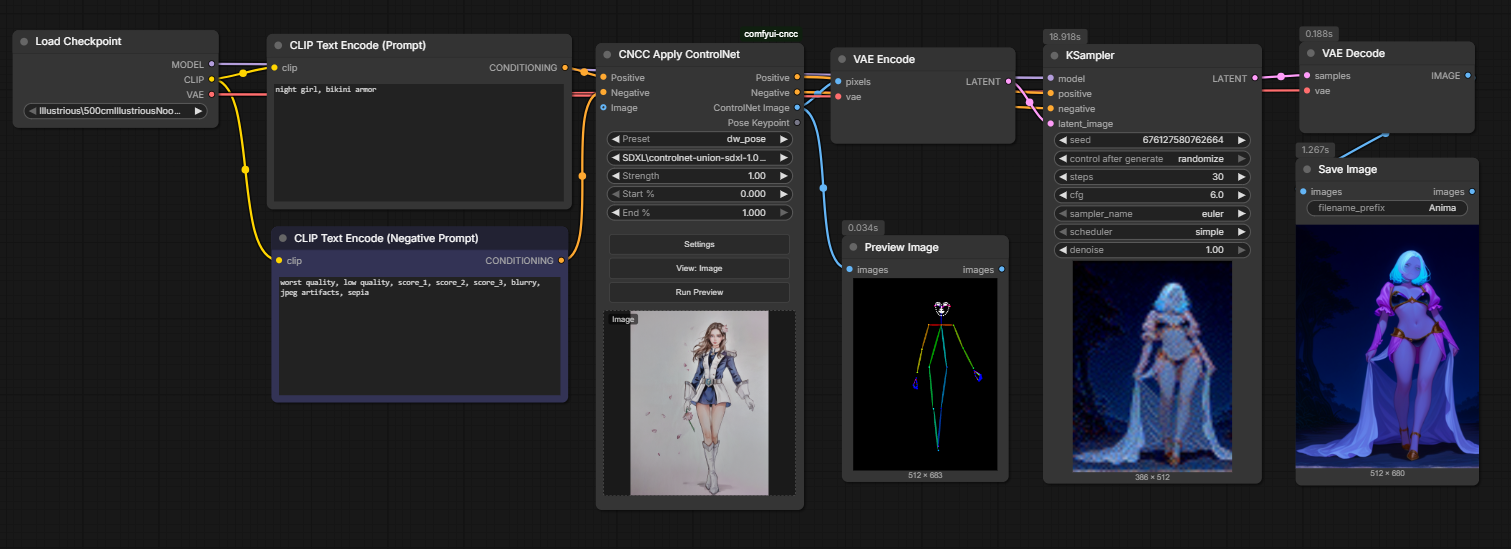
Nodes: CNCC ControlNet, CNCC Apply ControlNet. Saves comfyui_controlnet_aux preprocessors as reusable presets, and lets a single node run the preprocessor and apply the result as a ControlNet (a drop-in alternative to the native Apply ControlNet node). Includes a settings modal for creating/managing presets from a thumbnail gallery.
Nodes (2)
ComfyUI-CNCC
Full name: ControlNet Control Center
A ComfyUI custom node that saves comfyui_controlnet_aux preprocessors as reusable "presets", so
ControlNet preprocessing — and applying the result — can be handled from a single node.
Prerequisites
- comfyui_controlnet_aux must be installed.
Installation
Place this repository (comfyui-cncc/) under ComfyUI/custom_nodes/ and restart ComfyUI.
No additional dependencies are required.
Features
- Run a ControlNet preprocessor on its own from a single node (outputs both the original image and the ControlNet result)
- Load a ControlNet model (pick it from
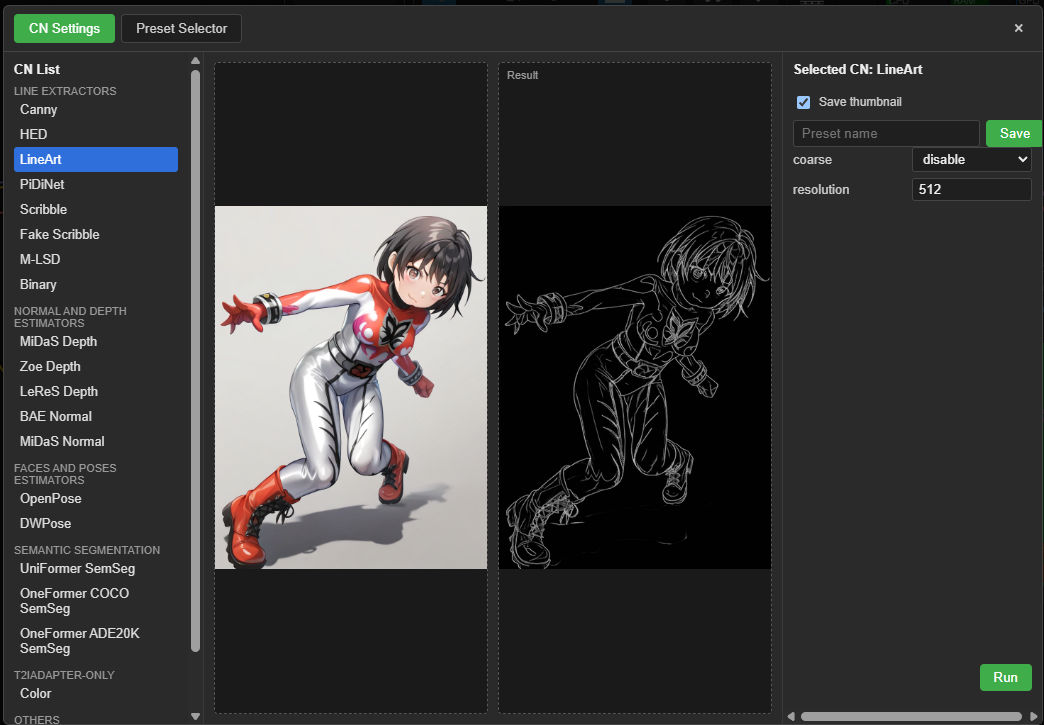
control_net_name— no need to wire in a separateLoad ControlNet Modelnode), preprocess, and apply it topositive/negativeCONDITIONING, all in one node - CNCC Settings modal for picking a preprocessor type, tuning its parameters, and saving it as a preset
- A checkbox at save time lets you choose whether to save a thumbnail image with the preset
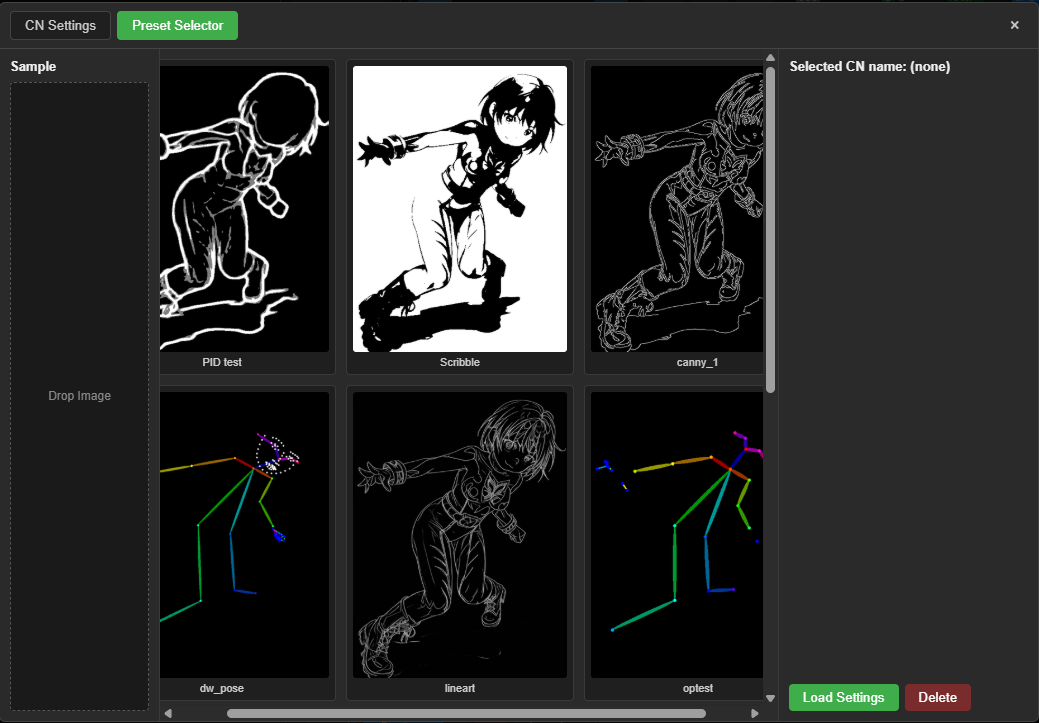
- Select, load, and delete saved presets from a thumbnail gallery
- Create new samples by dragging and dropping an image, including bulk-previewing it against every saved preset
- UI available in Japanese / English / Simplified Chinese (follows ComfyUI's language setting automatically)
Screenshots
| CN Settings | Preset Selector |
| --- | --- |
|  |
|  |
|
Nodes
CNCC ControlNet (CNCCNode)
Runs a saved preset's preprocessor only. Does not apply any ControlNet.
- Inputs:
cn_name(a saved preset name),image(IMAGE, optional), the node's own image-drop area (used only whenimageis not connected) - Outputs:
original_image,controlnet_image(the preprocessor's output),pose_keypoint(POSE_KEYPOINT data, only populated when the preset uses a pose preprocessor such as DWPose/OpenPose —Noneotherwise)
CNCC Apply ControlNet (CNCCControlNetApplyNode)
A drop-in alternative to ComfyUI's native Apply ControlNet (ControlNetApplyAdvanced). Combines
running the preprocessor and loading/applying the ControlNet model into a single node.
- Inputs:
cn_name(a saved preset name),positive/negative(CONDITIONING),control_net_name(a combo of ControlNet model names frommodels/controlnet/),strength,start_percent,end_percent,image(IMAGE, optional), the node's own image-drop area (used only whenimageis not connected) - Outputs:
positive,negative(CONDITIONING),controlnet_image(a preview of the preprocessed image),pose_keypoint(POSE_KEYPOINT data, only populated when the preset uses a pose preprocessor such as DWPose/OpenPose —Noneotherwise) - Supports chaining multiple ControlNets in series (each new application keeps the previous one instead of overwriting it)
Sample workflow
workflow/ccnc_sample_workflow.json is a minimal example wiring
CNCCControlNetApplyNode into a standard SDXL txt2img graph. Prompts and the uploaded reference image
have been cleared out — after loading it, drop in your own ControlNet reference image and fill in your
own prompts, checkpoint, and preset before running.
Troubleshooting
- DWPose preprocessor raises
cv2.error: ... cv::dnn::gather: without a GPU build of onnxruntime (CUDAExecutionProvider),comfyui_controlnet_aux's DWPose falls back to running itsbbox_detectorONNX model through OpenCV's DNN backend, which has a known issue with certain models (e.g.yolo_nas_*_fp16.onnx). Changing the preset'sbbox_detectortoyolox_l.torchscript.ptroutes it through torch.jit instead, avoiding OpenCV DNN entirely and working around the bug.
License
This package (CNCC's own code) is released under the Apache License 2.0.
Licenses of dependencies and related models
CNCC does not bundle any preprocessor implementation code. It's a thin wrapper that dynamically
accesses comfyui_controlnet_aux via NODE_CLASS_MAPPINGS and calls into your existing install of
that package. Because of this, the license of the actual preprocessor code and weights (models) being
executed needs to be checked separately:
- comfyui_controlnet_aux: Apache License 2.0.
However, some of the individual preprocessors it bundles (e.g. PiDiNet, OpenPose-based ones) may
carry their own license inherited from the original research implementation (research/non-commercial
restrictions that differ from the package's overall license). If you're considering commercial use,
check the license notice for each specific preprocessor in
comfyui_controlnet_aux. - ControlNet model files themselves (the files under
models/controlnet/selectable viacontrol_net_name): not bundled with CNCC — they follow the license of whatever model file you've placed there (check the distributor's model card / repository). - ComfyUI itself: GNU General Public License v3.0. CNCC only calls ComfyUI's node API
(
comfy.controlnet'scopy()/set_cond_hint()/set_previous_controlnet(), etc.) the way any ordinary custom node does — it does not bundle or modify ComfyUI's own code.
Reference implementation
- ChrisColeTech/ComfyUI-ControlNet-Nodes (Apache-2.0): used as a reference for README structure and license notice wording.