
ComfyUI-Qwen3-ASR
ComfyUI nodes for Qwen3-ASR (0.6B/1.7B) and ForcedAligner. Supports high-accuracy ASR and language identification for 52 languages/dialects, including 22 Chinese dialects and various English accents. Features word-level timestamps, long audio transcription, and VRAM-optimized inference.
Nodes (2)
ComfyUI Qwen3 ASR
A high-performance ComfyUI integration for the Qwen3-ASR model family. This extension provides state-of-the-art speech-to-text transcription, language identification, and precise word-level timestamps using the novel Qwen3 Forced Aligner.


Features
- High Accuracy: Supports Qwen3-ASR 0.6B and 1.7B models.
- Multilingual: Supports 52 languages and dialects with automatic language detection.
- Word-Level Timestamps: Optional integration with Qwen3-ForcedAligner-0.6B.
- Flexible Precision: Support for
bf16,fp16, andfp32to balance VRAM and speed. - Automatic Resampling: Internally handles audio resampling to 16kHz for optimal model performance.
- FlashAttention 2: Integrated support for FlashAttention 2 to significantly reduce VRAM usage and accelerate inference.
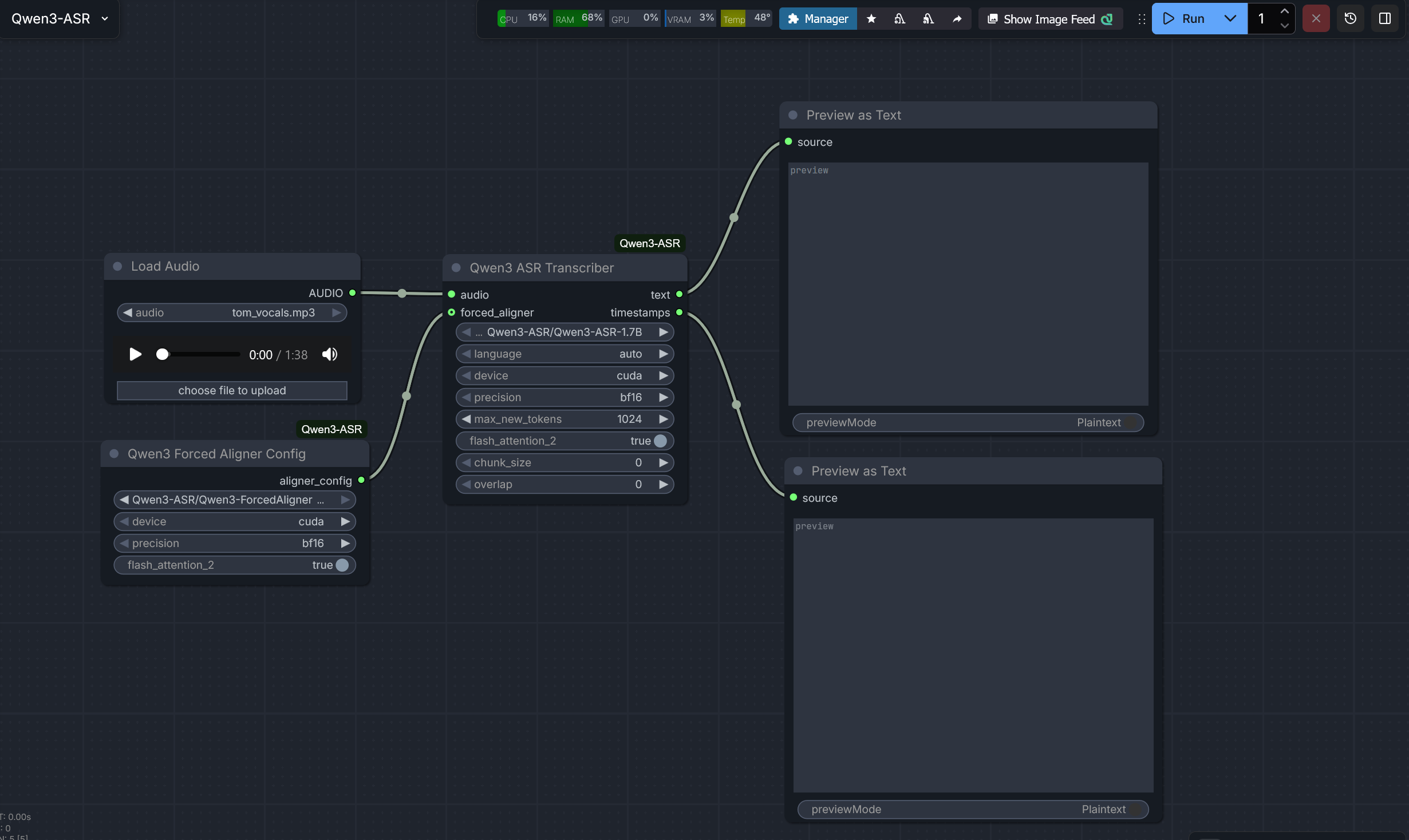
Preview
Installation
Manual Installation
-
Navigate to your ComfyUI
custom_nodesdirectory:cd ComfyUI/custom_nodes -
Clone this repository:
git clone https://github.com/kaushiknishchay/ComfyUI-Qwen3-ASR -
Install the dependencies using your ComfyUI Python executable:
# For portable versions, use the full path to your python.exe python.exe -m pip install -r ComfyUI-Qwen3-ASR/requirements.txt -
(Recommended) Install FlashAttention 2 for maximum performance:
# For FlashAttention 2 (requires compatible NVIDIA GPU)
python.exe -m pip install -U flash-attn --no-build-isolation
OR
Install via ComfyUI Manager
- Search
ComfyUI-Qwen3-ASRbyKaushik
Model Setup
Models must be placed in the models/diffusion_models/Qwen3-ASR/ directory. Each model should be in its own subfolder containing the full weights and configuration.
Recommended Directory Structure:
ComfyUI/models/diffusion_models/Qwen3-ASR/
├── Qwen3-ASR-1.7B/
│   ├── config.json
│   ├── model.safetensors
│   └── ...
├── Qwen3-ASR-0.6B/
│   └── ...
└── Qwen3-ForcedAligner-0.6B/
    └── ...
Downloading Models
You can use the huggingface-cli to download the models directly into the correct folders:
huggingface-cli download Qwen/Qwen3-ASR-1.7B --local-dir models/diffusion_models/Qwen3-ASR/Qwen3-ASR-1.7B
huggingface-cli download Qwen/Qwen3-ForcedAligner-0.6B --local-dir models/diffusion_models/Qwen3-ASR/Qwen3-ForcedAligner-0.6B
Node Usage
1. Qwen3 ASR Transcriber
The main node for generating transcriptions.
Inputs:
audio: The audio input from a "Load Audio" node.model_name: Select the ASR model folder from the dropdown.language: Set toautofor automatic detection, or specify a language (e.g.,English,Chinese).device:cuda(recommended) orcpu.precision:bf16(recommended for RTX 30/40 series),fp16, orfp32.max_new_tokens: Maximum length of the generated text.flash_attention_2: Enable Flash Attention 2 for faster inference and lower VRAM usage.chunk_size: Process audio in chunks of this many seconds (default: 30). Set to 0 to disable.overlap: Overlap between chunks in seconds to maintain context (default: 2).forced_aligner(Optional): Connect the output of a Qwen3 Forced Aligner Config node here to enable timestamps.
Outputs:
text: The raw transcription text.timestamps: A formatted string containing word-level timestamps (requires the Forced Aligner).
2. Qwen3 Forced Aligner Config
A configuration node that prepares the alignment model.
Inputs:
model_name: Select theQwen3-ForcedAligner-0.6Bfolder.device: Should match the Transcriber node.precision: Should match the Transcriber node.flash_attention_2: Enable Flash Attention 2 for the aligner model to improve performance and reduce memory footprint.
Outputs:
aligner_config: Connect this to theforced_alignerinput on the Transcriber node.
Troubleshooting
- Python 3.13 Issues: If you encounter an
UnboundLocalErrorrelated tolazy_loader, ensure you have updated the package:python.exe -m pip install -U lazy-loader - VRAM Usage: The 1.7B model requires approximately 4-6GB of VRAM in
bf16mode. If you run out of memory, try the 0.6B model or usecpumode.
License
This project is licensed under the MIT License. The Qwen3 models are subject to the Qwen License Agreement.