
ComfyUI-Audio-Waveform-Visualizer
Collection of custom nodes for ComfyUI designed to generate audio waveform visualizations ranging from real-time workspace previews to high-resolution images for video synthesis.
Nodes (3)
ComfyUI Audio Waveform Visualizer
A collection of custom nodes for ComfyUI designed to generate audio waveform visualizations. This package provides several methods to visualize audio, ranging from real-time workspace previews to high-resolution images for video synthesis.
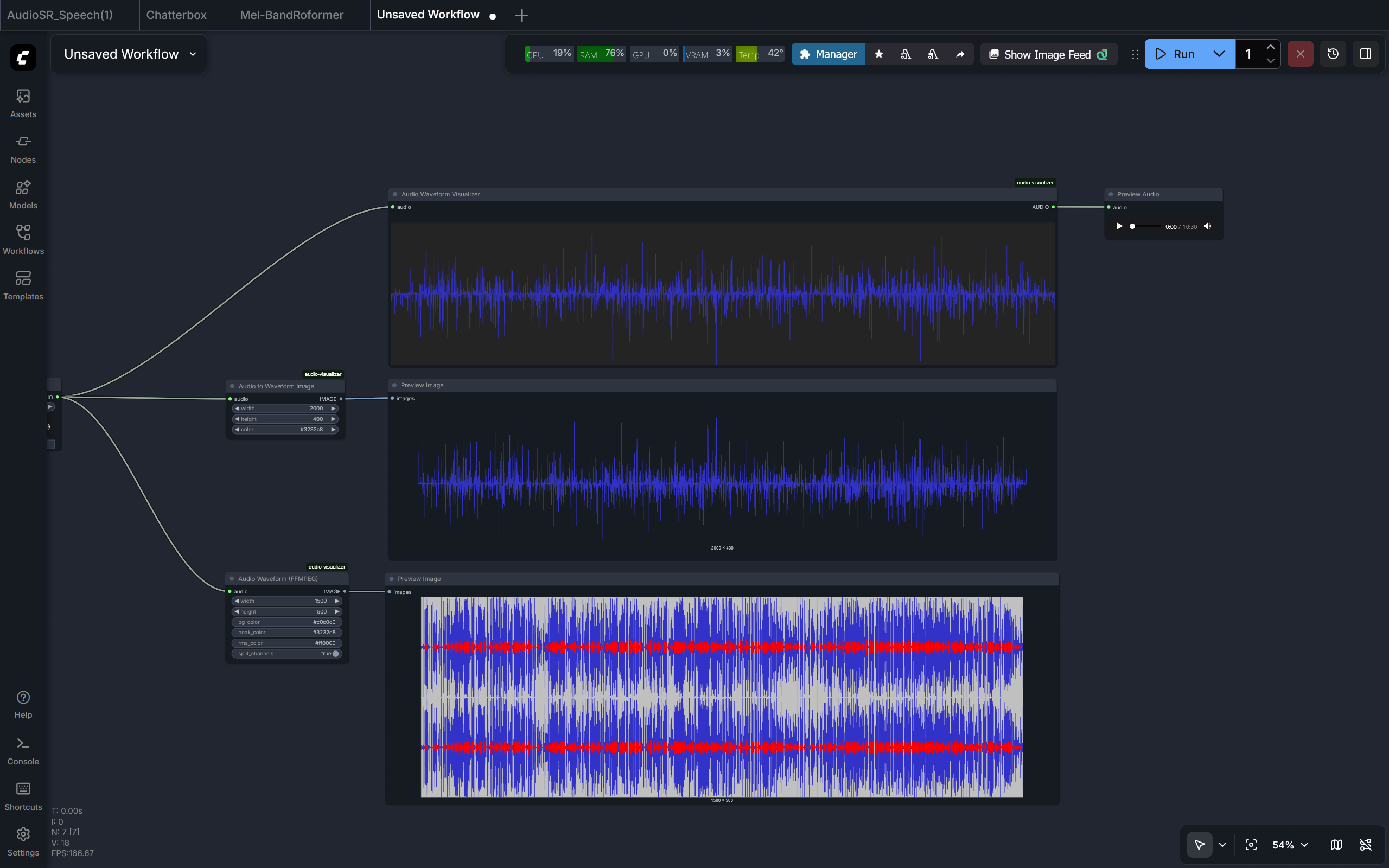
Preview
Features
- Real-time Visualization: Waveform rendering directly on the ComfyUI canvas using JavaScript.
- Image Generation: Detailed waveform images using Matplotlib or FFmpeg.
- Customization: Control over dimensions, colors (hex supported), and mono/stereo channel handling.
- Performance Optimization: Audio decimation (downsampling) and offscreen buffering for handling long audio files.
Installation
1. Prerequisites
FFmpeg (Required for FFMPEG Node)
- Windows: Download from gyan.dev, extract, and add the
binfolder to your System PATH. - Linux:
sudo apt install ffmpeg - macOS:
brew install ffmpeg
Python Dependencies
Install the required libraries:
pip install -r requirements.txt
2. Manual Installation
- Navigate to your ComfyUI custom nodes directory:
cd ComfyUI/custom_nodes/ - Clone this repository:
git clone https://github.com/kaushiknishchay/ComfyUI-Audio-Waveform-Visualizer audio-visualizer - Restart ComfyUI.
Visualization Methods
This suite provides three specialized nodes for different use cases.
1. Audio Waveform Visualizer (Frontend Canvas)
Renders a waveform directly on the node's UI using a JavaScript canvas.
- Usage: Quick inspection and real-time feedback during workflow development.
- Pros: Fast; minimal impact on generation time; responsive to resizing.
- Cons: No image output; visualization is lost on UI refresh.
2. Audio to Waveform Image (Matplotlib)
Generates a waveform image using the Matplotlib engine.
- Usage: Creating clean overlays for composites.
- Pros: Supports transparency (RGBA); generates a standard
IMAGEtensor. - Parameters:
width,height,color(supports hex codes).
3. Audio Waveform (FFMPEG)
Uses the FFmpeg showwavespic filter to create a detailed visualization.
- Usage: Video production and accurate audio representation.
- Pros: Displays both Peak and RMS levels; supports stereo channel splitting.
- Parameters:
bg_color,peak_color,rms_color,split_channels(stereo/mono).
Workflow Examples
An example workflow is available in the workflows/ directory:
- AudioWaveform.json: Demonstrates all three visualization methods.
To use it: Drag and drop the JSON file into your ComfyUI workspace.
Usage Notes
- Input: All nodes accept the standard ComfyUI
AUDIOtype. - Output: Image-based nodes output a standard
IMAGEtensor compatible with nodes likePreview ImageorSave Image. - Large Files: Automatic decimation is applied to manage memory and performance when processing long audio recordings.
License
Distributed under the MIT License.
Connect
- Website: nkaushik.in
- GitHub: @kaushiknishchay