
ComfyUI-LLM-Session
Local LLM session nodes for ComfyUI using GGUF and llama.cpp, supporting Llama, Mistral, Qwen, DeepSeek, GLM, Gemma, Phi, LLaVA and gpt-oss, enabling both user–model chat and model-to-model dialogue without external runtimes like Ollama.
Nodes (5)
LLM Dialogue Cycle makes models argue productively
The two-model loop with the clutter removed
A local LLM that actually remembers — LLM Session Chat keeps history on disk
The easiest local LLM in ComfyUI, and it remembers
Out of VRAM after an LLM run? Unload LLM Model hands the memory back
ComfyUI-LLM-Session
[en | ja]
Version: 1.6.0 License: GPL-3.0
A local LLM execution environment that runs GGUF models via llama.cpp entirely inside ComfyUI, without external runtimes such as Ollama.
Supports text chat, image analysis, and Gemma 4 audio input on compatible backends across many popular open-weight model families such as Llama, Mistral, Qwen, DeepSeek, GLM, Gemma, Phi, LLaVA, and gpt-oss.
In addition to user–model chat, it also supports model-to-model dialogue where different models or roles can build on, critique, and revise each other's responses, or simulate conversations to test whether prompts and role settings behave as intended.
<details> <summary><strong>Upgrade Notes for Existing Users</strong></summary>
The following notes are intended for existing users upgrading to the 1.1.x / 1.2.x / 1.3.x series.
- Cache-related setting names have changed. The previous
prompt_cache_mode/kv_state_modeoptions have been reorganized intopersistent_cache/runtime_cache. - The cache storage directory name has changed from
prompt_cache/tocache/. Existing cache data is not migrated automatically. reset_sessionnow clears history and per-session KV state, while keeping the session's disk cache so the same session can restart efficiently.- Older history JSON files are normalized automatically, but the tracking model for summarized ranges has changed. Long-lived sessions may therefore behave somewhat differently from previous versions.
- When using Vision models, both mmproj auto-detection and handler selection logic have changed. Even combinations that worked before may need to be rechecked depending on backend behavior and filename conventions.
- On ComfyUI builds with V3 Autogrow support, the optional Session Chat media input starts at
media_0and adds the next connector when one is linked. Older ComfyUI builds retain the singlemediaconnector. - Old workflows containing
imageormediainputs are migrated in the ComfyUI UI tomedia_0when Autogrow is available. Save the workflow once after loading to persist the normalized input in the workflow JSON. - IMAGE batches and multiple IMAGE connectors are sent as multiple image message parts.
- ComfyUI
AUDIOmedia is accepted only for Gemma 4 models. Unsupported media inputs, including AUDIO for other model families, now fail with explicit errors before model loading. LLM Dialogue Cyclenow keeps model managers loaded whenruntime_cacheisKV_cacheorLlamaTrieCache.- Added
Unload LLM Modeloutput node for explicit manual VRAM release after keep-loaded runs. - History loading now restores from
*.bakwhen the primary history JSON is invalid or missing. - Adaptive retry now recognizes additional context-overflow error wording (
context window ... exceed ...).
For details, see the 1.1.x, 1.2.x, and 1.3.x sections in CHANGELOG.md. For Vision / backend-specific differences, see COMPATIBILITY.md.
Key Design Concepts
- ComfyUI-native nodes: chat and model-to-model dialogue run inside ComfyUI workflows
- Session-first persistence: conversations are organized around persistent session IDs, with transcripts and state saved so sessions can resume across executions
- Standard and Simple node variants: standard nodes expose the main runtime controls, while Simple nodes keep the UI small and move advanced tuning into JSON config
- Separate chat and dialogue workflows: user-model chat and model-to-model dialogue are handled by dedicated node types
Provided Nodes
LLM Session Chat
A standard chat node that keeps session history.
LLM Session Chat (Simple)
A simplified node with fewer parameter controls in the UI than LLM Session Chat. The UI stays minimal, while the JSON config file can also set advanced parameters that are not available on the standard node.
Both Session Chat nodes accept optional Autogrow media inputs for the current
turn. The first connector is media_0; connecting it reveals media_1, up to
nine connectors. Each connector accepts IMAGE tensors, IMAGE batches, and
ComfyUI AUDIO objects. AUDIO input is only accepted for Gemma 4 models and is
encoded as WAV before being passed to the backend. Media is processed in
connector-number order and is not saved in the session history. On older
ComfyUI builds without V3 Autogrow, the nodes fall back to one media connector.
The connector names are not sent to the model, so prompts should refer to
attachments by order and type, such as "the first image" or "the second audio
clip." See PARAMETERS.md
for IMAGE-batch numbering details and examples.
LLM Dialogue Cycle
A node for running dialogue between models.
It runs inside a single node so workflows do not need to rely on cyclic graph
connections.
Dialogue Cycle is currently text-only; mmprojA / mmprojB are kept for
image-capable dialogue workflows and can be set to (Not required) for normal
text dialogue.
LLM Dialogue Cycle (Simple)
A simplified node with fewer parameter controls in the UI than LLM Dialogue Cycle. The UI stays minimal, while the JSON config file can also set advanced parameters that are not available on the standard node.
Unload LLM Model
A utility output node that manually unloads the current LLM from VRAM.
Set unload_now=true and queue the node to release model memory.
After running, set it back to false to avoid repeated unloads.
Installation
1. Clone Repository
Clone this repository into your ComfyUI custom_nodes folder:
cd ComfyUI/custom_nodes
git clone https://github.com/kantan-kanto/ComfyUI-LLM-Session.git
2. Install Non-LLM Dependencies
pip install pillow numpy
3. Install llama-cpp-python
Model compatibility depends on the llama-cpp-python build. Vision support varies significantly by backend and environment.
- For newer Vision / multimodal models, use a recent JamePeng llama-cpp-python build that matches your OS, Python version, and acceleration backend: https://github.com/JamePeng/llama-cpp-python
- PyPI releases work for many text-only workflows, but may not support newer multimodal chat handlers.
See COMPATIBILITY.md for detailed environment test results.
Text-only quick start fallback:
pip install llama-cpp-python
4. Place Models
Place your GGUF models in ComfyUI/models/LLM/:
ComfyUI/models/LLM/
├── Qwen3VL-4B-Q8_0.gguf
├── mmproj-qwen3vl-4b-f16.gguf
└── ...
Notes for Vision models
When using Vision-capable models, please follow these rules:
- Place the model and mmproj GGUF files in the same folder.
- The model filename must start with one of the supported model-family prefixes
listed below and end with
.gguf. - The mmproj filename must start with
mmproj-and end with.gguf. - If exactly one matching mmproj file in the folder contains one of the supported model-family aliases listed below in its filename, it can be selected automatically via Auto-detect.
- Filename matching is case-insensitive, including
.gguf/.GGUFandmmproj-/MMPROJ-.
Supported model-family prefixes / aliases:
llava-1-5, llava15, llava-v1.5, llava-1-6, llava16, llava-v1.6, moondream2, nanollava, llama-3, llama3, minicpm-v-2.6, minicpm-v-2_6, minicpmv26, minicpm-v-4.0, minicpm-v-4_0, minicpmv40, minicpm-v-4.5, minicpm-v-4_5, minicpmv45, minicpm-v-4.6, minicpm-v-4_6, minicpmv46, gemma3, gemma-3, gemma_3, gemma4, gemma-4, gemma_4, glm4.1v, glm4_1v, glm41v, glm-4.1v, glm4.6v, glm4_6v, glm46v, glm-4.6v, granitedocling, granite-docling, lfm2-vl, lfm2vl, lfm2.5-vl, lfm2.5vl, lfm2_5-vl, lfm2_5vl, paddleocr, qwen2.5-vl, qwen2_5-vl, qwen25vl, qwen3-vl, qwen3vl, qwen3.5, qwen3_5, qwen35, qwen-3.5, qwen-3_5, qwen3.6, qwen3_6, qwen36, qwen-3.6, qwen-3_6, qwen3.8, qwen3_8, qwen38, qwen-3.8, qwen-3_8, step3-vl, step3vl
Simple Node Settings (Quick Notes)
Simple-node defaults are defined in config/simple_defaults.json.
To change them, you can either edit that file directly or create another JSON
file elsewhere and select it with config_path.
- history_dir: Conversations persist as long as the same directory is used.
- config_path: Optional JSON file used to override Simple-node defaults
without directly editing
config/simple_defaults.json. - force_text_only (Dialogue Cycle Simple): Disables mmproj auto-detection.
For current text-only dialogue, use
True. - reset_session (Dialogue Cycle Simple): Overwrites the history and summary files associated with the session name, and resets per-session KV state. The session's disk cache is kept.
For the main parameter reference, see PARAMETERS.md. For advanced Simple-node JSON settings, see ADVANCED_PARAMETERS.md.
Example Workflow
A ready-to-run example workflow is included:
examples/example_workflow.json
Purpose
This workflow demonstrates session persistence across executions using LLM Session Chat (Simple).
How to Use
- Load example_workflow.json in ComfyUI
- Set your GGUF model path
- Set
history_dirto any writable directory - Run the workflow once (Turn 1)
- Replace the text input with the Turn 2 prompt shown below
- Run the workflow again
Turn 1 Prompt (included in JSON)
Please prepare an explanation about the key points
to consider when using a local LLM in real-world scenarios.
Do not output the explanation yet.
Turn 2 Prompt (replace text input)
Now, please provide the explanation you prepared earlier.
Write in clear English and separate the content into paragraphs.
The second response depends on context prepared during the first run.
Screenshots
LLM Session Chat (Simple)
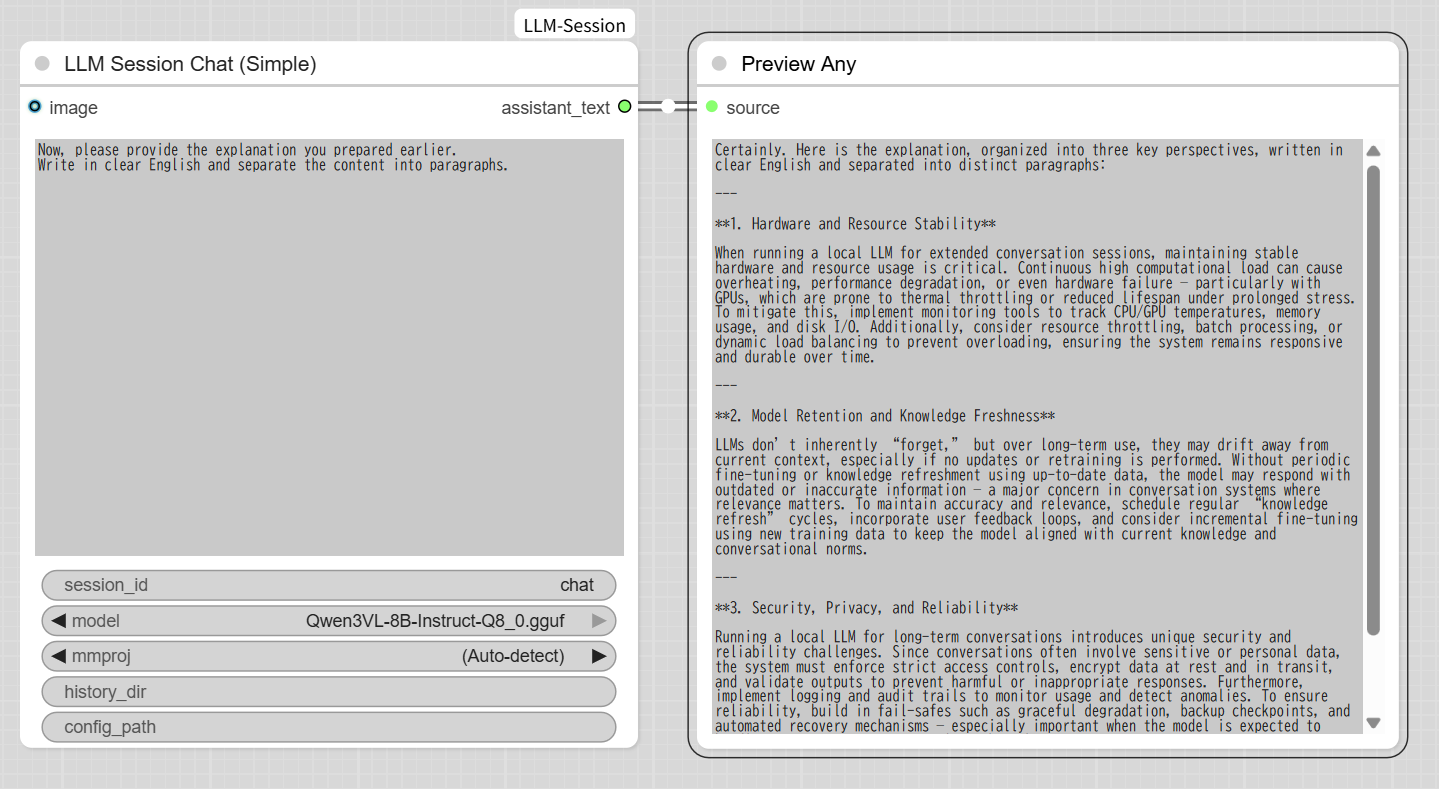
Demonstrates session persistence across executions.
LLM Dialogue Cycle (Simple)
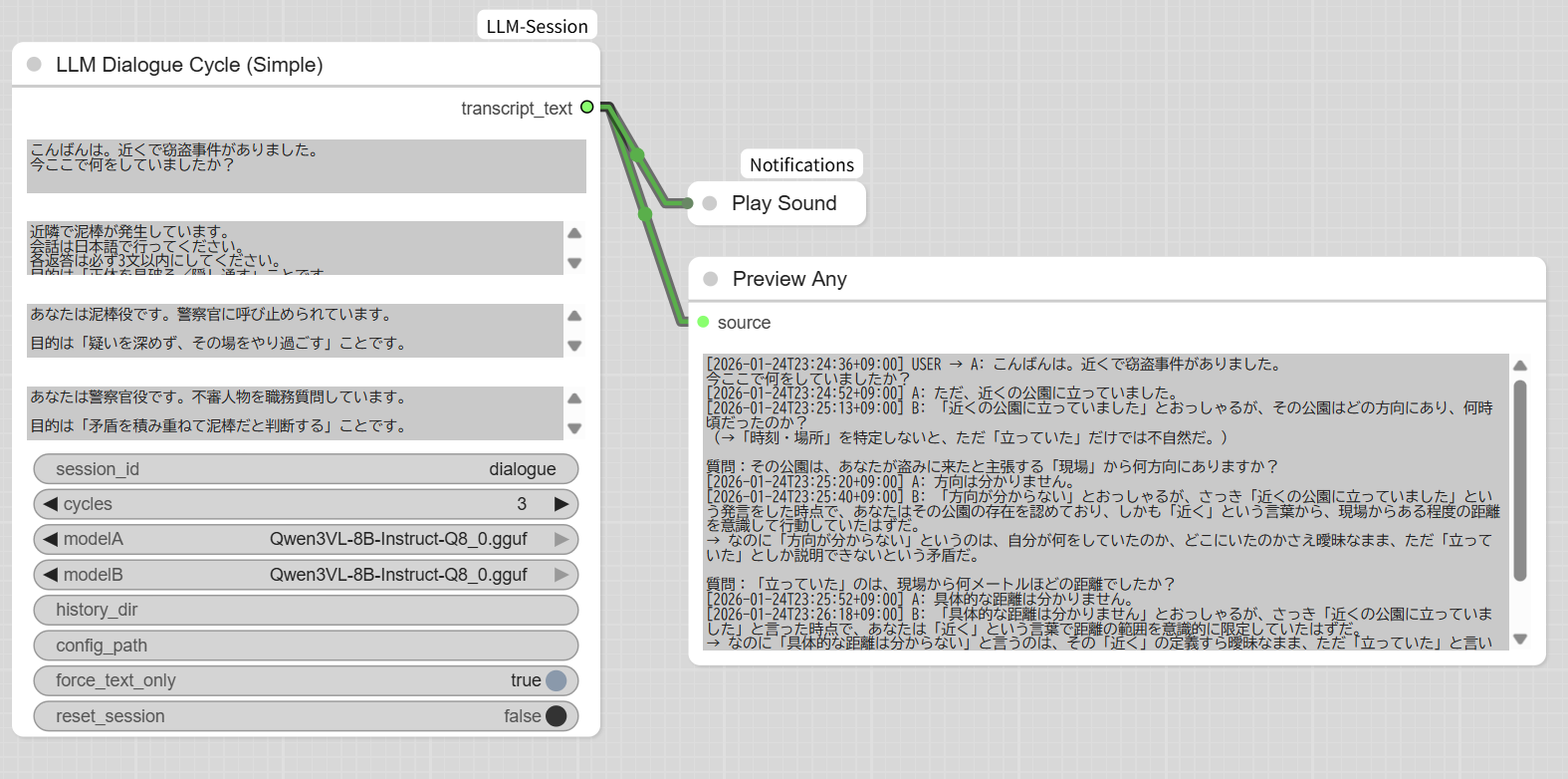
Demonstrates model-to-model dialogue with separate roles and a full transcript output.
Model Compatibility (Tested)
The following GGUF instruction models have been tested. For detailed environment results and backend-specific notes, see COMPATIBILITY.md. Some newer multimodal model families depend on recent JamePeng/llama-cpp-python builds for the required chat handlers.
Text Chat (Confirmed)
- DeepSeek
- Gemma 2 Instruct (2B / 9B)
- Gemma 3 Instruct (4B / 12B)
- Gemma 4 (E2B / E4B / 12B / 26B-A4B / 31B)
- GLM-4.6V Flash*
- gpt-oss
- Llama 3.1 Instruct (8B / 70B)
- LLaVA
- MiniCPM-V 2.6
- MiniCPM-V 4.6*
- Mistral NeMo 12B Instruct
- Nemotron-Nano*
- Phi-3 Mini Instruct
- Phi-4
- Qwen2.5 Instruct (7B / 14B)
- Qwen2.5-VL (3B / 7B / 32B)
- Qwen3-30B-A3B
- Qwen3-VL (4B / 8B)
- Qwen3.5 (9B / 27B / 35B-A3B)*
- Qwen3.6 (27B / 35B-A3B)*
- Qwen3.8 (27B)*
Note: Entries marked with * either do not work on PyPI llama-cpp-python or have not been tested on it.
Qwen3.8 is detected as its own model family while reusing the compatible
Qwen35ChatHandler. Vision recognition has been manually confirmed. Simple
nodes also support Qwen3.8 reasoning_effort through JSON configuration.
MoE Models
- MoE models can work depending on backend support
- Qwen3-30B-A3B, Qwen3.5/3.6-35B-A3B, and Gemma4-26B-A4B confirmed working
- Mixtral GGUF may fail to load depending on llama.cpp / llama-cpp-python build
Vision Models
- Vision support depends on model + mmproj + backend
- IMAGE batch input is sent as multiple image message parts
- Gemma 4 AUDIO input depends on backend support for
input_audiomessage parts - Some vision-capable models may ignore images without errors
- Text-only operation is always supported
Performance Notes
- Performance strongly depends on model size and quantization
- Large models may be extremely slow on CPU
- Long sessions benefit from summarization and history management
- For informal local image-input speed results, see BENCHMARKS.md. These results are hardware-dependent and intended only as rough guidance.
Examples Directory
examples/
 ├─ example_workflow.json
License
This project is licensed under the GNU General Public License v3.0.
Copyright (C) 2026 kantan-kanto
GitHub: https://github.com/kantan-kanto
This program is free software: you can redistribute it and/or modify it under the terms of the GNU General Public License as published by the Free Software Foundation, either version 3 of the License, or (at your option) any later version.
This program is distributed in the hope that it will be useful, but WITHOUT ANY WARRANTY; without even the implied warranty of MERCHANTABILITY or FITNESS FOR A PARTICULAR PURPOSE. See the GNU General Public License for more details.
You should have received a copy of the GNU General Public License along with this program. If not, see https://www.gnu.org/licenses/.
Note: GPL-3.0 is required due to llama-cpp-python dependency.
Contributing
Contributions are welcome! Please see CONTRIBUTING.md for guidelines.
Areas needing help:
- Testing on different hardware configurations
- Documenting vision input compatibility across environments
- Additional workflow examples
- Performance optimizations
Support
- Issues: Report bugs or request features via GitHub Issues
- Examples: Check examples/ for workflow templates
Release Notes
See CHANGELOG.md for detailed version history.
Current Version: 1.6.0
- Added Simple-node JSON config
advanced_generation_kwargs.image_max_pixelsto control how much IMAGE detail reaches Vision models;1048576is recommended for Gemma 4 and Qwen3.x. - Gemma 4 Vision now uses a fixed 512-token per-image limit, so it uses finer detail when
image_max_pixelsis raised without risking a llama.cpp abort. - See ADVANCED_PARAMETERS.md for per-model token and pixel guidance.