
Comfy-Fetch
Download large ComfyUI models faster by fetching file pieces in parallel with HTTP range requests.
K0V0K Comfy Fetch
Download large ComfyUI models faster by fetching several pieces of each file at once.
K0V0K Comfy Fetch, published as Comfy-Fetch, is a ComfyUI custom-node plugin that adds a missing-model resolver panel to Workflow Overview. When a workflow or ComfyUI error entry exposes model download URLs, the plugin sends those URLs to a local fetch service, tracks progress, and refreshes ComfyUI's missing-model state when the downloads finish. When the source supports HTTP range requests, the service splits a large file into smaller pieces and downloads several pieces at the same time. Parallel transfers can make large model downloads significantly faster, though the speedup depends on the source server and network. The service then places the completed model in the correct ComfyUI folder.
The goal is to support every Comfy model type that exposes downloadable hints to the user, not only common folders such as diffusion models, checkpoints, and LoRAs.
Why This Helps
Comfy workflows can depend on several model files spread across different working folders. A documented workflow may tell you what to download and where each file belongs, but doing that manually still means monitoring large downloads, checking disk space, and moving every file into the correct ComfyUI model directory.
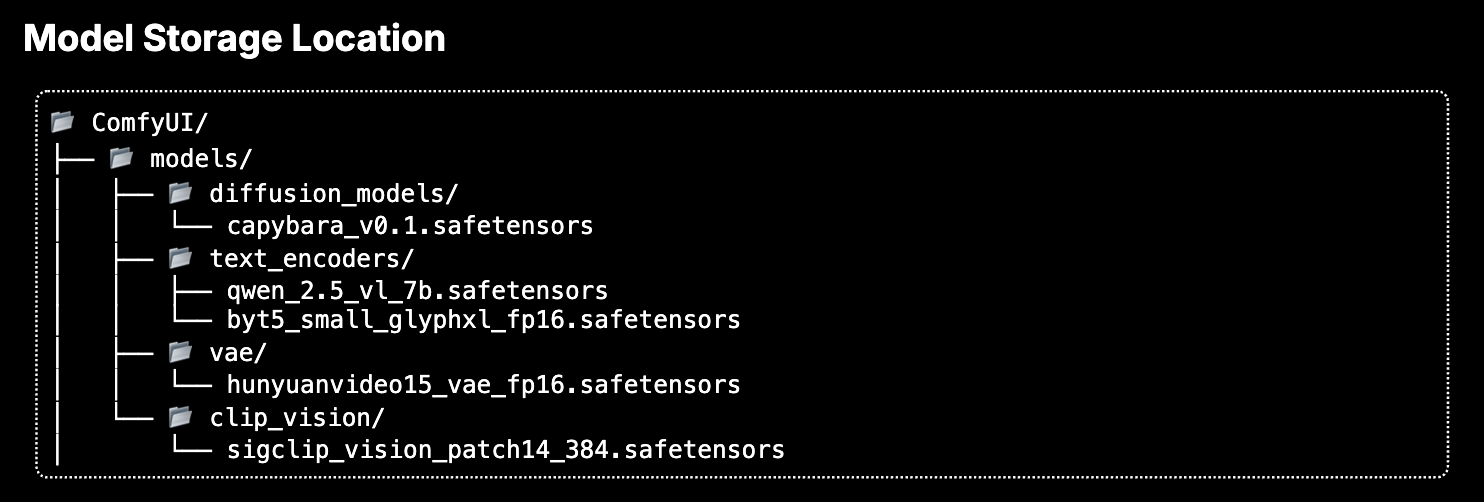
K0V0K Comfy Fetch replaces that manual process with one button. When the workflow exposes download URLs, the plugin shows available model-storage disk space, lists the missing models it can resolve, downloads them in the background, places them in the correct ComfyUI folders, and refreshes missing-model errors when the job finishes.

How Parallel Downloads Work
If a model host supports HTTP range requests, the local fetch service asks for different pieces of the same file at the same time instead of waiting for one continuous download. It combines those pieces into the completed model file and places it in the appropriate ComfyUI model folder. Downloading several pieces in parallel can cut the wait for a large model.
Parallel downloading requires range support from the source. Hosts without that support do not get this speedup, and actual download time still depends on the host, connection, file size, and available bandwidth. The transfer happens in comfy-asset-fetch-api; the ComfyUI plugin provides the workflow integration and progress UI.
Features
- Adds a
Resolve Missing Modelspanel to the top of the Workflow Overview errors experience. - Resolves workflow-linked model assets across Comfy model families when download URLs are available.
- Downloads supported model files in parallel HTTP range segments through the local fetch service.
- Supports native Comfy model folders including checkpoints, LoRAs, text encoders, diffusion models, VAE families, background removal, detection, frame interpolation, geometry estimation, optical flow, and related model directories.
- Shows per-model progress, numeric percentages, progress bars, observed transfer rate, and ETA.
- Retries failed downloads up to five times per model.
- Supports cancellation for the current workflow's active resolution job.
- Refreshes missing-model errors after downloadable dependencies finish.
- Shows structured, user-facing errors for common provider, network, token, checksum, and disk-space failures.
- Uses a same-origin, server-issued session cookie for plugin routes. The frontend never reads or writes the cookie value.
Requirements
- ComfyUI with the modern extension entrypoint API available through
comfy_api.latest. - Python 3.10 or newer.
aiohttp>=3.9, installed automatically byinstall.pywhen supported by the installer.- A running
comfy-asset-fetch-apiservice reachable from the ComfyUI host.
By default, the plugin expects the asset fetch API at:
http://127.0.0.1:8189
This repository contains the ComfyUI plugin UI and route bridge. The actual model download work is delegated to comfy-asset-fetch-api.
Installation
ComfyUI-Manager
Once published to the Comfy Registry, install Comfy-Fetch from ComfyUI-Manager by searching for:
Comfy-Fetch
or:
comfy-fetch
Restart ComfyUI after installation.
Manual Install
Clone this repository directly into your ComfyUI custom_nodes directory:
cd ComfyUI/custom_nodes
git clone https://github.com/k00v00k/k0v0k_comfy_fetch.git comfy-fetch
Install Python dependencies if your Comfy installer does not run install.py automatically:
cd ComfyUI/custom_nodes/comfy-fetch
python install.py
Restart ComfyUI after installation.
The expected folder shape is:
ComfyUI/custom_nodes/k0v0k_comfy_fetch/
  __init__.py
  install.py
  requirements.txt
  js/
  plugin/
  pyproject.toml
The folder may also be named comfy-fetch; ComfyUI only requires that it lives under custom_nodes.
Configuration
Create a JSON config file if you need to override the default API URL or token behavior:
ComfyUI/custom_nodes/k0v0k_comfy_fetch/config/k0v0k-comfy-fetch.json
Example:
{
  "asset_api_base_url": "http://127.0.0.1:8189",
  "asset_api_token_required": true
}
If the asset API requires a token, set the token in the ComfyUI process environment:
export COMFY_ASSET_API_TOKEN="replace-with-token"
Do not commit real tokens to this repository or to workflow files.
Downloaded model files are not stored by this plugin. The plugin forwards workflow resolution requests to comfy-asset-fetch-api, which writes files into the configured ComfyUI model folders such as models/diffusion_models, models/loras, models/text_encoders, and related folders. Cache paths and download staging are controlled by the fetch service, not browser-local state.
How It Works
- ComfyUI shows missing-model errors for the current workflow.
- The plugin serializes the current workflow and looks for download hints in workflow metadata and Markdown notes.
- The plugin submits the workflow to
comfy-asset-fetch-api. - Where the source supports HTTP ranges, the fetch service downloads segments of a model file in parallel; it places completed assets into the correct model folders.
- The plugin receives job updates through ComfyUI websocket events.
- When downloads complete, the plugin refreshes ComfyUI's missing-model view.
The plugin only resolves models when URLs are available. If ComfyUI can name a missing model but no download URL is exposed, the plugin will show that the model cannot be resolved automatically.
Supported Model Types
K0V0K Comfy Fetch is designed around Comfy model folder names. Current supported folders include:
checkpointslorasvaevae_approxtext_encodersaudio_encodersclipclip_visioncontrolnetdiffusion_modelsdiffusersunetupscale_modelslatent_upscale_modelsembeddingsbackground_removaldetectionframe_interpolationgeometry_estimationgligenhypernetworksmodel_patchesoptical_flowphotomakerstyle_modelsipadapterinsightface
Additional model families can be added by mapping the Comfy folder name in both the plugin parser and the fetch service destination map.
Route Protection
The plugin exposes local routes from the ComfyUI origin:
POST /k0v0k/comfy-fetch/bootstrapGET /k0v0k/comfy-fetch/statusGET /k0v0k/comfy-fetch/jobsGET /k0v0k/comfy-fetch/jobs/{job_id}POST /k0v0k/comfy-fetch/jobs/{job_id}/cancelPOST /k0v0k/comfy-fetch/analyzePOST /k0v0k/comfy-fetch/resolve
Routes are protected by a same-origin check and an ephemeral server-side cookie:
HttpOnlySameSite=Strict- path-scoped to
/k0v0k/comfy-fetch - generated in memory at ComfyUI startup
This is a practical local protection layer for a ComfyUI plugin. It is not a replacement for HTTPS-backed user authentication on public deployments. Do not expose ComfyUI or the asset fetch API directly to the public internet.
Websocket Event
The plugin listens for this ComfyUI event:
k0v0k.comfy-fetch.job_update
Node / Extension Registration
Comfy-Fetch is a ComfyUI web extension and route bridge. It does not currently register image-processing node classes.
Runtime registration is declared in __init__.py:
WEB_DIRECTORY = "./js"
and through the async comfy_entrypoint() extension hook. Because there are no conventional node classes, this repository intentionally does not include a fake node_list.json.
Error Handling
The backend returns structured error_details objects with stable error codes. The UI maps those codes to user-facing text through js/i18n.js.
When a provider blocks a download, the plugin surfaces the reason instead of leaving the user to diagnose a silent failed transfer. For example, Hugging Face gated models fail until the user accepts the model license or terms on Hugging Face and configures a token with access.
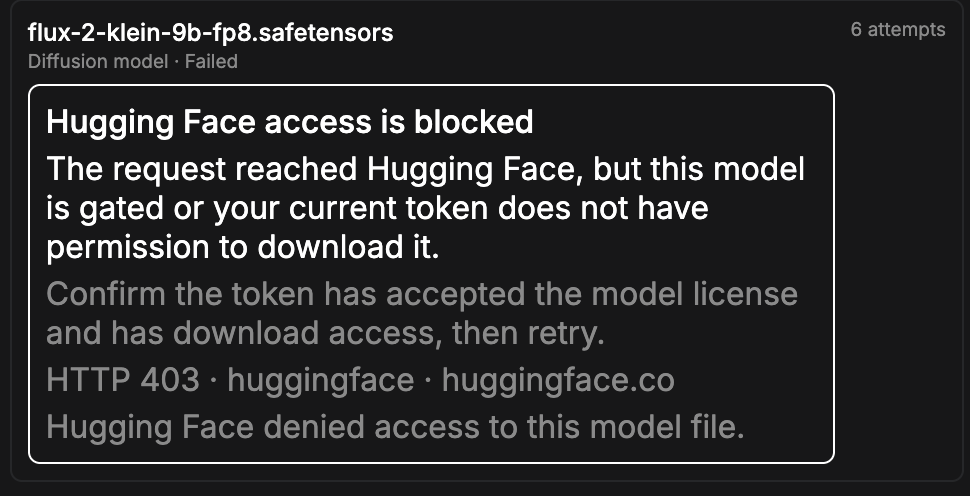
Common error codes include:
missing_huggingface_tokenhuggingface_gated_model_access_requiredhuggingface_access_forbiddenhuggingface_model_not_foundmissing_civitai_tokencivitai_access_forbiddenprovider_rate_limitedprovider_not_foundprovider_server_errornetwork_timeoutnetwork_dns_failurenetwork_connection_failedtls_ssl_errorinsufficient_free_spacedestination_write_failedchecksum_mismatcharia2_unavailableretry_exhaustedcanceled_by_user
Localization
All user-facing UI copy should live in js/i18n.js.
The current catalog uses English as the default locale. The helper functions exported from that file provide:
t(key, values, fallback)for ordinary translated stringstPlural(key, count, values)for count-aware stringslocalizeError(errorInfo)for structured download and provider errors
When adding or changing UI text:
- add the string to the locale catalog in
js/i18n.js - reference it from UI code by key
- keep backend error codes stable and map their display text through
localizeError - avoid hardcoding visible English text in
js/missing-input-resolver.js
Future locales should be added by extending the same catalog keys used by the English default. A locale should be considered incomplete if it does not provide the same top-level sections and error-code mappings as English.
Restart Behavior
- The plugin reloads when ComfyUI restarts.
- In-flight UI state is not persisted across a ComfyUI restart.
- The underlying fetch service is expected to mark persisted
queuedorrunningjobs as interrupted on restart. - The fetch service can report recovered partial downloads through its
/healthzendpoint, and the plugin displays that startup recovery state when available.
Development
Verify the package structure:
npm run verify
Build a local package tarball:
npm pack
The package intentionally ignores generated artifacts such as *.tgz, node_modules/, package-lock.json, __pycache__/, and *.pyc.
Project Metadata
Comfy Manager and Registry metadata are declared in pyproject.toml:
- node id:
comfy-fetch - display name:
Comfy-Fetch - publisher id:
k00v00k
Security
Please report security-sensitive issues privately if possible. Do not include API tokens, bearer tokens, cookies, workflow secrets, or private model credentials in public issues.
The plugin should never require users to paste Hugging Face, Civitai, or other provider tokens into the browser UI. Provider tokens belong in the server-side environment used by the fetch service.
Contributing
Issues and pull requests are welcome. Useful contributions include:
- new Comfy model folder mappings
- provider-specific error handling
- additional i18n locales
- compatibility reports for current ComfyUI releases
- documentation for portable
comfy-asset-fetch-apideployment
Before opening a pull request, run:
npm run verify
python -m py_compile install.py
Publishing
Comfy Registry metadata is declared in pyproject.toml:
- package id:
comfy-fetch - display name:
Comfy-Fetch - publisher id:
k0v0k - repository:
https://github.com/k00v00k/k0v0k_comfy_fetch
The GitHub Actions workflow .github/workflows/publish_action.yml publishes to the Comfy Registry when pyproject.toml changes on main or when run manually.
Before publishing, add this GitHub Actions repository secret:
REGISTRY_ACCESS_TOKEN
Do not commit the token. See docs/registry-publishing.md for the manual publish flow and ComfyUI-Manager fallback PR instructions.
Uninstall
Stop ComfyUI, remove the plugin directory, then restart ComfyUI:
cd ComfyUI/custom_nodes
rm -rf comfy-fetch
If you installed the repository under another directory name, remove that directory instead.
This does not remove downloaded model files. Remove model files manually from your ComfyUI model folders only if you are sure they are no longer needed.
Known Limitations
- The plugin can only resolve models when ComfyUI or the workflow exposes a usable download URL.
- Provider-gated downloads still require server-side credentials and any required license or terms acceptance.
- It delegates actual downloads to
comfy-asset-fetch-api; without that local service, the UI can analyze missing models but cannot fetch them. - It is designed for trusted local ComfyUI environments, not unrestricted public downloader access.
Support
If K0V0K Comfy Fetch saves you time or helps keep your ComfyUI workflows moving, tips are appreciated through Ko-fi. Support helps fund continued plugin maintenance, compatibility updates, and documentation.
License
Apache License 2.0. See LICENSE.