
ComfyUI JoyCaption-Beta-GGUF Node
This project provides a node for ComfyUI to use the JoyCaption-Beta model in GGUF format for image captioning.
ComfyUI JoyCaption-Beta-GGUF Node
This project provides a node for ComfyUI to use the JoyCaption-Beta model in GGUF format for image captioning.
Acknowledgments:
This node is based on fpgaminer/joycaption_comfyui, with modifications to support the GGUF model format.
Thanks to the LayerStyleAdvance, I copied the relevant code for extra options from it.
20250802-Update:
Due to the difficulty of installing the GPU version of llama-cpp-python, I have uploaded the model to Ollama. You can now use it by installing Ollama and comfyui-ollama. Model link: https://ollama.com/aha2025/llama-joycaption-beta-one-hf-llava Meanwhile, I've separated the prompt template into a standalone node. For details, please check the ComfyUI JoyCaption-Beta-GGUF.
Usage
Installation
This node requires llama-cpp-python to be installed.
Important:
- Installing with
pip install llama-cpp-pythonwill only enable CPU inference. - To utilize NVIDIA GPU acceleration, install with the following command:
(Adjustpip install llama-cpp-python --extra-index-url https://abetlen.github.io/llama-cpp-python/whl/cu124cu124according to your CUDA version) - For non-NVIDIA GPUs or other installation methods, please refer to the official
llama-cpp-pythondocumentation: https://llama-cpp-python.readthedocs.io/en/latest/
llama-cpp-python is not listed in requirements.txt to allow users to manually install the correct version with GPU support.
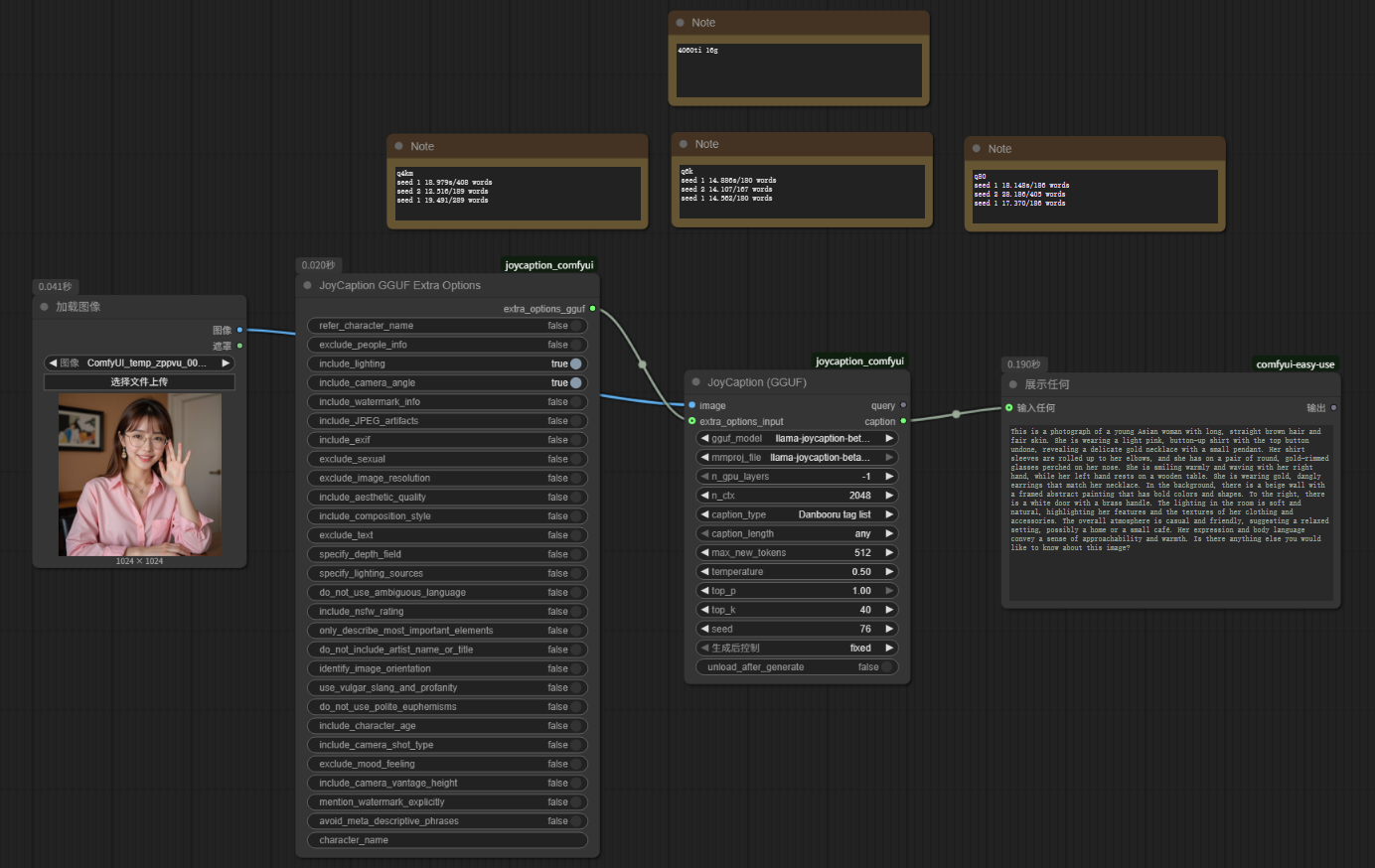
Workflow Example
You can view an example workflow image at assets/example.png.
Model Download and Placement
You need to download the JoyCaption-Beta GGUF model and the corresponding mmproj model.
-
Download the models from the following Hugging Face repositories:
- Main Model (Recommended): concedo/llama-joycaption-beta-one-hf-llava-mmproj-gguf
- Download the relevant
joycaption-betamodel files and thellama-joycaption-beta-one-llava-mmproj-model-f16.gguffile.
- Download the relevant
- Other Quantized Versions: mradermacher/llama-joycaption-beta-one-hf-llava-GGUF
- IQ Quantized Version (Theoretically higher quality, potentially slower on CPU): mradermacher/llama-joycaption-beta-one-hf-llava-i1-GGUF
- Main Model (Recommended): concedo/llama-joycaption-beta-one-hf-llava-mmproj-gguf
-
Place the downloaded model files into the
models\llava_gguf\folder within your ComfyUI installation directory.
Video Tutorial
You can refer to the following Bilibili video tutorial for setup and usage: