
ComfyUI HTTP API
A collection of custom nodes for interacting with ComfyUI's internal HTTP APIs, such as fetching files from workflows.
ComfyUI HTTP API
A collection of custom nodes for interacting with ComfyUI's internal HTTP APIs, such as fetching files from workflows.
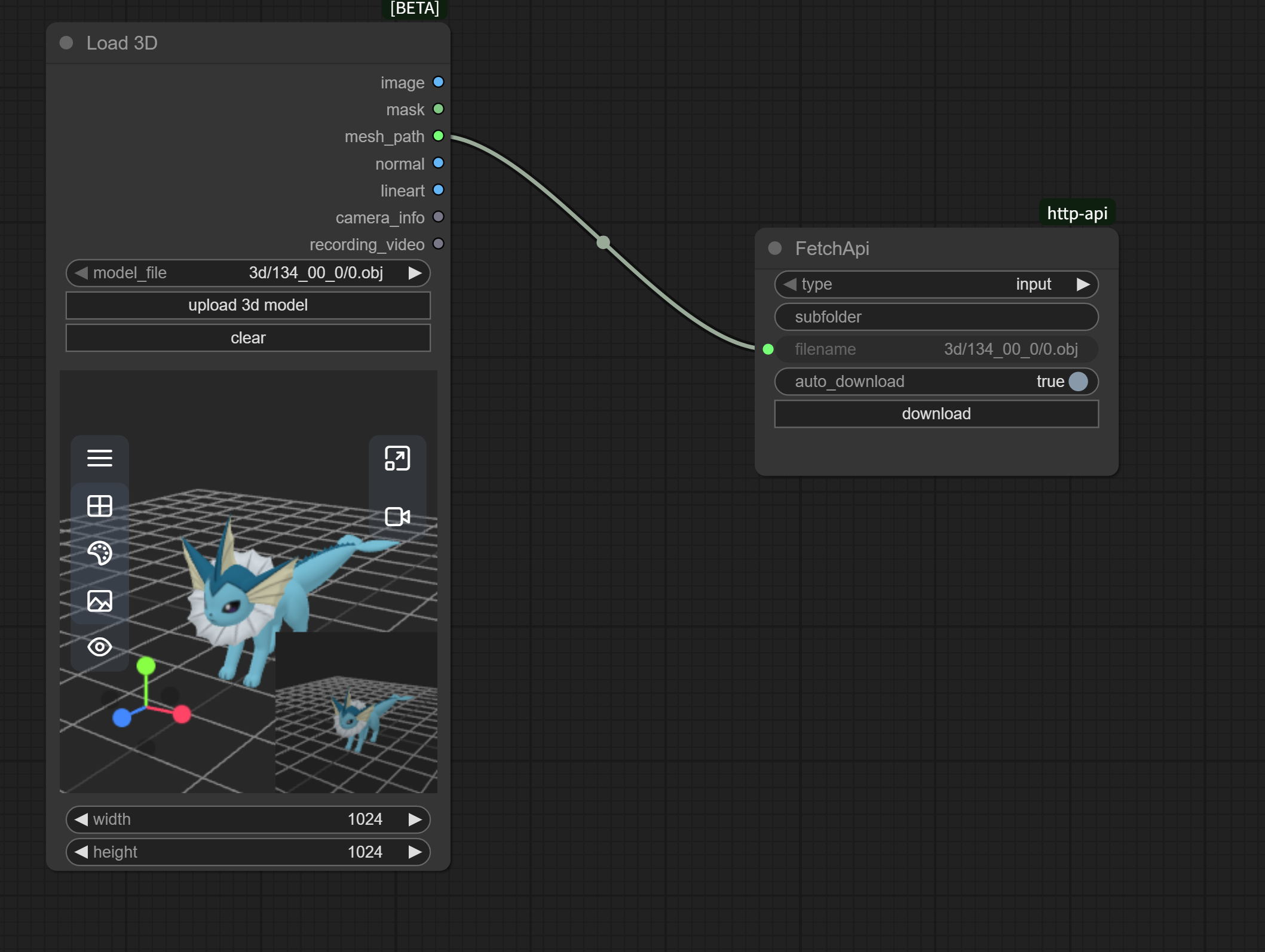
Features
- 🚀 File Download: Download files from ComfyUI's input or output directories
- 🔄 Auto Download: Support automatic file download after workflow execution
- 🎯 Manual Control: Provides download button for manual downloads
- 📁 Subfolder Support: Support fetching files from subfolders
- 🛤️ Path Handling: Intelligent path parsing for files with relative paths
- 🔒 Secure Download: Uses ComfyUI's built-in API for security
Installation
Method 1: Via ComfyUI Manager
- Search for "ComfyUI HTTP API" in ComfyUI Manager
- Click Install
Method 2: Manual Installation
-
Navigate to ComfyUI's
custom_nodesdirectory:cd ComfyUI/custom_nodes/ -
Clone this repository:
git clone https://github.com/jtydhr88/comfyui-http-api.git -
Restart ComfyUI
Usage
Node Description
The Fetch node is used to download files from the ComfyUI server.
Input Parameters
-
type (
combo): File typeinput: Download from input directoryoutput: Download from output directory
-
subfolder (
string): Subfolder path (optional)- Leave empty for root directory
- Example:
subfolder1/subfolder2
-
filename (
string): File name to download- Can be just filename:
image.png - Or include relative path:
models/3d/mesh.obj - The node will automatically parse and handle paths correctly
- Can be just filename:
-
auto_download (
boolean): Enable automatic downloadtrue: Auto-download after workflow executionfalse: Manual download via button click required
UI Elements
- download button: Manually trigger file download
Usage Examples
Example 1: Download Generated Images
- Add a Fetch node to your workflow
- Set parameters:
- type:
output - subfolder:
(leave empty or specify subfolder) - filename:
ComfyUI_00001_.png - auto_download:
true
- type:
- Run workflow, file will download automatically
Example 2: Manual Download of Input Files
- Add a Fetch node
- Set parameters:
- type:
input - subfolder:
images - filename:
example.jpg - auto_download:
false
- type:
- After running workflow, click the download button to download the file
Example 3: Download Files with Relative Paths
- Add a Fetch node
- Set parameters:
- type:
output - subfolder:
(leave empty) - filename:
3d/models/mesh.obj(path included in filename) - auto_download:
true
- type:
- The node will automatically parse the path and download the file correctly
This allows automatic download to local storage after file generation.
Technical Details
API Endpoint
The plugin uses ComfyUI's built-in /view API endpoint:
GET /view?filename={filename}&type={type}&subfolder={subfolder}
Path Handling
The node intelligently handles various path formats:
filename = "mesh.obj", subfolder = "3d"→ Works normallyfilename = "3d/mesh.obj", subfolder = ""→ Parses tosubfolder="3d", filename="mesh.obj"filename = "models/3d/mesh.obj", subfolder = "output"→ Merges tosubfolder="output/models/3d", filename="mesh.obj"
File Structure
comfyui-http-api/
├── src/main.ts          # Frontend extension logic (TypeScript source)
├── js/main.js           # Compiled JavaScript for the frontend
├── __init__.py
├── ComfyUIHttpApi.py    # Backend node definition
├── README.md            # This document
└── LICENSE              # MIT License
Troubleshooting
Common Issues
-
"Unable to fetch file" error
- Ensure the file exists in the specified directory
- Check if the filename is correct (including extension)
- Verify the subfolder path is correct
- If using relative paths in filename, ensure the full path is valid
-
Auto-download not working
- Ensure
auto_downloadis set totrue - Check if browser is blocking automatic downloads
- Some browsers may require user interaction for downloads
- Ensure
-
Node not appearing in node list
- Ensure plugin is properly installed in
custom_nodesdirectory - Restart ComfyUI
- Check console for error messages
- Ensure plugin is properly installed in
-
Files with paths not downloading
- The node now supports paths in filenames (e.g.,
folder/file.ext) - Ensure the complete path exists in the specified type directory
- The node now supports paths in filenames (e.g.,
Development
Prerequisites
- Node.js and TypeScript (for frontend development)
- Python 3.10+ (for backend development)
- ComfyUI development environment
Building
# Install dependencies
npm install

# Compile TypeScript
npm run build
Contributing
Contributions are welcome! If you have ideas for improvements or have found bugs, feel free to:
- Open an issue
- Submit a pull request with proposed changes
Contribution Guidelines
- Fork the repository
- Create your feature branch (
git checkout -b feature/AmazingFeature) - Commit your changes (
git commit -m 'Add some AmazingFeature') - Push to the branch (
git push origin feature/AmazingFeature) - Open a Pull Request
Roadmap
- [ ] Add more comfyui internal http apis
- [ ] Support batch download of multiple files
- [ ] Add download progress display
- [ ] Support file preview functionality
License
Contact
For questions or suggestions, please contact via:
- Submit an Issue