
ComfyUI Pascal Editor
ComfyUI plugin that integrates Pascal 3D architectural editor
ComfyUI-PascalEditor
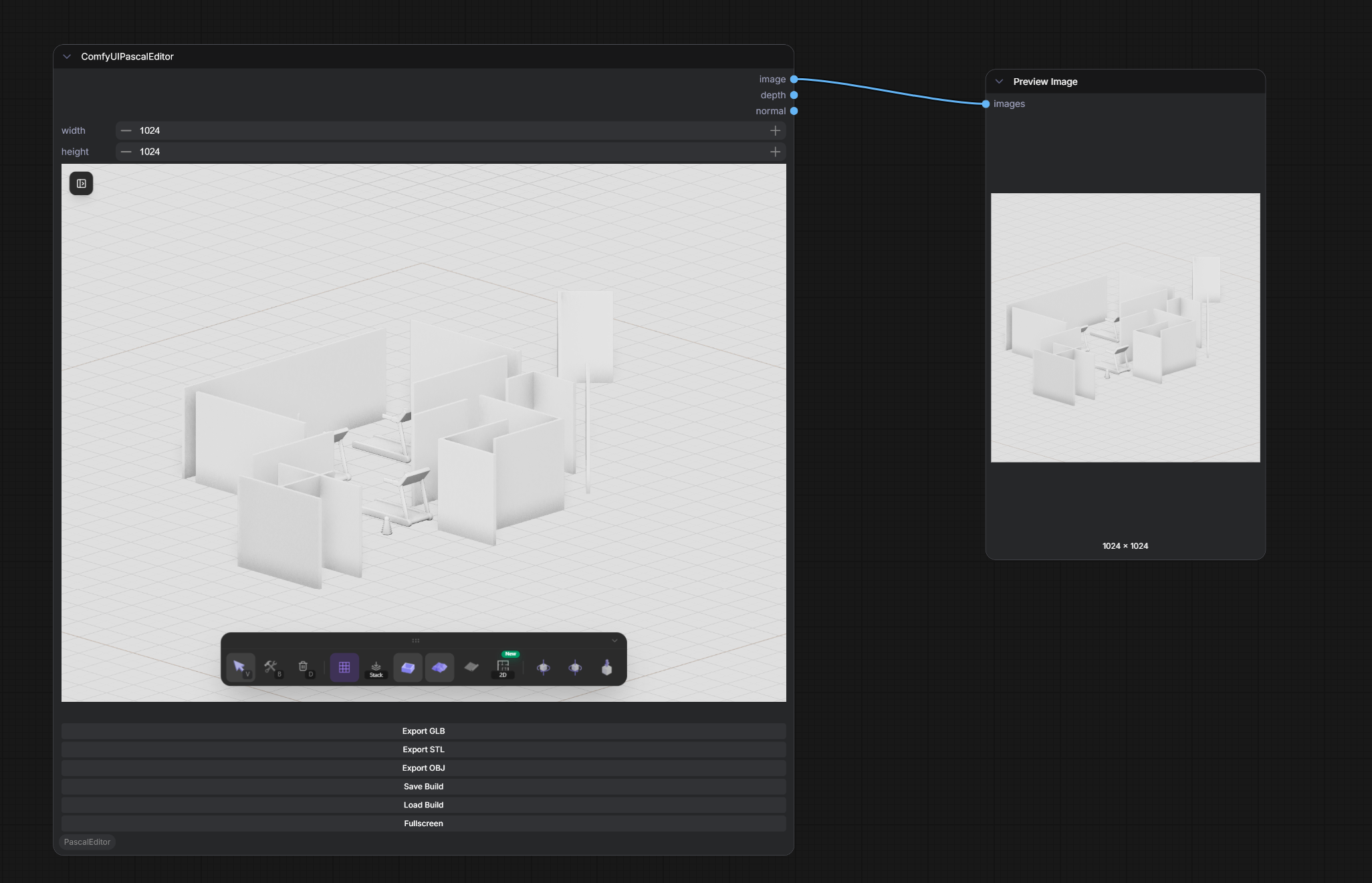
A ComfyUI plugin that integrates Pascal Editor — a full-featured 3D architectural editor — directly into your ComfyUI workflow.
What's New (v0.4.0)
This release updates the bundled Pascal Editor from 0.6.0 to upstream v0.9.1, bringing four minor versions of editor improvements into the ComfyUI plugin:
- Paint slots material system v2 — per-slot painting (slab top/side split), dynamic material library with browse categories and create-in-place scene materials
- Vertical building model — stored level heights, wall inversion, and decks
- Group manipulation — Photoshop-style multi-selection move, rotate, and duplicate
- Placement & interaction overhaul — FSM-driven placement, mode-aware snapping for walls/fences/roofs/stairs/MEP, contextual HUD
- Baked GLB export — animation clips baked in (doors, fans), GLB walkthrough viewer with LOD, texture-reference export mode
- Floorplan upgrades — multi-page PDF export per level, construction documentation, much faster navigation
- Measurement tools — production measurement tools, natural-language measurement inputs, metric/imperial honored in every length input
- Rendering & lighting pass — sun-dominant look, sky backdrop, grounded horizon
- Plugin system — plugin contract + first-party Nature pack (trees, flowers, grass)
- Walkthrough improvements — crouch, wider FOV, tuned walk/run/jump speeds, unified viewer UI
- New door open-animations (sliding/garage/folding/pocket/barn), horizontal-board fence style, SFX, and hundreds of fixes
Note: upstream's cloud scene API and realtime collaboration are server features and are not part of this static in-ComfyUI build.
Plugin-side changes:
- Scene load/save now goes through upstream's build JSON validation and keeps installed-plugin state; loading correctly resets undo history
- The editor's new
fonts/,hdri/, andmaterial/asset roots are now served by the plugin routes
Features
- Full 3D Architectural Editor — Create and edit buildings, walls, floors, ceilings, roofs, doors, windows, stairs, fences, and zones directly in a ComfyUI node
- Screenshot Output — Automatically captures the current 3D viewport as an IMAGE output when running the workflow, ready for img2img, ControlNet, etc.
- Configurable Resolution — Width/height controls on the node determine the output image size (center-crop + LANCZOS scaling, no distortion)
- 3D Model Export — Export your designs as GLB, STL, or OBJ via node buttons
- Scene Save & Load — Save your building layout as JSON and reload it later
- Fullscreen Mode — Open the editor in a fullscreen dialog for a better editing experience
- Top Menu Access — Quick access button in the ComfyUI top menu bar
- Collapsible UI — Sidebar and toolbar can be collapsed/dragged for maximum viewport space
Installation
Clone this repository into your ComfyUI custom_nodes directory:
cd ComfyUI/custom_nodes
git clone https://github.com/jtydhr88/ComfyUI-PascalEditor.git
Restart ComfyUI. The Pascal Editor node will appear under the PascalEditor category.
Usage
As a Node
- Add the Pascal Editor node to your workflow
- Design your building in the embedded 3D editor
- Connect the
imageoutput to downstream nodes (e.g., Preview Image, img2img, ControlNet) - Run the workflow — the current viewport is automatically captured and output
Node Buttons
| Button | Action | |--------|--------| | Export GLB | Download the 3D model in GLB format | | Export STL | Download the 3D model in STL format | | Export OBJ | Download the 3D model in OBJ format | | Save Build | Save the current scene as a JSON file | | Load Build | Load a previously saved JSON scene | | Fullscreen | Open the editor in a fullscreen dialog |
Top Menu
Click the Pascal Editor button in the ComfyUI top menu bar to open the editor in a fullscreen dialog.
Direct URL
Access the editor directly at: http://127.0.0.1:8188/pascal-editor/
Development
Prerequisites
- Node.js 18+
- Bun package manager
Build the Plugin Extension
cd ComfyUI/custom_nodes/ComfyUI-PascalEditor
npm install
npm run build
Rebuild the Editor UI
The pascal-editor-ui/ directory contains the pre-built editor. To rebuild from source, check out the feat/comfyui-plugin-v3 branch of pascalorg/editor and run:
bun install
bun scripts/build-comfyui.mjs
Then copy apps/editor/out/ over this plugin's pascal-editor-ui/ directory.
Credits
This plugin integrates Pascal Editor by Pascal — an open-source 3D architectural editor built with React Three Fiber, Three.js, and Next.js.
License
MIT