
ComfyUI-InstantHMR
InstantHMR for ComfyUI: fast 3D human bodies from photos, video and a live camera, on the native SAM 3D Body / MHR nodes
English | 中文
ComfyUI-InstantHMR
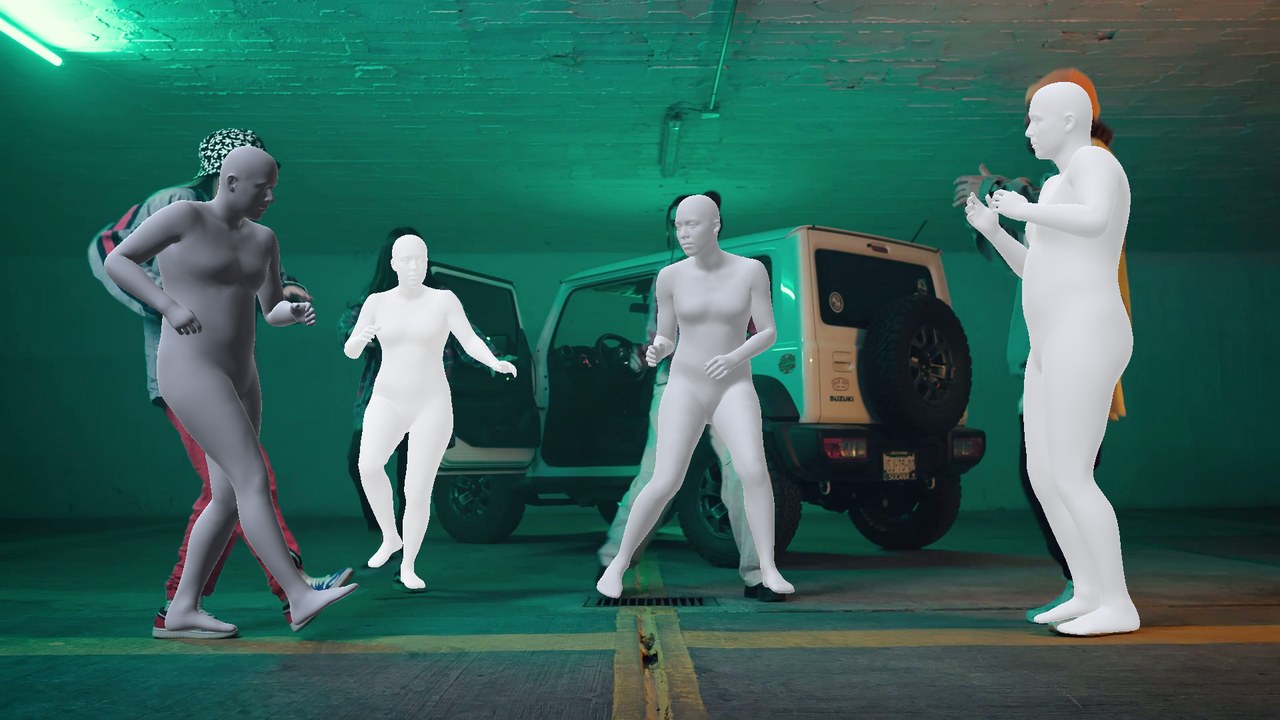
InstantHMR recovers the 3D body of every person in an image or video: pose, body shape, 70 keypoints in 2D and 3D, and the full MHR body mesh. It is a small, fast model (20-32 M parameters) that outputs the same MHR body as ComfyUI's SAM 3D Body, so its result plugs into the native SAM 3D Body nodes for smoothing, rendering and 3D export.
Nodes
| Node | What it does |
| --- | --- |
| Load InstantHMR Model | loads an InstantHMR checkpoint from models/detection |
| Run InstantHMR Prediction | predicts one MHR body per person box and outputs MHR_POSE_DATA |
| InstantHMR Live Capture | live 2D and 3D preview from a camera that can drive a rigged character or a VMC app, with recording; outputs the recorded clip as VIDEO |
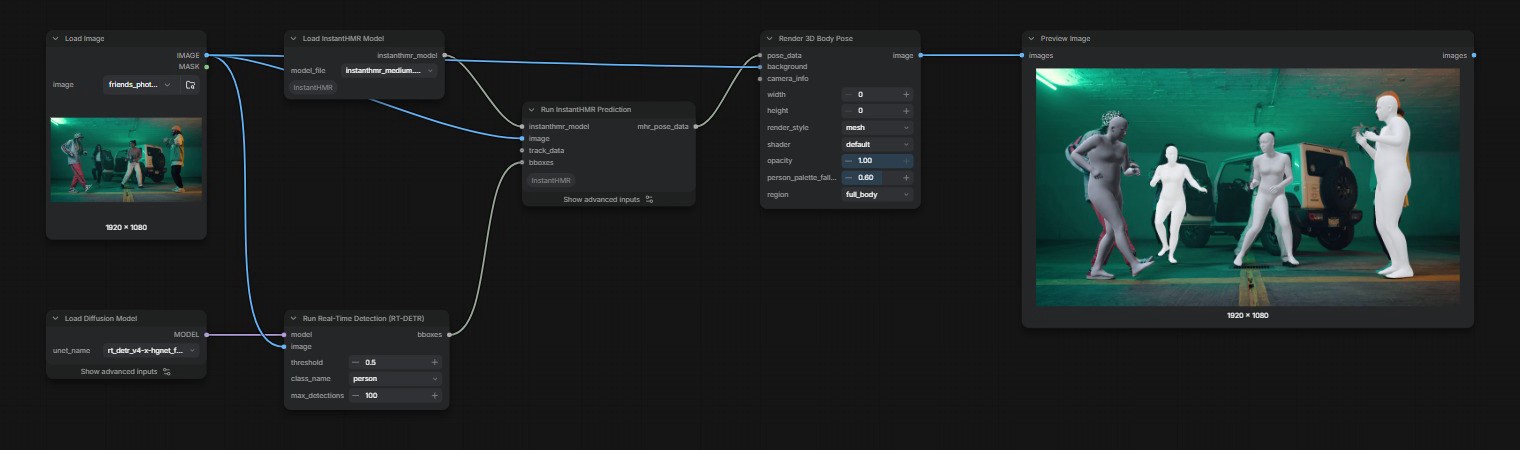
Run InstantHMR Prediction takes person boxes from RT-DETR Detect (class person) or tracks from SAM3 Video Track; with neither, the whole frame is one person. fov is the vertical field of view in degrees; connect MoGe through MoGe Geometry To FOV for the camera of a video, or leave it at 0 for a focal of 1.05x the image diagonal.
The output works with the native nodes:
Smooth SAM3D Body Pose Datafor video jitterRender 3D Body Pose: mesh, silhouette, OpenPose 2D/3D, SCAILCreate 3D Animation File: animated GLB in theopenposeandscailstyles. Thebody_meshandbones_onlystyles and BVH read the MHR rig from asam3d_body_modelinput, so connect a SAM 3D Body loader for those.
Live capture
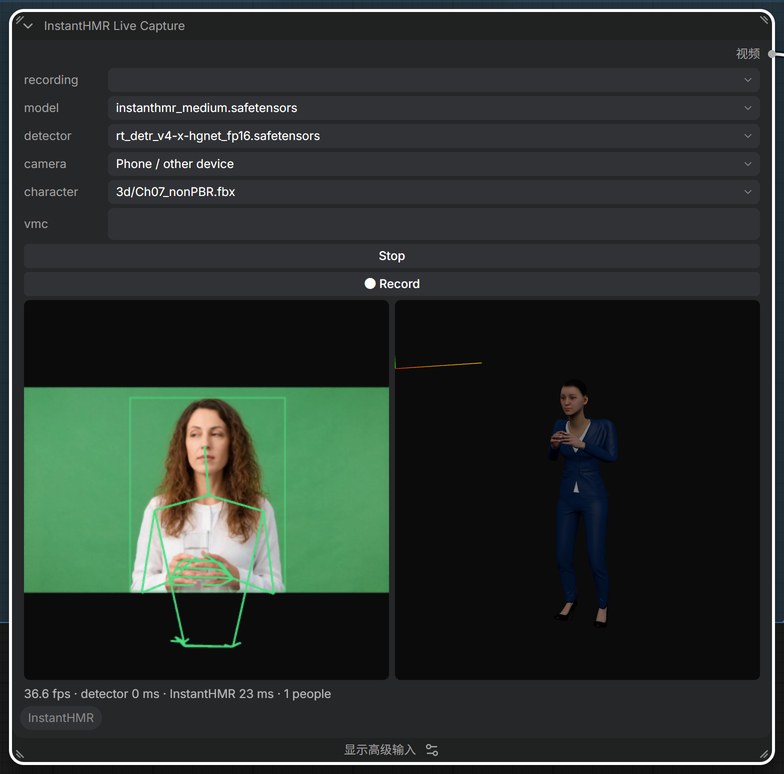
InstantHMR Live Capture runs RT-DETR and InstantHMR on a camera feed while you watch: the camera image with the 2D skeletons on the left, the 3D bodies on the right (drag to orbit). Pick the InstantHMR model, the RT-DETR detector and the camera in the node, then press Start. These settings are saved with the workflow.
cameraThis device uses the webcam of the browser showing ComfyUI; both views show it mirrored, like a video call. Recordings and VMC keep the real left and right.cameraPhone / other device shows a QR code. Scan it with a phone on the same network; the phone page streams its camera and shows the skeletons, while the node shows the 3D view.● Recordrecords the incoming frames toinput/instanthmr_live/. The new clip is selected in therecordinglist, and running the workflow outputs it asVIDEO, ready forGet Video Components→Run InstantHMR Predictionand the rest of the pipeline (example_workflows/instanthmr_live.json).smoothingsteadies the body between frames: while you hold still it stays put, fast moves still come through. Higher is steadier and lags a little more on slow moves; 0 shows the raw per-frame result. The 3D view, the character and VMC all use the smoothed pose.detect_every(advanced input) runs the detector every N frames and reuses its boxes in between; the detector is the slowest step, so 2-3 keeps the preview smooth.fov(advanced input) works like the prediction node'sfov.characterlists rigged characters (.fbx,.glb,.gltf,.vrm) found in theinputfolder, for exampleinput/3d/. Pick one and the 3D view drives it instead of the MHR body, one copy per person. Bones are matched by name for Mixamo, Unreal and similar rigs, and from the humanoid table for VRM. T-pose and A-pose characters both work; the character is scaled to the performer's leg length.vmc: typehost:portof an app that receives the VMC protocol (VSeeFace, Warudo, VNyan, VMC Link for Blender, VMC4U for Unity) to stream the first person as a humanoid avatar pose, for example127.0.0.1:39539. ComfyUI sends it, so the address is seen from the computer running ComfyUI. Clear the field to stop.- In Blender: install VMC Link, import a T-pose character (for example a Mixamo FBX), apply its rotation and scale (Object > Apply > All Transforms), pick the armature in the VMC Link panel and press Start Receiver. Start Recording there keys the motion onto the armature. For Mixamo rigs, set these in VMC Link's manual bone mapping (Advanced): UpperLeg → UpLeg, LowerLeg → Leg, Toes → ToeBase, Chest → Spine1, UpperChest → Spine2, and the fingers → HandThumb1–3, HandIndex1–3 and so on (Little → HandPinky).
Browsers open a camera only on localhost or over HTTPS. For a phone, start ComfyUI with a certificate, for example a self-signed one:
openssl req -x509 -newkey rsa:2048 -nodes -days 825 -keyout key.pem -out cert.pem -subj "/CN=ComfyUI" -addext "subjectAltName=IP:192.168.0.10"
python main.py --listen 0.0.0.0 --tls-keyfile key.pem --tls-certfile cert.pem
Put your computer's LAN address in subjectAltName, open ComfyUI at https://<address>:8188, and accept the certificate warning once on the computer and once on the phone.
Models
| File | Backbone | 3DPW PA-MPJPE (mm) | Licence |
| --- | --- | --- | --- |
| instanthmr_nano.safetensors | HGNetV2-B0 | 46.6 | SAM License, non-commercial |
| instanthmr_tiny.safetensors | HGNetV2-B1 | 44.0 | SAM License, non-commercial |
| instanthmr_small.safetensors | HGNetV2-B2 | 41.7 | SAM License, non-commercial |
| instanthmr_medium.safetensors | HGNetV2-B4 | 40.0 | SAM License, non-commercial |
| instanthmr_medium_commercial.safetensors | HGNetV2-B4 | 50.7 | SAM License |
Download them from Hugging Face and put them in models/detection. Each file holds the network and the MHR body rig it is trained on, so no other model is needed. All weights are under the SAM License, since they are trained on SAM 3D Body annotations and contain parts of its checkpoint. nano, tiny, small and medium are also for non-commercial use only; medium_commercial is trained on commercially usable images and allows commercial use under the SAM License terms.
Converting the released ONNX files
The upstream release ships ONNX graphs on Hugging Face. scripts/convert_onnx.py turns one into a checkpoint for this pack, taking the MHR rig from ComfyUI's SAM 3D Body checkpoint (sam_3d_body_dinov3_bf16.safetensors). It needs onnx, and checks the result against the ONNX graph when onnxruntime is installed. From the ComfyUI folder:
pip install onnx onnxruntime
python custom_nodes/ComfyUI-InstantHMR/scripts/convert_onnx.py instanthmr-medium.onnx \
    models/detection/sam_3d_body_dinov3_bf16.safetensors models/detection/instanthmr_medium.safetensors \
    --body mhr-body.onnx
Example workflows
example_workflows/instanthmr_image.json: RT-DETR boxes on a photo, rendered as meshes over the image.example_workflows/instanthmr_video.json: the SAM 3D Body video template with InstantHMR: SAM3 tracks, MoGe FoV, smoothing, a rendered video and a SCAIL GLB.example_workflows/instanthmr_live.json: the same pipeline on a clip recorded withInstantHMR Live Capture.
Tips
- InstantHMR is trained on whole people. On close-ups that cut the body at the chest the pose stays good, while the mesh can sit a few percent off the person in the image; full-body shots line up closely.
- For several people in a video, use SAM3 tracks so each person keeps the same index across frames, which the smoothing node relies on. Tracks whose predicted body mostly falls outside their own SAM3 mask, such as a raised arm detected on its own, are dropped. When you know how many people are in the clip, set
max_objectsinRun SAM3 Video Trackto that number. - Smaller models (
nano,tiny) are faster and less accurate; the network takes about 1 ms per person on a desktop GPU, so the detector and tracker set the speed of a workflow. - For facial expressions, add
Face Expression to SAM3D BodyafterRun InstantHMR Prediction, with a model fromLoad SAM3D Body Model. It reads the faces with MediaPipe and drives MHR's expression blendshapes, so the rendered mesh and GLB / BVH export carry the expression. InstantHMR itself predicts body, hands and shape.
Credits
InstantHMR by Mohamed Adjel, Kahina Chalabi and Vincent Bonnet (paper); code under Apache-2.0, weights under the SAM License. The body model is Meta's MHR (Apache-2.0). Demo footage from Mixkit.