
ComfyTV
LibTV-style Canvas pipeline for ComfyUI
Nodes (190)
Composition boxes, grids, and broadcast-safe padding — without leaving the graph
Turn footage into cartoon, charcoal, emboss, or halftone — no model, no prompt, no waiting
Grab a sound from your ComfyTV asset library and hand it to the audio chain
Pull an image from your ComfyTV project library without touching the input folder
Bring a 3D model into ComfyTV's Scene3D pipeline, preview included
Stop retyping the same prompt — pull it from your asset library instead
Get footage into a ComfyTV pipeline from the project library, not a drag-and-drop gamble
Is your audio loud enough for YouTube? This stage tells you — and flags every silence too
Trim an audio track to an exact time range in one stage
Feed it any audio as an impulse response
Stitch audio together without a hard cut
Turn a sine-sweep recording into a usable impulse response
Three denoise modes on one node
Make the music dip when someone talks — real sidechain ducking, no audio tool required
Compressor, gate, limiter, de-esser — one node, four ways to stop your audio misbehaving
From a mountain canyon to a robot voice — presets that get you there in one click
The parametric EQ with a graph inside the node — drag bands, hear the change
The classic way to load audio in ComfyTV — straight from the input folder
Normalize to YouTube, Spotify, or just 'not annoying' — LUFS loudness inside ComfyUI
Put a live audio waveform on your video — the 'music video' look in one node
Find every beat, onset, or note in a track — then drive your video from it
Four faders and a pan knob — ComfyTV's Audio Mix is the glue for your soundtrack
Phaser, flanger, chorus, and friends — Audio Modulation is the guitar pedal rack
Noise Reduction (Spectral) — the hiss-killer that samples your silence first
Audio Picker — the node that lets you pick the take, not re-run the chain
Audio Reactive — turn your track's kick drum into video parameters
Audio Repair — the de-clicker, de-clipper, and hum-killer in one stage
Audio Saturate — the character knob for your sterile-sounding mixes
Audio Split Export — slice a track into files by its silence, automatically
Audio Split — one marker, two halves
Music Stage — type a vibe, get a local song (no Suno, no API key)
Audio Stem Split — pull vocals, drums, bass, and everything else apart
Audio Stereo — widen it, center it, or swap the channels entirely
Audio Sweep (ESS) — the test tone that captures your room's fingerprint
Audio Time / Pitch — speed it up, pitch it down, or run it backwards
Demux · Audio Track — pull the sound out of a video clip
Demux · Silent Video — the same clip, with the soundboard ripped out
Audio Visualize — turn your track into an image the video pipeline can use
Turn your Blender scene into a video clip the AI pipeline can chew on
Render a still from Blender straight into your ComfyUI graph
Blender Scene is a workbench, not a Run button — here's how it fits
← ComfyTV Audio — hand a ComfyTV track to any normal ComfyUI audio node
← ComfyTV Image — hand a ComfyTV image to any standard ComfyUI node
← ComfyTV Mask — turn a ComfyTV image's alpha into a real MASK tensor
Getting ComfyTV text back into normal ComfyUI
Export a ComfyTV video back to normal ComfyUI nodes
Getting native audio into a ComfyTV pipeline
The only way to get a normal IMAGE into a ComfyTV pipeline
Bring an entire image batch into ComfyTV, then pick one
Feed any STRING into ComfyTV stages as a snapshot
Put a native ComfyUI video on the ComfyTV canvas
Turn a flat clip into a card floating in 3D space
The colorist's grade, in ten portable numbers
Type a chord chart, get a played-out backing part
RGB-split glitch and lens fringe, one channel offset at a time
Cheap-lens color fringing with one slider
A metronome that renders as audio
Six instant color tools that never touch the queue
Knock out any color cast, not just green screen spill
A before/after slider that isn't a node that does anything
The whole clip, on one image
Warp footage onto a screen by dragging four corners
Crop in the browser, instantly, with no queue
Custom Stage
One-click background removal on the ComfyTV canvas
Kill the green halo that ruins every greenscreen key
Generate a whole shot-by-shot video from one node
Remove an object with LaMa, and nothing else moves
Animate any parameter with a line of math
Privacy-mask footage with zero model downloads
Self-referential video weirdness, vertigo mode included
Real motion blur from static shots, shutter-angle style
Render every video effect in one pass instead of re-encoding forever
Broken-pixel chaos that's actually tunable
The bloom you actually want, without burning a diffusion pass
Volumetric light shafts from a couple of dials
Fix color casts with zero dials to turn
Slice one image into tiles without touching the queue
Drag flat, hazy footage up by spreading its tones
Recolor a specific color range, not the whole frame
Image Concat Stitches Your Images in the Browser
Tell a model what to change, in plain words
The front door of every ComfyTV image pipeline
Pick the good one out of a batch, without the thumbnail whack-a-mole
The text-to-image node that starts every ComfyTV pipeline
Fan one image into a batch of angles or scenes
Paint a mask, describe the fix, and the rest of the frame doesn't move
Mirror-symmetric psychedelia with six knobs
Turn one still into a slow push-in video, no model required
ComfyTV's Keyer and why matte ≠ composite
The stage where your key finally lands on a background
A full 2D layer editor that lives inside a ComfyUI node
ComfyTV's Lens Distort
Lens flare without a $50 plugin or a single API call
Paint with moving lights without a long exposure
Render a 3D model as line art, ready to feed a ControlNet
Stop scrubbing 4K footage and edit the small version
Delete the specks your segmentation mask left behind
Turn one painted frame of roto into a whole shot
Build a PBR material — or let a vision model guess it from a photo
Look at the key before you trust the composite
Matte Morphology fixes what the keyer can't
Normal and AO maps from high-poly to low-poly
Mesh Boolean without a modeling app
The geometry workshop ComfyTV hides in one dropdown
Mesh Primitive makes the raw shapes everything else carves
Draw MIDI on a piano roll that lives in seconds, not beats
The instant flip that needs no GPU and no Run button
Turn a prompt (or a photo) into an orbitable GLB without leaving the canvas
Load 3D models into ComfyTV and bind materials to individual mesh parts
Click points on your clip and get track data you can pin things to
Grab a 3D camera widget, drag it around, and the AI re-renders your subject from that angle
Algorithmic reverb with all the knobs a hall deserves
Aging your clean render into worn archive footage, artifact by artifact
Drag the canvas edges outward and let the model finish the picture
Clone, blur, or paint directly on your video, over a chosen time window
Aim inside a 360° panorama and capture that exact viewport as a flat image
One panorama, a ring of cameras, and a whole storyboard in a single Run
Upload an HDRI or generate a whole surround from a prompt
Sparks, embers, smoke, and magic dust — a 2D particle system with a live preview
Render test cards, gradients, noise, and countdowns — the clip you didn't know you needed
The IBK-style keyer for green screens even a simple chroma key can't hold
Flatten your clip to a few flat colors for a screen-print or cel-shaded look
Lay out a real poster with real typography, because diffusion can't spell
The one ComfyTV node that does nothing but keeps everything organized
Map luminance onto a colormap and fake a thermal camera in one pass
Film Grain That Doesn't Look Like Noise (ComfyTV Regrain)
A 3D Light Ball in a Comfy Node
The Comfy Node That Rotates Images Without Running Anything
Bezier Masks That Track Time
A DCC Scene, Multi-Camera Capture, and a Keyframed Camera Path — Inside One Node
Cut Detection That Skips the NLE
A Piano Roll That Lives on the Canvas (No MusicXML Required)
ComfyUI Finally Speaks Sheet Music
Making Robot Music Sound Played by a Person
The Nuke-Style Keyer That Made It Into ComfyUI
The Old Photoshop Trick, Done Per-Zone
Stitch Clips and Transitions Into One Cut
The SoundFont Player That Turns Scores Into Audio
Procedural Stencils That Sweep Across the Frame
The Time-Warp Effect That's More Than a Trend
Text-to-Speech Inside ComfyUI, Without the Pain
Turn One Image Into Its Pieces With SAM3
The Humble Dust-Blemish Fixer
Bake Lens Distortion Into a Map, Not Into Every Frame
Warp Video Any Way You Like With a Map
A full storyboard workbench — layers, onion skin, animatic export — inside one node
Make your footage blink to a beat — without paying per node
Speech-to-text subtitles, generated from the clip's own audio
Burn real SRT or WebVTT subtitles onto a clip
One text box that feeds your whole canvas, with @media references
Generate text with a local LLM, wired into the rest of your canvas
Speed ramps, freeze frames, and remapped time without leaving the graph
Animated title cards with typewriter effect, timed and faded
A GAN upscaler that ships its own workflow — and knows what scale means
Stop 360 footage from wobbling without losing the whole sphere
Turn equirectangular 360 footage into a normal-looking shot, or re-point it
The blur/sharpen node that knows gaussian and bilateral are not the same thing
Green screen removal that also handles the spill
The trim node with frame-accurate keyboard nudging
A proper colorist's node, not another brightness slider
A 39-blend-mode compositor that does keyframed transforms too
Glue clips together in the order you drag them
Crop by dragging a rectangle on the node itself
The curves node for when a contrast slider is too dumb
Rescue interlaced footage without installing an entire video stack
Clean grain and banding without touching the source
Grab the still that seeds the next clip
Mark a timeline, get a batch of stills back
Fake the high-fps camera you don't own
The quiet entry point for every ComfyTV edit chain
The gradient wipe, from radial iris to your own artwork
Bake a finished look onto every frame
Drop the music bed onto the silent clip
Keep the take you like, drop the rest
The -1 trick is the whole game
Fix the sideways phone clip in one click
The colorist's instruments, one frame at a time
Slow it down without the chipmunk soundtrack
One clean cut, two clips, zero drama
The fast deshake when you don't need the full treatment
When the fast deshake isn't enough
ComfyTV's video generator — LTX 2.3 under the hood, and why you won't see a tensor
Seven one-click looks when you don't want to build an FX chain
Pan, zoom, rotate — with keyframes and real motion blur
57 ways to join two clips
The quiet fix for AI video's worst habit (silence)
Ripples on demand, and it's a real wave sim — not a canned filter
ComfyTV's heat-haze and VHS-wobble cheat code
Real bokeh on AI video — if you feed it a depth map
English | 简体中文
ComfyTV
ComfyTV — the canvas-based app that truly belongs to ComfyUI.
ComfyTV turns ComfyUI into a TapNow / LibTV-style canvas app — and keeps going, all the way to a full media workbench. Every operation is its own node; results flow downstream automatically. Chain stages into a complete flow: generate → pick → edit → composite → export, across image, video, audio, music, panorama, 2D layers, and 3D.
Today that means ~190 stages, each with its own reference page.
📖 Documentation: comfytv.org — bilingual (English / 中文) guides plus a per-node reference for every stage.
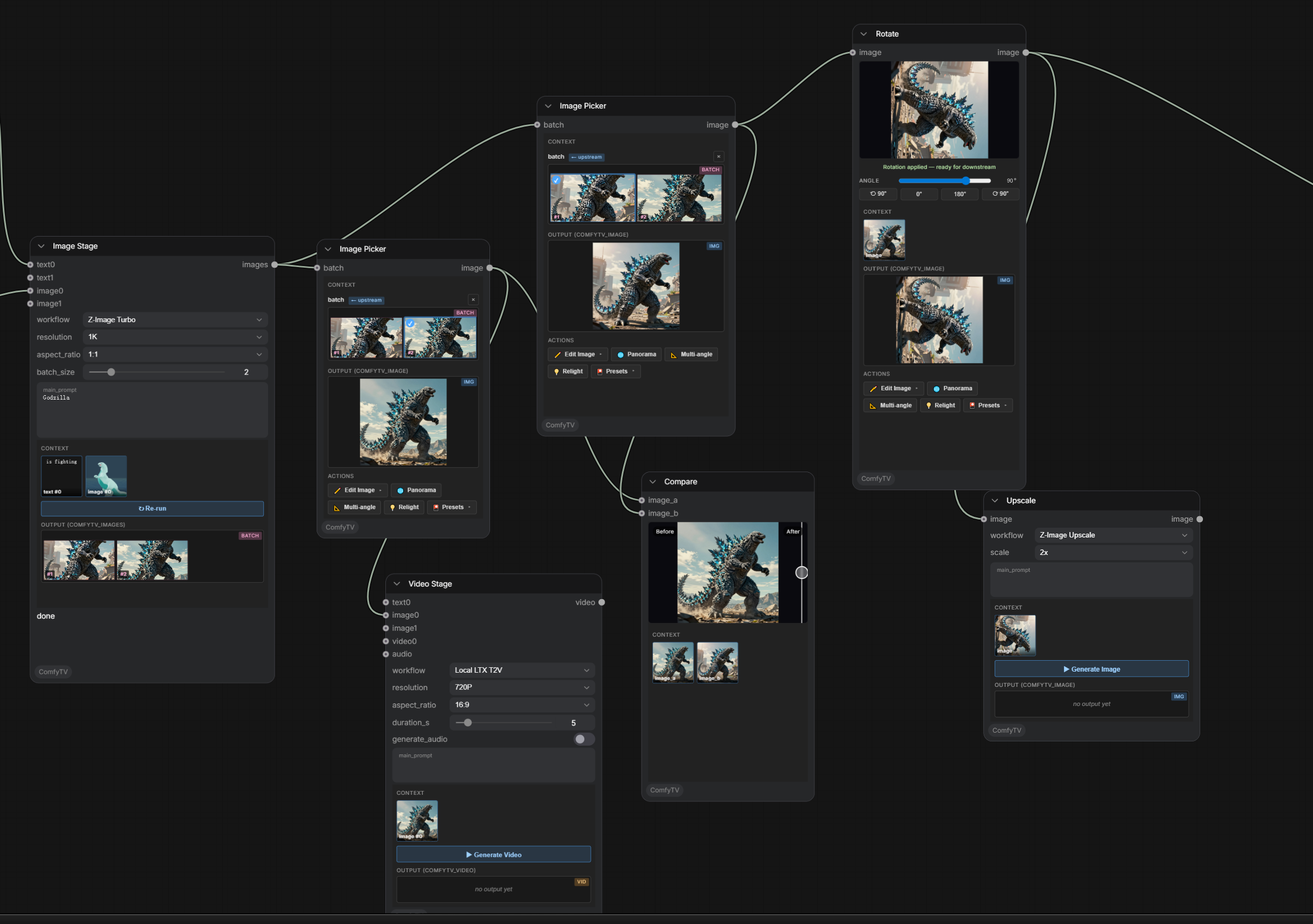
Core ideas
- Per-node Run: each stage runs on its own, not through ComfyUI's global queue. Downstream stages consume the snapshot of an upstream stage's last output, so re-running one node doesn't drag the whole chain with it.
- Project-centric: stages belong to a project; every output is kept with full history and restores on reload.
- Your models, your workflows: a curated set of workflows ships under
workflows/<kind>/, all running against your own local models. Import any ComfyUI workflow as JSON, bind its inputs in the sidebar GUI editor, save per-stage presets, and star a default workflow per stage. - Part of the ComfyUI ecosystem: subgraphs and third-party plugins just work; Bridge nodes connect any plugin into a ComfyTV pipeline; remote ComfyUI machines can be registered as extra runners (Servers tab) with capability preflight.
- Libraries built in: a project asset library (images / video / audio / 3D models), a resource library (LUTs, fonts, SoundFonts), and reusable prompt fragments — all in the 9-tab sidebar, and all reachable from any prompt via
@references. - Eagle as your archive: connect the local Eagle app — browse and search your Eagle library in the sidebar, drag items straight onto the canvas, and optionally auto-archive every render into per-project Eagle folders, each carrying its full generation provenance (workflow / prompt / parameters) in the annotation. Guide →
- Rich in-node editors: many stages embed a real editor in the node — layer editor, storyboard workbench, piano rolls, 3D viewports, scopes — with live previews on most video effects.
- Agent-native: an embedded Bot, a 45-tool MCP server, and installable Agent Skills — see the Agents section below.
- Two looks: the classic node shells, plus an experimental content-first V2 skin (light + dark) behind a Settings toggle.
What's inside
Image
Generation (text-to-image, image-to-image, edit, inpaint, outpaint, erase, upscale, relight, variations, multi-angle 3D camera), instant browser-side tools (crop / rotate / mirror / grid split), SAM-based part splitting + mask cleanup, line-art extraction, contact sheets.
2D layer editor & storyboard
A full layered editor inside a node: raster, text (real font parsing), vector-shape, parametric-fill (solid / gradient), and adjustment layers; per-layer masks; selections with magic wand, boolean ops and morphology; non-destructive transforms; undo; PSD import & export. The storyboard workbench reuses the same engine per board and adds onion skin, timeline playback, animatic / GIF / PDF / ZIP export, and Fountain script import.
The editor engine is developed as its own project, Pentrado — try it standalone in your browser at pentrado.com.
Video (~100 nodes)
- Edit: clip, split, concat, crop, resize, speed / reverse, rotate, scene detect, frame extraction, proxy generation with transparent proxy playback.
- Color: color wheels / curves / LUT / ASC CDL / HueCorrect / selective color / histogram EQ / gray world.
- Keying: chroma key plus a full keyer suite — PIK, Keyer, Despill, Color Suppress, KeyMix, matte monitor / morphology, Select0r.
- Roto & tracking: bezier roto masks with feather, point motion tracking, optical-flow mask propagation, corner pin, paint strokes with clone brushes.
- Compositing: 39 blend modes, keyframed transforms, 57 xfade transitions + luma wipes, time remap, sequencing.
- FX: glow, god rays, particle system, lens distortion (multiple lens models), chromatic aberration, lens flare, Z-defocus, old film, regrain, glitch, kaleidoscope, wave warp, water, light graffiti, slit scan, feedback, strobe, stylize, and more.
- 360: projection + stabilization for 360° footage, Card3D, STMap UV remapping + STMap generator.
- Infrastructure: parameter expressions, FX Chain (stack many effects, render in a single pass), scopes (waveform / vectorscope / histogram), titles / subtitles / annotations, speech-to-text subtitle generation.
Audio (30+ nodes)
Dynamics (compressor / gate / limiter / de-esser), parametric EQ with graph UI, loudness normalization, denoise / repair, echo, modulation, stereo tools, time-stretch / pitch-shift, saturation; convolution reverb — including capturing the sound of your own room — and an algorithmic reverb; stem split into vocals / accompaniment / drums / bass / other (built in, nothing extra to install), noise reduction, beats & notes extraction; mix, crossfade, sidechain ducking, segment export, analysis and visualization; audio-reactive parameter automation and meter overlays for video.
Music (symbolic)
Score stage with MusicXML and engraved notation, piano-roll score and MIDI editors, performance rendering with style profiles, a SoundFont (SF2/SF3) synthesizer, click track, and chord accompaniment — composition → performance → synthesis → mixing on one canvas.
Panorama
360° viewer with single- and multi-viewport capture; text-to-panorama and image-to-panorama workflows.
3D
Scene3D DCC-style stage (multi-camera, keyframed camera paths, multi-channel viewport capture), 3D model generation and loaders, a geometry workshop (mesh ops, booleans, primitives, map baking), PBR material stage with per-part material binding, and line-art rendering from 3D.
Compose & flow
Auto-spawned pickers (image / audio / video), A/B compare, track-style sequence assembly, and a Director console: a shot-by-shot clip timeline where every clip is generated, with per-clip transitions, a shared reference cast for cross-shot consistency, content-addressed caching (only changed clips re-render), and a master timeline with ruler, playhead and unified film preview. A storyboard → per-shot image pipeline is on the roadmap.
Install
cd ComfyUI/custom_nodes
git clone https://github.com/jtydhr88/ComfyTV
Restart ComfyUI. ComfyTV nodes appear under the ComfyTV category in the Add-Node menu, grouped into sub-categories (Project / Input / Generate / Image / Panorama / Video / VideoFX / Keying / Compose / Timeline / Audio / AudioFX / Music / 3D / Material / Storyboard / Bridge).
ComfyUI Desktop / macOS / multiple ComfyUI installs
If you use ComfyUI Desktop, are on macOS, or have more than one ComfyUI on your machine, the relative cd ComfyUI/custom_nodes above can easily drop you into the wrong instance (a common symptom: the clone succeeds but ComfyTV never shows up). Install into the running instance by its absolute path instead:
- Find the running instance. Read the ComfyUI startup log — it prints the base path it loaded from, e.g.
/Users/you/Downloads/ComfyUI (1)/ComfyUI. That is the instance to install into. - Clone straight into that instance's
custom_nodes, quoting the path (quotes are required if it contains spaces or parentheses). Keep it on one line so no stray line-continuation\splits it apart:
If you must wrap it across lines, thegit clone https://github.com/jtydhr88/ComfyTV.git "/Users/you/Downloads/ComfyUI (1)/ComfyUI/custom_nodes/ComfyTV"\has to be the very last character of the line with nothing after it — a stray\at the end of thecdline, for example, silently joins the next command sogit clonenever runs on its own. - Verify the layout. The first level of
custom_nodes/ComfyTV/must contain__init__.py. If you instead see a nestedComfyTV/ComfyTV/…, move the inner folder up one level. - Fully restart the ComfyUI backend (quit and relaunch the Desktop app, or stop and restart the server — not just a browser refresh). On success the startup log shows ComfyTV loading and registering its nodes.
User guides
The full documentation lives at comfytv.org — guides plus a reference page for every node, in English and 中文. The guide sources are also browsable in docs/:
| Guide | What it covers |
|-------|----------------|
| getting-started.md | Install, the canvas basics, your first generation, per-node Run, picking from a set |
| sidebar.md | The 9-tab sidebar: workflow config, asset library, Eagle browser, prompt fragments, stage manager, presets, resources, servers, settings — plus @ references in prompts |
| eagle.md | The Eagle integration: browsing your Eagle library, drag-to-canvas import, sending assets, auto-archive with provenance, AI search |
| generate.md | Text / Image / Video / Audio generation, choosing a model, running |
| image-tools.md | Crop, Rotate, Mirror, Inpaint, Erase, Cutout, Upscale, Outpaint, Grid Split, Variations, Multiangle, Relight |
| panorama.md | Loading/viewing a 360° panorama, capturing single + multi viewports |
| video-and-audio.md | The video & audio suites: editing, color, keying, compositing, FX, audio processing |
| making-music.md | Composition → performance → synthesis → mixing on one canvas: MusicXML, every Music-node parameter, reverb presets |
| compose.md | Pickers, A/B Compare, and the bigger arranging tools |
| roadmap.md | What works today vs TODO (backend workflows not yet built) |
| models.md | Per-workflow model files + folder locations + download URLs for everything shipped under workflows/ |
| custom-workflows.md | Adding your own ComfyUI workflow as a JSON file (no Python edits) |
| sidebar-config-editor.md | The sidebar GUI for editing how a stage's inputs map to its workflow nodes |
| bridges.md | Connecting third-party ComfyUI plugins (mesh2motion, IPAdapter, …) via Bridge nodes |
| mcp.md | The MCP endpoint: 45 agent tools, connecting clients, agent patterns |
| bot.md | The embedded sidebar chat agent: providers, attachments, skills |
| skills.md | Agent Skills: the format, managing them, writing your own |
Agents — Bot, MCP server, Skills
ComfyTV is built to be driven by AI agents as well as by hand. Three pieces, all managed from the Settings tab (MCP and the Bot are off by default):
ComfyTV Bot — a chat agent docked beside the canvas (the agent button at the top right), using the same panel the ComfyUI frontend ships for its cloud agent. Describe what you want; it builds nodes, runs workflows, waits for renders, looks at the results with real vision and iterates. It drives your locally installed agent CLI — Claude Code, Codex, Qwen Code — or any OpenAI-compatible local LLM server; no API keys are ever stored. Image / video attachments, @ mentions of nodes, per-provider model choice, persistent conversations. Guide →
MCP server — a built-in MCP endpoint at /comfytv/mcp with 45 tools: read the live canvas, build / run / wait on stages, inspect results (view_image returns actual pixels), edit the native ComfyUI graph (graph_edit / graph_run — any node from any plugin), and manage workflow bindings. It runs inside the ComfyUI server process — no extra install:
claude mcp add --transport http comfytv http://127.0.0.1:8188/comfytv/mcp
Canvas writes are executed by the open ComfyTV page (Comfy Desktop or a browser). The endpoint shares ComfyUI's trust boundary — expose port 8188 carefully. Pairs with the official comfy-mcp for the machine layer (installing nodes, downloading models). Guide →
Agent Skills — installable SKILL.md instruction packs (the open Agent Skills format) that teach agents your methodologies. Every agent above discovers them automatically; invoke one explicitly from the Bot by starting a message with /<name>, or from Claude Code as a /mcp__comfytv__<name> slash command. One skill ships built in: h3-cinematic-director, a director-grade MiniMax H3 production methodology. Guide →
Quick tour
- Drop a Generate → Image node, type a prompt, pick
Local SD1.5as the workflow, click Run. It produces a set of images and auto-spawns an Image Picker. - Pick a frame in the picker. Its
✏️ Edittoolbar offers Inpaint / Crop / Rotate / Mirror / Grid Split / Upscale / Outpaint / Cutout. - Crop / Rotate / Mirror happen entirely in the browser — no Run needed.
- Wire the picked image into a Generate → Video node (
Local LTX I2V) and Run. - Chain a few VideoFX nodes (color, glow, grain, …) into an FX Chain and render them in a single pass — most effects preview live right in the node.
- Use Compose → Compare to A/B the before/after.
License
GPL-3.0 — see LICENSE. The bot panel under src/agent/native is
vendored from ComfyUI_frontend
(GPL-3.0); src/agent/native/UPSTREAM records the commit it was taken from and
python scripts/agent/sync_native.py refreshes it.