
comfyui-ollama-image-to-prompt
A custom node for ComfyUI that leverages local Ollama vision models to generate detailed prompts or Danbooru-style tags from images.
Nodes (1)


Overview
The Ollama Image/Text to Prompt node enables local Vision-Language Models (VLMs) and LLMs to run within ComfyUI workflows. It operates as a dual-purpose node:
- Vision Mode: Processes input images to produce natural language descriptions, Danbooru tags, or video motion instructions.
- Text Mode: Processes input text keywords without an image to expand them into detailed prompts and tags.
The node includes 10 distinct architectural presets for processing inputs.
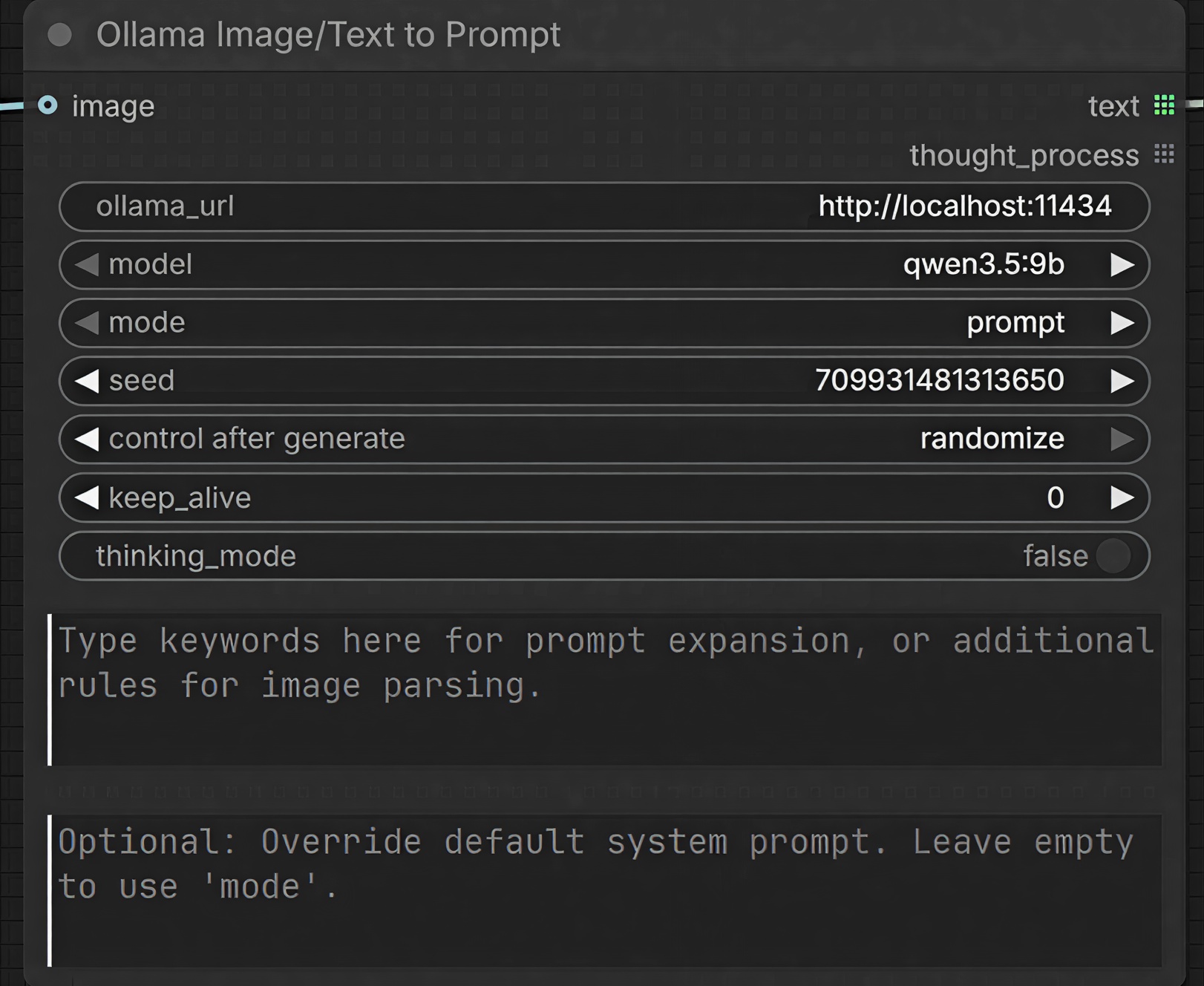
Setup
- Install Ollama locally and pull a required model (e.g.,
qwen3.5:9b). - Clone the repository into your ComfyUI custom nodes directory:
cd ComfyUI/custom_nodes/ git clone https://github.com/jluo-github/comfyui-ollama-image-to-prompt.git cd comfyui-ollama-image-to-prompt pip install -r requirements.txt - Restart ComfyUI.
Usage
The node can be configured for either image-based or text-based processing:
- Vision Setup (Image to Prompt): Provide an input to the
imageinterface and select a processing mode (e.g.,prompt). - Text Setup (Text to Prompt): Leave the
imageinterface disconnected, define input text via thekeywordsparameter, and select an expansion mode (e.g.,expand_prompt).
Processing Modes
| Mode | Function |
| :--- | :--- |
| prompt | Extracts dense, highly-descriptive prose for models such as Flux or Qwen. |
| danbooru_tags | Extracts comma-separated Booru-style tags, formatted for models like NoobAI or Illustrious. |
| anima | Extracts character identities and visual features into stylized Anima prompts. |
| expand_prompt | Expands concise user keywords into rich, full-sentence prompts. |
| expand_tags | Expands concise user keywords into dense Danbooru tag formats. |
| expand_anima | Expands user keywords to modify extracted image features into stylized Anima prompts. |
| image_edit | Generates structured editing instructions for image-to-image models. |
| video_prompt | Generates physics-based, cinematic instructions for video generation models. |
| video_storyboard | Generates shot-by-shot directorial sequences. |
| json_extract | Extracts high-detail structured output configured as JSON. |
Configuration Parameters
| Parameter | Default | Description |
| :--- | :--- | :--- |
| ollama_url | http://localhost:11434 | The endpoint URL for the local Ollama instance. |
| model | qwen3.5:9b | The local vision or language model to execute. Options: qwen3.5:9b, qwen3.5:4b, qwen3-vl:8b, qwen3-vl:4b, gemma4:e4b, gemma4:e2b. |
| mode | prompt | The architectural preset to use for processing. |
| seed | 0 | Defines the randomization seed for generation determinism. |
| keep_alive | 0 | Model VRAM cache duration in minutes (-1 for indefinite caching). |
| thinking_mode | False | Enables reasoning logs for supported models. Disabling this bypasses the <think> generation phase. |
| keywords | (Empty) | Provides base keywords for Text Mode expansion, or appends instructions/rules during Vision Mode processing. |
| custom_prompt | (Empty) | Overrides the preset system prompt format. |
Outputs
text(STRING): The generated prompt or formatted tag output.thought_process(STRING): The captured latent reasoning trace ifthinking_modeis enabled for compatible models.
License
Made with ❤️ for the ComfyUI community