
comfyui-auto-anime-prompts
ComfyUI custom nodes for loading anime character prompts with aesthetic suffix support
Nodes (8)
Batch anime generation without the click loop
Cross every character with every style, and let ComfyUI sort it out
Turn one TXT file into a thousand different anime prompts
The Xiaohongshu-aesthetic prompt node that drags a mood slider into your workflow
A government-compliant prompt for Qwen-Image-Edit, so you don't have to write it
Crop and scale any image to an actual US passport photo size
Turn one passport photo into a printable 4×6 sheet, no photo editor needed
Read the quality-tag presets this pack is hiding, and bend them to your taste
🎨 Auto Anime Prompt Loader for ComfyUI


Custom ComfyUI nodes for loading anime character prompts with dynamic generation — automatic actions, backgrounds, and camera effects. Optimized for Illustrious-XL.
✨ Features
- Dynamic Prompt Formula: Quality Tags + Character + Action + Background + Camera
- Style Presets: 7 curated styles with matching negative prompts
- Random Generation: 21 actions, 14 backgrounds, 8 camera effects
- Batch Processing: Generate multiple unique prompts at once
- Character + Style Combiner: Combine characters with styles in nested loops
Installation
# Navigate to your ComfyUI custom_nodes directory
cd ComfyUI/custom_nodes

# Clone the repository
git clone https://github.com/jluo-github/comfyui-auto-anime-prompts.git
Sample files (sample_1girl_v1.txt and style_names_v1.txt) are included in the prompts/ folder for testing.
- (Optional) Add your own TXT files to the
prompts/directory - Restart ComfyUI
📸 Workflow Examples
Single Prompt Workflow
Use Auto Prompt Loader for single image generation with dynamic elements.
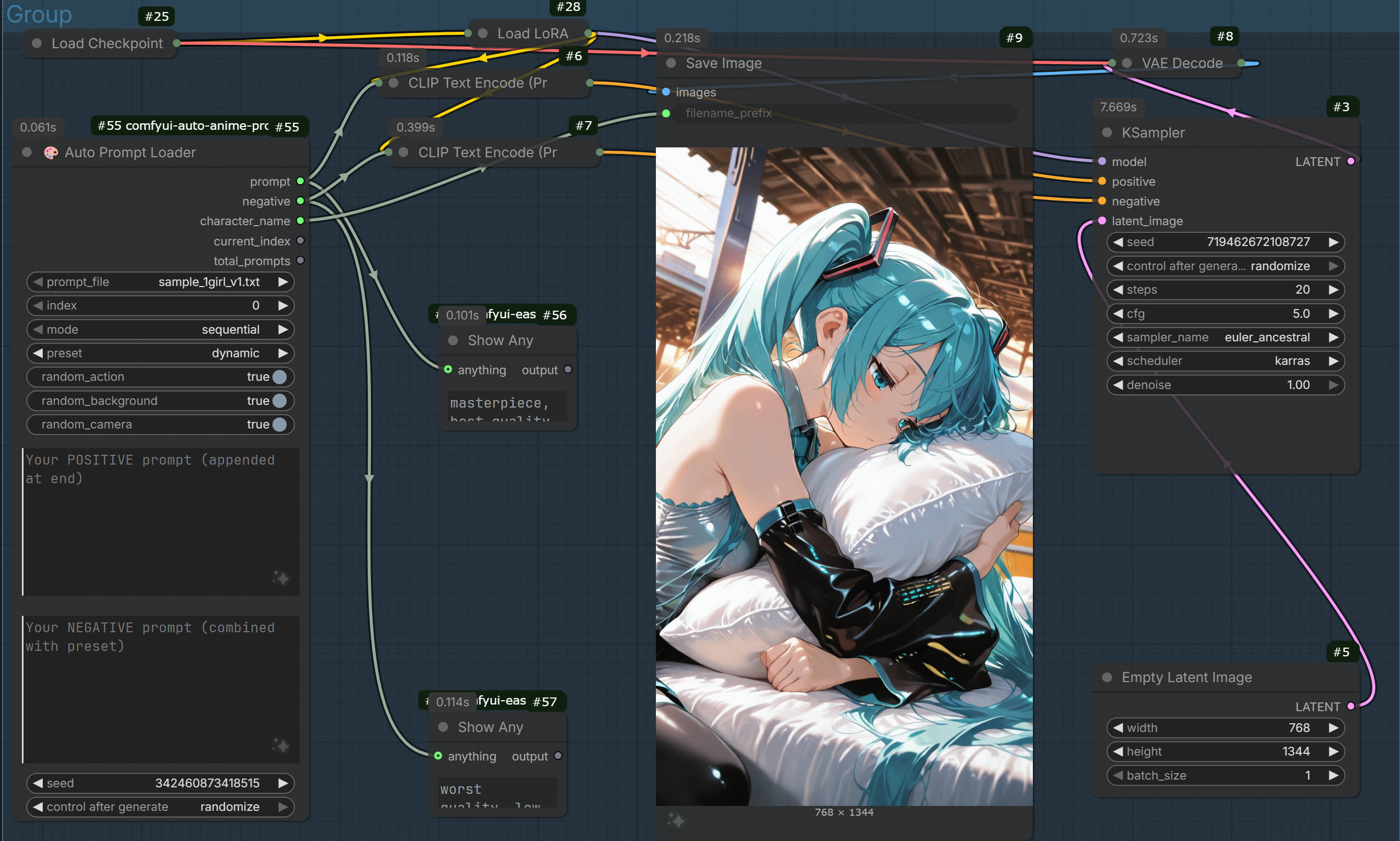
📥 Download: basic_workflow.json
Batch Prompt Workflow
Use Auto Prompt Batch for generating multiple unique images at once.
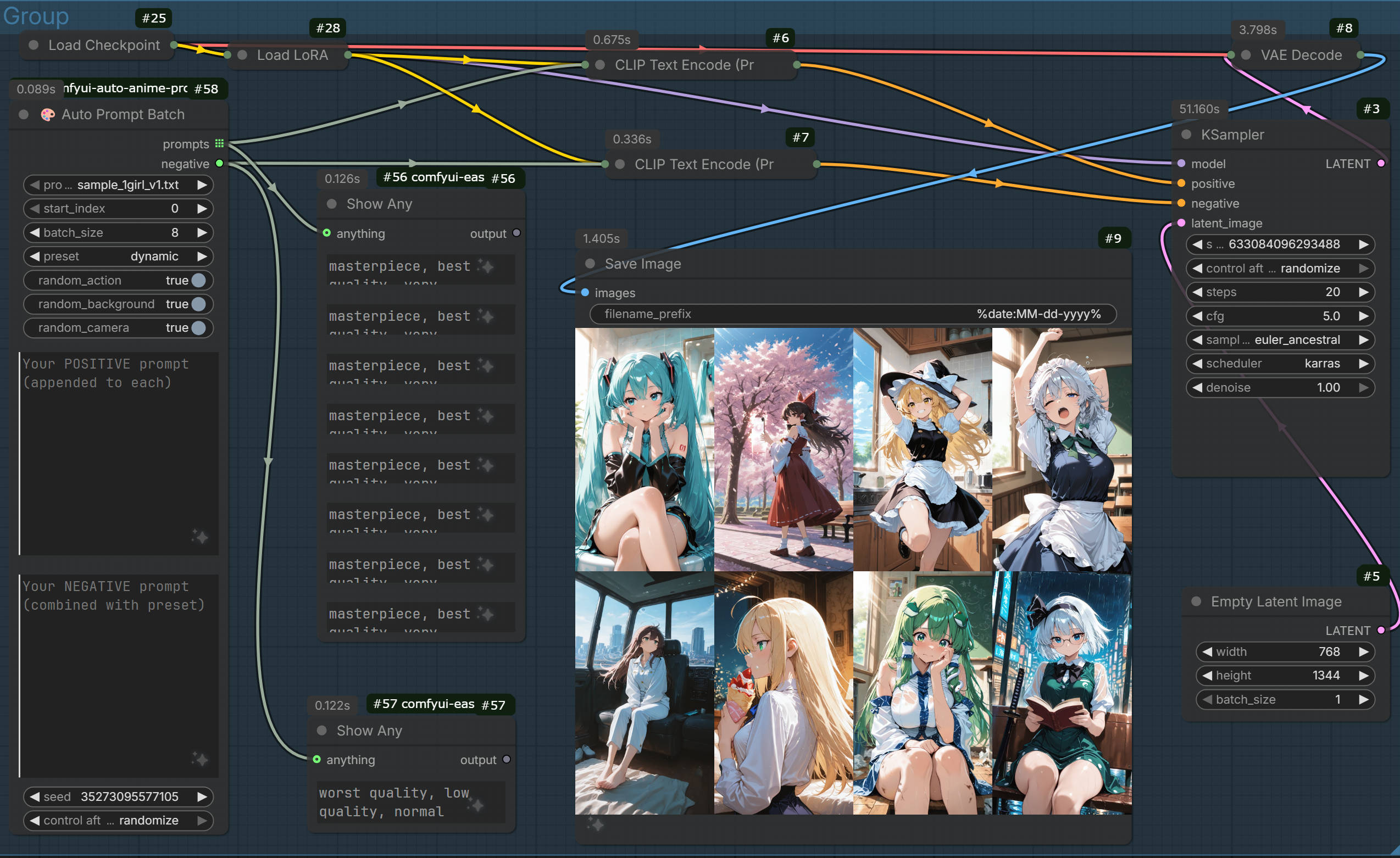
📥 Download: batch_workflow.json
RedNote Style Workflow (New!)
Use Auto Prompt RedNote for highly aesthetic, social-media style generations with managed presets.
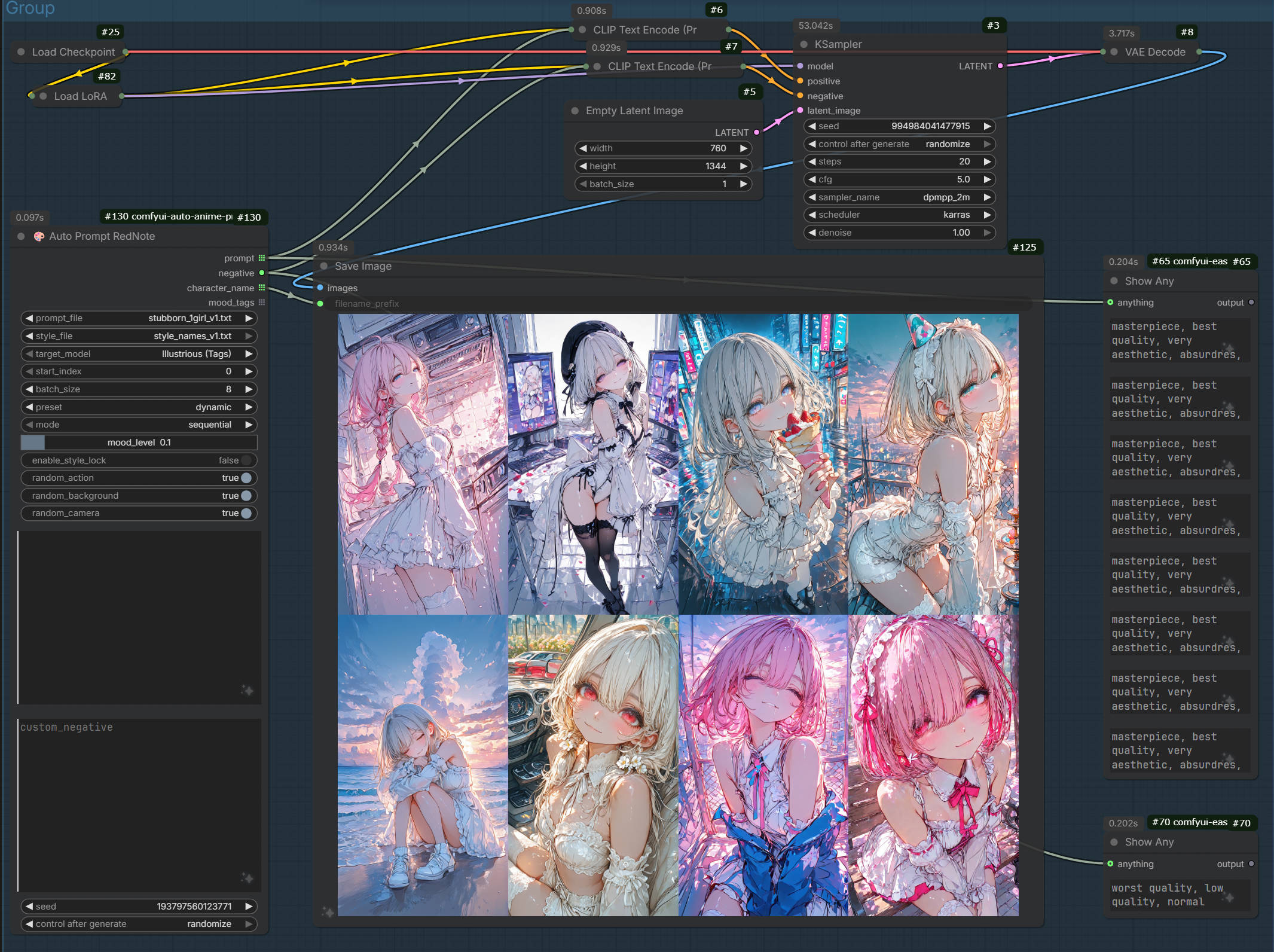
📥 Download: rednote_workflow.json
Combiner Workflow
Use Auto Prompt Combiner to combine characters from one file with styles from another.
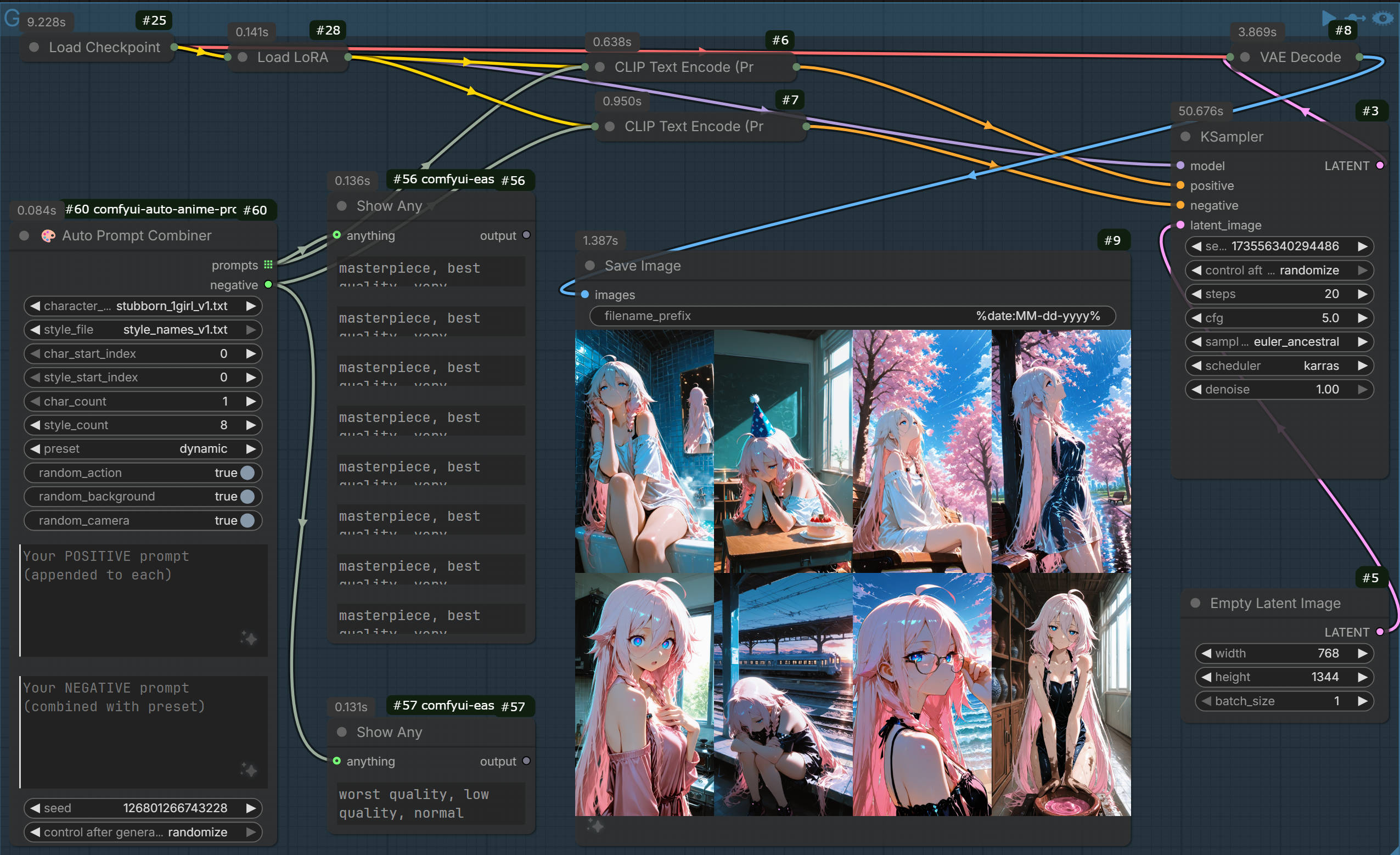
📥 Download: combiner_workflow.json
Nodes
🎨 Auto Prompt Loader
Loads a single prompt with dynamic generation.
| Input | Type | Description |
|-------|------|-------------|
| prompt_file | dropdown | Select from available TXT files |
| index | int | Prompt index (sequential mode) |
| mode | dropdown | sequential or random |
| preset | dropdown | Style preset (see presets below) |
| random_action | bool | Add random action/pose |
| random_background | bool | Add random background |
| random_camera | bool | Add random camera effects |
| custom_positive | string | Your additional positive tags |
| custom_negative | string | Your additional negative tags |
| seed | int | Random seed for reproducibility |
| Output | Type | Description |
|--------|------|-------------|
| prompt | string | Complete positive prompt |
| negative | string | Combined negative prompt |
| character_name | string | Character name from TXT |
| current_index | int | Selected prompt index |
| total_prompts | int | Total prompts in file |
🎨 Auto Prompt Batch
Outputs multiple unique prompts for batch generation.
| Input | Type | Description |
|-------|------|-------------|
| prompt_file | dropdown | Select from available TXT files |
| start_index | int | Starting index for batch |
| batch_size | int | Number of prompts to output |
| preset | dropdown | Style preset |
| random_action | bool | Add random actions (unique per batch) |
| random_background | bool | Add random backgrounds (unique per batch) |
| random_camera | bool | Add random camera effects (unique per batch) |
| custom_positive | string | Your additional positive tags |
| custom_negative | string | Your additional negative tags |
| seed | int | Random seed |
| Output | Type | Description |
|--------|------|-------------|
| prompts | list[string] | List of unique prompt strings |
| negative | string | Combined negative prompt |
🎨 Auto Prompt Combiner
Combines characters with styles using nested loops.
| Input | Type | Description |
|-------|------|-------------|
| character_file | dropdown | TXT file with character prompts |
| style_file | dropdown | TXT file with style prompts |
| char_start_index | int | Starting index for characters |
| style_start_index | int | Starting index for styles |
| char_count | int | Number of characters to use |
| style_count | int | Number of styles per character |
| preset | dropdown | Style preset |
| random_action | bool | Add random actions |
| random_background | bool | Add random backgrounds |
| random_camera | bool | Add random camera effects |
| custom_positive | string | Your additional positive tags |
| custom_negative | string | Your additional negative tags |
| seed | int | Random seed |
| Output | Type | Description |
|--------|------|-------------|
| prompts | list[string] | Combined prompts (char_count × style_count) |
| negative | string | Combined negative prompt |
🎨 Auto Prompt RedNote
Specialized node for RedNote/Xiaohongshu aesthetic with mood control and specific style management.
| Input | Type | Description |
|-------|------|-------------|
| prompt_file | dropdown | Character prompts TXT file |
| style_file | dropdown | Style prompts TXT file |
| target_model | dropdown | Illustrious (Tags) or Flux/Qwen (Natural) |
| start_index | int | Starting index |
| batch_size | int | Number of images to generate |
| preset | dropdown | Style preset |
| mode | dropdown | sequential or random |
| mood_level | float | 0.0 (Happy) to 1.0 (Angry/Sad) |
| enable_style_lock | bool | Lock style to character index |
| random_action | bool | Add random action |
| random_background | bool | Add random background |
| random_camera | bool | Add random camera effects |
| custom_positive | string | Additional tags |
| custom_negative | string | Additional negative tags |
| seed | int | Random seed |
| Output | Type | Description |
|--------|------|-------------|
| prompt | list[string] | Generated prompts |
| negative | string | Negative prompt |
| character_name | list[string] | Character names |
| mood_tags | list[string] | Applied mood tags |
✨ Suffix Editor
Preview and customize style presets.
| Input | Type | Description |
|-------|------|-------------|
| preset | dropdown | Select style preset |
| use_custom | bool | Override preset with custom values |
| custom_suffix | string | Custom positive suffix |
| custom_negative | string | Custom negative prompt |
| Output | Type | Description |
|--------|------|-------------|
| suffix | string | Positive suffix string |
| negative | string | Negative prompt string |
Style Presets
| Preset | Description |
|--------|-------------|
| none | Raw output, no quality tags |
| standard | Default Illustrious-XL quality tags |
| dynamic | Action shots with motion blur and wind |
| atmospheric | Cinematic lighting, depth of field, soft focus |
| flat | Vibrant colors, vector style, bold lines |
| dreamy | Pastel colors, soft lighting, ethereal atmosphere |
| gothic | Dark theme with high contrast shadows |
Each preset includes a matching negative prompt automatically applied.
TXT Format
Tab-separated format (one per line):
tags<TAB>character_name
Example:
hatsune miku,vocaloid,1girl,aqua eyes,blue hair,twintails	初音未来
hakurei reimu,touhou,1girl,brown hair,red eyes,hair bow	博丽灵梦
Dynamic Generation
When enabled, these elements are randomly added to each prompt:
Actions (55+)
- Daily Life: Reading, smartphone, headphones, school bag
- Motion: Running, jumping, reaching out, dynamic poses
- Emotions: Laughing, surprised, annoyed, shy, determined
- Cozy/Resting: Sleeping, hugging plushie, sitting, lying on grass
- Cute/Girly: Eating toast, peace sign, twirling
Backgrounds (14)
- Libraries, cyberpunk streets, fantasy forests
- Beaches, cathedrals, rooftops, underwater scenes
- Modern interiors: apartments, cafes, classrooms
Camera Effects (8)
- Angles: from above, from below, dutch angle
- Lighting: cinematic, backlight, rim light
- Shots: close-up, wide shot, silhouette
Development
# Install dev dependencies
pip install ruff pytest

# Run linting
ruff check .

# Run tests
pytest tests/ -v
License
Made with ❤️ for the ComfyUI community