
ComfyUI-AudioX
ComfyUI custom nodes for AudioX/AudioX-MAF video-to-audio generation
Nodes (3)
ComfyUI-AudioX
ComfyUI custom nodes for AudioX — generate sound effects and background music from video, powered by HKUSTAudio/AudioX.
Great thanks to ZeyueT/AudioX.
Sample Workflow
See examples/AudioX_sample_workflow.json.
The workflow contains two parallel paths:
[ComfyUI Load Video] ──► VIDEO ──► [AudioX Video to Audio] ──► AUDIO ──► [Preview Audio]

[VHS Load Video] ──► IMAGE ──► [AudioX Images to Audio (VHS)] ──► AUDIO ──► [Preview Audio]
                  fps ↗ (from VHS Video Info)
Import it via ComfyUI → Load → select the JSON file, or find it in ComfyUI's template browser.
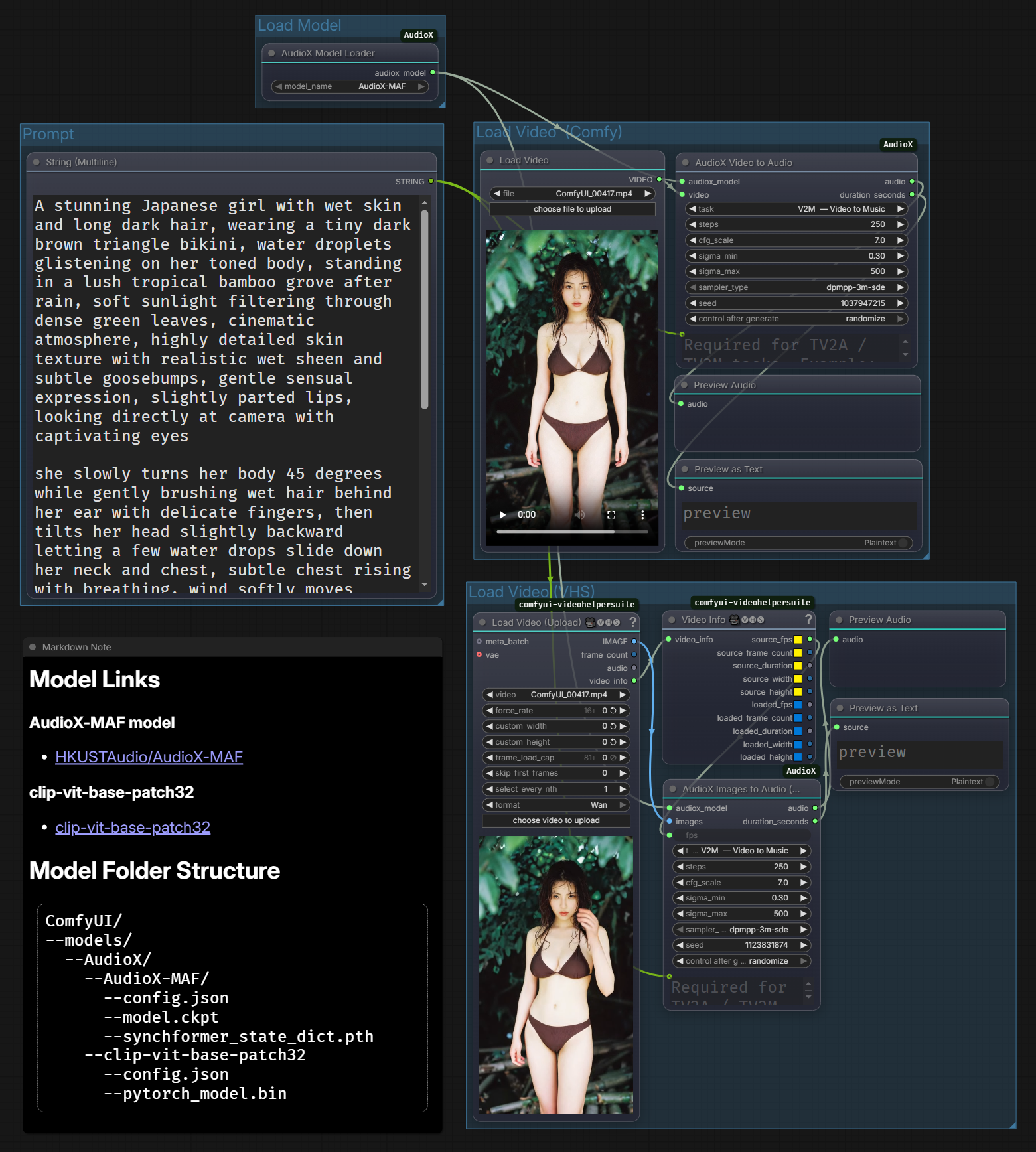
Nodes
| Node | Input | Output | Description |
|------|-------|--------|-------------|
| AudioX Model Loader | — | AUDIOX_MODEL | Load a local AudioX model |
| AudioX Video to Audio | VIDEO | AUDIO | Generate audio from ComfyUI's Load Video node |
| AudioX Images to Audio (VHS) | IMAGE | AUDIO | Generate audio from frame sequences (VideoHelperSuite etc.) |
Supported Models
| Model | Notes | |-------|-------| | AudioX-MAF | Recommended — best quality, uses Synchformer visual encoder | | AudioX-MAF-MMDiT | MMDiT variant (in progress, not tested yet) | | AudioX | Base model, no Synchformer (in progress, not tested yet)|
Tasks
Install from ComfyUI Manager Extensions
Search 'ComfyUI-AudioX' in ComfyUI Manager Extensions.
All dependencies will be installed automatically. If you encounter numpy conflicts after installation, see the troubleshooting section below.
Install manually:
1 — Clone the node
cd ComfyUI/custom_nodes
git clone https://github.com/jinxishe/ComfyUI-AudioX.git
2 — Install dependencies
cd ComfyUI-AudioX
pip install -r requirements.txt
Note:
torch,torchvision, andtorchaudioare not inrequirements.txtbecause ComfyUI already manages them.
3 — Download models
Create the directory structure under ComfyUI/models/AudioX/:
ComfyUI/models/AudioX/
├── clip-vit-base-patch32/       ← shared CLIP (download once)
│   ├── config.json
│   └── pytorch_model.bin
└── AudioX-MAF/
    ├── config.json
    ├── model.ckpt
    └── synchformer_state_dict.pth
# AudioX-MAF (recommended)
huggingface-cli download HKUSTAudio/AudioX-MAF \
    --local-dir "ComfyUI/models/AudioX/AudioX-MAF"

# Shared CLIP model (avoids repeated downloads)
huggingface-cli download openai/clip-vit-base-patch32 \
    --local-dir "ComfyUI/models/AudioX/clip-vit-base-patch32"
Restart ComfyUI after downloading.
Tasks
| Task | Description | custom_prompt required? |
|------|-------------|:---:|
| V2A — Video to Audio | Generate sound effects matching the video | No |
| V2M — Video to Music | Generate background music matching the video | No |
| TV2A — Text + Video to Audio | Guide sound effects with a text prompt | Yes |
| TV2M — Text + Video to Music | Guide music generation with a text prompt | Yes |
Parameters
| Parameter | Default | Description |
|-----------|---------|-------------|
| steps | 250 | Diffusion sampling steps. Higher = better quality, slower |
| cfg_scale | 7.0 | Classifier-free guidance scale |
| sigma_min | 0.3 | Minimum noise level |
| sigma_max | 500 | Maximum noise level |
| sampler_type | dpmpp-3m-sde | Sampling algorithm |
| seed | -1 | Fixed seed for reproducibility; -1 = random |
Notes
- Models are trained on 10-second clips. Videos shorter than 10 s are padded with the last frame; the output audio is trimmed to the actual video duration.
- GPU memory: ~16 GB VRAM recommended (tested on RTX 4060 Ti 16 GB).
- The
AudioX Images to Audio (VHS)node requires ffmpeg on the system PATH to assemble frames into a temporary MP4. - CLIP
UNEXPECTEDkey warnings in the log are harmless — they appear becauseCLIPVisionModelWithProjectionloads only the vision head from a full CLIP checkpoint. - Tested on Python 3.12 and CU128.
Troubleshooting
Dependency Conflicts
If you encounter dependency conflicts after installation:
NumPy version conflict (e.g., dctorch requires numpy<2.0.0 or opencv-python requires numpy>=2.0):
# Upgrade numpy to latest version
pip install "numpy>=2.0.0"
This is safe — most packages work fine with numpy 2.x even if they specify older version constraints.
Protobuf conflict (descript-audiotools requires protobuf<3.20):
# Downgrade protobuf if needed
pip install "protobuf<3.20,>=3.9.2"
These dependency warnings from pip are usually safe to ignore if the nodes are working correctly.
Credits
- Original model: HKUSTAudio/AudioX — HKUST Audio Lab
- Sampling: k-diffusion — Katherine Crowson
- Great thanks to ZeyueT/AudioX.
License
MIT — see LICENSE