
ComfyUI Extension
Visual Model Merge
A ComfyUI custom node that provides an interactive curve editor for SDXL model block weight merging.
jeremy-strang/ComfyUI-VisualModelMerge
Nodes1
On cloudLocal install
Categoryadvanced/model_merging/visual
Stars11
Updated8 months ago
Readme
<h1 style="display:flex; align-items:center; gap:12px;">
<img src="icon.svg" style="width:96px; height:96px;">
<span>Visual Model Merge SDXL</span>
</h1>
A ComfyUI custom node that provides an interactive curve editor for SDXL model block weight merging.
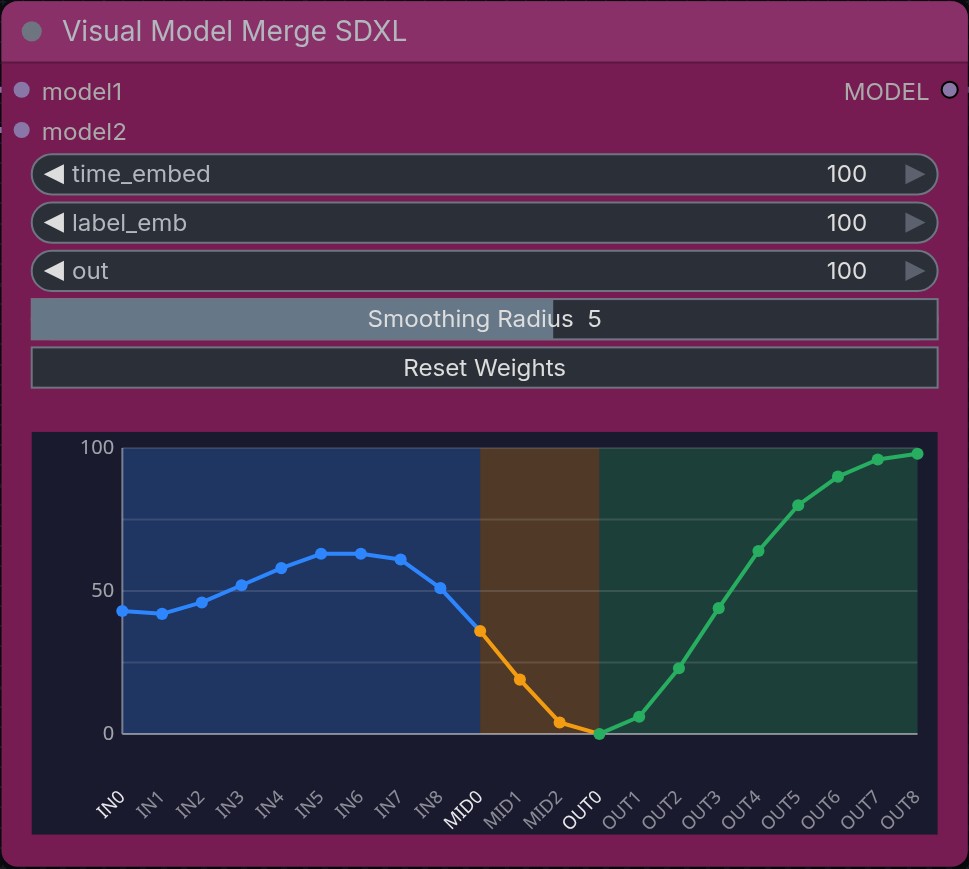
Features
- Visual curve editor for controlling merge weights across 21 SDXL blocks (9 input, 3 middle, 9 output)
- Gaussian smoothing for natural curve adjustments
- Color-coded sections: Blue (IN), Orange (MID), Green (OUT)
- Additional controls for
time_embed,label_emb, andoutlayer weights
Installation
Install via the ComfyUI Manager, or you can clone this folder to your ComfyUI/custom_nodes/ directory and restart ComfyUI:
git clone https://github.com/jeremy-strang/ComfyUI-VisualModelMerge.git
Usage
- Add the Visual Model Merge SDXL node (found under
advanced/model_merging/visual) - Connect two SDXL models to
model1andmodel2inputs - Drag on the curve to adjust block weights (values 0-100, converted to 0.0-1.0 internally)
See examples/VisualModelMergeSDXL.json for a sample workflow.
Controls
| Action | Effect | |--------|--------| | Drag | Adjust curve with Gaussian smoothing applied to nearby blocks | | Shift + Drag | Edit only the single block under the cursor | | Smoothing Radius | Controls how many neighboring blocks are affected when dragging (1 = tight, 8 = wide) | | Reset Weights | Returns all 21 block weights to 100 |
Merge Behavior
- 100 = Use model 1's weights fully for that block
- 0 = Use model 2's weights fully for that block
- Values in between blend proportionally