
NodeForge
A node-authoring copilot for ComfyUI: describe a node in plain language, NodeForge retrieves an existing one or authors a new one through a sandboxed write→test→verify loop, and installs it only after you approve the code, the test report, and a before/after preview. Surfaced as a sidebar panel.
ComfyUI-NodeForge

Describe the ComfyUI node you need. NodeForge finds it if it already exists, and forges a brand-new one (tested, reviewed by you, and installed) if it doesn't.
Status: v0.2, pre-alpha. NodeForge is a ComfyUI sidebar panel. You type what you want in plain language; it checks whether a node already exists, and otherwise authors a new custom node, tests it in a sandbox, shows you the generated code plus a real before/after preview at an approval gate, and installs it as a reusable node only after you approve. The full loop has been run end to end, in the browser, producing a working installed node. It is early and there are rough edges; the honest limits are spelled out below.
See it in action
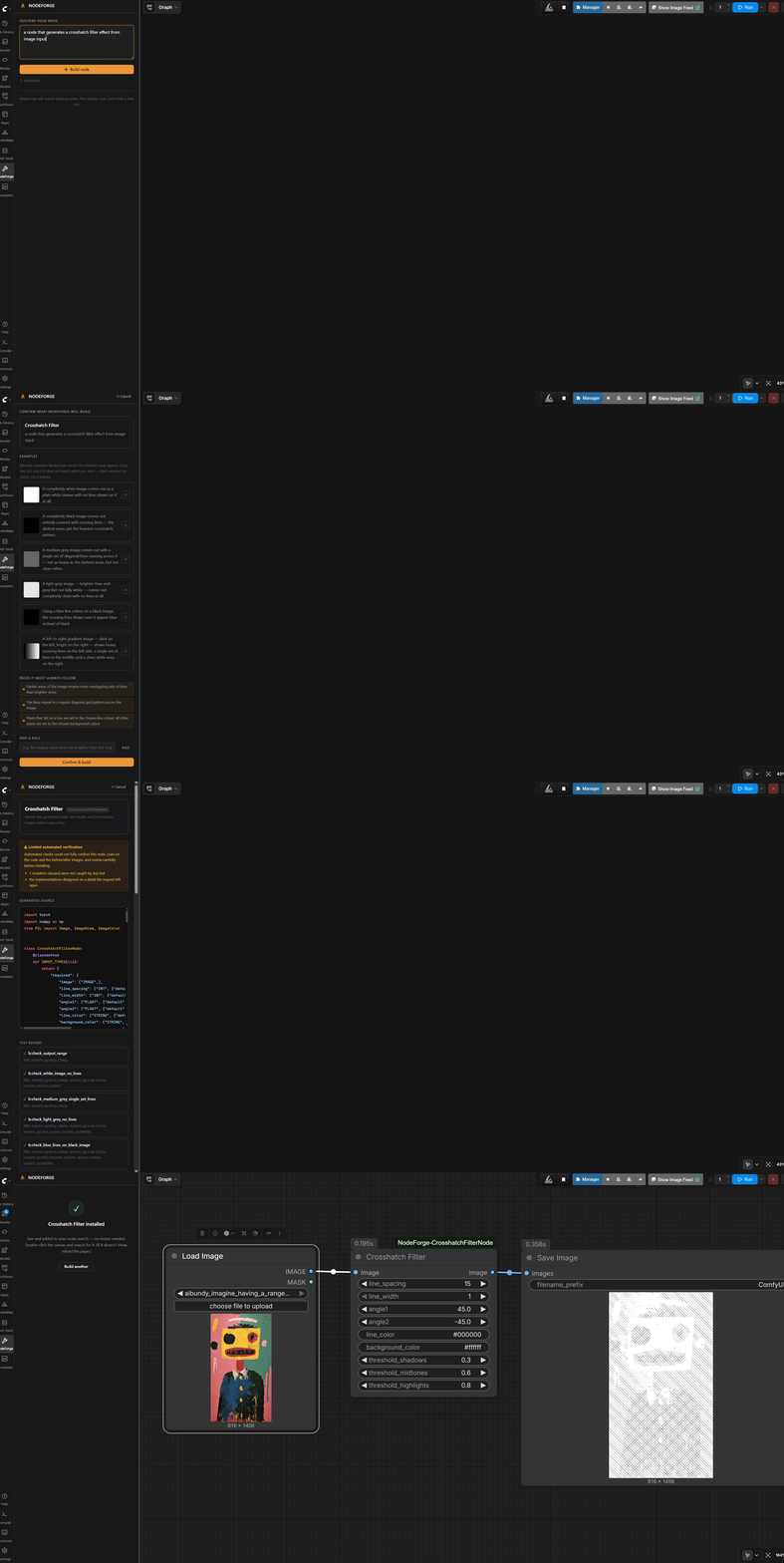
Describing a crosshatch filter in plain language, confirming what it will build, reviewing the generated code and a real before/after at the approval gate, and the installed node running on a photo, all inside ComfyUI and about a minute end to end:
What it is
ComfyUI has thousands of custom nodes, but two things still hurt: finding the one that does what you want, and the times when the operation you need simply does not exist as a node. "Go write a custom node" is a wall for most people.
NodeForge closes both gaps from a single plain-language description, inside ComfyUI:
- Find it first. It searches ComfyUI's built-in nodes and the community pack index, ranks the candidates, and if something already does the job it points you there instead of reinventing it.
- Forge it if it is missing. When nothing fits, it drafts a new custom node, runs it in a sandbox against real test images, shows you the code and a real before/after, and on your approval installs it as a normal, reusable node you can wire into any graph. It can appear in your node search without a restart.
The lineage is the self-authoring, skill-library agent pattern (Voyager, ADAS) applied to ComfyUI's executable node graph rather than to chat. A node is code; the graph is data; the agent closes the loop between them.
Why it is different
There are tools that let an LLM write node logic inline at runtime inside a single node. NodeForge is not that. The difference is the point:
- It tests what it writes (a sandboxed write, run, and self-check loop) instead of running unchecked code.
- It puts a human approval gate in front of installation. You see the code and a real before/after and decide.
- It produces a real, reusable, standalone node banked into your install, not throwaway code trapped inside one node that you re-prompt every time.
- It is retrieval-first, so it does not author a redundant node when ComfyUI or a community pack already does the job.
Install
NodeForge installs like any other ComfyUI custom node pack.
cd ComfyUI/custom_nodes
git clone https://github.com/jeremieLouvaert/ComfyUI-NodeForge
# restart ComfyUI
It needs an Anthropic API key for the authoring engine. Provide it either way:
- set the
ANTHROPIC_API_KEYenvironment variable, or - put the key as the only contents of
anthropic_api_key.txtin your ComfyUI root.
NodeForge registers zero graph nodes of its own. It adds a NodeForge tab to the right sidebar and a set of backend routes. After restarting, open the sidebar and click the NodeForge (wrench) tab.
Using the panel
- Describe the node you want, in plain language ("a node that gives an image a halftone print look").
- Find-first. NodeForge shows whether something already exists. If a built-in node or a community pack fits, it tells you; you can install that instead, or author a new node anyway.
- Confirm. Before writing any code, it shows you a few plain-language worked examples ("the darkest areas get the biggest dots") and the rules the node must always follow. These are how it will check itself. If one does not match what you want, drop it; otherwise just confirm. If a genuinely ambiguous convention comes up (which way a rotation turns, for instance), it asks you to pick.
- Review and approve. It generates the node, runs it in a sandbox, and shows you the generated code, the test results (and any honest caveats), and a real before/after on test images. Nothing is installed until you click Approve.
- Installed. On approval it banks the node into
custom_nodesand, when possible, registers it live so it shows up in your node search without a restart. Double-click the canvas and search for it.
The CLI engine underneath is also usable directly as a power-user backdoor (see below).
How verification works, honestly
This is the heart of the tool and the part worth being precise about.
The two hard guarantees:
- The generated code loads and runs in an isolated sandbox subprocess. The parent process never imports torch and never executes candidate code; everything risky runs in the sandbox child with a memory cap and a wall-clock kill. ComfyUI's own execution is the runtime oracle: did it import, did it run, is the output the right type, shape, and range.
- Nothing is installed until you approve it at the gate, after seeing the code and a real before/after. This is the security boundary, not a UX nicety.
Everything else is advisory. NodeForge tries to build a test battery with teeth (checks that catch deliberately broken variants) and tests several candidate implementations against your confirmed examples. When it can establish confidence, it shows you that it did. When it cannot, it does not dead-end; it presents the best runnable node with an honest "limited verification" note and the specific caveats, and lets you decide. The only outright failures are "could not understand the ask into a spec" and "could not generate code that even runs."
What "verified" does and does not mean. Verified means the node runs and matches the examples you confirmed, and you approved it after seeing it work. It does not mean the node is provably semantically correct. A plausible-looking node can still do the wrong thing, and the automated checks will not always catch it. The before/after at the gate is the real check, and it asks you to actually look. Treat the approval gate as a code review with a preview, not a rubber stamp.
Known limits
- Semantic correctness rests on your review. As above: the tool proves "it runs and matches your examples," not "it is correct." Look at the before/after.
- Live appear is best-effort. Banked single-file nodes register live in most cases; if one does not show up, a one-click restart (offered in the panel) or a page reload always works. Nodes that ship their own front-end JavaScript still need a reload.
- Retrieval is pack-level and provisional. Thresholds were calibrated on a small adjudication set; a generic ask can still rank a polished community pack above an equivalent built-in.
- The clarifying question is a backstop, not a guarantee. It asks when it detects a genuinely user-visible convention choice, but it does not catch every ambiguity; often it picks a sensible standard default instead.
- Cost and latency. Each author run makes several Anthropic API calls and takes a few minutes; an ambiguous operation can take longer. Cheaper and faster model tiering for the mechanical stages is the next priority.
The CLI (power-user backdoor)
The same engine runs from the command line, outside ComfyUI:
export ANTHROPIC_API_KEY=sk-ant-...
python -m nodeforge.cli "a node that splits an image into its luma and chroma channels"
Flags: --n (candidate implementations, default 3), --model, --yes (non-interactive), --force (overwrite an existing banked pack), --no-precheck (skip retrieval). Note: ComfyUI's embedded Python disables the repo import path, so run from the repo root or use a standard Python install.
Evidence trail
NodeForge was de-risked before it was built, and the artifacts ship with the repo:
probe/: capability and negative-control probes. A strong LLM drafted 5 non-trivial nodes (channel shuffle, luma-key mask, tile mosaic, unsharp mask, luma split), each verified against real torch by an independent numeric oracle covering the known traps (MASK[B,H,W]vs[B,H,W,C], separable-Gaussian conv, multi-output typing, Rec.709 luma). 5/5 correct, and 5/5 deliberately-broken variants caught (the oracles have teeth).benchmark/: a meta-validation harness that runs the verification model without the human to prove it builds teeth-having, non-over-strict test batteries from a spec alone (teeth 21/21, specificity 21/21).- Design docs:
docs/self-verification-model.md,docs/retrieval-model.md.
What has been verified end to end
- Live in ComfyUI: authored nodes register in
/object_infoand run via/prompt; a freshly approved node appears live in node search without a restart. - The full panel loop in the browser: describe, find-first, confirm, generate, sandbox-test, review code plus before/after, approve, installed and usable. This has been run successfully end to end.
- Retrieval routing: built-ins win over wrapper packs (SD3, ControlNet), related-but-not-exact asks surface candidate packs, novel asks proceed to author.
Roadmap
- Cheaper-model tiering for the mechanical stages to cut cost per run.
- Stronger semantic checks and clearer, plainer verification reporting.
- Node-level retrieval (currently pack-level only).
- Comfy registry distribution.
License
MIT. See LICENSE.