
ComfyUI-ForLoops
Real in-graph loops for ComfyUI, in the JkNodes category.
Nodes (4)
The close brace of your ComfyUI loop — and the secret to accumulating
The accumulator for your iterate-over-anything loop
Iterate over up to 50 of anything, typed automatically
Finally, a real for-loop that runs inside one Queue Prompt

JkNodes — ForLoop
🌐 English · Português
Real in-graph loops for ComfyUI, in the JkNodes category.
These nodes use ComfyUI's graph-expansion execution model, so an entire loop runs inside a single Queue Prompt. Every loop is an Open / Close pair, and everything placed downstream of the Open node (up to Close) is repeated once per iteration — including sink nodes such as Save Image or Preview.
Nodes
All four nodes live under the JkNodes category.
For Open / For Close
A counting loop, like Python range(start, end).
| Node | Inputs | Outputs |
|------|--------|---------|
| For Open | start, end, initial_value (optional) | flow, index, value |
| For Close | flow, value (optional) | value |
indexemitsstart, start+1, … , end-1(e.g.start=0, end=5→0,1,2,3,4).endis exclusive: the loop runsend − starttimes.
For Each Open / For Each Close
Iterate over up to 50 inputs of any type (like a typed "switch any"). Connect one input and the sockets/outputs adopt that type; a new empty slot is added automatically as you connect more.
| Node | Inputs | Outputs |
|------|--------|---------|
| For Each Open | value0 … value49 (dynamic), initial_value (optional) | flow, index, item, value |
| For Each Close | flow, value (optional) | value |
itemis the current element for this iteration.indexis the current 0-based position.
How to wire a loop
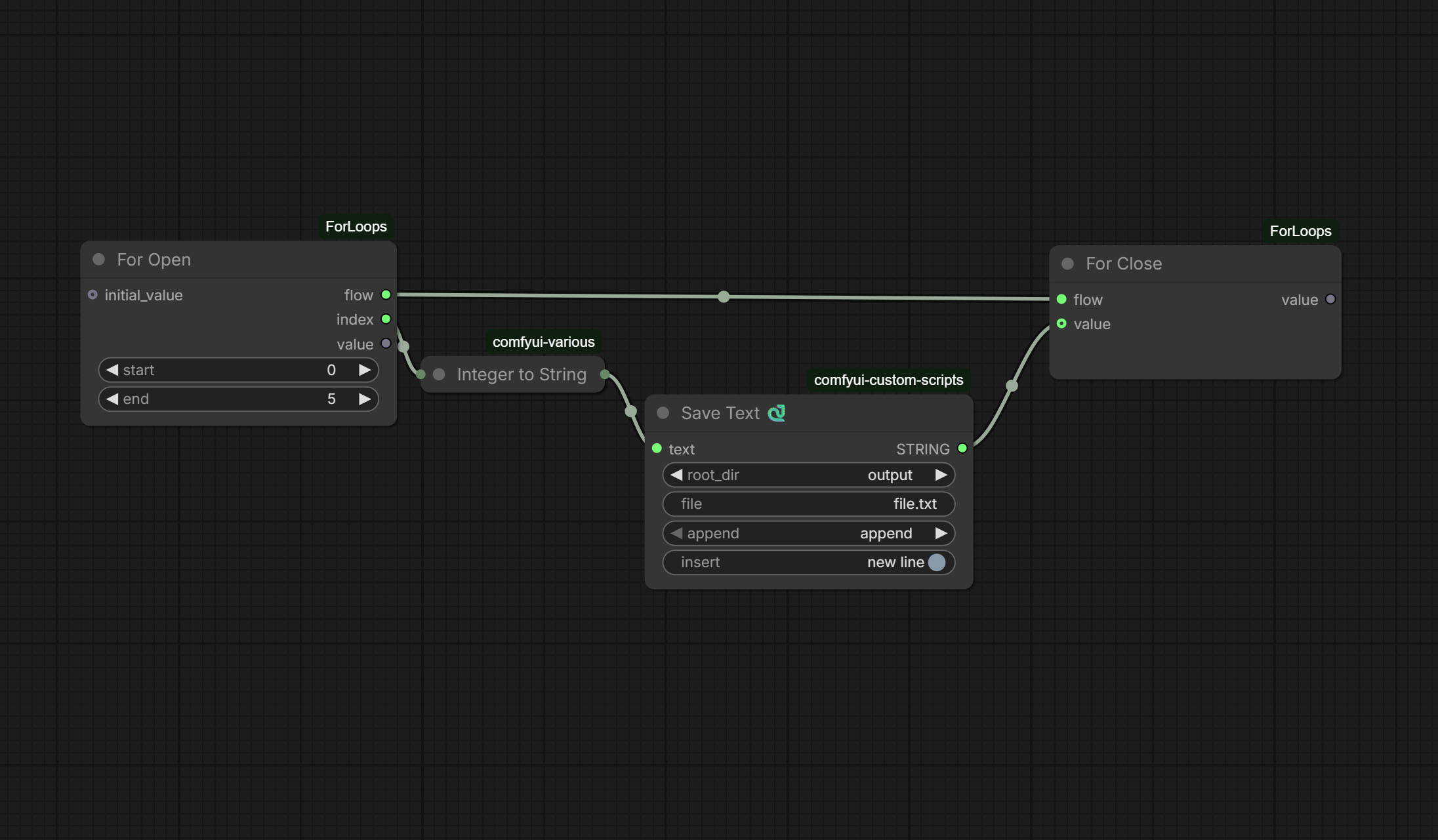 For loop example
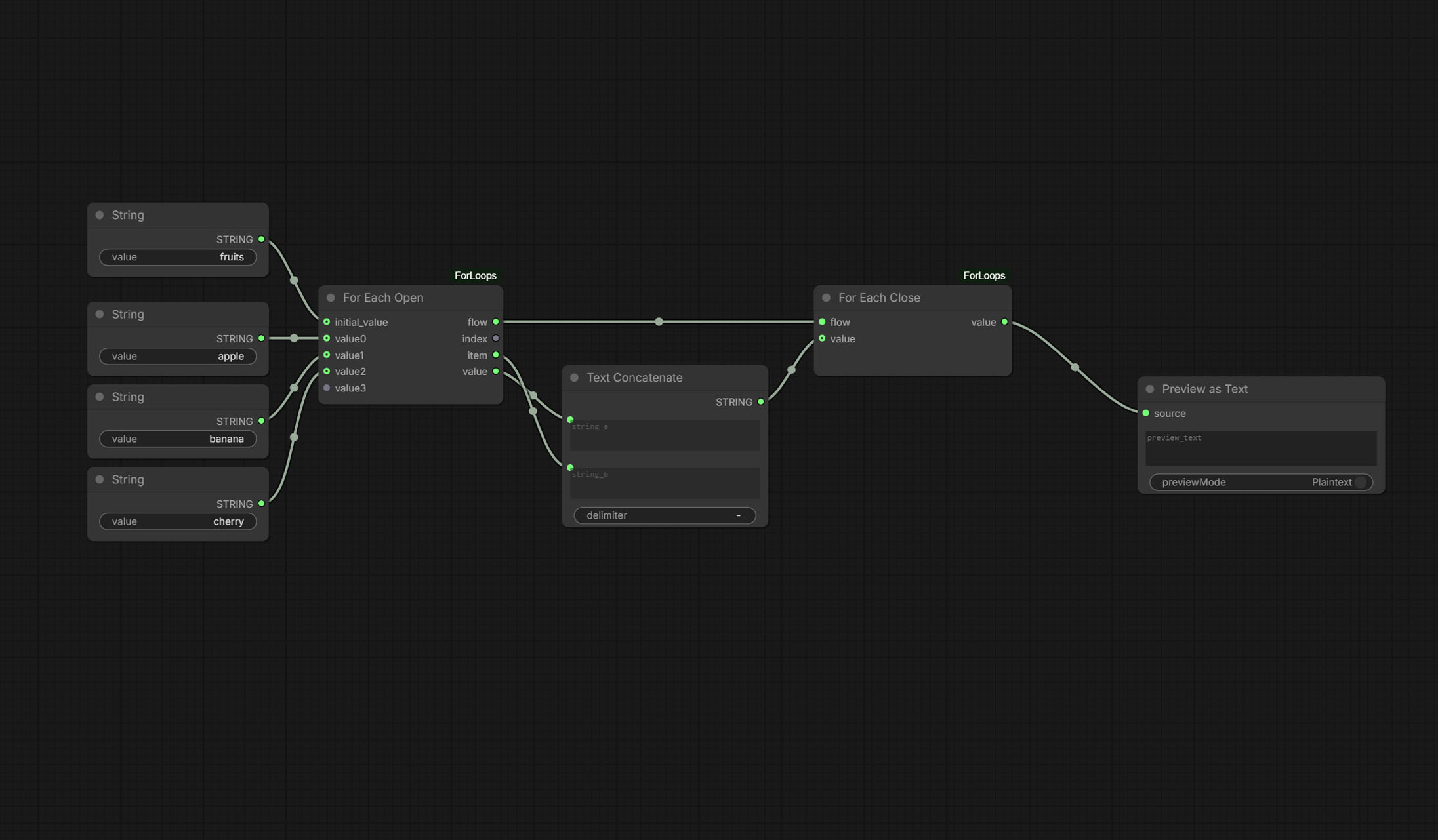 For Each loop example
For Open ──flow─────────────────────────────► For Close
        └─index/item─► [ your work … → Save Image ]
- Drop a … Open node and its matching … Close node.
- Connect Open
flow→ Closeflow. - Drive your pipeline with Open
index(For) or Openitem(For Each).
That's it. Everything downstream of the Open node runs once per iteration, so a Save Image at the end of the pipeline fires once for every iteration.
Threading a value back (optional)
You can connect the result at the end of your pipeline into Close value.
This is useful to:
- Force ordering — guarantees the whole pipeline finishes before the loop advances to the next iteration.
- Accumulate —
Close valueis fed back into Openinitial_valueon the next iteration, and the final value comes out of Closevaluewhen the loop ends.
A common, robust setup (recommended):
Open flow  ──────────────► Close flow
Open index ──► [ load line → generate → Save Image ] ──► Close value
Example workflows
Drag a file from example_workflows/ onto the ComfyUI
canvas:
- For_example.json — a
range(0, 5)loop; Preview as Text shows the result. - ForEach_example.json — iterates over three strings and concatenates them into one, showing how to accumulate across items.
Notes & tips
endis exclusive. If you have a file with N lines, setend = Nto get indices0 … N−1. Ifend ≤ start, the loop does not iterate.- The
flowwire is typed. A Forflowcannot be plugged into a For Each Close (and vice-versa) — this is intentional, to prevent mismatched pairs. - The internal
_isocket is hidden by the bundled JavaScript; it carries the iteration counter and is managed automatically. - This package uses the same execution mechanism as ComfyUI's official loop
examples (graph expansion via
comfy_execution.graph_utils.GraphBuilder).
Installation
Place the ForLoops folder in ComfyUI/custom_nodes/ and restart ComfyUI.
No extra dependencies are required.