
ComfyUI-AceStep_SFT
An all-in-one node for ComfyUI that implements AceStep 1.5 SFT (Supervised Fine-Tuning), a high-quality music generation model. This node replicates the full functionality of the official Gradio pipeline, offering fine control over audio synthesis parameters.
Nodes (13)
The boring node that stops your cover rendering at 60 seconds
Same song, new genre — and the lyrics trap that bites everyone
The node that makes AceStep 1.5 SFT actually sound good in ComfyUI
The KSampler-Advanced treatment, finally, for a music model
Fix one botched line without re-singing the whole track
The ACE-Step Voice Reference You Can Actually Switch Off
LoRA support for a music model — and it swallows PEFT, DoRA, LyCORIS and Kohya files without complaint
Four dropdowns and a stack of model files
Reverse-engineer any track into tags, BPM and key — then feed it back into generation
One input, a waveform, and no files written
FLAC, MP3 or Opus with auto-incrementing names and a waveform right on the node
Your 'prompt' for music is caption + lyrics + BPM + key. This node turns all of it into conditioning
Turbo tags mean Turbo settings. This node rewrites them so the SFT model actually listens

ComfyUI-AceStep SFT

A modular node suite for ComfyUI that implements AceStep 1.5 SFT (Supervised Fine-Tuning), a state-of-the-art music generation model. It starts from the official AceStep workflow and extends it with stronger conditioning control and practical ComfyUI-oriented quality options.
SFT = Supervised Fine-Tuning: A specialized version of AceStep optimized for generating superior quality audio through supervised training.
📋 Overview
Experimental SFT → Base → Turbo shared loading
AceStep 1.5 SFT Cascade Model Loader loads the three original diffusion checkpoints into one shared native model architecture, with one CLIP/VAE pair. Each MODEL output retains its own checkpoint identity and independent downstream LoRA. This does not merge or add weights: switching selects the exact target checkpoint tensors, preserving their stored dtypes. ComfyUI still controls inference casting and memory eviction.
On the supported native Dynamic VRAM implementation, the custom ModelPatcher replaces changed CPU weight sources and invalidates only GPU modules whose sources or effective adapters changed. Unchanged resident modules can be reused; stale native host pins are cleared before switching. Returning to SFT after Turbo, including cached workflow branches, selects SFT again. No ComfyUI core files or global patcher classes are modified.
- Replace the three Model Loaders with one Cascade Model Loader and select original SFT, Base and Turbo checkpoints with matching architecture, shapes and tensor dtypes.
- Connect
sft_model,base_modelandturbo_modelto the corresponding LoRA/Generate branches. Apply each branch's LoRA after this loader. - Connect the shared
clipto TextEncode/LoRA and the sharedvaeto Generate. - Pass LATENT from SFT → Base → Turbo. Keep your existing sampling settings for each model.
- Set Generate
decode_audio=falseon SFT and Base, andtrueon the final Turbo. Intermediate AUDIO outputs areNone; connect previews/savers to the final stage. Source/reference VAE encoding remains available. - Keep
unload_models_after_generate=falseand use the same GPU for all stages. Restart ComfyUI and refresh the browser to load the controls.
The first load compares checkpoint tensors and can take longer; ComfyUI caches its loader output afterward. Native CPU/static loading, unsupported custom patchers and incompatible/quantized checkpoints use independent native loaders, with a console message and no selective retention benefit. Native memory pressure can also evict common GPU blocks. This reduces initialization/transfers and intermediate decoding, not the number of denoising evaluations. The local SFT/Base XL pair shares about 16% of parameter bytes, so a large total generation speedup should not be assumed. Benchmark the actual workflow.
Local verification on an RTX 3090: seven short native forwards with the real XL checkpoints produced bit-identical results after selective switching and full invalidation. Source transfers fell 14.5–14.6%; the single measured transitions were only 0.5–3.5% faster. These measurements exclude CLIP/VAE and full-song sampling, and do not establish a reliable overall speedup. Thirteen tiny native forwards additionally checked independent LoRAs, cached returns and offload recovery.
Sampling speed without changing the sampler
Generate and Generate Advanced now expose precompute_conditioning=true. For ordinary single-song generation, the native lyric/timbre encoder and semantic detokenizer run once per conditioning branch instead of on every denoising evaluation. Their tensors travel through ComfyUI's normal conditioning inputs and are released with the sampling execution. The decoder, LoRA application, inference dtype, noise, guidance and step count stay unchanged. Reference audio, native editing tasks, batches, split guidance, ERG and custom model wrappers retain the normal path. Disable the option for an A/B comparison.
The Cascade loader also offers cache_runtime_weights: a CPU RAM staging area capped at 4 GiB across all three variants, for eligible large weights at the inference dtype already chosen by ComfyUI. Original checkpoint tensors remain untouched, including FP32 parameters. Memory checks reserve room for native model loading and encoders; insufficient RAM reduces or disables staging. Custom weight transforms and resizing adapters use their original sources. This cache does not quantize models, move files or reserve a second GPU.
Local RTX 3090 verification with the real SFT XL and a 352-patch LoRA compared 50 native forward evaluations, 1,500 latent frames, 64 caption tokens and 256 lyric tokens. Results were bit-identical; encoder/detokenizer calls fell from 50 to 2. This tests warmed sampling, excluding checkpoint loading, text generation and VAE decoding. Total song-generation speed depends on those costs and available RAM. Continue using your quality-preserving launch settings; --fast is not required.
Official silence latent
The node includes the original silence_latent.pt from ACE-Step XL Base, without conversion. Generate and Generate Advanced use it for the default silent conditioning and reference padding; Cover/Remix, Repaint and semantic padding use the same tensor. No new input or workflow change is required.
The file contains 15,000 frames (600 seconds at 25 Hz). Shorter requests use its prefix; longer requests repeat the complete sequence before cropping, following the official loader. This replaces ComfyUI's four-frame/constant approximation through execution-scoped ModelPatcher changes, without editing ComfyUI core. It aligns the silence data, not every part of ComfyUI's conditioning pipeline, and does not guarantee an audible quality improvement. Restart ComfyUI after ongoing generations finish.
Optional reference audio loader
Load Reference Audio (audio/AceStep SFT) selects or uploads a voice recording and has an enabled switch. During execution, true loads the file using ComfyUI's audio decoder; false returns None without reading or validating the selected file. It starts disabled and can run without any uploaded file. The output connects to reference_audio on Generate, Generate Advanced, Cover/Remix or Repaint. No empty waveform is encoded. The switch controls the generation output; selecting a file still provides a local preview in the browser.
For Cover/Remix, connect the loader to the task node. Its separate preserve_singer_identity=true option still reuses the source song when no explicit reference is supplied; set that option to false if you also want to disable source-based timbre guidance. When a task already contains a reference, disabling only the direct Generate reference input does not clear the task's reference. Restart ComfyUI and refresh the browser to find the new node.
Experimental adaptation of an uploaded voice
AceStep 1.5 SFT Adapt Voice (Experimental) fits a temporary native timbre vector to a recording before joint voice-and-music generation. It adjusts only 2,048 conditioning values, with a bounded change from the original timbre. It does not train a LoRA, change checkpoint weights, separate stems or convert vocals after generation. The profile also retains the recording's encoded reference; no trained model file is written.
- Connect the SFT loader's
model,clipandvae, plus Load Reference Audio withenabled=true, to Adapt Voice. - Start with
max_seconds=60,learning_rate=0.02and a fixedseed. Setlanguageto the recording's language, such aspt, or useauto. - Connect its
voice_profileoutput to Generate or Generate Advanced. This overrides that Generate'sreference_audio. Keep the desired song's caption/lyrics in the normal TextEncode node. - For SFT → Base → Turbo, pass LATENT between stages and connect the same profile to all three Generate nodes. Transfer of a vector fitted on SFT to another checkpoint remains experimental. Native editing tasks currently do not accept
voice_profile.
Leave transcript empty to transcribe reference crops on CPU using Whisper large-v3-turbo already present in the local Hugging Face cache. This path does not download a model; supply a transcript if the cache is unavailable. Plain text describes the whole recording. For aligned crops, provide a JSON list of {"start":0,"end":5,"text":"Exact words spoken in this interval"} records, with times in seconds. Do not enter the new song's lyrics here. With multiple crops, the last is reserved for validation.
The 0–60 second budget covers fitting, excluding transcription, encoding and model loading. Cooperative checks run between model layers and backward operations; an executing GPU operation can cause a small overrun, reported with actual elapsed time. max_seconds=0 bypasses adaptation. A candidate is used only if validation reconstruction improves; otherwise generation retains ordinary reference conditioning. The JSON adaptation_report explains acceptance, steps, losses and timing.
One local SFT fit completed six updates in 49.13 seconds within a 60-second budget, reducing validation loss from 0.99217 to 0.97656. This verifies reconstruction optimization, not an identical singing voice or better musical quality. Compare recordings by listening, keeping seeds and generation settings fixed. Restart ComfyUI and refresh the browser to load the new node and socket.
Pure SFT quality experiments
Three generation changes are available without additional waveform processing:
- Generate
timbre_cls_token=truerestores the learned summary token omitted by this ComfyUI core's timbre encoder. It is prepended before audio and RoPE positions, as in official XL. ModelPatcher limits the correction to this execution; disable it to compare the previous behavior. - Generate
guidance_mode=apg_denoisedapplies APG momentum, norm clipping and projection to clean predictionsx0, following the prediction-type analysis in the APG paper.apgretains velocity guidance. Both retain ACE-Step's temporal projection axes, rather than fully reproducing the paper's dimension aggregation. The norm threshold measures clean-latent units in the new mode. It also works injkass_qualitypredictor and corrector evaluations. - TextEncode
lm_codes_strength=0.75uses LM codes for the first 75% of main steps and switches to separately encoded, code-free text2music conditioning for the remainder.1preserves full conditioning;0skips the LM. Corrector evaluations follow their sigma's conditioning branch too. Partial strength adds one text encoding, without generating LM codes twice. Native Cover/Repaint retain their own controls.
Restart ComfyUI and refresh the browser to load the controls. Keep caption, lyrics, both seeds, duration, sampler, scheduler, steps, CFG and shift fixed:
| Test | timbre_cls_token | guidance_mode | lm_codes_strength |
|------|--------------------|-----------------|---------------------|
| Previous behavior | false | apg | 1 |
| Timbre correction only | true | apg | 1 |
| Clean-prediction APG | true | apg_denoised | 1 |
| Late code release | true | apg_denoised | 0.75 |
Start with the current remaining values, including apg_norm_threshold=2.5. Omitting the new parameters retains existing APG/code behavior while enabling the timbre correction. The missing token was verified in code; musical improvements from the two experiments require listening comparisons. Automated checks verify math, conditioning, compatibility and patch restoration, not perceptual quality.
Generate also offers guidance_rescale, disabled by default (0). After CFG/APG/ADG, it moves the guided velocity's standard deviation toward the conditional prediction's, independently per batch sample, following EzAudio's rescale formula. This adaptation operates during sampling, including jkass_quality predictor and corrector evaluations, without extra model calls. APG still projects in x0 when apg_denoised is selected; the subsequent rescale acts on velocity rather than directly on clean latents. Statistics use FP32; constant predictions use a neutral scale.
Keep apg_denoised, timbre_cls_token=true and lm_codes_strength=1, with identical seeds and remaining parameters. Compare only guidance_rescale: 0 → 0.25 → 0.50. 1 applies the full correction. Musical improvement in ACE-Step requires listening comparisons. Restart ComfyUI and refresh the browser to load the widget, appended after existing Generate controls to preserve their order.
Generate now builds the ace_step schedule in FP32 by default (schedule_precision=float32), without changing weight or noise precision. Building it in BF16 and converting afterward has already lost precision: CPU checks at shift=3 found 3/13/35 repeated-sigma intervals for 50/100/200 steps, where the integrator did not advance. schedule_precision=model reproduces the previous precision for comparison. Other schedulers and native Cover's fallback schedule for a non-ace_step scheduler retain their precision. The control is appended after existing widgets; restart ComfyUI once running generations finish.
Experimental guidance_mode=apg_denoised_joint projects clean predictions jointly across channels and time, separately per batch sample. This follows the geometry of the APG algorithm and the Stable Audio 3 audio implementation. Existing apg_denoised retains per-channel projection. Joint projection removes one parallel direction instead of one per channel; retaining more variation may help, but ACE-Step perceptual improvement is unverified. To avoid eight-times stricter global clipping, its radius is apg_norm_threshold * sqrt(channels): 2.5 becomes 20 for 64 channels. This is an adaptation to the previous aggregate budget, not a paper-recommended setting. Momentum and rescale remain available, without additional model calls.
First compare schedule_precision=model and float32 while retaining apg_denoised. Then fix float32 and compare apg_denoised against apg_denoised_joint. Keep full LM codes, timbre correction, seeds and all other settings identical; start with guidance_rescale=0 to isolate projection. Judge instruments/rhythm and sung words separately.
New clarity experiments using pure SFT
Generate adds apg_norm_rms as the last widget. 0 preserves the fixed L2 cap from apg_norm_threshold. A positive value replaces it with an APG update RMS cap, before projection and CFG, independent of duration. This is not audio RMS or volume. With 180 seconds, 64 channels and 4,500 frames, joint APG threshold 2.5 caps update RMS at 0.0373; at 30 seconds the same cap permits 0.0913. Duration dependence is mathematical; its audible effect remains unverified. The APG paper warns against excessive clipping, but RMS normalization for audio is our adaptation.
First retain the configuration you prefer, including apg_denoised_joint, and change only apg_norm_rms: 0, 0.05, 0.075. At 180 seconds, the positive values yield radii 26.83 and 40.25 instead of 20. Other APG modes apply the cap in their own prediction space; ADG/CFG ignore it. Restart ComfyUI after ongoing generations finish to load the appended widget.
Audio clarity: optional VAE comparison
ScragVAE retrains the decoder to improve upper-frequency and transient reconstruction. Published gains are author-reported and require listening comparisons on your audio. Use the ComfyUI conversion, ace_1.5_scrag_vae.safetensors, in ComfyUI/models/vae, then select it in Model Loader vae_name. Renaming the original Diffusers checkpoint does not make it loadable here.
First change only the VAE, keeping the seed and all other settings. To isolate decoding completely, connect Generate's latent output to two VAE Decode Audio nodes, each using a separate Load VAE, and compare their previews. Keep latent_shift=0, latent_rescale=1, and fades/voice boost disabled for this comparison. This changes reconstruction within generation without waveform equalization. Sampling, including jkass_quality, remains identical; guidance settings do not need to change.
The two local checkpoints have different encoder weights. The encoder is not used for text2music without reference audio; swapping the VAE for Cover/Remix with an audio reference can also change encoding. Comparing the same latent isolates the decoder.
Current sampling defaults and Gradio alignment
Reference: ACE-Step 1.5 at ca1e85f, checked against both Gradio controls and SFT generate_audio.
Use sampler_name=jkass_quality, scheduler=ace_step, noise_source=official, steps=50, cfg=7, shift=3, infer_method=ode, guidance_mode=apg. New nodes/widgets use these defaults; saved workflows retain their existing selections. Keep TextEncode/Generate duration equal, or use Generate duration=0 to inherit encoded duration when no source audio/latent is connected.
ace_stepsupplies the shifted linear schedule in FP32 by default;schedule_precision=modelretains the previous dtype. CFG interval bounds are diffusion timesteps (1 down to 0); other schedulers retain elapsed-step fractions.guidance_intervalcan further restrict the centered interval.jkass_qualityis bundled from JK-AceStep-Nodes. It preserves the original second-order Heun updates and callbacks; the JK pack does not need to be installed. With a schedule ending at zero, N steps use 2N−1 model evaluations (99 for 50 steps). The last step returns the clean prediction.- Gradio noise uses model device/dtype and BTC layout. Comfy noise preserves CPU sampling. Batch seeds are
seed + index, rather than Gradio's randomly chosen additional seeds. - Output retains the existing anti-clipping safeguard, without target-level normalization. The sampler displays console progress through ComfyUI.
- The default LM prompt and sampling remain CFG 2, temperature 0.85, top-p 0.9, top-k 0. APG/ADG and null conditioning follow SFT math.
- APG re-evaluations at the same consecutive timestep (as in Heun/
jkass_quality) reuse the preceding momentum history while recomputing the current prediction. This avoids advancing momentum twice at that timestep; Euler keeps the original recurrence. - In this installation, the core does not propagate attention windows to the lyric and timbre encoders. Generate's
reference_xl_attentionoption applies the model's configured windows to timbre attention, following XL's local/global alternation. It uses ModelPatcher during reference generation without editing the core or lyric encoder, and is enabled by default. Set it tofalseto compare previous behavior.
Local stability fixes: native LM sampling computes CFG and probabilities in FP32, following the official PyTorch backend, and lm_top_p=0 disables the filter. The code budget uses int(duration * 5) without first rounding duration to whole seconds. Generate warns when its duration differs by more than one second from the LM duration. Over-range input audio is scaled proportionally, preserving waveform shape and stereo balance. Native forward also keeps a separate timbre reference for each batch sample. The two ComfyUI core fixes live in comfy/text_encoders/ace15.py and comfy/ldm/ace/ace_step15.py; updating ComfyUI may overwrite them.
Gradio SFT uses constant CFG (guidance_schedule=normal). Select decay and min_guidance_scale=1 for CFG 7 → 1, or ramp_up for 1 → 7. Checkpoint filenames never override the requested CFG, since merged weights cannot be identified reliably by name.
Equivalence is limited by ComfyUI's LM, attention, integration precision and VAE. jkass_quality always uses ODE integration. infer_method=sde only remaps the supported ComfyUI Euler/Heun choices to their SDE alternatives; it does not turn JKASS into SDE. The bundled sampler is not Gradio's Euler solver. Automatic metadata/caption CoT, DCW, retake and flow-edit were not ported; Gradio disables DCW by default for SFT. Matching parameters does not guarantee identical audio.
Run python -m unittest discover -s tests -v. Set ACESTEP_REFERENCE_DIR to the pinned upstream checkout to enable direct noise/APG/ADG comparisons.
This package provides fifteen nodes under audio/AceStep SFT:
| Node | Purpose | |------|---------| | AceStep 1.5 SFT Model Loader | Loads the diffusion model, CLIP text encoders, and VAE | | AceStep 1.5 SFT Cascade Model Loader | Loads exact SFT/Base/Turbo variants with shared architecture and encoders/VAE; experimental selective GPU retention | | AceStep 1.5 SFT Lora Loader | Applies a LoRA to MODEL + CLIP (chainable) | | AceStep 1.5 SFT Lora Loader With Trigger Word | Same adapter loading, plus a STRING trigger output; prioritizes Side-Step | | AceStep 1.5 SFT TextEncode | Encodes caption, lyrics, and metadata into conditioning | | AceStep 1.5 SFT Generate | Diffusion sampler + optional VAE decode | | AceStep 1.5 SFT Generate Advanced | Explicit noise and step-range controls for staged sampling | | AceStep 1.5 SFT Cover / Remix | Native structural cover/remix conditioning from source audio | | AceStep 1.5 SFT Inpaint / Repaint | Native time-range regeneration with source preservation | | AceStep 1.5 SFT Preview Audio | Audio playback with waveform spectrum visualizer | | AceStep 1.5 SFT Save Audio | Save audio (FLAC/MP3/Opus) with waveform visualizer | | AceStep 1.5 SFT Audio Duration | Returns the audio duration as an integer number of seconds | | Load Reference Audio | Optional audio upload/selection with an enabled switch | | AceStep 1.5 SFT Get Music Infos | Native transcription with ACE-Step-formatted lyrics, tags, BPM, and key/scale | | AceStep 1.5 SFT Turbo Tag Adapter | Rewrites Turbo-oriented tags into SFT-friendly tags (BETA) |
Sampler migration
ace_step_euler has been removed. In saved workflows that used it, select jkass_quality in Generate. The ace_step scheduler remains available. Restart ComfyUI and refresh the page to reload the choices. The local copy does not modify the global sampler registry or the JK pack; even with JK installed, Generate uses the bundled implementation and shows only one jkass_quality entry.
CFG 7 → 1 remains available with guidance_schedule=decay and min_guidance_scale=1; ramp_up reverses it. Scheduling follows actual timesteps without counting Heun corrector evaluations as additional steps. The enable_normalization, normalization_db, velocity_norm_threshold and velocity_ema_factor controls have been removed; output peak protection remains.
Modular Architecture
The workflow is split into dedicated nodes for maximum flexibility:
Model Loader → (model, clip, vae)
       │            │        │
       │   Lora Loader (optional, chainable)
       │     │    │          │
       │     │  TextEncode   │
       │     │   │    │      │
       ▼     ▼   ▼    ▼      ▼
      Generate (model, positive, negative, vae)
         │         │
    Preview Audio  Save Audio
Example Configuration
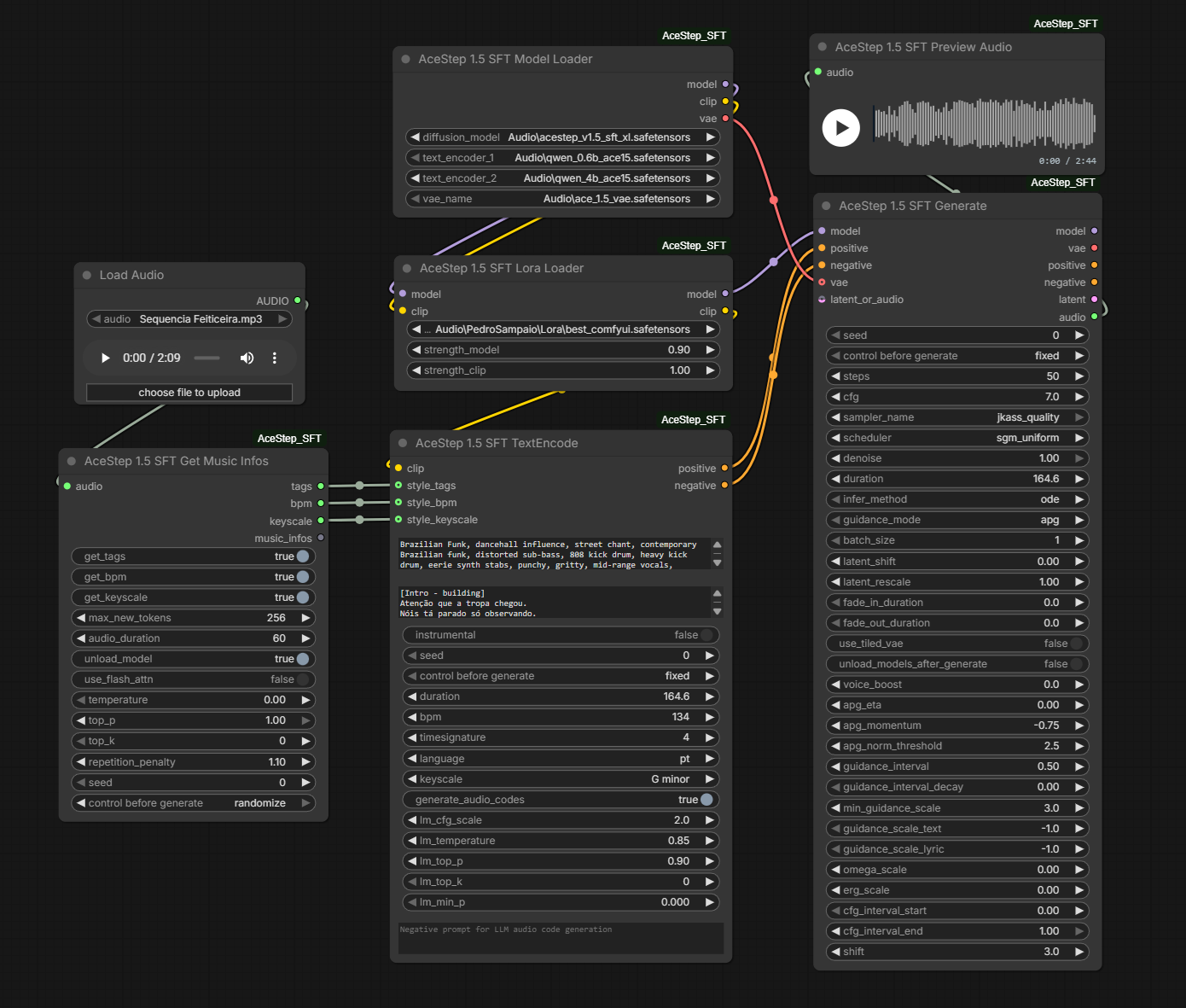
🎯 Key Features
✨ Advanced Guidance
The node supports four classifier-free guidance modes:
-
APG (Adaptive Projected Guidance) ⭐ Recommended
- Dynamic adaptation via momentum buffering
- Gradient clipping with adaptive thresholds
- Orthogonal projection to eliminate unwanted noise
- AceStep SFT Default - best quality and stability balance
-
Clean-prediction APG (
apg_denoised)- Experimental APG on
x0, with the same momentum and norm controls - See the pure SFT quality experiments above
- Experimental APG on
-
ADG (Angle-based Dynamic Guidance)
- Angle-based guidance between conditions
- Operates in velocity space (flow matching)
- Ideal for aggressive style distortion
-
Standard CFG
- Traditional Classifier-Free Guidance
- Simple and predictable implementation
- Useful as a comparison baseline
🎵 Intelligent Metadata Processing
- Auto-Duration: Automatically estimates music duration by analyzing lyric structure
- LLM Encoding: Use Qwen LLM (0.6B or 1.7B/4B) to generate semantic audio codes
- Auto Values: BPM, Time Signature, and Key/Scale automatic (model decides)
- Multilingual Support: Over 23 languages supported
🎧 AI Music Analyzer
- Audio Tag Extraction: Derives lyric, vocal, and song-structure tags from the selected transcription model
- Formatted Lyrics Output: Returns a
lyricsSTRING with ACE-Step section markers for direct connection to TextEncode; Whisper output uses bounded[Verse N]blocks, while the native model preserves its own detected sections - BPM Detection: Automatic tempo detection via librosa
- Key/Scale Detection: Detects musical key and scale (e.g. "G minor")
- JSON Output: Structured
music_infosoutput with all analysis results
🔊 Audio Preview & Save with Waveform Visualizer
Both Preview Audio and Save Audio nodes feature:
- Interactive waveform spectrum display directly on the node (dark background with amplitude bars)
- Play/Pause button with click-to-seek on the waveform
- Time display showing current position and total duration
Save Audio additionally supports:
- Multiple formats: FLAC (lossless), MP3, and Opus
- Quality options: V0, 64k, 96k, 128k, 192k, 320k
- Auto-incrementing filenames with configurable prefix
🔄 Audio Refinement (img2img)
- Latent-based Refinement: Use
denoise < 1.0withlatent_or_audioconnected to refine existing audio - Accepts AUDIO or LATENT: Connect any audio or latent output for img2img-style editing
- Batch Generation: Generate multiple variations in parallel
New music with a voice reference
Connect a vocal recording from Load Audio directly to Generate's optional reference_audio, with no Cover/Remix task or source song. Set the new song's caption, lyrics, language and duration in TextEncode as usual. Connect VAE to Generate when the reference is AUDIO. The reference guides global acoustic features, including vocal timbre; it does not supply the new lyrics or guarantee an identical singer.
Generate Advanced accepts the same input. For split generation, connect the reference to every stage and continue the first stage's LATENT with add_noise=disable. The reference is encoded for each stage; LM audio codes and the requested duration retain their normal behavior. Without LM codes, the composition context uses encoded silence rather than treating the spoken recording as a source song.
For a muffled result, first save Generate's AUDIO directly and compare it with any Music Fix, stereo or loudness processing of the same generation. Use a clearly recorded reference with adequate level and little silence; including singing is a useful comparison to a short spoken clip. No automatic EQ, gain boost or precision change is applied to compensate for a reference.
reference_xl_attention=true is the default to bring timbre extraction closer to the official XL encoder. The option gives the timbre encoder the decoder's configured attention windows; it does not change LM codes or use speech as a composition source. For comparison, use false in test A and true in B while holding the reference, seed and all other fields constant. It works in Generate and Advanced independently of timbre_cls_token, and restores patches after completion or errors. With no reference, attention remains unchanged. Tests verify windows and restoration; clarity and vocal similarity require listening comparisons.
Two additional controls experiment with stronger direct-reference conditioning in Generate and Generate Advanced:
reference_guidance_scale(default1): at1, keeps the original single prediction. Other values compare predictions with the reference and encoded silence, with identical text, lyrics and composition context, then extrapolate the difference. This adds a model evaluation for each conditional evaluation. It runs before CFG/APG: with CFG 7, start a comparison around1.2–1.25, rather than immediately using2–4.reference_timbre_repeats(default1): repeats the encoded timbre token before cross-attention, increasing its relative attention weight without increasing its amplitude. Compare1against2or3separately from guidance. It does not repeat the audio or song. This emphasizes global reference acoustics, not an independently trained speaker-identity embedding.
These are experimental, inference-only methods, not official ACE-Step cloning features. They apply to direct reference_audio without a task, and their patches are restored after generation, including on errors. Set both to 1 to retain the previous behavior. Strong settings can change composition, diction or sound quality. Keep the same seed, reference, caption, lyrics and LM settings for comparisons; speaker-embedding scores across speech and singing are not identity percentages or substitutes for listening. No execution log files are added; generation uses the existing native ComfyUI progress.
🎛️ Native Cover, Remix, and Inpaint
These operations use the ACE-Step 1.5 conditioning paths on which the model was trained. They are separate from latent_or_audio; the existing img2img-style audio-to-audio flow remains unchanged.
Connect a task node's output to both TextEncode.task and Generate.task:
Load Audio/Latent → Cover / Remix ─┬→ TextEncode.task
                                   └→ Generate.task

Load Audio/Latent → Inpaint / Repaint ─┬→ TextEncode.task
                                       └→ Generate.task
- Cover / Remix: Receives the complete source song and regenerates a complete result—both the vocal performance and the instrumentation—in the requested style. In upstream ACE-Step, Remix is the UI name for the same
covertask. - Semantic FSQ: Recommended mode; extracts 5 Hz semantic codes and reconstructs 25 Hz structural hints, allowing a stronger style/timbre change while following the source composition.
- Raw no-FSQ: Advanced mode that conditions on the acoustic latent directly and therefore retains more of the source sound.
- Remix strength:
remix_strength = 0.4is the default and recommended starting point here. The official guide suggests approximately0.3–0.5for a dramatic genre change; this value is the fraction of sampling steps that use Cover conditioning. - Singer identity (best effort): With
preserve_singer_identityenabled, the source song is also used asreference_audioby default. This guides vocal timbre but is not exact voice cloning because Cover regenerates the full waveform. An explicitreference_audioreplaces the automatic source reference. - Lyrics are explicit: To retain the original words, paste the original lyrics into TextEncode. Native Cover does not infer or preserve lyrics from an empty lyrics field, and
generate_audio_codesis disabled for the task. - Model presets: Use CFG
1,8steps, ODE, and shift3for Turbo. Use CFG7for Base/SFT. - Inpaint / Repaint: Regenerates only
start_seconds:end_secondsusing the native repaint instruction, source latent with a silenced edit region, and a 64-channel ACE chunk mask. - Source preservation: Reinjects the appropriately noised source during sampling, blends latent boundaries, then restores the original waveform outside the edit range with a short crossfade.
For native tasks, source duration and batch size come from the task. Audio-code generation is disabled automatically. The legacy img2img-style latent_or_audio path is unchanged and must remain disconnected in this flow.
🧠 Extended Conditioning Control
- Split Text/Lyric Guidance: Independent
guidance_scale_textandguidance_scale_lyric - Omega Scale: Mean-preserving output reweighting to approximate AceStep scheduler behavior
- ERG Approximation: Node-local prompt energy reweighting via
erg_scale - Guidance Interval Decay: Smoothly decay guidance inside the active interval
🎚️ AceStep LoRA Workflow
- Direct LoRA Application: The Lora Loader takes MODEL + CLIP, applies the LoRA via
comfy.sd.load_lora_for_models(), and outputs the modified MODEL + CLIP - Chainable: Stack multiple Lora Loaders in sequence
- Separate strengths: Independent
strength_modelandstrength_clip - DoRA support: Full DoRA (Weight-Decomposed Low-Rank Adaptation) support with automatic
dora_scaledimension fix - Local
Loras/folder: Drop LoRA files directly into the node'sLoras/folder — they are automatically registered at startup - Auto PEFT/DoRA conversion: PEFT-format LoRAs (
adapter_config.json+adapter_model.safetensors) placed inLoras/are automatically converted to ComfyUI format on first startup
🛠️ Latent Post-processing
- Latent Shift: Optional additive latent offset (default 0)
- Latent Rescale: Multiplicative scaling for dynamic control
📦 Installation
Prerequisites
- ComfyUI installed and functional
- CUDA/GPU or equivalent (modern processors)
- Recommended for better output quality (based on practical testing): use the merged SFT+Turbo model.
- Required model files:
- Diffusion model (DiT):
acestep_v1.5_sft.safetensors - Text Encoders:
qwen_0.6b_ace15.safetensors,qwen_1.7b_ace15.safetensors(or 4B) - VAE:
ace_1.5_vae.safetensors
- Diffusion model (DiT):
Download Model Files
Download the required models from HuggingFace:
- Diffusion Model (Recommended: merged SFT+Turbo):
-
Alternative Diffusion Model (official SFT):
-
Text Encoders (choose any versions):
- Text Encoders Collection
qwen_0.6b_ace15.safetensors(caption processing)qwen_1.7b_ace15.safetensorsorqwen_4b_ace15.safetensors(audio code generation)
- Text Encoders Collection
-
VAE (Audio codec):
Installation Steps
- Clone the repository to your custom nodes folder:
cd ComfyUI/custom_nodes
git clone https://github.com/jeankassio/ComfyUI-AceStep_SFT.git
- Place model files in the appropriate directories:
ComfyUI/models/diffusion_models/     # AceStep 1.5 SFT model
ComfyUI/models/text_encoders/        # Qwen encoders
ComfyUI/models/vae/                  # VAE
ComfyUI/models/loras/                # Optional AceStep 1.5 LoRAs
- (Optional) Place LoRAs in the local folder:
ComfyUI/custom_nodes/ComfyUI-AceStep_SFT/Loras/ # Local LoRA folder
You can place LoRAs here in any of these formats:
- ComfyUI format: Single
.safetensorsfile (ready to use) - PEFT/DoRA format: A folder containing
adapter_config.json+adapter_model.safetensors(auto-converted on startup) - Nested zip artifact: If your zip extracted a folder-inside-folder, the node detects this and fixes it automatically
- Install
requirements.txtusing the same Python environment that runs ComfyUI. For Windows portable, from its root:
.\python_embeded\python.exe -m pip install -r .\ComfyUI\custom_nodes\ComfyUI-AceStep_SFT\requirements.txt
- Restart ComfyUI - the nodes will appear under
audio/AceStep SFT. Use a ComfyUI version with native ACE-Step 1.5 support. The local core fixes described above are separate from this custom-node repository.
🧩 Available Nodes
AceStep 1.5 SFT Model Loader
Loads the AceStep 1.5 diffusion model, dual CLIP text encoders, and audio VAE.
Inputs:
diffusion_model: AceStep 1.5 diffusion model (.safetensors)text_encoder_1: Qwen3-0.6B encoder (caption processing)text_encoder_2: Qwen3 LLM (1.7B or 4B, audio code generation)vae_name: AceStep 1.5 audio VAE
Outputs:
model: MODEL — connect to Lora Loader or Generateclip: CLIP — connect to Lora Loader or TextEncodevae: VAE — connect to Generate
AceStep 1.5 SFT Lora Loader
Applies a LoRA directly to the MODEL and CLIP. Multiple Lora Loaders can be chained.
Inputs:
model: MODEL from Model Loader or previous Lora Loaderclip: CLIP from Model Loader or previous Lora Loaderlora_name: LoRA file fromComfyUI/models/lorasor the localLoras/folderstrength_model: strength applied to the diffusion modelstrength_clip: strength applied to the text encoder stack
Outputs:
model: MODEL — connect to next Lora Loader or Generateclip: CLIP — connect to next Lora Loader or TextEncode
Supported LoRA Formats
| Format | What to place in Loras/ | Action |
|--------|--------------------------|--------|
| ComfyUI .safetensors | Single file | Used directly |
| PEFT/DoRA directory | Folder with adapter_config.json + adapter_model.safetensors | Auto-converted to *_comfyui.safetensors on startup |
| Nested zip artifact | Folder containing a .safetensors inside | Auto-extracted to root on startup |
AceStep 1.5 SFT Lora Loader With Trigger Word
Uses the existing loader's adapter application and strength controls unchanged, with one extra Trigger word output (STRING). Combine this string with your musical tags before connecting the caption to TextEncode; the node does not rewrite your caption or lyrics.
- Side-Step's declared
custom_tagtakes priority over Civitai data. It is read from the safetensors header or a matching local JSON, includingmetadata.custom_tagin dataset JSON. A dataset with different per-song triggers is not combined into an invented single trigger. - Other explicit metadata, such as
modelspec.trigger_phrase, and local.civitai.info/.infofiles are also supported. Multiple declared CivitaitrainedWordsare returned comma-separated. trigger_word_override: optional manual value, with highest priority.lookup_civitai: enabled by default. Only when local detection fails, sends the file's SHA-256 to the public Civitai lookup endpoint. Disable it for offline use. No model file is uploaded.
Side-Step exports: setting a trigger during training does not guarantee that the exported safetensors keeps it. If your export has no trigger metadata, copy the corresponding preprocess_meta.json next to my_style.safetensors, naming the copy my_style.sidestep.json. The loader reads its custom_tag automatically. Alternatively, create that matching file with:
{"custom_tag": "my_style_trigger"}
For a PEFT adapter directory, a co-located sidestep_metadata.json, preprocess_meta.json or dataset.json is accepted when adapter_config.json is present. sidestep_metadata.json keeps the declared training tag portable when the original dataset is unavailable. New automatic PEFT conversions in this node pack retain original metadata and embed any detected local trigger as modelspec.trigger_phrase. Existing converted files are not overwritten.
Trigger data is read as metadata only. The loader never follows dataset paths in training configs and never guesses triggers from filenames or ss_tag_frequency. If none is declared or the optional remote lookup fails, the string is empty and the adapter still loads. Editing the adapter or a matching metadata file invalidates the new node's execution cache.
AceStep 1.5 SFT Cover / Remix
Creates a native full-song cover/remix task. Connect the complete song to source, then branch the task output to the task inputs on both TextEncode and Generate. Generate returns a newly synthesized complete mix: the singer performs in the target style and the instruments are regenerated with it.
Inputs:
source: AUDIO or LATENT that supplies melody, rhythm, and structuresource_conditioning:semantic_fsq(recommended) orraw_no_fsqremix_strength: fraction of sampling that uses Cover conditioning; default0.4. The official guide recommends approximately0.3–0.5for a dramatic genre changecover_noise_strength: default0.2;0starts from pure noise, while higher values initialize closer to the sourcepreserve_singer_identity: enabled by default; also uses the source song asreference_audioto guide the regenerated singer's timbre. Disable it for a freely generated voice- Optional
reference_audio: explicit AUDIO or LATENT timbre/voice reference; when connected, it replaces the automatic source reference
Singer identity is best effort, not exact voice cloning: Cover/Remix regenerates the complete waveform, including the vocal performance. Keep source_conditioning = semantic_fsq for the normal remix path. Paste the original lyrics explicitly into TextEncode if the cover must sing the same words; an empty lyrics input does not transcribe the source. Native tasks disable generate_audio_codes because the real source audio supplies the native conditioning.
For Turbo, use CFG 1, 8 steps, ODE, and shift 3. Native Cover uses ACE-Step's shifted-linear timesteps and peak-normalizes decoded audio instead of hard clipping it. For Base/SFT, use CFG 7. The legacy img2img-style latent_or_audio input remains unchanged and disconnected from this workflow.
AceStep 1.5 SFT Inpaint / Repaint
Creates a native time-range repaint task. Its task output must be branched to the task inputs on both TextEncode and Generate.
Inputs:
source: AUDIO or LATENT to editstart_seconds,end_seconds: regenerated interval (-1means source end)repaint_mode:conservative,balanced, oraggressiverepaint_strength: preservation/freedom balance used bybalancedmode- Optional
reference_audio: independent timbre/style reference for the regenerated region
AceStep 1.5 SFT TextEncode
Encodes caption, lyrics, and metadata into positive and negative conditioning for the Generate node.
Inputs:
clip: CLIP from Model Loader or Lora Loadercaption: Text description of the music (genre, mood, instruments)lyrics: Song lyrics or[Instrumental]instrumental: Force instrumental modeseed,duration,bpm,timesignature,language,keyscale- Optional:
task,generate_audio_codes,lm_cfg_scale,lm_temperature,lm_top_p,lm_top_k,lm_min_p,lm_negative_prompt - Optional style overrides:
style_tags,style_bpm,style_keyscale(from Music Analyzer)
Outputs:
positive: CONDITIONING — connect to Generatenegative: CONDITIONING — connect to Generate
AceStep 1.5 SFT Generate
Diffusion sampler + optional VAE decoder. Requires MODEL and conditioning inputs.
Inputs:
model: MODEL from Model Loader or Lora Loaderpositive: CONDITIONING from TextEncodenegative: CONDITIONING from TextEncode- Sampling:
seed,steps,cfg,sampler_name,scheduler,denoise,duration,infer_method,guidance_mode - Optional:
vae(for audio output),latent_or_audio(for existing img2img),task(for native editing),batch_size - Optional post-processing:
latent_shift,latent_rescale,fade_in_duration,fade_out_duration,voice_boost,use_tiled_vae - Optional guidance:
apg_eta,apg_momentum,apg_norm_threshold,guidance_interval,guidance_schedule,min_guidance_scale,guidance_scale_text,guidance_scale_lyric,omega_scale,erg_scale,cfg_interval_start,cfg_interval_end,shift
Outputs:
model: MODEL (passthrough for chaining)vae: VAE (passthrough for chaining)positive: CONDITIONING (passthrough)negative: CONDITIONING (passthrough)latent: LATENT (raw diffusion output)audio: AUDIO (decoded audio, only when VAE is connected)
AceStep 1.5 SFT Generate Advanced
Adds KSampler Advanced-style controls while retaining Generate's sampler choices (including jkass_quality), guidance controls and outputs. The regular Generate is unchanged. Advanced uses noise_seed instead of seed, omits denoise, and adds:
| Control | Default | Behavior |
|---------|---------|----------|
| add_noise | enable | disable continues an existing noisy latent without adding fresh noise |
| start_at_step | 0 | First step to execute on the full steps schedule |
| end_at_step | 10000 | Stop boundary, capped at the full schedule's final step |
| return_with_leftover_noise | disable | enable preserves the noise level at an intermediate boundary; disable finishes at zero noise |
For two stages with steps=50, use the same sampler, scheduler, shift and noise_seed in both nodes:
| Stage | add_noise | start_at_step | end_at_step | return_with_leftover_noise |
|-------|-------------|-----------------|---------------|------------------------------|
| First | enable | 0 | 25 | enable |
| Final | disable | 25 | 50 | disable |
Connect the first node's latent output to the second node's latent_or_audio. Unfinished ranges and ranges that execute no steps skip AUDIO decoding, even with a VAE connected.
Advanced also accepts native Cover/Remix and Repaint through the optional task input. Connect the same task to TextEncode and every Advanced stage, and connect VAE to each native-task stage to encode its source and reference. The final stage can use task together with the previous stage's LATENT when add_noise=disable; it continues that latent while restoring source/reference conditioning for the selected model. A task together with an AUDIO input or fresh startup noise is ambiguous and is not accepted.
Cover's start_at_step and end_at_step use the original full schedule, even when cover_noise_strength skips initial steps. With 50 steps, cover_noise_strength=0.2 and shift=1, the automatic start is step 10: a first range of 0–25 executes 10–25, followed by 25–50. Repaint's source blending and waveform splice run only when the final stage finishes at zero noise.
guidance_schedule and the LM-code handoff use the full schedule instead of restarting in each stage. Splitting stages adds control, not a guaranteed quality gain. APG momentum, multistep solver history and SDE noise state may reset between nodes, so not every configuration matches a single uninterrupted run. Deterministic standard_cfg with the Heun-based jkass_quality supports continuation. No ComfyUI core changes or additional dependencies are required.
AceStep 1.5 SFT Preview Audio
Previews audio with an interactive waveform spectrum visualizer directly on the node.
Inputs:
audio: AUDIO to preview
Features:
- Interactive waveform display with play/pause button
- Click-to-seek on the waveform
- Current time / total duration display
AceStep 1.5 SFT Save Audio
Saves audio to disk with an interactive waveform spectrum visualizer.
Inputs:
audio: AUDIO to savefilename_prefix: Filename prefix (supports subfolder paths, e.g.audio/AceStep)format: FLAC, MP3, or Opusquality(optional): V0, 64k, 96k, 128k, 192k, 320k (for MP3/Opus)- Save Metadata (
save_metadata, optional, default: enabled): Embed the ComfyUI prompt and workflow in the audio. Disable to save without these metadata in FLAC, MP3, or Opus. The global--disable-metadataflag always disables embedding. Existing workflows keep their previous behavior when this input is omitted.
Features:
- Auto-incrementing filenames (e.g.
AceStep_00001_.flac,AceStep_00002_.flac) - Waveform visualizer with play/pause and seek
- Optional metadata embedding (prompt, workflow)
AceStep 1.5 SFT Audio Duration
Receives a ComfyUI AUDIO value and returns duration_seconds as an INT, rounded to the nearest whole second. A disabled Load Reference Audio output (None) returns 0; malformed audio still raises an error. It reads the in-memory waveform directly and does not load any model.
AceStep 1.5 SFT Get Music Infos
AI-powered audio analysis node that extracts descriptive tags, ACE-Step-formatted lyrics, BPM, and key/scale from audio input. Whisper large-v3 is the accurate lyrics default; long songs are transcribed in bounded segments and merged before tags and lyrics are returned.
Inputs:
audio: Audio input to analyzeget_tags/get_lyrics/get_bpm/get_keyscale: Enable/disable each analysismax_new_tokens: Maximum token ceiling for each transcription segmentaudio_duration: Max seconds of audio to analyzetranscription_chunk_seconds: Segment length for long-song transcription; default30prevents a decoder loop in one passage from consuming the complete outputlyrics_model:Whisper-large-v3-transcription(accurate default), Whisper Turbo (faster), or the native ACE-Step Transcriberlyrics_language: Optional language hint;autoby default, or useptfor Brazilian Portuguese when vocals are heavily processedtemperature,top_p,top_k,repetition_penalty,seed: Generation parametersunload_model: Free VRAM after analysisuse_flash_attn: Enable Flash Attention 2 (if compatible)free_vram_before: Unload ComfyUI generation models before loading the selected transcription model
Outputs:
tags: Comma-separated descriptive tags (STRING)bpm: Detected BPM (INT)keyscale: Key and scale e.g. "G minor" (STRING)music_infos: JSON with all results (STRING)lyrics: Lyrics ready for TextEncode, with ACE-Step section markers preserved (STRING)
AceStep 1.5 SFT Turbo Tag Adapter
Rewrites Turbo-oriented music tags into shorter SFT-friendly prompt tags.
Inputs:
turbo_tags: Turbo-style tags or captionadaptation_strength: conservative / balanced / aggressivekeep_unknown_tags: Keep tags that were not explicitly mappedadd_sft_bias_tags: Add extra SFT-oriented anchor tags
Outputs:
sft_tags: Adapted comma-separated tags (STRING)notes: Conversion notes (STRING)suggested_cfg: Suggested CFG value (FLOAT)suggested_steps: Suggested steps value (INT)
🎛️ Node Parameters
Generate - Required Parameters
| Parameter | Range | Description | |-----------|-------|-------------| | model | MODEL | AceStep 1.5 diffusion model from Model Loader or Lora Loader | | positive | CONDITIONING | Positive conditioning from TextEncode | | negative | CONDITIONING | Negative conditioning from TextEncode | | seed | 0 - 2^64 | Seed for reproducibility | | steps | 1 - 200 | Diffusion inference steps (default: 50) | | cfg | 1.0 - 20.0 | Classifier-free guidance scale (default: 7.0) | | sampler_name | jkass_quality / ComfyUI | Heun JKASS local (default) | | scheduler | ace_step | ACE-Step shifted-linear / schedulers ComfyUI | | denoise | 0.0 - 1.0 | Denoising strength (1.0 = fresh, < 1.0 = editing) | | duration | 0.0 - 600.0 | Duration in seconds (0 = auto) | | infer_method | ode/sde | SDE remaps supported ComfyUI samplers; JKASS remains ODE | | guidance_mode | apg/adg/standard_cfg/apg_denoised | Guidance type (default: apg) |
Generate - Optional Parameters
Batch Generation
- batch_size (1-16): Number of audios to generate in parallel
Execution controls
- noise_source (
official/comfy, default:official): Model-device/dtype noise or ComfyUI CPU noise - unload_models_after_generate (default: False): Unloads models after generation
Audio Input
- vae: VAE from Model Loader (required for audio output)
- latent_or_audio: Base input for refinement (img2img). Accepts AUDIO or LATENT.
denoise=0preserves the source latent;denoise<1starts at the requested noise fraction - task: Native Cover/Remix or Inpaint/Repaint task, connected to TextEncode as well. Regular Generate keeps it mutually exclusive with
latent_or_audio; Advanced can combine it with a continuation LATENT whenadd_noise=disable. - reference_audio: Optional AUDIO/LATENT timbre reference for a new song, independent of
taskandlatent_or_audio. When a task is also connected, this input overrides its reference without changing the task's source. - reference_xl_attention: Enabled by default to apply the model's configured attention windows to the timbre encoder. Only active with a voice reference;
falserestores previous attention behavior.
Latent Post-processing
- latent_shift (-0.2-0.2, default: 0.0): Additive latent shift; keep 0 unless intentionally altering the decode
- latent_rescale (0.5-1.5, default: 1.0): Multiplicative scaling
- fade_in_duration / fade_out_duration (0.0-10.0, default: 0.0): Optional linear fades
- use_tiled_vae (default: True): Decodes 1D audio in context-padded chunks and discards boundary predictions; reduces peak VRAM
- voice_boost (-12.0-12.0, default: 0.0): Whole-mix gain in dB before peak protection; does not isolate vocals
APG Configuration
- apg_eta (-10.0-10.0, default: 0.0): Parallel component retention
- apg_momentum (-1.0-1.0, default: -0.75): Momentum buffer coefficient
- apg_norm_threshold (0.0-15.0, default: 2.5): Norm threshold for gradient clipping
Extended Guidance Controls
- guidance_interval (-1.0-1.0, default: 1.0): Centered guidance interval width;
1.0covers the complete official schedule - guidance_schedule (
normal,decay,ramp_up; default:normal):normalkeeps CFG constant,decayramps CFG → minimum, andramp_upramps minimum → CFG. Ramps are linear inside the active guidance interval and also apply tojkass_quality. After upgrading an older workflow, select the desired mode in Generate. - min_guidance_scale (0.0-30.0, default: 3.0): Final CFG for
decayor initial CFG forramp_up; unused bynormal. - guidance_scale_text (-1.0-30.0, default: -1.0): Text-only guidance (split)
- guidance_scale_lyric (-1.0-30.0, default: -1.0): Lyric-only guidance (split)
- omega_scale (-8.0-8.0, default: 0.0): Mean-preserving reweighting
- erg_scale (-0.9-2.0, default: 0.0): Prompt energy reweighting
- cfg_interval_start / cfg_interval_end (0.0-1.0): Diffusion timestep bounds with
ace_step; elapsed-step fractions with other schedulers - shift (0.1-5.0, default: 3.0): Timestep schedule shift
TextEncode - Parameters
| Parameter | Range | Description |
|-----------|-------|-------------|
| clip | CLIP | CLIP from Model Loader or Lora Loader |
| caption | text | Music description (genre, mood, instruments) |
| lyrics | text | Song lyrics or [Instrumental] |
| instrumental | boolean | Force instrumental mode |
| seed | 0 - 2^64 | Seed |
| duration | 0.0 - 600.0 | Duration in seconds (0 = auto from lyrics) |
| bpm | 0 - 300 | Beats per minute (0 = auto) |
| timesignature | auto/2/3/4/6 | Time signature numerator |
| language | - | Lyric language (en, ja, zh, es, pt, etc.) |
| keyscale | auto/... | Key and scale (e.g. "C major") |
TextEncode - Optional LLM Configuration
- generate_audio_codes (default: True): Enable LLM audio code generation
- lm_cfg_scale (0.0-100.0, default: 2.0): LLM CFG scale
- lm_temperature (0.0-2.0, default: 0.85): LLM sampling temperature
- lm_top_p (0.0-1.0, default: 0.9): Nucleus sampling; 0 or 1 disables filtering
- lm_top_k (0-100, default: 0): Top-k sampling
- lm_min_p (0.0-1.0, default: 0.0): Minimum probability
- lm_negative_prompt: Negative prompt for LLM CFG
TextEncode - Style Overrides (from Music Analyzer)
- style_tags: Appended to caption when connected
- style_bpm: Overrides bpm when > 0
- style_keyscale: Overrides keyscale when not empty
🎨 Workflow Examples
Example 1: Basic Generation
Model Loader:
  diffusion_model: "acestep_v1.5_sft.safetensors"
  text_encoder_1: "qwen_0.6b_ace15.safetensors"
  text_encoder_2: "qwen_1.7b_ace15.safetensors"
  vae_name: "ace_1.5_vae.safetensors"
  → model, clip, vae

TextEncode:
  clip: (from Model Loader)
  caption: "upbeat electronic dance music with synthesizers"
  lyrics: [Instrumental]
  instrumental: True
  duration: 60.0
  → positive, negative

Generate:
  model: (from Model Loader)
  positive: (from TextEncode)
  negative: (from TextEncode)
  vae: (from Model Loader)
  cfg: 7.0, steps: 50, guidance_mode: "apg"
  sampler_name: "jkass_quality", scheduler: "ace_step"
  noise_source: "official", infer_method: "ode", shift: 3.0
  → audio

Preview Audio:
  audio: (from Generate)
Example 2: With LoRA
Model Loader → model, clip, vae
  ↓ model, clip
Lora Loader:
  lora_name: "ace-step15-style1.safetensors"
  strength_model: 0.7
  strength_clip: 0.0
  → model, clip
  ↓ model, clip
Lora Loader:
  lora_name: "Ace-Step1.5-TechnoRain.safetensors"
  strength_model: 0.35
  strength_clip: 0.0
  → model, clip

TextEncode (clip from last Lora Loader) → positive, negative
Generate (model from last Lora Loader, vae from Model Loader) → audio
Save Audio (format: mp3, quality: 320k)
Example 3: Audio Refinement (img2img)
Generate:
  latent_or_audio: (existing audio)
  denoise: 0.7 (initial noise fraction; not a guarantee of 30% musical preservation)
  duration: 0 (uses input duration)
  → Refines audio while preserving original characteristics
Example 4: Music Analysis → Generation
Music Analyzer:
  audio: (input audio file)
  → tags, bpm, keyscale

TextEncode:
  style_tags: (from Music Analyzer)
  style_bpm: (from Music Analyzer)
  style_keyscale: (from Music Analyzer)
  → positive, negative

Generate → Save Audio (format: flac)
🐛 Troubleshooting
Audio Distortion/Clipping
Generate scales peaks above 1 proportionally without hard clipping. Keep latent_shift=0 and latent_rescale=1: changing latents is not a volume adjustment. With use_tiled_vae=true, the 1D VAE decodes chunks with 64 context frames on each side and discards their boundaries, following ACE-Step's overlap-discard policy. This avoids mixing predictions at seams; syllable repetition already present in the latents still depends on generation.
High Variance Results
Start with apg_eta=0, apg_momentum=-0.75 and apg_norm_threshold=2.5. A lower threshold limits the APG update more; increasing it allows larger updates. For unstable vocals, compare with sampler jkass_quality and scheduler ace_step, holding the seed and other parameters constant. Generate rejects values outside the widget ranges; check that older workflows restored values into the correct fields.
Lower Than Expected Quality
Solution:
- Use
guidance_mode: "apg"(recommended) - Start from
steps: 50,cfg: 7.0,sampler_name: "jkass_quality",scheduler: "ace_step",infer_method: "ode"
LoRA Sounds Deformed or Overcooked
Solution:
- Lower
strength_modelfirst, e.g.0.2to0.6 - Set
strength_clipto0.0unless the LoRA explicitly targets the text encoders - Compare
guidance_mode: "standard_cfg"vs"apg"for that LoRA - Avoid stacking multiple strong LoRAs at full strength
LoRA Dimension Mismatch Error (The size of tensor a must match...)
Cause: DoRA LoRAs store dora_scale as a 1D tensor [N]. ComfyUI's weight_decompose expects [N,1].
Solution: This is automatically fixed by the Lora Loader — all dora_scale tensors are unsqueezed to 2D [N,1] at load time.
PEFT/DoRA LoRA Not Showing in Dropdown
Solution:
- Place the PEFT folder (containing
adapter_config.json+adapter_model.safetensors) insideComfyUI-AceStep_SFT/Loras/ - Restart ComfyUI — the conversion runs automatically on startup
- Check the console for
[AceStep SFT] Converted PEFT/DoRA → ComfyUI: ...message - The converted file appears as
*_comfyui.safetensorsin the dropdown
Slow Generation
Solution: Reduce batch_size, lower steps to ~20, or use "karras" scheduler
📊 Guidance Modes Comparison
| Aspect | APG | ADG | Standard CFG | |--------|-----|-----|----------| | Quality | ⭐⭐⭐⭐⭐ | ⭐⭐⭐⭐ | ⭐⭐⭐ | | Stability | ⭐⭐⭐⭐⭐ | ⭐⭐⭐⭐ | ⭐⭐ | | Dynamics | Natural | Aggressive | Predictable | | Computation | Normal | Normal | Minimal | | Recommended | ✅ Yes | For extreme styles | Baseline |
🎚️ Quality Tips
- Use
guidance_mode=apgwithsteps=50to64for best quality - For img2img refinement, start with
denoise=0.5to0.7to preserve the original character - Mild vocal hiss is usually a generation artifact; APG and slightly higher step counts generally help more than raw
cfg - Simplify overly dense or contradictory tags for cleaner results
📚 Implementation references
- ACE-Step 1.5 reference
- ComfyUI
- JK-AceStep-Nodes:
py/jkass_sampler.py,sample_jkass_quality; MIT attribution.
📝 License
MIT License - Feel free to use in personal or commercial projects
🤝 Contributing
Issues and PRs are welcome! Please:
- Fork the repository
- Create a feature branch (
git checkout -b feature/AmazingFeature) - Commit your changes (
git commit -m 'Add some AmazingFeature') - Push to the branch (
git push origin feature/AmazingFeature) - Open a Pull Request
⚠️ Important Notes
- Recommended maximum duration: 240 seconds (GPU memory)
- Maximum batch size: Depends on your GPU (start with 1-2)
- SFT models: These models are specific to Supervised Fine-Tuning - not tested with non-SFT models
- Rights and attribution: Respect model and dataset usage rights
Built on the AceStep SFT workflow and extended with modular nodes, advanced guidance, waveform visualization, and quality controls for ComfyUI.
For bugs, questions, or suggestions: open an issue on the repository! 🎵