
comfyui-profiles
Usage profiles for ComfyUI: install, check and uninstall from the sidebar the models, custom nodes, workflows and pip packages of a use case, described in a profiles.json.
comfyui-profiles
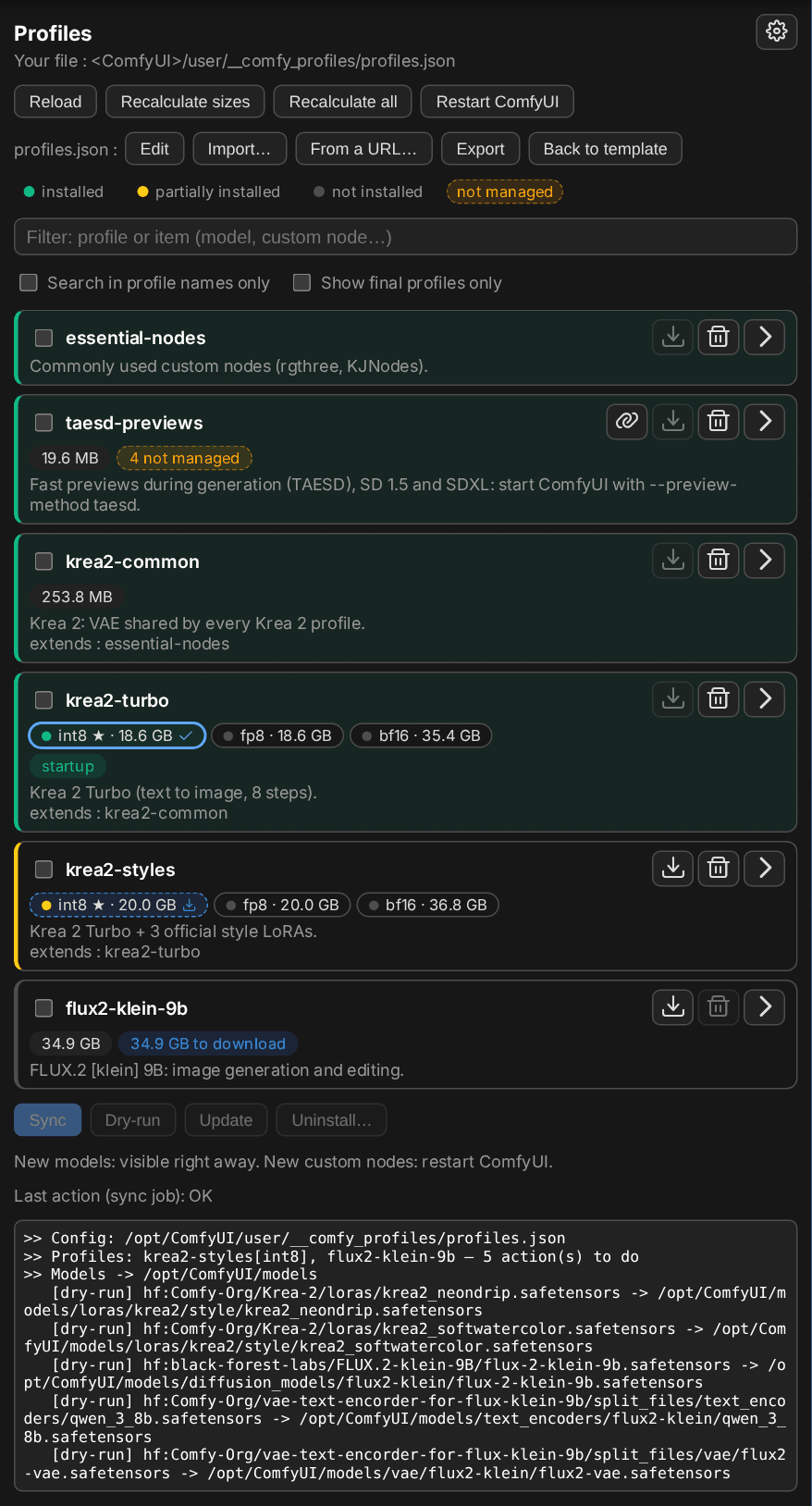
Profiles panel for ComfyUI: install, check and uninstall usage profiles from the sidebar.
A profile describes everything a use case needs (models, custom nodes, workflows, pip
packages) in a profiles.json file.
New here? Start with the user guide: step-by-step examples, screenshots,
.env files, command line and Docker.
Works with any ComfyUI (manual install, comfy-cli, Docker image). For an example of integration in a Docker image, see runpod-comfy-blackwell.
Installation
cd ComfyUI/custom_nodes
git clone https://github.com/jdelahayes/comfyui-profiles.git
then restart ComfyUI. The Profiles tab shows up in the sidebar, and the Workflow profiles node in the utils category (see Workflow profiles).
Contents
comfy_profiles.py: the profile manager, usable on its own from the command line. Itssizescommand computes the size of each profile at the source (Hugging Face, CivitAI, GitHub, URL), without downloading anything, and saves it in the profiles file, with thesha256of the models (Hugging Face, CivitAI) to spot the same file installed twice.__init__.py:/comfy-profiles/*HTTP routes added to the ComfyUI server; they runcomfy_profiles.pyas a subprocess, with ComfyUI's Python and paths.profiles_node.py: the Workflow profiles node.profiles_merge.py: adds to the profiles file some profiles taken from another file.web/profiles.js: the sidebar tab.profiles_i18n.pyandlang/: translations (see Language);locales/: translation of the node, loaded by ComfyUI.examples/profiles.example.json: example profiles file, used as long as no other one is provided. Its profiles install for real (no token needed, except possibly for CivitAI) and cover every feature of the format: Hugging Face, GitHub, CivitAI and URL sources, Git custom nodes (withref), a Google Drive zip (in comment), pip packages, workflows,extends, variants (FLUX.2 [klein] 4B in fp8, nvfp4, bf16), variants named inextends, grouping profiles and//comments.profiles.schema.json: JSON schema of the profiles file (validation and completion in an editor, through"$schema").
Profiles file
The file used is the first one found among:
--config FILE(command line);COMFY_PROFILES_CONFIG: if it does not exist yet, the template is copied there first;ComfyUI/user/__comfy_profiles/profiles.json: your file, the one written by the panel's editing, import and size computation;- the template, read-only:
COMFY_PROFILES_SEED(provided for instance by a Docker image), otherwiseexamples/profiles.example.json.
As long as you have not changed anything, the template is used, and its updates are taken
into account. The first change creates your file, which takes over. Back to template sets
it aside (profiles.json.bak).
user/__comfy_profiles/ is a ComfyUI "System User" folder (__ prefix): ComfyUI never serves
it through its HTTP routes (/api/userdata...), only this panel reads and writes there, after
validation.
From the panel: Edit, Import… (file from your computer), From a URL… (e.g. a raw GitHub or gist link: handy to keep your profiles in a repository), Export. An invalid file is rejected before anything is replaced.
From a URL… first compares the remote file with yours, profile by profile: new, different
(custom nodes, models, workflows and pip packages added +, removed − or changed ~), only
in your file, identical. Then:
- Merge: adds or replaces only the ticked profiles (all the new and different ones by default), plus the profiles they extend if you don't have them. Your other profiles stay.
- Replace all: the remote file replaces yours, including deleting the profiles that are only in yours.
The import is refused if the remote file changed after the comparison. The panel remembers the
last 10 URLs imported (user/__comfy_profiles/remotes.json): Sync next to one of them
compares it again, ✕ forgets it.
Format
{
  "$schema": "https://raw.githubusercontent.com/jdelahayes/comfyui-profiles/main/profiles.schema.json",
  "profiles": {
    "my-profile": {
      "description": "Free text, shown in the panel and by `list`.",
      "extends": ["krea2"],              // inherits the whole content of other profiles
      "models": [
        // type = subfolder of ComfyUI/models (loras, vae, diffusion_models, checkpoints...)
        {"type": "loras", "hf": "org/repo", "file": "path/in/the/repo.safetensors"},
        {"type": "loras", "hf": "org/repo", "file": "x.safetensors", "revision": "main", "name": "renamed.safetensors"},
        {"type": "checkpoints", "civitai": 123456, "name": "my_model.safetensors"},   // model VERSION id
        {"type": "vae", "github": "https://github.com/madebyollin/taehv.git", "file": "safetensors/taeh3.safetensors"},  // a single file of the repo
        {"type": "upscale_models", "url": "https://example.com/4x.pth", "name": "4x.pth"}
      ],
      "custom_nodes": [
        {"git": "https://github.com/author/ComfyUI-Foo.git"},
        {"git": "https://github.com/author/ComfyUI-Bar.git", "ref": "v1.2.0", "name": "Bar"},
        // public zip on Google Drive (share link or file id)
        {"gdrive": "https://drive.google.com/file/d/1AbC.../view?usp=sharing", "name": "ComfyUI-Baz"}
      ],
      "workflows": [
        {"url": "https://example.com/workflow.json", "name": "my_workflow.json"}
      ],
      "pip": ["onnxruntime-gpu"]
    }
  }
}
(The real file is strict JSON, without comments. Keys starting with // are ignored and can
be used as comments.)
- Sources (models and workflows): exactly one per item among
hf(+file, and optionallyrevision),github(public repositoryowner/repoor its URL, +file, and optionallyrevision: branch, tag or commit),civitai(version id, usesCIVITAI_TOKEN) orurl. Withgithub, only the file is downloaded, without cloning the repository (Git LFS included).namesets the local file name. It is required forcivitaiandurl, and defaults to the name offileforhfandgithub. - Destinations: models in the folders of their type as ComfyUI sees them,
extra_model_paths.yamlincluded (see below); custom nodes incustom_nodes/(or inCOMFY_PROFILES_NODES_STORE, then linked incustom_nodes/); workflows inuser/default/workflows/. - Model folders: a model is found in any of the folders ComfyUI scans for its type (e.g.
unet/ordiffusion_models/, and those ofextra_model_paths.yaml). If it is missing, it is downloaded into the first of these folders, in ComfyUI's order (so anis_default: truepath comes first), preferring the one named after the type:diffusion_models/rather thanunet/. A subfolder intype(diffusion_models/krea2) is part of the model name for ComfyUI: a file stored elsewhere in the type's folder is not recognized. - Python dependencies: the custom nodes'
requirements.txtandinstall.py, as well as thepippackages, are installed in ComfyUI's Python environment. What was installed is noted in that environment: a new container reinstalls the dependencies, even if the custom nodes are already on a persistent volume. - Custom node version:
ref(optional) pins a branch, a tag or a commit. Withoutref, the default branch is cloned once and never updated. Ifrefchanges, the nextsyncswitches the existing clone to it (only for a node installed by the manager). A branch is not updated again as long asrefstays the same. - Custom nodes as a zip on Google Drive:
gdrive(share link or file id, shared with "Anyone with the link") andname(folder name, required). The zip is extracted intocustom_nodes/<name>; if it holds a single root folder, its content is taken. It is only downloaded again ifgdrivechanges: to update the node, publish the new zip as a new Drive file (or delete the folder). To protect the content of a public link, encrypt the zip (7-Zip: zip format, AES-256 encryption) with theGDRIVE_ZIP_PASSWORDpassword. Encryption is detected automatically; an unencrypted zip is extracted without a password. - An unknown key (typo) makes the command fail before any action.
Variants
Several variants of the same models (quantizations int8, fp8, bf16...) fit in a single
profile: variants lists them, and each item tagged with variant (a name, or a list for an
item shared by several variants) only belongs to these variants. Items without variant are
common to all of them.
"krea2-raw": {
  "extends": ["krea2-common"],
  "variants": ["int8", "fp8", "bf16"],
  "default_variant": "int8",           // optional
  "models": [
    {"type": "loras/krea2", "hf": "Comfy-Org/Krea-2", "file": "loras/krea2_turbo_lora_rank_64_bf16.safetensors"},
    {"variant": "int8", "type": "diffusion_models/krea2", "hf": "Comfy-Org/Krea-2", "file": "diffusion_models/krea2_raw_int8_convrot.safetensors"},
    {"variant": "bf16", "type": "diffusion_models/krea2", "hf": "Comfy-Org/Krea-2", "file": "diffusion_models/krea2_raw_bf16.safetensors"}
  ]
}
A profile is then named with the variants to install between brackets, everywhere a profile
name is expected (command line, COMFY_PROFILES, extends, Workflow profiles node):
krea2-raw[int8]: the common items and those ofint8;krea2-raw[int8,bf16]: the common items and those of both variants;krea2-raw: the common items and those ofdefault_variant, or only the common items if the profile has no default variant;krea2-raw[]: only the common items.
Variants follow extends: a parent named without brackets that declares variants gets those
of the child (the ones it has). minimax-h3-fl2va[bf16], which extends minimax-h3-common,
thus installs minimax-h3-common[bf16]. A profile without variants gets the parent's default
variant. Brackets in extends take precedence: "extends": ["minimax-h3-common[]"] only takes
the common items, "extends": ["minimax-h3-common[int8]"] always takes int8.
Each variant has its own state and size. A variant does not become "partially installed"
because another one is installed (the common items count as inherited). comfy_profiles.py sizes
writes one size per variant: "size": {"int8": "19.3 GB", "bf16": "36.1 GB"}.
What is installed, what is removed
sync installs what is missing and never touches what is already there (except with
--update, see Update). What the manager installs itself is noted in
user/__comfy_profiles/installed.json, and uninstall only removes these items: a model
copied by hand, a custom node already there (installed with the Manager, shipped with a Docker
image...) is never removed, nor changed to another version, even if a profile mentions it. Its
Python dependencies also remain the business of whoever installed it. A custom node without
.git (installed by ComfyUI-Manager from the Comfy Registry) never changes version either,
even when managed: its ref is ignored.
A custom node already installed under another name is recognized and left as is, instead
of being cloned a second time (ComfyUI would load it twice): same name up to case, or same
repository (origin remote of its .git, or Repository of its pyproject.toml). This is
the case of nodes installed by ComfyUI-Manager from the Comfy Registry, stored under their
registry id: comfyui-kjnodes for ComfyUI-KJNodes.
uninstall removes the models, workflows and custom nodes of the profiles themselves,
except what is still used by a kept profile: a profile of COMFY_PROFILES, or another fully
installed profile, including those they inherit from. Example: uninstalling krea2 (which
inherits from krea2-common) removes its diffusion model, but keeps the text encoder and the
VAE of krea2-common. With --with-extends ("Include the inherited profiles" checkbox in the
panel), the inherited profiles are uninstalled too: this is what a profile that only groups
other profiles needs. pip packages are never removed. For a profile with variants, each
variant counts as a profile of its own: uninstalling krea2-raw[bf16] removes the files of
bf16, and its common items only if no other variant of the profile stays installed. A
variant a profile only has through extends (no item of its own for it: krea2-styles[bf16],
whose bf16 files are those of krea2-turbo) only protects the profile's own items, so that
krea2-turbo[bf16] can still be uninstalled; and nothing when that profile is the one being
uninstalled.
When everything left of a profile is still used elsewhere, uninstalling it removes nothing: the
panel then grays out its uninstall button and names, on hover, the profiles keeping its files
(e.g. flux3-klein-common[nvfp4], whose files are all those of [int8]). It finds out with
uninstall --json --each, which summarizes what uninstalling each profile alone would
remove (number of items, size freed, profiles keeping the rest), in one call.
For uninstall to still remove what was already there, take it over: adopt PROFILE
(the profile's "link" button in the panel) adds to the manifest everything present for the
profile, extends included. The dependencies of its custom nodes are considered already
installed (the node already worked): sync does not run them again. The panel shows what is
not managed yet: orange "N not managed" chip on the profile, and a mention on each item in its
details.
Update
sync --update (the panel's Update button) installs what is missing, like sync, and
also updates what the manager installed or took over, if it changed at the source:
- git custom nodes: latest commit of their branch (that of
ref, otherwise the repository's default branch; a tag or commitrefdoes not move). A node whose git-tracked files were modified in place is left as is, like a node without.git(installed by ComfyUI-Manager from the Comfy Registry: update it with the Manager); - Google Drive custom nodes: the zip is downloaded again and only replaces the node if it
differs from the one it comes from (sha256 checksum noted in
.comfy-profiles-gdrive); - models and workflows: the source is queried without downloading anything (Hugging Face
ETag, or HTTP ETag /
Last-Modifiedfor GitHub and URLs), and the file is only downloaded again if it changed. The version of each file is noted inuser/__comfy_profiles/versions.json. For a file without a noted version (installed before this feature), a Hugging Face file is compared to its checksum (computed once), another one to its size. CivitAI is never checked: the file of a model version does not change; - pip packages:
pip install --upgrade.
The dependencies of an updated custom node are installed again if its requirements.txt or
its install.py changed. What the manager did not install is never updated: take it over
first (adopt). After updating custom nodes, restart ComfyUI.
Upgrading from a version without a manifest: if custom nodes are stored separately
(COMFY_PROFILES_NODES_STORE), what is already there for the profiles of the file is taken
into the manifest at the first use (that storage is only filled by the manager).
Workflow profiles
The Workflow profiles node (utils category) declares in a workflow the profiles it needs. The information travels with the workflow: whoever receives it knows what to install.
- profiles: profile names, comma-separated (
krea2-turbo, essential-nodes), with their variants between brackets if needed (krea2-turbo[int8], krea2-raw[int8,bf16], see Variants). - source (optional): URL of the profiles file that defines them, for instance a raw GitHub link. A profile name only makes sense within a given profiles file: without a source, the declaration is only useful to those who already have these profiles.
The node has no linkable input and no output: ComfyUI never executes it, it changes nothing in the workflow's result. In a ComfyUI without this plugin, it shows up as a missing node, which signals that comfyui-profiles must be installed.
When a workflow containing this node opens (subgraphs included), a notification lists the declared profiles that are not installed or not in the profiles file. The panel then shows a This workflow section at the top: the state of each declared profile, a button to install what is missing (one profile, or all those of the workflow), and, for a profile missing from the profiles file, a button that adds it from the node's source. This adds the profile and those it inherits from, without replacing the file: profiles already there stay as they are (reported if they differ from the source), and the rest of the file keeps its formatting.
For a workflow without this node, the section says so and offers to add it (+ icon), filled with the profiles ticked in the panel. The node is placed in the visible part of the canvas, without overlapping other nodes (otherwise just above the workflow, and the view goes to it).
Models of the workflow
The Check the workflow's models… button (on the node, and in the This workflow section)
opens a dialog listing the model fields of the workflow (loaders: unet_name, clip_name,
vae_name, lora_name…, subgraphs included; for a widget promoted on a subgraph node, the
field of the subgraph node). Each field is marked present and provided by the declared
profiles, present but outside them, or file not found. For each field, a list offers the files
of all the profiles of the file that can replace it, best match first:
- the same file in another folder (
flux2-vae.safetensors→flux3-klein/flux2-vae.safetensors); - the same model in another variant: names compared without their precision marks (
int8,fp8,bf16,nvfp4,convrot,scaled,fp8mixed, GGUFq4_k_m…); - another version of the model (
v2→v3.1,2.0→2.1), preferably in the same precision; - a similar name, or a file of the same kind.
Among good matches (1 to 3), the files of the declared profiles come first: declaring
flux3-klein[bf16] turns the fields of an int8 workflow to the bf16 files. A choice is only
preselected when it is clear (a good match ranked first on its own; ties broken by declared,
installed, then by the profile providing the most files of the workflow). Under each field,
Provided by gives the profiles providing the chosen file (up to 3, those providing the most
files of the workflow first, with the matching variant); + adds one to the node (merging
the variants of a profile already declared, e.g. flux3-klein[int8,bf16]), or creates the node.
When every field points to a file of a profile, a banner at the top gives the fewest profiles
providing them all, declared at once with Declare in the workflow. Under it, Variant
shows the variants of the profiles with variants the workflow declares (otherwise of those the
banner offers), with their state: a click declares that variant alone in the node
(flux3-klein[int8] → flux3-klein[bf16]) and preselects again the fields' files for it.
Profiles are declared in the node right away; the fields only change with Apply, undone with Ctrl+Z. ComfyUI then checks the missing models again: only the nodes whose chosen file is not installed yet keep their red frame (it goes away after the sync that installs it). One workflow thus serves every variant of a profile and every folder layout: the profiles can point to the original workflows of a model, without copies adapted to each variant or subfolder.
Language
The panel, the script's messages and the server's errors are in English or French. The panel
follows ComfyUI's language (Language setting); on the command line, it is
COMFY_PROFILES_LANG, otherwise LC_ALL, LC_MESSAGES or LANG. English is the default
language, and the one used for an untranslated language. Changing ComfyUI's language requires
reloading the page.
To add a language: copy lang/fr.json to lang/<code>.json (e.g. de.json) and translate the
values. The keys are the English messages of the code; {variables} must stay as they are. A
missing message stays in English.
Panel
- Profile list: description, size,
extends, startup badge for those ofCOMFY_PROFILES. A folded card is compact: description on one line,extendsonly once unfolded. A profile with variants keeps a single card, with one chip per variant next to its name (state color, ★ for the default variant; its size on hover): the ticked variants are those the card's buttons, and the buttons under the list for a checked profile, apply to (krea2-raw[int8,bf16]). None is ticked at first: these buttons then apply to the whole profile, all its variants included (installing, or uninstalling with its common items). A ticked variant is outlined, with a download icon if it is not fully installed. Its details group the items by variant. For a profile that is not fully installed, a blue … to download badge gives the size of the missing files that installing it would add (extendsincluded; custom nodes and pip packages are not counted). The background color gives the state: green installed (everything is there,extendsincluded), orange partial, neutral not installed. Only the profile's own items count for "partial", not the inherited ones; a profile that only groups other profiles is judged on their items outside the base they all share (forminimax-h3-all[bf16]: the fl2va and ref2va models, notminimax-h3-common[bf16]). - List filters, remembered in the browser: text on the names of the profiles and of their
items (
extendsincluded), or on the profile names only; final profiles only (those no other profile extends), optionally with those extended only by a grouping profile (without items of its own, e.g.minimax-h3-all); state, by clicking installed, partially installed or not installed in the legend (several at once possible), and not managed for the profiles that have unmanaged items. A checked profile stays shown. - Buttons per profile: install (if it is not fully installed), uninstall (if it is, even
partially), take over (if it has unmanaged items), details of what is present or not, grouped
by the profile declaring each item (the profile itself, then each inherited profile), with
the size of each file (
?as long as it is unknown: "Recalculate sizes" queries it at the source) and an icon that opens its source (Hugging Face, GitHub, CivitAI, Google Drive, PyPI or the URL). - Sync, dry-run, update (see Update) or uninstall of the checked profiles, with a
Downloads table (one progress bar per file) and live logs, hidden until Show the log. One action at a time; Stop interrupts it (the current clone is abandoned without
leaving an incomplete folder; downloads keep their
.part, see Downloads). - This workflow section: profiles declared by the open workflow, or the offer to add the node, and the dialog checking the workflow's models: see Workflow profiles.
- Profiles file: edit, import (file or URL), export, back to template.
- Recalculate sizes: runs
comfy_profiles.py sizeson the profiles file (only the files without a size are queried); Recalculate all also queries again those whose size is known (--force). - On disk, outside the profiles (tray icon next to the title): table of the models, custom
nodes and workflows present on disk that no profile of the file declares, all variants
included (
comfy_profiles.py orphans), models grouped by root folder (folded, with their total; the filter unfolds them): size, date, path to copy, installed by the manager for what a profile since removed left behind; empty folders are not shown. A model folder without any file of a profile counts as one item; previews and.civitai.info-like annexes are ignored. Read-only. - HF / CivitAI badges under the title: whether each token is found; a click explains how to set it (see Secrets).
- Settings (gear next to the title): download settings (see Downloads) and deletion of partial downloads.
- Restart of ComfyUI, needed after installing new custom nodes: same process started again, or
restarted by comfy-cli when ComfyUI runs under
comfy launch.
Anyone with access to the UI can install profiles, change their file and restart ComfyUI. On
a shared instance, COMFY_PROFILES_READONLY=1 limits the panel to browsing and dry-run.
Downloads
- In parallel: models and workflows are downloaded several at a time (3 by default), once custom nodes and pip packages are installed, one by one. The panel shows a Downloads table, one row and progress bar per file (state, percentage, throughput); the log, hidden by default (Show the log), keeps a single progress line for all the running files.
- Resume: an interrupted CivitAI, GitHub, URL or Google Drive download (Stop, network
drop, container stopped) leaves a
<name>.partfile (ignored by ComfyUI), resumed where it stopped by the next sync, if the server accepts partial requests and the file has not changed at the source (otherwise it starts over). A network drop along the way is resumed right away (5 attempts). Hugging Face goes throughhuggingface_hub(Xet), which cannot resume: an interrupted file starts over. - Hugging Face: Xet high performance mode (
HF_XET_HIGH_PERFORMANCE) enabled by default: more connections and memory per file.
Settings: the panel's Settings, or comfy_profiles.py settings. They are saved in
<user>/__comfy_profiles/settings.json and apply to all the following syncs, including the one
at container startup. Priority order: saved value, otherwise environment variable, otherwise
default.
| Setting | Environment variable | Default |
|---|---|---|
| jobs: files downloaded at a time (1 to 16) | COMFY_PROFILES_JOBS | 3 |
| hf_high_performance: Xet high performance mode | HF_XET_HIGH_PERFORMANCE | enabled |
Partial downloads stay on disk until they are resumed: the panel's Settings counts them and
can delete them (settings --clean-partials).
Command line
comfy_profiles.py [--config FILE] list [--json]
comfy_profiles.py [--config FILE] where                    # file in use and its origin (JSON)
comfy_profiles.py [--config FILE] show PROFILE[,PROFILE...] [--json]
comfy_profiles.py [--config FILE] sync [PROFILE[,PROFILE...]] [--update] [--jobs N] [--dry-run]
comfy_profiles.py [--config FILE] uninstall PROFILE[,PROFILE...] [--with-extends] [--dry-run] [--json [--each]]
comfy_profiles.py [--config FILE] adopt PROFILE[,PROFILE...] [--dry-run] [--json]
comfy_profiles.py [--config FILE] sizes [--env FILE] [--force] [--dry-run]
comfy_profiles.py [--config FILE] orphans --json           # on disk, outside any profile (JSON)
comfy_profiles.py settings [--set JSON] [--reset] [--clean-partials]   # settings (JSON)
Run with ComfyUI's Python (dependencies get installed there). The ComfyUI folder is
COMFY_HOME, otherwise the one this repository is a custom node of. Example: sync profiles at
container startup, before starting ComfyUI:
COMFY_PROFILES=krea2,flux2-klein-9b python custom_nodes/comfyui-profiles/comfy_profiles.py sync
sizes only queries the files without a size, or the models without a sha256 their source
gives (--force: all of them), and keeps the file's formatting. It then lists the files
installed in several places (same sha256, different <type>/<name>). --env takes HF_TOKEN / CIVITAI_TOKEN from a .env file when they
are not in the environment. It also works outside any ComfyUI with --config, for instance on
the profiles.json of a repository.
Environment variables
| Variable | Role | Default |
|---|---|---|
| COMFY_PROFILES_SEED | template profiles file (read-only) | examples/profiles.example.json |
| COMFY_PROFILES_CONFIG | imposed profiles file (copied from the template if it does not exist) | — |
| COMFY_PROFILES | profiles synced by sync without an argument (startup badge) | — |
| COMFY_PROFILES_NODES_STORE | folder where custom nodes are cloned, then linked in custom_nodes/ (e.g. a persistent volume) | custom_nodes/ |
| COMFY_PROFILES_READONLY | 1: read-only panel | — |
| COMFY_HOME | ComfyUI folder (command line) | the ComfyUI this repository is in |
| COMFY_MODELS_DIR, COMFY_CUSTOM_NODES_DIR, COMFY_USER_DIR | ComfyUI paths (passed by the panel) | under COMFY_HOME |
| COMFY_MODEL_FOLDERS | folders of each model type, as JSON (passed by the panel) | default folders + extra_model_paths.yaml |
| COMFY_EXTRA_MODEL_PATHS | other extra_model_paths files (separated by :), like --extra-model-paths-config (command line) | — |
| HF_TOKEN, CIVITAI_TOKEN | authenticated downloads | — |
| COMFY_PROFILES_JOBS | files downloaded at a time, if the jobs setting is not saved | 3 |
| HF_XET_HIGH_PERFORMANCE | 0: disables Xet high performance mode, if the setting is not saved | enabled |
| GDRIVE_ZIP_PASSWORD | encrypted zips of gdrive custom nodes | — |
| COMFY_PROFILES_LANG | language of the messages (en, fr) | from the locale, otherwise en |
| COMFY_PROFILES_SCRIPT | other comfy_profiles.py for the panel to use | the one of this repository |
Tokens and passwords: see Secrets.
Secrets
The panel neither asks for nor stores any secret: HF_TOKEN (or hf auth login),
CIVITAI_TOKEN and GDRIVE_ZIP_PASSWORD are read from the environment of the ComfyUI server,
so they must be set before ComfyUI starts. The HF / CivitAI badges under the panel's
title show whether each token is found, and a click explains how to set it. Examples of .env files and launchers for Linux,
Windows (portable, PowerShell, Desktop) and Docker: user guide, section 8.
Integration in a Docker image
The minimum:
RUN git clone --branch v0.8.0 --depth 1 https://github.com/jdelahayes/comfyui-profiles.git \
      "${COMFY_HOME}/custom_nodes/comfyui-profiles"
COPY profiles.json /opt/profiles.json
ENV COMFY_PROFILES_SEED=/opt/profiles.json
- The image's profiles serve as the template, and those the user changes live in
user/. Ifuser/is on a persistent volume, the user's profiles file and the manifest are too. - With custom nodes on a volume:
COMFY_PROFILES_NODES_STORE=<volume>/custom_nodes. The custom nodes copied into the image (real folders incustom_nodes/) are then never touched. - Sync at startup:
comfy_profiles.py syncin the entrypoint, withCOMFY_PROFILES.
Publishing to the Comfy Registry
pyproject.toml describes the node for the Comfy Registry. The
Publish to Comfy registry workflow (manual) publishes the pyproject.toml version; it
needs a publisher on the registry (PublisherId) and its token in the REGISTRY_ACCESS_TOKEN
secret. Remember to align version with the git tag.
License
MIT, see LICENSE.