
LogBlaster
Real-time Audio-Reactive WebGL2 GPU Shader Log-Text Visualizer & Auto-Popup HUD for ComfyUI — giant foreground streaming logs tapering into a 3D trail, 4 shaders, Comfy Black & Yellow palette, zero pip dependencies, and 0 MB extra PyTorch VRAM.
ComfyUI-LogBlaster
Real-time Audio-Reactive WebGL2 GPU Shader Log-Text Visualizer for ComfyUI — featuring giant live foreground streaming typography that smoothly shrinks into a receding 3D trail as logs scroll.
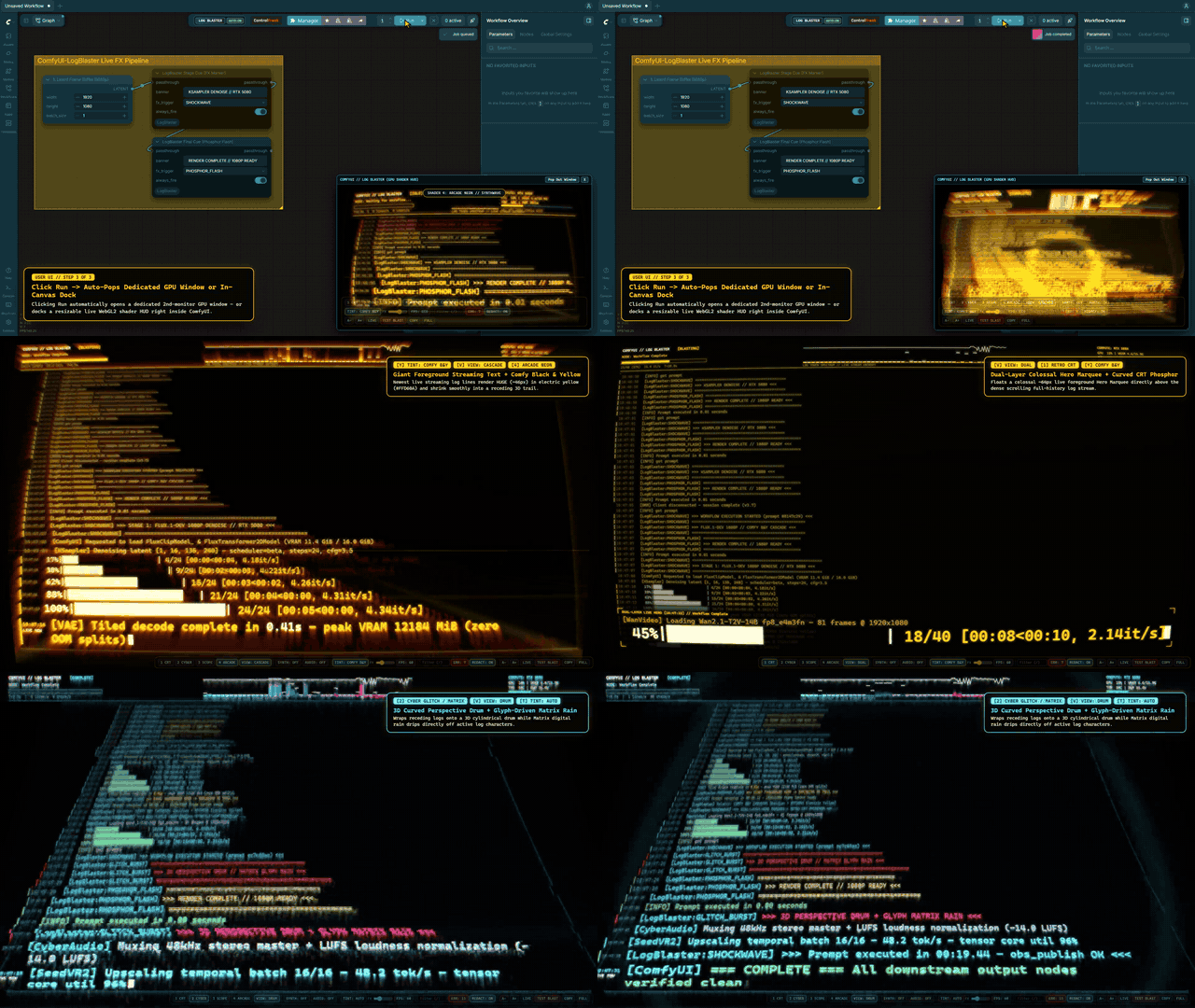
- Full 1080p30 + Stereo Audio Demo Video (48s — Installation, ComfyUI User UI,
LogBlaster Stage Cue, Shaders &COMFY B&Y):docs/demo/comfyui_logblaster_demo.mp4
Instead of a flat wall of uniform tiny HTML text, ComfyUI-LogBlaster renders ComfyUI's live blasting stdout/stderr stream (/internal/logs/subscribe + /ws) onto an offscreen transparent-alpha glyph canvas and processes the log characters themselves through a 2-pass WebGL2 ping-pong fragment shader pipeline.
Installation (Zero pip Dependencies)
- Option 1 — ComfyUI-Manager / Comfy Registry (
@fluxus): SearchLogBlaster(comfyui-logblaster) in ComfyUI-Manager and click Install, or view on the official Comfy Registry: https://registry.comfy.org/nodes/comfyui-logblaster - Option 2 — Comfy CLI:
comfy node install comfyui-logblaster - Option 3 — Manual
git clone:cd ComfyUI/custom_nodes git clone https://github.com/jbrick2070/ComfyUI-LogBlaster.git
Restart ComfyUI — no Python packages to install and 0 MB extra PyTorch VRAM (ctypes NVML). LogBlaster automatically registers GET /logblaster, mounts LOG BLASTER | AUTO: ON in ComfyUI's top bar, and pops open on workflow runs.
Getting Comfortable
- Open ? or press H for the quick guide. It appears automatically on your first visit.
- Try TEST BLAST while no workflow is running to preview a short ComfyUI demo. A real workflow takes priority over the demo.
- Scroll up to hold your place in history; press Space to pause or resume. Browser shortcuts such as Ctrl+A and Ctrl+F keep their usual behavior.
- In smaller windows, MORE contains text-size and copy controls. The log area stays clear of wrapped controls.
- Your system's reduced-motion preference disables moving distortions and animated scrolling, and caps FX at 60%. You can lower FX further.
Giant Foreground Live Text -> Shrinking Trail (VIEW Modes, Hotkey V)
| Mode | Visual Behavior |
| --- | --- |
| CASCADE (Default) | Most recent real-time streaming log text renders HUGE (~46px bold, smart-wrapped) at the front stage and progressively shrinks (46px -> 35px -> 29px -> 22px -> 15px -> 9px) with perspective convergence and depth glow as new lines scroll it upward. |
| DUAL | Dual-Layer HUD: full dense scrolling log matrix in the background layer + colossal 56px–68px glowing foreground Hero Marquee blasting the newest streaming line & active node on top. |
| DRUM | 3D Curved Drum: combines the giant-to-small CASCADE stream with pronounced 3D cylindrical glass & perspective foreshortening curvature in the WebGL2 fragment shader. |
| FLAT | Classic uniform monospace terminal for dense stack-trace inspection. |
4 Switchable GPU Shader Presets (1 – 4) & Comfy Black & Yellow Palette (Y / T)
| Hotkey | Preset / Palette | Log-Text GPU Effects |
| --- | --- | --- |
| 1 | Retro CRT Phosphor | Curved CRT barrel glass, 9-tap HDR phosphor bloom, temporal cathode afterglow, scanlines cutting across thick hero glyphs, RGB aperture grille, degauss shake on workflow start |
| 2 | Cyberpunk Glitch // Matrix | Velocity-reactive horizontal scan-band slicing on log lines, dynamic RGB chromatic aberration prisms, Matrix digital rain dripping directly downward off live log letters |
| 3 | Vintage Radio Oscilloscope | Illuminated copper/emerald Tektronix etched graticule, P7 radar phosphor decay, live carrier/audio waveform, magnetic electron-beam deflection across log lines |
| 4 | Arcade Neon // Synthwave | 3D receding synthwave horizon grid, plasma gradient highlights, physical radial shockwave rings that refract and bend log characters on node transitions & bass beats |
| Y / T | COMFY B&Y (Black & Yellow) | Full-stack Pitch-Black & Electric Comfy Yellow studio theme (#050504 obsidian canvas + #FFD60A Comfy yellow + #FFF9C4 white-gold hot badges + #FF453A alert errors) across all 4 shaders (Y toggles directly; T cycles AUTO, COMFY B&Y, AMBER P3, GREEN P31, ICE CYAN) |
Bounded Overhead & Multi-Platform Telemetry
-
FPS: ECO | 60 | MAXFrame Governor (ECOdefault: 30 FPS while blasting/audio-active, 15 FPS when quiet/idle, 0 FPS truerequestAnimationFramepause when hidden/minimized) + dirty-gated 2D canvas uploads + 4K render-target memory ceiling +FX=0%raw fast-blit path. -
Requests
powerPreference: "low-power"(?gpu=highopt-in) and honestly reports the active WebGL2 GPU adapter + live FPS in the top-right telemetry block. -
Reads NVIDIA GPU utilization, VRAM, temperature, and watts via zero-subprocess, zero-
torch.cudactypesNVML (telemetry.py), automatically falling back to ComfyUIGET /system_statsVRAM telemetry on macOS MPS, AMD ROCm, Intel XPU, or CPU. -
Telemetry shows STALE after five seconds without a valid sample and OFFLINE after fifteen. A disconnected server shows outage time and a retry countdown. NVML recovers automatically after transient failures.
Zero-Echo Audio Reactivity (M / A / Drag & Drop)
-
SYNTH(M): Built-in procedural Web Audio telemetry synthesizer — turns live log velocity, diffusion steps, node transitions, and errors into gentle sci-fi ticks, bass drones, and completion chords fed directly into the 512-point GPU FFT texture (u_audioTex). -
AUDIO(A/Shift+Click): Capture System/Tab loopback audio (getDisplayMedia, video track immediately stopped) or Microphone (Shift+Click), routed strictly to a silent terminalAnalyserNode(never echoed back to speakers!), or drag-and-drop any.mp3/.wav/.ogg/.flacfile onto the window. -
SYS/MIC are silent taps; FILE/SYNTH are audible. SYNTH quiets when the window is hidden and resumes when shown. FILE playback is left unchanged.
Streamer Privacy Redaction, Live Filter & Error Jump
REDACT: ON(default): Automatically masks secret tokens (sk-,gh*_,hf_,AIza,AKIA,Authorization: Bearer ...,api_key/token/secret/password), URL basic-auth credentials (https://user:pass@host->https://user:***REDACTED***@host), and collapses local home paths (C:\Users\<name>\->~\) on screen and when copying logs (COPY).- Quoted JSON values, keys such as
client_secretandrefresh_token, Basic/Token/ApiKey authorization headers, password-only URLs and bare home directories are covered, including partial streaming values. COPY exports the bounded visible history with truncation markers for long lines. /Live Filter: Filter the 3,500-line scrollback buffer in real time inside the GPU shader.EError Jump (ERR: N): Instantly pause follow and spotlight any error line directly in the giant foreground Hero stage.
Launching
- Inside ComfyUI UI: Click
LOG BLASTERin the top bar, or leaveAUTO:ONenabled:- UI Click/Shortcut Queue: pops open the standalone HUD window synchronously.
- External API Queue while ComfyUI tab is open: wakes an existing HUD via
BroadcastChannelor opens an embedded dock drawer if the browser blocks background popups.
- Direct URL: Open
http://127.0.0.1:8000/logblaster(supports?preset=1..4&view=cascade|dual|drum|flat&tint=auto|comfy|amber|green|cyan&fx=0..160&fps=eco|60|max&redact=0|1&anchor=middle;anchor=middleputs the live line just below mid-screen instead of at the bottom, for a projector or shared screen whose lower edge the audience cannot see; inview=dualthe background stream still fills the whole screen and the hero band is centred). - Chromeless Native App Window: Run
launch_log_blaster.bat [port] [host]. - Opt-in Headless Watcher: Run
powershell -ExecutionPolicy Bypass -File scripts\watch_and_pop.ps1 -HostName 127.0.0.1 -Port 8000when driving headless API jobs with no ComfyUI browser tab open. - Optional Workflow Stage Marker (
LogBlaster_StageCue): DropLogBlaster Stage Cue (FX Marker)(utils/LogBlaster) inline on any wire (passthrough) or as a leaf cue (always_fire = True) to triggerSHOCKWAVE,GLITCH_BURST,PHOSPHOR_FLASH, orBANNER_ONLYpulses at key workflow milestones without invalidating downstream ComfyUI cache by default.
Development Checks
Run python -m pytest -q -p no:cacheprovider tests/test_logblaster.py with Node.js available for the frontend harnesses. CI runs this plugin suite on main pushes and pull requests. The maintainer's separate comfyui-custom-node-survival-guide/tests/bug_bible_regression.py suite is also a mandatory local gate; it is not bundled or run by this repository's CI. Publishing requires an intentional version change or manual release dispatch.