
Workflow Iterator
A/B testing and batch parameter comparison nodes for ComfyUI
Nodes (8)
Your A/B test, arranged as a labeled grid you can actually read
Finally answer 'which sampler is best on my setup' without 40 manual queues
Hunt down your model's sweet-spot CFG the way you'd actually tune it
Sweep an integer widget (steps, batch size, anything) without touching it again
Seed sweeps done right — random batches, incrementing runs, and holding it fixed
Sweep prompts, not just sliders — one line per prompt variation
Save Image that names itself after what it tested, and remembers it in the PNG
Queue an entire parameter experiment from one node, then go make coffee
ComfyUI Workflow Iterator
<!-- LOGO placeholder -->





Systematic A/B testing and parameter sweep tooling for ComfyUI workflows. Define ranges or lists of values for any node widget — CFG scale, sampler, steps, prompts, seeds — and the extension automatically queues every combination, then assembles a labeled comparison grid when the batch is complete. Stop tweaking sliders one at a time and start running controlled experiments.
<!-- Best screenshot: a side-by-side showing (1) the ComfyUI canvas with a Workflow Iterator node, two WIParameter nodes, and a WIGridCompositor node wired up, and (2) the resulting labeled comparison grid image in the output panel. -->
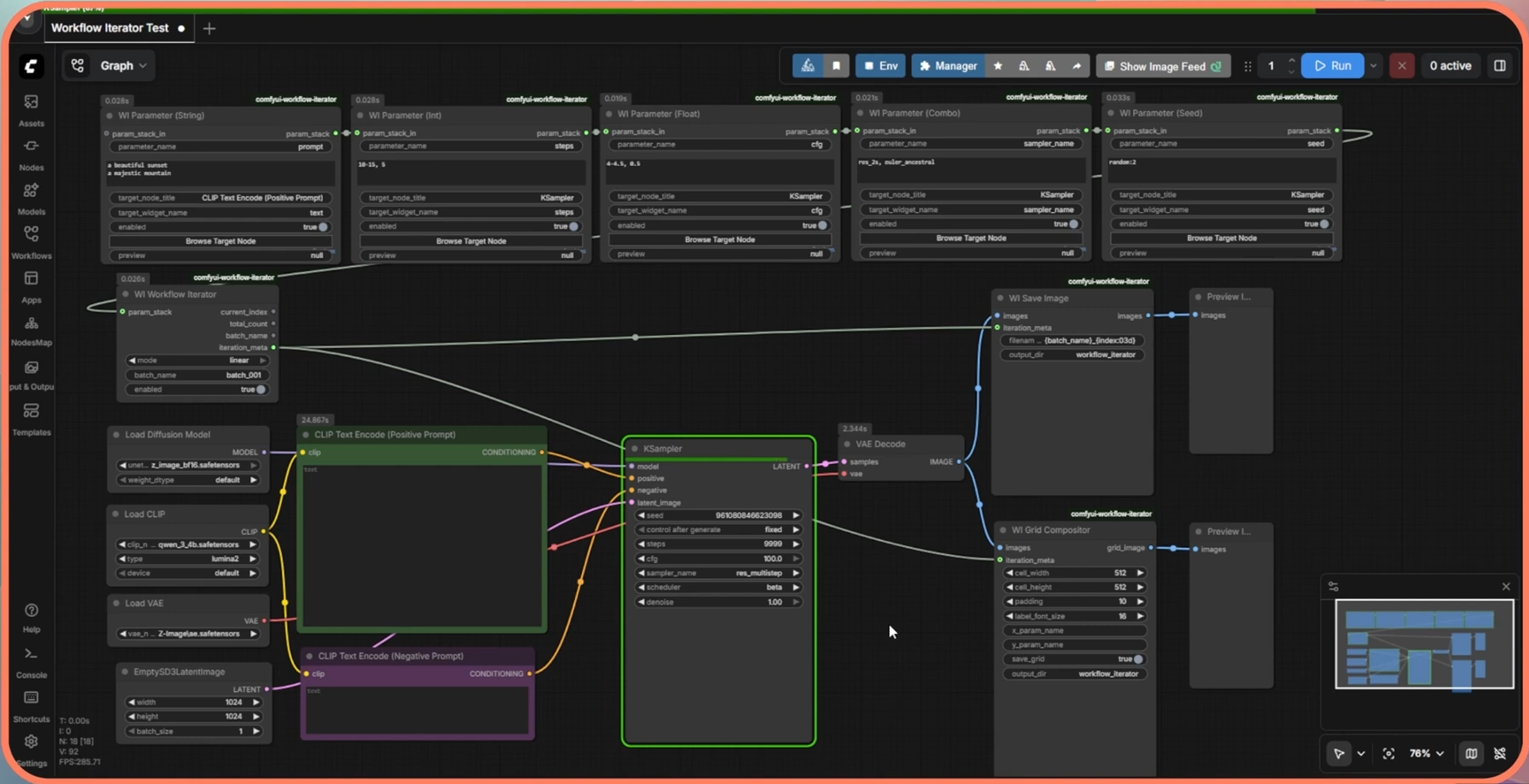
Table of Contents
- About The Project
- Getting Started
- Usage
- Node Reference
- Project Structure
- Running Tests
- Roadmap
- License
- Contact
About The Project
Motivation
ComfyUI's default workflow executes one prompt at a time. Finding optimal generation settings — the right CFG scale, the best sampler, the most effective prompt — requires manually adjusting widgets, re-queuing, and visually comparing results held only in memory. This process is slow, error-prone, and produces no structured record of what was tested.
Workflow Iterator treats parameter exploration as a first-class workflow operation. You declare what to vary, how many combinations to generate, and where to save results — then walk away while the batch runs.
Key Features
- Five typed parameter nodes — dedicated nodes for
INT,FLOAT,STRING,COMBO, andSEEDtypes, each with its own parsing and validation logic. - Expressive value syntax — define ranges with step (
10-30, 5), comma-separated lists (euler, dpm_2, ddim), random seeds (random:5), or sequential seeds (increment:100:5). - Two combination strategies — matrix mode generates the full Cartesian product of all parameters; linear mode zips them index-by-index with cycling for curated, efficient runs.
- Automatic labeled comparison grids — the
WIGridCompositornode assembles a 2D grid (for two-parameter matrix sweeps) or a linear strip, with axis labels derived directly from the parameter values tested. - PNG metadata embedding — every saved image carries a structured JSON payload and an A1111-compatible parameter string describing the exact combination that produced it.
- Wildcard expansion — string parameters support
__wildcard_name__file references and{option1|option2}inline syntax, expanding before combination generation. - Live progress overlay — a JavaScript frontend extension polls the active batch status and renders a progress indicator directly on the WorkflowIterator node in the canvas.
- Batch cancellation API — cancel a running batch via HTTP without restarting ComfyUI.
Built With



| Component | Technology |
|---|---|
| Backend | Python 3.9+ |
| Image processing | Pillow ≥ 9.0.0, NumPy |
| Async HTTP routes | aiohttp (via ComfyUI's embedded PromptServer) |
| Frontend progress UI | Vanilla JavaScript (ComfyUI extension API) |
| Packaging | pyproject.toml (PEP 517) |
| Testing | pytest |
Getting Started
Prerequisites
- ComfyUI — any recent version. (Installation guide)
- Python 3.9 or higher — bundled with most ComfyUI installations.
- Git — for cloning the repository.
Installation
Option A — ComfyUI Manager (recommended)
If you have ComfyUI Manager installed, search for "Workflow Iterator" in the Custom Nodes panel and click Install. Restart ComfyUI when prompted.
Option B — Manual install
- Clone the repository into your ComfyUI
custom_nodesdirectory:
cd /path/to/ComfyUI/custom_nodes
git clone https://github.com/YOUR_USERNAME/comfyui-workflow-iterator
- Install the Python dependency:
# Using ComfyUI's embedded Python (recommended)
/path/to/ComfyUI/python_embeded/python -m pip install Pillow>=9.0.0

# Or, if using a system/venv Python
pip install Pillow>=9.0.0
- Restart ComfyUI. The Workflow Iterator nodes will appear in the node browser under the
Workflow Iteratorcategory.
Usage
Building a Parameter Sweep Workflow
A complete iteration workflow requires four elements wired together on the canvas:
[WIParameter nodes] ──param_stack──► [WorkflowIterator] ──iteration_meta──► [WIGridCompositor]
                                             │
                                      targets any node's
                                      widget at runtime
                                      (e.g., KSampler.cfg)
Step-by-step:
-
Add a
WI Workflow Iteratornode from the node browser (Workflow Iteratorcategory). Setmodetomatrixorlinearand give the batch a name. -
Add one or more
WI Parameternodes (Int, Float, String, Combo, or Seed). Chain them by connecting each node'sparam_stackoutput to the next node'sparam_stack_ininput. Connect the final node'sparam_stackoutput to theWorkflowIteratornode'sparam_stackinput. -
Configure each parameter node:
parameter_name— a display label (used in grid axis labels and filenames).values— the values to sweep (see syntax reference below).target_node_title— the title of the node whose widget you want to control (e.g.,KSampler).target_widget_name— the exact widget name (e.g.,cfg,steps,sampler_name).
-
Add a
WI Grid Compositornode. Connectiteration_metafrom the WorkflowIterator. This node collects each iteration's output and assembles the grid on completion. -
Queue the workflow. The extension intercepts the submission, generates all combinations, and queues them automatically.
Parameter Value Syntax
| Type | Format | Example Input | Parsed Result |
|---|---|---|---|
| INT | Range with step | 10-30, 5 | [10, 15, 20, 25, 30] |
| INT | Comma list | 10, 20, 30 | [10, 20, 30] |
| FLOAT | Range with step | 0.5-1.5, 0.25 | [0.5, 0.75, 1.0, 1.25, 1.5] |
| FLOAT | Comma list | 5.0, 7.5, 10.0 | [5.0, 7.5, 10.0] |
| STRING | Newline-separated | a cat\na dog | ["a cat", "a dog"] |
| COMBO | Comma list | euler, dpm_2, ddim | ["euler", "dpm_2", "ddim"] |
| SEED | Random count | random:5 | 5 random integers |
| SEED | Sequential | increment:100:4 | [100, 101, 102, 103] |
| SEED | Explicit list | 42, 1337, 9999 | [42, 1337, 9999] |
Wildcard expansion (STRING type only):
__subjects__           # loads every line from wildcards/subjects.txt
{cat|dog|bird}         # inline random selection
a photo of __subjects__ in {summer|winter}
Wildcards are expanded before combination generation, so each resolved string becomes a separate combination value.
Combination Modes
| Mode | Behaviour | Best for |
|---|---|---|
| matrix | Full Cartesian product of all parameters | Exhaustive exploration — 3 params × 10 values = 1,000 renders |
| linear | Index-by-index pairing, shorter lists cycle | Curated comparisons — always equals the longest list length |
Example — matrix mode with 2 parameters:
| | euler | dpm_2 |
|---|---|---|
| cfg=5 | ✓ | ✓ |
| cfg=7 | ✓ | ✓ |
| cfg=9 | ✓ | ✓ |
6 renders, assembled into a 3×2 labeled grid automatically.
Example — linear mode with the same parameters:
| Iteration | sampler | cfg |
|---|---|---|
| 0 | euler | 5 |
| 1 | dpm_2 | 7 |
| 2 | euler (cycling) | 9 |
3 renders. Shorter list cycles to fill.
HTTP Status API
The extension registers REST endpoints on ComfyUI's built-in server:
# List all active batches
GET /wi/active_batches

# Get progress for a specific batch
GET /wi/batch_status/{batch_id}

# Cancel a running batch
POST /wi/cancel_batch/{batch_id}
Example response from /wi/active_batches:
{
  "sampler_test_a3f9c12b": {
    "total": 6,
    "completed": 2,
    "name": "sampler_test",
    "mode": "matrix",
    "cancelled": false,
    "age_seconds": 14
  }
}
Node Reference
WI Workflow Iterator
The main control node. Detects WIParameter nodes connected via param_stack, generates combinations, and outputs iteration metadata for downstream nodes.
| Input | Type | Description |
|---|---|---|
| mode | COMBO | matrix (cartesian) or linear (zip with cycling) |
| batch_name | STRING | Prefix for output filenames and batch ID |
| enabled | BOOLEAN | Disable to run the workflow once without iterating |
| param_stack | WI_PARAM_STACK | Connect from the last WIParameter node in the chain |
| Output | Type | Description |
|---|---|---|
| current_index | INT | Index of this execution within the batch (0-based) |
| total_count | INT | Total number of iterations in this batch |
| batch_name | STRING | Pass-through of the batch name |
| iteration_meta | WI_ITERATION_META | Structured metadata dict for downstream nodes |
WI Parameter (Int / Float / String / Combo / Seed)
Defines one parameter to sweep. Chain multiple nodes together via param_stack_in → param_stack.
| Input | Type | Description |
|---|---|---|
| parameter_name | STRING | Display label — appears in grid axis labels |
| values | STRING | Value list or range (see syntax table above) |
| target_node_title | STRING | Canvas title of the node to control |
| target_widget_name | STRING | Widget name on the target node |
| enabled | BOOLEAN | Disable to exclude this parameter without disconnecting it |
| param_stack_in | WI_PARAM_STACK | (Optional) Connect from the previous parameter node |
WI Grid Compositor
Collects each iteration's output image, then assembles and saves a labeled comparison grid on the final iteration.
| Input | Type | Description |
|---|---|---|
| images | IMAGE | Connect to the image output of your generation pipeline |
| cell_width / cell_height | INT | Size of each image cell in the grid (px) |
| padding | INT | Pixel gap between cells |
| label_font_size | INT | Font size for axis labels |
| x_param_name / y_param_name | STRING | Override which parameter appears on each axis |
| save_grid | BOOLEAN | Save the assembled grid to disk |
| output_dir | STRING | Subdirectory under ComfyUI's output folder |
| iteration_meta | WI_ITERATION_META | Connect from the WorkflowIterator node |
WI Save Image
A drop-in replacement for ComfyUI's built-in Save Image node that embeds iteration metadata into the PNG and uses parameterized filenames.
Project Structure
comfyui-workflow-iterator/
├── __init__.py               # Extension entry point — node registration,
│                             # onprompt hook, HTTP route registration
├── pyproject.toml            # Package metadata and dependencies
│
├── nodes/                    # ComfyUI node class definitions
│   ├── workflow_iterator.py  # WorkflowIteratorNode
│   ├── parameter_input.py    # WIParameterInt/Float/String/Combo/Seed
│   ├── save_image.py         # WISaveImage
│   └── grid_compositor.py    # WIGridCompositor
│
├── core/                     # Business logic (no ComfyUI dependencies)
│   ├── parameter_parser.py   # Type-aware value string parser
│   ├── combination_engine.py # Cartesian and linear_zip generators
│   ├── iteration_state.py    # Thread-safe singleton batch manager
│   ├── grid_builder.py       # PIL-based grid assembly
│   ├── metadata.py           # PNG metadata construction and embedding
│   └── wildcard.py           # Wildcard file and inline expansion
│
├── web/
│   └── workflow_iterator.js  # Frontend: progress overlay, node browser
│                             # widget picker, value preview counter
│
└── tests/
    ├── test_parameter_parser.py
    ├── test_combination_engine.py
    ├── test_grid_builder.py
    ├── test_metadata.py
    └── test_wildcard.py
The core/ directory has no dependencies on ComfyUI internals and can be imported and tested with a plain Python interpreter.
Running Tests
The test suite uses pytest and requires no running ComfyUI instance.
# Install dev dependencies
pip install pytest Pillow

# Run all tests from the repository root
pytest tests/ -v

# Run a specific module
pytest tests/test_parameter_parser.py -v

# Run with coverage (requires pytest-cov)
pip install pytest-cov
pytest tests/ --cov=core --cov-report=term-missing
All tests live in tests/ and are organised per core module. The core/ package is importable standalone because __init__.py wraps all PromptServer imports in a try/except ImportError block.
Roadmap
- [x] Five typed parameter nodes (Int, Float, String, Combo, Seed)
- [x] Matrix (Cartesian) and linear (zip) combination modes
- [x] Automatic labeled 2D and linear comparison grids
- [x] PNG metadata embedding (JSON + A1111-compatible string)
- [x] Wildcard expansion (
__name__files and{a|b}inline) - [x] Live progress overlay in the ComfyUI canvas
- [x] Batch cancellation via HTTP API
- [x] Full unit test coverage for all core modules
- [ ] Persistent experiment history — SQLite-backed log of batch configurations and result paths, queryable across sessions
- [ ] Human preference scoring — drag-to-rank or thumbs-up/down UI embedded in the canvas, feeding into a lightweight preference model
- [ ] GitHub Actions CI — automated test runs on push and pull request
- [x] ComfyUI Manager official registry listing
License
Distributed under the MIT License. See LICENSE for full terms.
Contact
Jason Tran
- Website: jasontran.pages.dev
- Email: [email protected]
- GitHub Issues: use the issue tracker for bug reports and feature requests.