
Krea2 Regional
Regional prompting and per-region LoRA for Krea 2 in ComfyUI (single-pass).
Nodes (7)
Krea2 Apply Regional
ComfyUI's EmptyLatentImage will silently give Krea 2 a 4-channel latent. Use this one.
The boring LoRA-list node that makes per-region LoRAs actually possible
Draw the boxes, type the prompts, pick per-region LoRAs — all inside one ComfyUI node
Krea 2 Regional Detailer finds where the subject actually landed
Prompt, mask, optional LoRA
Turn Ideogram-4-style caption JSON into Krea 2 regions without ever opening the canvas
ComfyUI-Krea2-Regional
Regional prompting and per-region LoRA for Krea 2 (K2) in ComfyUI — draw regions on a canvas, give each its own prompt and LoRAs, and generate in a single pass.


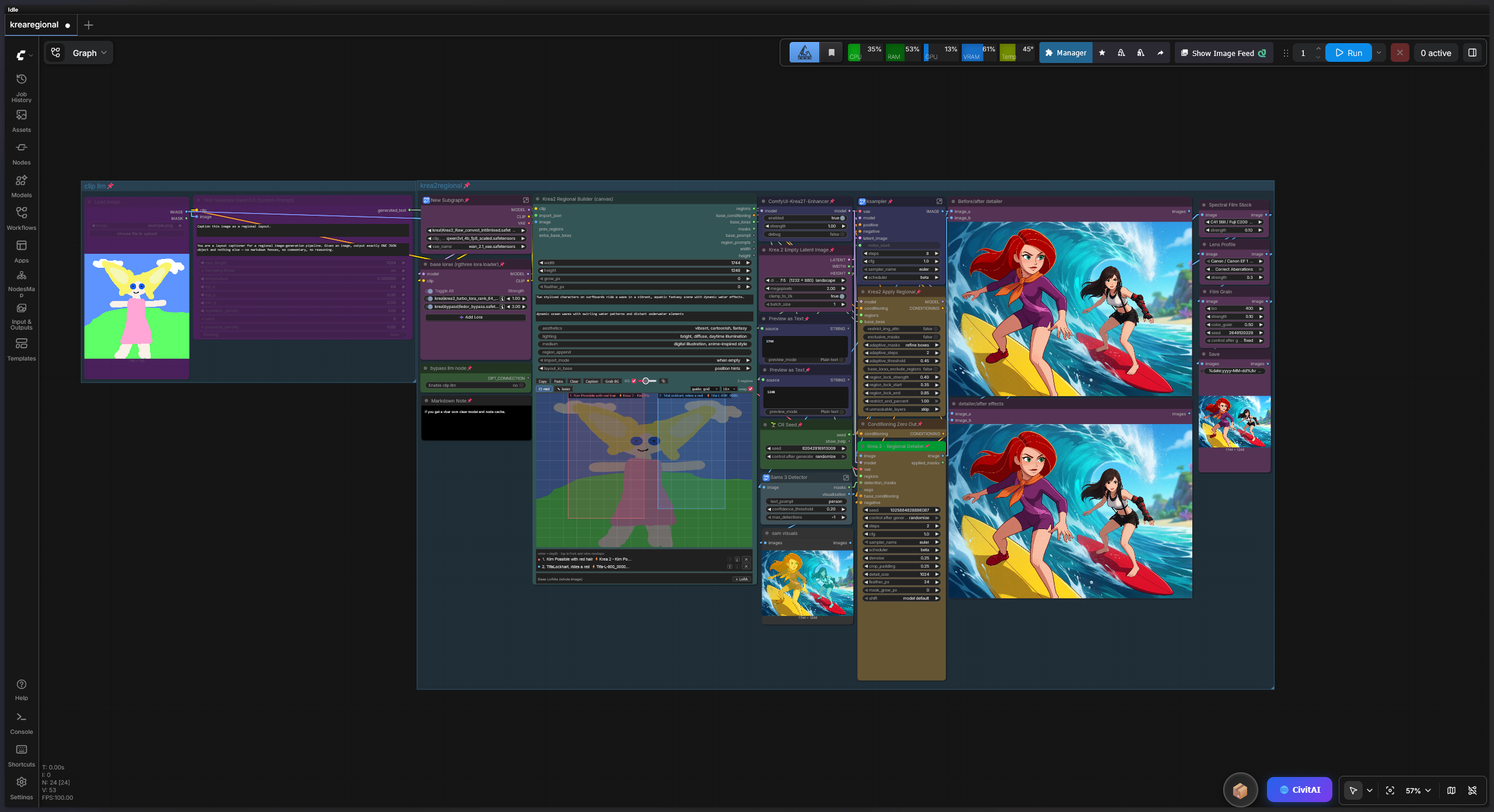
Krea 2 is a single-stream MMDiT: text and image tokens share every attention op. This pack exploits that to do regional generation in one model pass per step instead of the usual N-passes-and-blend approach:
- Regional prompts — all prompts are concatenated into one text sequence; a joint attention mask keeps each region's image tokens attending only to their own prompt (plus a shared base prompt for scene coherence).
- Regional LoRA — LoRA deltas are gated per token, so a LoRA only acts inside its region's mask. This works without breaking ComfyUI's own LoRA weight-patching, so global LoRAs stack on top.
The result is fast (one pass, not N) with soft, coherent seams; the trade-off is some LoRA/style bleed at boundaries, which several options control.
Install
Clone into ComfyUI/custom_nodes/ and restart:
cd ComfyUI/custom_nodes
git clone https://github.com/januspluto/ComfyUI-Krea2-Regional.git
Requires a ComfyUI build with native Krea 2 support (v0.26+). No extra Python dependencies beyond what ComfyUI already ships.
Quick start
The fastest path is the all-in-one canvas node:
- Add Krea2 Regional Builder (canvas). Wire your Krea2
CLIPinto it. - Draw regions on the canvas, type each region's prompt, pick per-region LoRAs from the searchable dropdown.
- Wire its
regions,base_conditioning, andbase_lorasoutputs into Krea2 Apply Regional, along with yourMODEL. - Wire Apply Regional's
MODEL-> KSampler, and itsCONDITIONING-> KSampler positive.
Optionally wire an image captioner (see below) into the builder's
import_json and hit the Caption button to auto-populate regions from an
image — without running a full generation.
An example workflow is in example_workflows/ — drag the .json onto the ComfyUI canvas to load it.
Nodes
Krea2 Regional Builder (canvas) — the main event. A canvas editor with rect + freehand-lasso region tools, per-region prompts, obj/text region types, searchable per-region LoRA dropdowns with a trained-tag info panel, base description/background/style fields, grid/snap/guides, a live reference background (from a wired image or the Grab BG button), a pop-out editor window, and a Caption button that runs only a connected captioner. Lassos are fully editable pen-tool style: drag vertices, press-drag an edge midpoint to split it, alt-click a vertex to delete it, and scale the whole shape by its bounding-box handles; any region converts rect ↔ lasso with one button. The region list doubles as front-to-back depth — reorder with the ↑/↓ buttons; the top region wins where masks overlap.
Krea2 Apply Regional — patches the model for single-pass regional
generation. Options: adaptive_masks (FreeFuse-style: snap masks to the
subjects the model actually draws), restrict_img_attn (block cross-region
image attention) with restrict_end_percent scheduling, exclusive_masks
(winner-take-all where masks overlap; exact ties go to the front region),
region_lock_* (latent identity anchoring), base_loras_exclude_regions,
and unmaskable_layers (policy for LoRA layers with no spatial token axis
— timestep/modulation embedders from newer trainers: "skip" keeps them out
of region LoRAs, "apply globally" keeps their full effect image-wide).
Takes the builder's outputs; returns a patched MODEL and combined
CONDITIONING.
Krea 2 - Regional Detailer — optional second pass that fixes identity bleed and likeness after generation. See Regional Detailer below.
Krea 2 Empty Latent Image — an rgthree-style empty latent sized for Krea 2's Qwen-Image VAE (16-channel, /16 dims, 1K–2K native range). Aspect-ratio buckets + a megapixels dial; outputs the LATENT plus WIDTH/ HEIGHT ints that wire straight into the builder.
Krea2 Regional LoRA / Krea2 Regional Prompt — lower-level building blocks if you'd rather compose regions from node chains than use the canvas.
Krea2 Regions from Ideogram JSON (optional) — a headless bridge that
turns an Ideogram-4 caption JSON into regions with no canvas. The builder
supersedes it (it imports the same JSON via import_json and lets you edit
the result), so most users can ignore this; it's kept for no-UI pipelines.
Captioning an image into regions
Any node whose text output is an Ideogram-style layout JSON can feed the
builder's import_json. The recommended setup uses the Qwen3.5 VL text
encoder you already load for Krea 2 (no extra model): see
qwen_captioner_prompt.txt for the system
prompt and wiring. Hit Caption on the builder to run just that node and
import its output — no Krea2 sampling.
Controlling LoRA / subject bleed
In order of impact:
adaptive_masks(Apply Regional) — FreeFuse-style adaptive routing (arXiv:2510.23515): during the first couple of steps the wrapper watches the attention between each region's prompt tokens and the image tokens — i.e. where the model actually placed each subject — then snaps the region masks to those silhouettes for the remaining steps. "refine boxes" keeps discovery inside your (slightly grown) boxes, so rectangles become rough hints and the LoRA follows the subject's real shape; "free" lets regions land anywhere and your boxes only seed the prompts.layout_in_base(Builder, default "position hints") — Krea 2's Qwen3-VL encoder reads positional and structured prompts as layout guidance, so the builder injects each region's placement into the base prompt ("in the left side of the image, prominent: an armored knight…"), or the whole layout as an Ideogram-style JSON in "full JSON" mode. This steers WHERE the model composes each subject; the attention masks handle isolation and LoRA routing. Without it, the base prompt carries no positional signal and the masks fight whatever composition the model picks — the classic "subjects don't line up with the boxes" failure. Note this supersedes the old "keep subjects out of the base" rule: anchored subject mentions (with positions) help; only un-anchored enumeration ("a knight and a wizard") causes drift.exclusive_masks(Apply Regional, default on) — where grown/feathered masks overlap, each token keeps only its strongest region.restrict_img_attn(Apply Regional) — blocks image-to-image attention across regions. Strongest lever; can look collaged at hard seams. Pair it withrestrict_end_percent(~0.4-0.6) to get both: hard isolation while each subject's identity forms, then an open second half where the model integrates seams and lighting into one cohesive image.base_loras_exclude_regions(Apply Regional) — style/base LoRAs apply everywhere except inside subject regions, so a style LoRA can skin the scene without contaminating character LoRAs.- Keep
grow_px/feather_pxsmall for tightly packed layouts (at 1024px each latent token is 16px), and leave gutters between boxes.
Some soft bleed through the shared base prompt is inherent to single-pass regional attention — it's also what keeps seams coherent. For absolute separation, ComfyUI's native ConditioningSetMask multi-pass approach remains an option at N-times the step cost.
Regional Detailer (second-pass identity fix)
When subjects drift out of their boxes or a character's likeness gets diluted where masks overlap, Krea 2 - Regional Detailer repairs it after the fact: it finds where each subject actually landed, re-samples just that subject at high resolution with its region's prompt and LoRAs at full (ungated) strength, and composites it back through the subject's own silhouette — so a neighbour's arm inside the box is never repainted with the wrong identity.
Wiring, after your KSampler → VAE Decode:
- Run the decoded image through any subject detector — SAM3 (prompt "person") or Impact Pack's Ultralytics person/face detectors both work.
- Wire the image, the detector's masks into
detection_masks(or its SEGS intosegs), your baseMODEL(not Apply Regional's output), yourVAE, and the Builder'sregionsandbase_conditioning(the Builder's own output, not Apply Regional's combined conditioning). - Detections are matched to regions by overlap, with a bounded nearest-centre rescue for subjects that drifted out of their box. Unmatched regions are left untouched.
Settings that matter: denoise 0.2–0.3 (0.25 default) tightens likeness
while keeping pose; 0.35+ starts recomposing inside the silhouette. Keep
shift on "model default" — Krea 2 Turbo is distilled at a fixed mu
and must inherit the first pass's schedule; the per-crop "auto" mode is
for RAW only. Fewer steps (4–6) is often smoother than 8 for a
partial-denoise pass. With no detector connected the node falls back to
cropping by the region boxes themselves — fine for well-separated
subjects, bleed-prone when they overlap, so prefer detection mode for
multi-character images.
Compatibility notes
- Requires a ComfyUI build with native Krea 2 support (v0.26+); the 1.2.0 release is tested against ComfyUI 0.29–0.30.
- The canvas builder targets ComfyUI's standard graph renderer. If the canvas misrenders under the experimental "Nodes 2.0" rendering mode, try disabling that setting (several DOM-widget-heavy node packs are affected).
- Video VAEs (WanVAE) are supported end to end, including in the Detailer.
LoRA formats
Per-region and base LoRAs load from your models/loras folder. PEFT/
diffusers (lora_A/lora_B), kohya (lora_down/lora_up + alpha), and
LoKr (Kronecker: lokr_w1/lokr_w2, direct or a@b-factorized — what
recent ai-toolkit builds output) are all matched against Krea 2's blocks.*
and txtfusion.* layers; tucker/conv LoKr variants are skipped with a
warning. Tip: a region-masked LoRA has to establish its identity in a
fraction of the image — strengths around 1.3–1.6 often work better than the
~1.0 you'd use globally.
Regular LoraLoader/Power Lora Loader weight patches stack on top cleanly.
If a checkpoint logs unmatched keys, open an issue with a few key names.
Tests
CPU tests run against ComfyUI's real Krea 2 module. From the repo folder:
COMFYUI_PATH=/path/to/ComfyUI python test_nodes.py    # regional core
COMFYUI_PATH=/path/to/ComfyUI python test_bridge.py   # ideogram bridge
COMFYUI_PATH=/path/to/ComfyUI python test_builder.py  # canvas builder
python test_server_routes.py                          # lora metadata reader
COMFYUI_PATH defaults to ~/ComfyUI if unset. See
CONTRIBUTING.md.
How it works
Detailed notes on the single-stream attention masking, per-token LoRA
gating, and the run-level caching that avoids per-step allocation churn live
in docs/ARCHITECTURE.md.
License
MIT — see LICENSE. Not affiliated with Krea or Anthropic.