
ComfyUI-ModelRouter
Automatically detects, downloads, and routes missing workflow models into the correct ComfyUI model directories.
ComfyUI-ModelRouter



ComfyUI-ModelRouter automatically detects missing models required by a workflow, downloads them, and routes them into the correct ComfyUI model directories.
Artists loading a workflow template shouldn't need to know whether a model belongs in models/checkpoints, models/diffusion_models, or models/text_encoders - or where their extra_model_paths.yaml points. ModelRouter answers those questions automatically: open workflow → see what's missing → click Install → workflow ready.
It respects ComfyUI's own configured model paths (folder_paths, including anything registered via extra_model_paths.yaml or a network share) rather than assuming the default models/ layout.
Demo
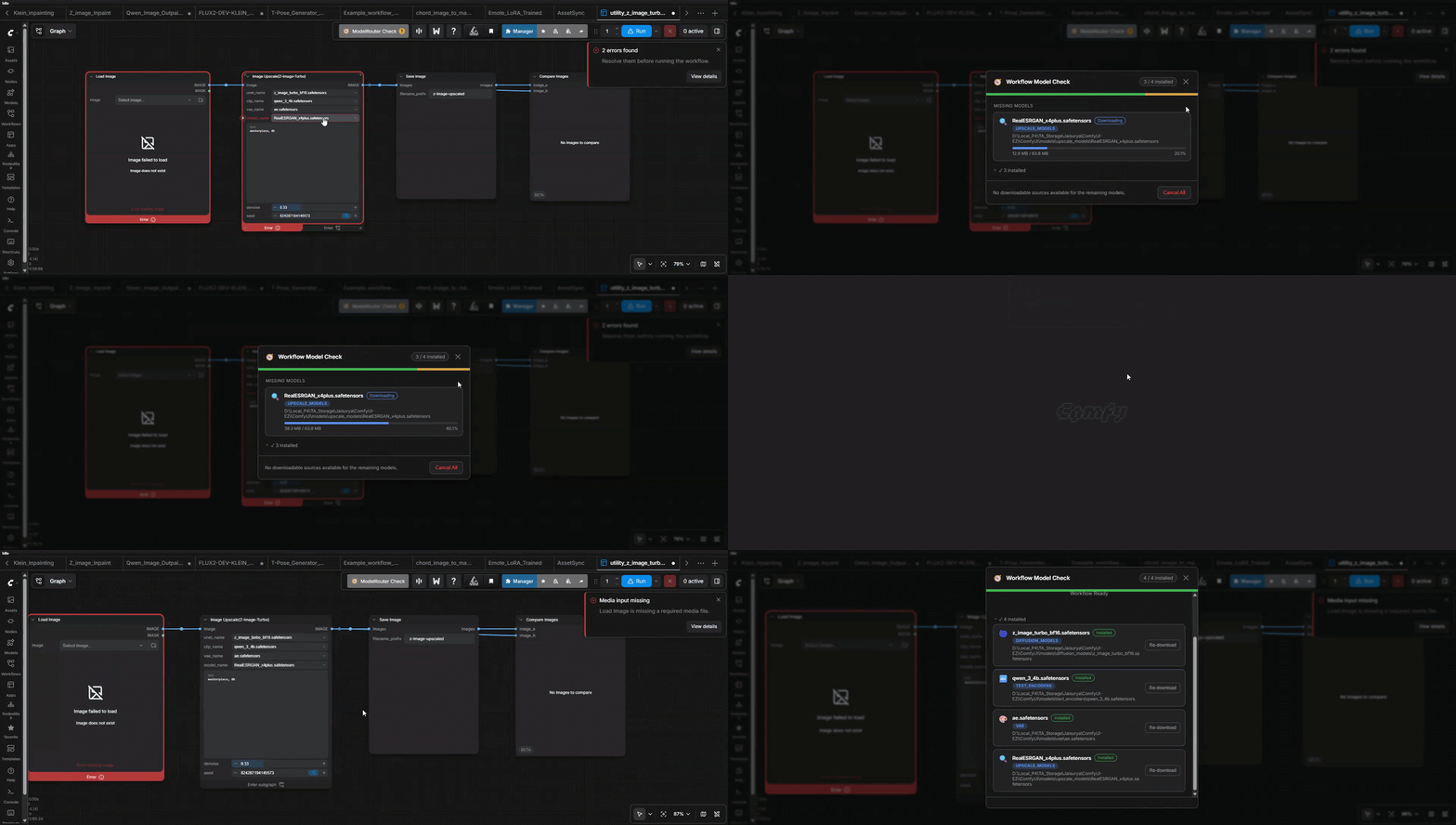
Why
Workflow templates increasingly ship with download links for the models they need. Non-technical users routinely download those files into their Windows Downloads folder and have no idea where to move them, or that "CLIP" sometimes lives in models/clip and sometimes in models/text_encoders. ModelRouter removes that step entirely.
Features
- Scans a loaded workflow (UI graph format and API/"prompt" format) for model dependencies
- Deterministic, priority-ordered category resolution (explicit metadata → registered folder → loader node type → named inputs → filename heuristic → unresolved)
- Detects models already installed anywhere in a category's registered directories - not just the default one
- Streaming, resumable-safe downloads (
.partfile + atomic rename) with live progress over ComfyUI's websocket - SHA256 verification when a workflow supplies a hash, with automatic rollback on mismatch
- A bounded-concurrency download queue (default: 2 parallel downloads) with per-item and cancel-all controls
- Never invents a destination: only writes into categories ComfyUI itself has registered, and only to directories that are confirmed writable
- A persistent "ModelRouter Check" button in ComfyUI's top action bar (next to Manager/Share), with a small count badge when something needs attention - not a floating overlay that can collide with the canvas controls
- A polished, theme-aware panel: per-model status/size/destination cards, live progress bars, and a clean "Workflow Ready" state when everything is available
- Re-download: any installed model can be explicitly re-fetched and overwritten (with a confirmation prompt naming the destination) if the local copy is ever suspect
- Once every download started through the panel finishes, and at least one succeeded, ModelRouter asks whether to reload the page - newly installed models won't appear as valid combo options in existing node dropdowns (they show up "red"/invalid) until ComfyUI re-fetches its node definitions, which a reload guarantees
Installation
ComfyUI-ModelRouter is published on the Comfy Registry.
Option 1: ComfyUI-Manager (recommended)
Open ComfyUI-Manager, search for ComfyUI-ModelRouter, and install it from there. Restart ComfyUI when prompted.
Option 2: comfy-cli
comfy node install comfyui-modelrouter
Option 3: Manual install
cd ComfyUI/custom_nodes
git clone https://github.com/jaisurya-dev-art/ComfyUI-ModelRouter
Restart ComfyUI. No extra Python dependencies are required beyond aiohttp, which ComfyUI already depends on.
Portable Windows
For ComfyUI_windows_portable (or any bundled-Python distribution such as an "Easy Install" package), clone into ComfyUI/custom_nodes/ComfyUI-ModelRouter exactly as above. If aiohttp is somehow missing from the embedded environment:
python_embeded\python.exe -m pip install -r ComfyUI\custom_nodes\ComfyUI-ModelRouter\requirements.txt
ModelRouter never assumes a global Python install, the Windows registry, a fixed drive letter, or administrator privileges - it only uses the interpreter and folder_paths module ComfyUI is already running with.
How It Works
Load Workflow
      |
ModelRouter scans workflow (frontend serializes the graph, backend parses it)
      |
Detect required models (metadata, loader node type, named inputs, filename heuristics)
      |
Check which models already exist (search every registered directory per category)
      |
Resolve destination for anything missing (first writable registered directory)
      |
Install Missing Models -> stream to .part, verify hash if available, atomic rename
      |
Refresh ComfyUI's model list cache
      |
Workflow Ready
The backend never invents a filesystem path. A model's category must already be one ComfyUI recognizes (built-in, or added via extra_model_paths.yaml / a custom node calling folder_paths.add_model_folder_path); if it isn't, the model is reported as unresolved_destination rather than written somewhere unregistered.
Supported Model Types
Built-in category resolution covers (and is not limited to - anything ComfyUI exposes through folder_paths.folder_names_and_paths is resolvable):
checkpoints, diffusion_models, text_encoders, vae, loras, controlnet, upscale_models, clip_vision, style_models, embeddings, gligen, hypernetworks, photomaker, model_patches, audio_encoders.
Loader-node fallback mappings (modelrouter/registry.py) currently include CheckpointLoaderSimple, UNETLoader, VAELoader, CLIPLoader/DualCLIPLoader/TripleCLIPLoader, LoraLoader/LoraLoaderModelOnly, ControlNetLoader, UpscaleModelLoader, CLIPVisionLoader, StyleModelLoader, GLIGENLoader, HypernetworkLoader, PhotoMakerLoader, and AudioEncoderLoader. Extending this list for a new custom loader node is a one-line addition to NODE_MODEL_CATEGORY_MAP.
Workflow Metadata
ModelRouter reads model metadata from node.properties.models:
{
  "properties": {
    "models": [
      {
        "name": "flux1-dev.safetensors",
        "url": "https://huggingface.co/.../flux1-dev.safetensors",
        "hash": "...",
        "hash_type": "SHA256",
        "directory": "diffusion_models"
      }
    ]
  }
}
Both "directory": "diffusion_models" and "directory": "models/diffusion_models" are accepted and normalized to the same category, along with legacy/community aliases (unet -> diffusion_models, clip -> text_encoders, etc.). See modelrouter/resolver.py::normalize_category.
When a workflow has no metadata at all, ModelRouter falls back to the loader node's type, and - for API/"prompt"-format workflows with named inputs - the input name (e.g. vae_name, ckpt_name). As a last resort it looks for category keywords in the filename itself. If none of that resolves a category, the model is still reported (as unresolved_destination) rather than silently ignored.
extra_model_paths.yaml
ModelRouter resolves destinations exclusively through folder_paths.get_folder_paths(category), so any directories you've registered are honored automatically, including additional or network paths:
comfyui:
  base_path: D:/AI/
  checkpoints: models/checkpoints/
  diffusion_models: models/diffusion_models/
  text_encoders: models/text_encoders/
  vae: models/vae/
  loras: models/loras/
When a category has multiple registered directories, ModelRouter checks for an existing copy of the model in all of them, and downloads new files to the first directory that is confirmed writable (it probes for write access before committing - a disconnected or read-only network share is skipped rather than silently failed into).
Security
- Only
http://andhttps://download URLs are accepted; everything else (file://, arbitrary schemes) is rejected outright. - Filenames are reduced to a sanitized basename before ever touching the filesystem - path traversal sequences (
../..) and absolute paths are stripped, so a malicious"name"can never escape the resolved directory. - Destinations are only ever produced by resolving a category through ComfyUI's own registered folders. A workflow cannot specify an arbitrary
"directory"and have ModelRouter write there - if the category isn't one ComfyUI recognizes, resolution fails closed (unresolved_destination). - Downloads always land in a
<filename>.parttemp file first; only a fully-downloaded (and, when a hash was supplied, verified) file is atomically renamed into place. Interrupted or corrupted downloads never appear as valid models. - Auth-gated sources (HTTP 401/403, or an HTML login page returned instead of the file) are surfaced as
Authentication Requiredrather than being saved as a model file. - The backend API never accepts a raw filesystem path from the client - every write goes through the category resolver above.
Limitations (V1)
- No custom-node installation, Python dependency management, model conversion/quantization, or Civitai/Hugging Face account integration - this is not a ComfyUI-Manager replacement.
- No search/marketplace/model browser: if a workflow doesn't supply a download URL, ModelRouter reports the model as missing with "manual source required" rather than guessing where to find it.
- Widget-value scanning for the UI graph format (
widgets_values) is positional and has no reliable name-to-value mapping without the node's schema; unrecognized loader node types fall back to filename keyword heuristics, which can occasionally miscategorize an unusually-named file. - Only SHA256 is currently supported for checksum verification.
- Full automatic refresh of already-open node dropdowns depends on the current ComfyUI frontend's own widget-refresh behavior; some already-open nodes may need to be reopened, or the workflow reloaded, to see a newly installed model immediately.
Development
cd ComfyUI-ModelRouter
python -m venv .venv
.venv/Scripts/activate  # or source .venv/bin/activate
pip install pytest aiohttp
pytest tests/ -v
Tests run standalone (no ComfyUI checkout required) via a fake folder_paths module installed in tests/conftest.py, and a fake aiohttp session/response in tests/test_downloader.py - no multi-gigabyte fixtures or real network access involved.
License
MIT - see LICENSE.