
ComfyUI-MaterialSync
Synchronize ComfyUI PBR texture maps with Blender, Maya, and Unreal Engine over localhost TCP.
ComfyUI-MaterialSync

ComfyUI custom node package for synchronizing exported PBR texture maps with Blender, Maya, and Unreal Engine over localhost TCP.
Overview
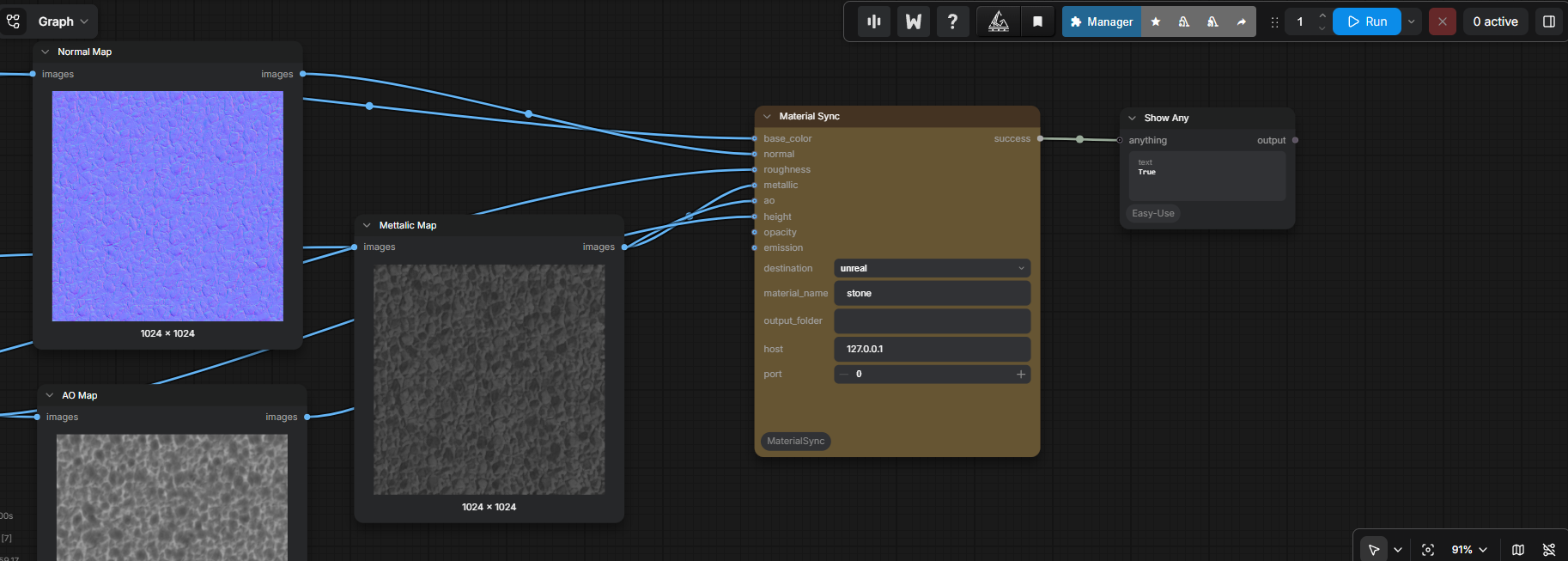
ComfyUI-MaterialSync removes the repetitive material-import step from a PBR workflow. Connect the maps produced by your ComfyUI workflow to the single Material Sync node, pick a destination DCC from the dropdown, and the matching material is created or updated automatically in that application.
The project contains two components per supported DCC:
- ComfyUI extension — exports supplied PBR maps as PNG files, creates a
manifest.json, and sends the sync request over localhost TCP. - DCC add-on/plug-in — runs a lightweight TCP server, processes the material sync on the main thread, and creates/updates the material node graph.
Supported DCCs
The single Material Sync node targets any of the DCCs below via its
destination dropdown. Leaving port at 0 or output_folder empty
uses that destination's default shown here.
| DCC | destination value | Default port | Default output_folder | Add-on / Plugin |
| --- | --- | --- | --- | --- |
| Blender | blender | 8765 | output/BlenderPBR | BlenderPBRSync/ |
| Maya | maya | 8766 | output/MayaPBR | MayaPBRSync/ |
| Unreal Engine | unreal | 8767 | output/UnrealPBR | UnrealMaterialSync/ |
Features
- No HTTP, Flask, or WebSockets: communication uses newline-delimited JSON over localhost TCP.
- Reuses existing materials, images, and shader nodes instead of creating duplicates.
- Supports Base Color, Normal, Roughness, Metallic, Ambient Occlusion, Height, Opacity, and Emission maps.
- Uses an acknowledgement-based protocol: ComfyUI reports success only after the DCC finishes processing the request.
- Shared TCP protocol across all targets — add new DCCs without changing the ComfyUI node interface.
- A single Material Sync node with a destination dropdown replaces the
separate per-DCC nodes; new DCC targets only need an entry in
DESTINATION_DEFAULTSinnodes.py.
Requirements
- ComfyUI with Python 3.11 or newer.
- Blender with Python add-on support for the Blender target.
- Maya with Arnold (
mtoa) available foraiStandardSurface,aiNormalMap, andaiBump2dnodes. - Unreal Engine 5.5 with Python Editor Script Plugin and Editor Scripting Utilities enabled. Unreal 5.5 is the currently tested and supported version. Other Unreal Engine 5.x editor versions may work through the included API compatibility fallbacks, but are not yet officially validated; this is an editor integration and does not run in packaged games.
- ComfyUI and the target DCC must be able to access the same exported image and manifest paths. The default configuration assumes they run on the same machine.
Installation
Clone this repository into ComfyUI/custom_nodes/, then install its Python
dependencies in ComfyUI's environment:
.\python_embeded\python.exe -m pip install -r .\ComfyUI\custom_nodes\ComfyUI-MaterialSync\requirements.txt
Then install the appropriate add-on for your DCC:
Example workflow dependencies
The provided Example_workflow_PBRMatSync.json includes a PBR extraction setup that
uses nodes from:
Install both custom-node packages, including their respective dependencies, to run the provided workflow in full. They are optional for ComfyUI-MaterialSync itself when you supply PBR maps through another workflow.
Blender
- In Blender, install and enable
BlenderPBRSync.zipfrom **Edit > PreferencesAdd-ons > Install**.
- Configure host/port and select Start Server.
Maya
For automatic Windows installation, double-click maya_plugin_setup.bat. Enter
the four-digit Maya version when prompted. The installer verifies Maya, resolves
the current user's Documents folder, and copies the package and loader into the
matching Maya user directories.
For manual installation:
- Copy
MayaPBRSync/toDocuments/maya/<version>/scripts/MayaPBRSync/. - Copy
MayaPBRSync_plugin.pytoDocuments/maya/<version>/plug-ins/MayaPBRSync_plugin.py. - Load
MayaPBRSync_plugin.pyfrom Plug-in Manager or runcmds.loadPlugin("MayaPBRSync_plugin.py"). - Enable Loaded and Auto load for both
mtoa.mllandMayaPBRSync_plugin.py. - The server starts automatically. Run
from MayaPBRSync.preferences import show_window; show_window()for controls.
Unreal Engine
Unreal Engine 5.5 is the validated target. This is not a blanket "5.5 or newer" requirement: later releases can change the Unreal Python API and should be treated as unverified until tested.
- Place
UnrealMaterialSync/inside your project'sPlugins/directory. - Enable ComfyUI Material Sync, Python Editor Script Plugin, and Editor Scripting Utilities, then restart the editor.
- The server starts automatically from
Content/Python/init_unreal.py.
Quick start
- Start the TCP server in your DCC application (see above).
- In ComfyUI, add the Material Sync node from the
Material Synccategory. - Pick the target application from the destination dropdown
(
blender,maya, orunreal). - Connect PBR maps and set material_name to the target material name.
- Queue the workflow. The DCC creates or updates the material on acknowledgement.
Add multiple Material Sync nodes with different destination values to sync the same maps to more than one DCC from a single workflow.
Material map behavior
| ComfyUI input | Blender | Maya (Arnold) | Unreal Engine | | --- | --- | --- | --- | | Base Color | Principled BSDF → Base Color | aiStandardSurface → baseColor | BaseColor | | Normal | Image Texture → Normal Map → Principled BSDF | aiNormalMap → normalCamera | Normal | | Roughness | Principled BSDF → Roughness | aiStandardSurface → specularRoughness | Roughness | | Metallic | Principled BSDF → Metallic | aiStandardSurface → metalness | Metallic | | AO | Multiplied with Base Color | multiplyDivide with Base Color | Ambient Occlusion | | Height | Bump → Principled BSDF | aiBump2d → normalCamera | BumpOffset UVs | | Opacity | Principled BSDF → Alpha | aiStandardSurface → opacity | Opacity (translucent) | | Emission | Principled BSDF → Emission Color | aiStandardSurface → emissionColor | Emissive Color |
Protocol
Packets are newline-delimited JSON and always include type.
{"type": "material_sync", "target": "blender", "manifest": "C:/absolute/path/manifest.json"}
The server also accepts ping and replies with an ack packet. This protocol is
designed to add targets and commands without changing the ComfyUI node interface.
Servers reject packets addressed to a different DCC target, and material updates
run on each application's main thread before acknowledgement.
Development validation
Run the host-independent regression suite from the repository root:
python -m unittest discover -s tests -t . -v
These tests cover packet validation plus Maya and Unreal main-thread dispatch. Final integration testing must run inside each DCC because its APIs are only available in that application's embedded Python environment.
Project layout
ComfyUI-MaterialSync/
├── nodes.py                 # ComfyUI node definition (Material Sync, destination dropdown)
├── blender_sync.py          # Legacy per-target TCP client wrapper for Blender
├── maya_sync.py             # Legacy per-target TCP client wrapper for Maya
├── unreal_sync.py           # Legacy per-target TCP client wrapper for Unreal Engine
├── sync_client.py           # Shared TCP client
├── manifest.py              # Manifest serialization
├── image_utils.py           # ComfyUI IMAGE-to-PNG conversion
├── BlenderPBRSync/          # Blender add-on source
│   ├── server.py            # Background TCP server
│   ├── material_sync.py     # Main-thread material graph updates
│   ├── protocol.py          # Protocol helpers
│   └── preferences.py       # Add-on preferences
├── MayaPBRSync/             # Maya plug-in source
│   ├── __init__.py          # Plug-in registration
│   ├── server.py            # Background TCP server
│   ├── material_sync.py     # Material creation via cmds
│   ├── protocol.py          # Protocol helpers
│   └── preferences.py       # Settings window
├── MayaPBRSync_plugin.py    # Maya Plug-in Manager entry point
├── maya_plugin_setup.bat    # Automated Windows Maya installer
└── UnrealMaterialSync/      # Unreal Engine plug-in source
    ├── UnrealMaterialSync.uplugin
    ├── Content/Python/init_unreal.py
    ├── __init__.py          # Plug-in registration
    ├── server.py            # Background TCP server
    ├── material_sync.py     # Material creation via unreal API
    └── protocol.py          # Protocol helpers
Troubleshooting
- Connection refused: Start the appropriate DCC server and confirm host/port match in both ComfyUI and the add-on preferences.
- Material does not update: Check the DCC's console/log for manifest or image-path errors, and ensure the DCC can access the ComfyUI output folder.
- Maya reports missing Arnold nodes: Enable or install the bundled
mtoaplug-in, then retry the sync. - Unreal server does not start: Confirm the project contains
Plugins/UnrealMaterialSync/UnrealMaterialSync.upluginand both required Editor scripting plugins are enabled. - Images appear unchanged: Confirm the material uses the generated image files; the add-on reloads matching image datablocks on each sync.