
ComfyUI Extension
ComfyUI-LVLM-API
This workflow demonstrates a streamlined way to connect visual inputs with Large Multimodal Models (VLM) using a custom API node.
iwindy910/ComfyUI-LVLM-API
Nodes2
On cloudLocal install
CategoryLLM(VLM) API
Stars2
Updated9 months ago
Nodes (2)
Readme
ComfyUI-LVLM-API
This workflow demonstrates a streamlined way to connect visual inputs with Large Multimodal Models (VLM) using a custom API node.
Workflow Breakdown
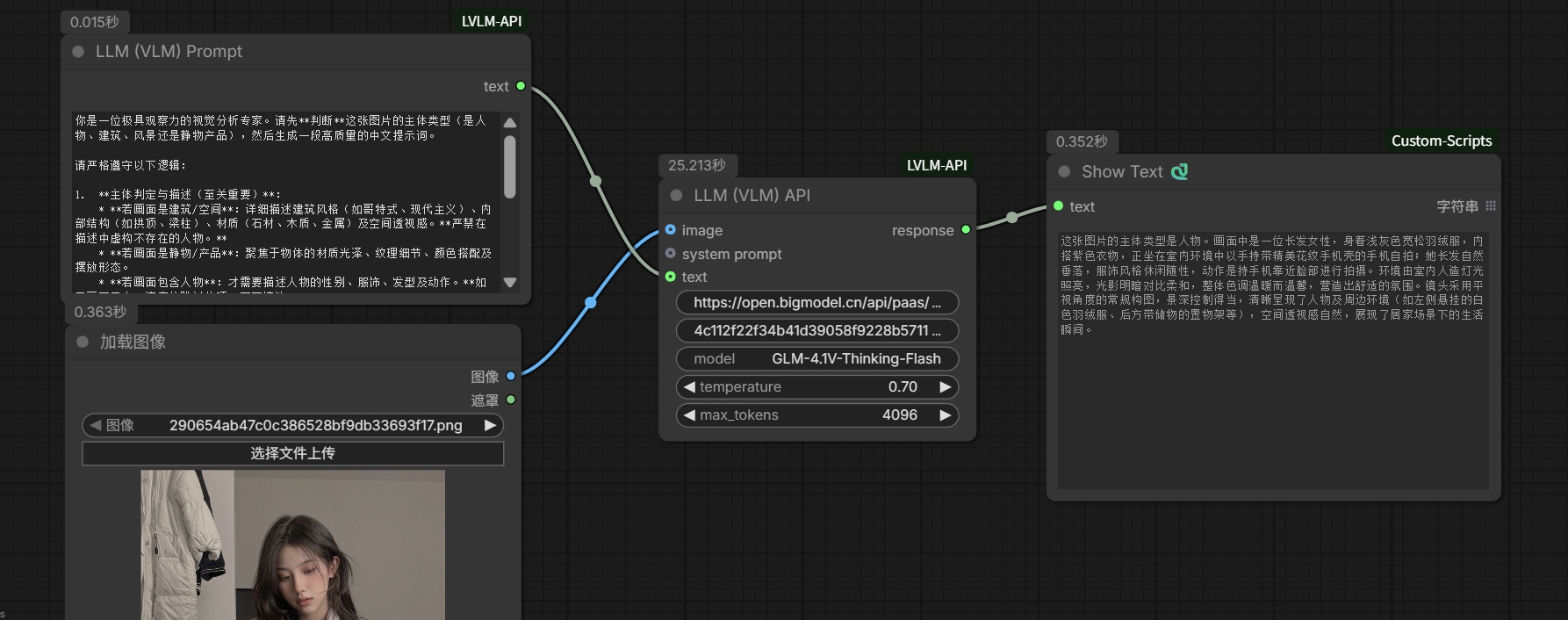
- Visual Source: The Load Image node brings your local image into the ComfyUI environment.
- The Prompt: A LLM (VLM) Prompt node stores instructions. Here, it's configured as a "Visual Analysis Expert" to guide the AI on what details to focus on.
- The Processing Hub: The LLM (VLM) API node acts as the bridge. It leverages the OpenAI API standard, allowing you to connect to any compatible provider (e.g., OpenAI, Groq, DeepSeek, or local servers) by customizing the base_url.
- The Output: A Show Text node captures the model's response, displaying the generated description or analysis instantly.
In Action
As seen in the screenshot, the system analyzes a portrait to describe the subject's attire (a grey puffer jacket), the indoor setting, and the soft lighting, turning a raw image into a detailed text report.
Installation & Usage
To install this custom node, run the following commands in your terminal:
cd ComfyUI
git clone https://github.com/iwindy910/ComfyUI-LVLM-API.git
.\python_embeded\python.exe -m pip install -r custom_nodes\ComfyUI-LVLM-API\requirements.txt