
ComfyUI Extension
ComfyUI-AutoDownload2Client
A custom node for ComfyUI that allows you to save generated images directly to your local computer via browser download, ensuring zero file footprint on the server's storage.
iwindy910/ComfyUI-AutoDownload2Client
Nodes1
On cloudLocal install
Categorycustom_nodes/Image
Stars1
Updated9 months ago
Nodes (1)
Readme
ComfyUI-AutoDownload2Client
A custom node for ComfyUI that allows you to save generated images directly to your local computer via browser download, ensuring zero file footprint on the server's storage.
Features
- Direct Local Saving: Saves images to your client-side machine instead of the server's
outputfolder. - Privacy & Storage Friendly: Images are transmitted via memory (Base64), leaving no files on the remote server.
- In-Node Preview: Real-time image preview directly on the node despite no server-side files existing.
Usage
-
Browser Configuration:
- Go to your browser's Settings -> Downloads.
- Set the Download Location to your desired path (e.g.,
C:\ComfyUI\output\client). - Disable "Ask where to save each file before downloading" to enable silent saving.
-
Workflow:
- Search for the
AutoDownload2Clientnode. - Connect your
IMAGEoutput to the node'simageinput. - Set your
filename_prefix. 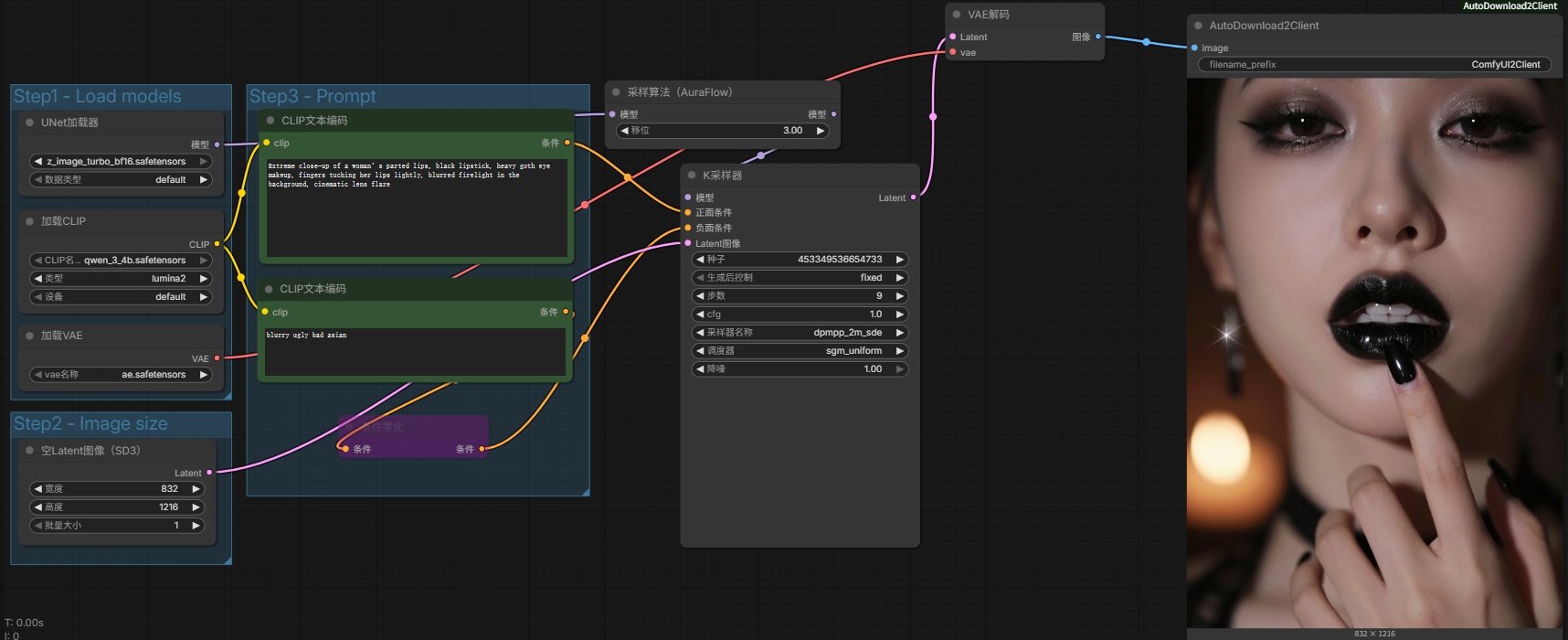
- Search for the
Installation
To install this custom node, run the following commands in your terminal:
cd ComfyUI
git clone https://github.com/iwindy910/ComfyUI-AutoDownload2Client.git
.\python_embeded\python.exe -m pip install -r custom_nodes\ComfyUI-AutoDownload2Client\requirements.txt