
comfyui-rb-command
Execute shell commands/scripts with dynamic inputs, and result caching. Supports placeholders ({input0}, {seed}) and environment variables ($INPUT_0, $SEED, etc.).
Nodes (3)
ComfyUI RB Command
Execute shell commands/scripts with dynamic inputs, and result caching. Supports placeholders ({input0}, {input0_0}, {seed}) and environment variables ($INPUT_0, $SEED, etc.).
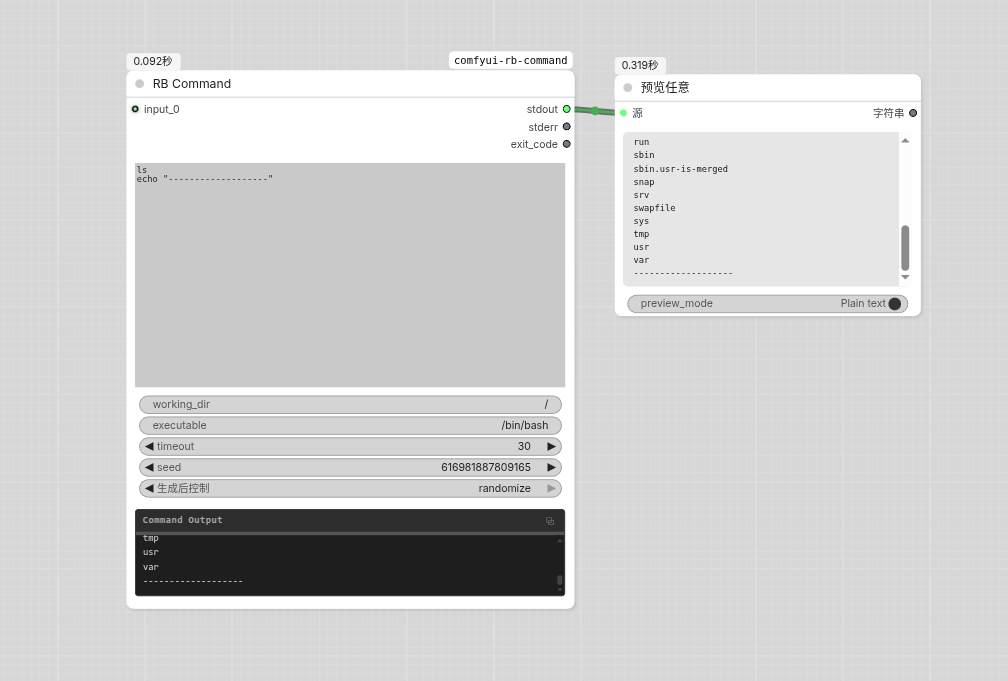
Features
- Command Execution: Run arbitrary shell commands and scripts via
/bin/bash(configurable) - Dynamic Input Slots: Automatically expand input slots on connection (up to 20), supporting images, audio, video, text, and more
- Input Bundle Node: Group multiple inputs into a single slot with
{inputN_0},{inputN_1},{inputN_count}syntax - Bundle Pass Node: Pass through a bundle input unchanged, useful for routing bundles through the graph
- Placeholder Substitution: Use
{input0},{input1}, ... placeholders in commands to reference inputs - Environment Variables: Access parameters via
$INPUT_0,$INPUT_1, ... - Timeout Protection: Configurable timeout (1-3600 seconds), auto-terminates on timeout
- Separate Outputs: stdout, stderr, and exit code are returned as distinct outputs for flexible workflow routing
Installation
cd ComfyUI/custom_nodes/
git clone https://github.com/itribs/comfyui-rb-command.git
pip install -r requirements.txt
Parameters
Required
| Parameter | Type | Default | Description |
|-----------|------|---------|-------------|
| command | STRING (multiline) | echo input: {input0} seed: {seed} | Shell command to execute, supports placeholders |
| seed | INT | 0 | Random seed, accessible via {seed} or $SEED |
| working_dir | STRING | current working directory | Working directory for command execution |
| executable | STRING | /bin/bash | Shell interpreter to use |
| timeout | INT | 30 | Timeout in seconds (1-3600) |
Optional (Dynamic Input Slots)
| Parameter | Type | Description |
|-----------|------|-------------|
| input_0 | * (any type) | First input slot. Connecting triggers input_1, and so on, up to 20 slots |
RB Command Input Bundle
The RB Command Input Bundle node groups multiple inputs into a single output that can be connected to one RB_Command input slot.
| Parameter | Type | Description |
|-----------|------|-------------|
| input_0 | * (any type) | First bundled input. Connecting triggers more slots, up to 20 |
Output: A bundle that can be connected to any RB_Command inputN slot. Bundle-to-bundle connections are not supported — connect each bundle to a separate RB_Command input slot instead.
In the command, access individual bundled items:
# {input0_0} = path of Image A, {input0_1} = Image B, {input0_2} = Image C
# {input0_count} = 3
# {input0} = all three values space-separated
RB Command Input Bundle Pass
The RB Command Input Bundle Pass node is a simple pass-through that takes a bundle as input and outputs it unchanged. It is useful for routing bundles through the graph, e.g., to fan out a single bundle to multiple RB_Command nodes.
| Parameter | Type | Description |
|-----------|------|-------------|
| bundle | RB_COMMAND_INPUT_BUNDLE | The bundle input to pass through unchanged |
Output: The same bundle, unchanged.
Outputs
| Output | Type | Description |
|--------|------|-------------|
| stdout | STRING | Standard output from the command |
| stderr | STRING | Standard error from the command |
| exit_code | INT | Exit code (0 = success, non-zero = error) |
Placeholder Syntax
Use the following placeholders in the command field:
| Placeholder | Description |
|-------------|-------------|
| {input0}, {input1}, ... | Input slot value (auto-quoted). For bundle inputs, all bundled values are joined with spaces |
| {inputN_0}, {inputN_1}, ... | Individual item in a bundle at inputN (auto-quoted) |
| {inputN_count} | Number of items in the bundle at inputN (1 for non-bundle inputs) |
| {input_count} | Total number of input values after flattening bundles |
| {input_all} | All input values, bundles flattened, in input order (auto-quoted, suitable for bash array expansion) |
| {input_images} | All image input paths, bundles flattened, in input order (auto-quoted, suitable for bash array expansion) |
| {input_videos} | All video input paths, bundles flattened, in input order (auto-quoted, suitable for bash array expansion) |
| {input_audios} | All audio input paths, bundles flattened, in input order (auto-quoted, suitable for bash array expansion) |
| {input_image_count} | Number of image-type inputs (includes items inside bundles) |
| {input_video_count} | Number of video-type inputs (includes items inside bundles) |
| {input_audio_count} | Number of audio-type inputs (includes items inside bundles) |
| {seed} | Seed value |
Examples:
# Merge two videos with ffmpeg
ffmpeg -i {input0} -i {input1} -filter_complex "[0:v][1:v]hstack" output.mp4

# Resize image with ImageMagick
convert {input0} -resize 512x512 -quality 90 output.jpg

# Call a Python script
python3 /path/to/script.py --input {input0} --seed {seed}

# Batch process all inputs via bash array
arr=({input_all})
for f in "${arr[@]}"; do
    echo "Processing: $f"
    convert "$f" -resize 256x256 "${f%.*}_thumb.png"
done

# Conditional logic based on input counts
if [ "$INPUT_IMAGE_COUNT" -gt 0 ]; then
    echo "Processing ${INPUT_IMAGE_COUNT} images, ${INPUT_VIDEO_COUNT} videos, ${INPUT_AUDIO_COUNT} audio files"
fi

# Process bundled inputs individually
for i in $(seq 0 $((INPUT_0_COUNT - 1))); do
    eval "path=\$INPUT_0_$i"
    echo "Processing: $path"
done

# Batch process only images (type-filtered)
eval "images=($INPUT_IMAGES)"
for img in "${images[@]}"; do
    convert "$img" -resize 512x512 "${img%.*}_thumb.png"
done

# Batch process only videos (type-filtered)
eval "videos=($INPUT_VIDEOS)"
for vid in "${videos[@]}"; do
    ffmpeg -i "$vid" -vf scale=640:-1 "${vid%.*}_small.mp4"
done
Environment Variables
The following environment variables are available during command execution:
| Variable | Description |
|----------|-------------|
| $INPUT_0, $INPUT_1, ... | Input slot value (space-joined for bundle inputs) |
| $INPUT_N_0, $INPUT_N_1, ... | Individual item in a bundle at INPUT_N (e.g., $INPUT_0_0 for the first item) |
| $INPUT_N_COUNT | Number of items in the bundle at INPUT_N (e.g., $INPUT_0_COUNT) |
| $SEED | Seed value |
| $INPUT_COUNT | Total number of input values after flattening bundles |
| $INPUT_ALL | All input values, bundles flattened, in input order (auto-quoted, suitable for bash array expansion) |
| $INPUT_IMAGES | All image input paths, bundles flattened, in input order (auto-quoted, suitable for bash array expansion) |
| $INPUT_VIDEOS | All video input paths, bundles flattened, in input order (auto-quoted, suitable for bash array expansion) |
| $INPUT_AUDIOS | All audio input paths, bundles flattened, in input order (auto-quoted, suitable for bash array expansion) |
| $INPUT_IMAGE_COUNT | Number of image-type inputs (includes bundles) |
| $INPUT_VIDEO_COUNT | Number of video-type inputs (includes bundles) |
| $INPUT_AUDIO_COUNT | Number of audio-type inputs (includes bundles) |
Example:
# Batch process all inputs via bash array (handles spaces, quotes, newlines correctly)
eval "arr=($INPUT_ALL)"
for f in "${arr[@]}"; do
    echo "Processing: $f"
    convert "$f" -resize 256x256 "${f%.*}_thumb.png"
done
Supported Input Types
The node accepts the following ComfyUI data types and converts them for use in commands:
| Type | Handling |
|------|----------|
| Image | Converted to temporary PNG file |
| Video | Converted to temporary MP4 file |
| Audio | Converted to temporary WAV file |
| Text (str, int, float, bool) | Converted to string representation |
License
MIT License