
comfyui-rb-bridge
A collection of pause-and-edit nodes for ComfyUI that let you interrupt workflow execution, inspect and modify values, then continue.
Nodes (5)
Flip one switch mid-run and keep going
Nudge the denoise or LoRA strength without restarting
Change the number mid-run, not after a restart
Park the run and look before you burn more GPU
Rewrite the prompt between two halves of a run
ComfyUI Bridge
A collection of pause-and-edit nodes for ComfyUI that let you interrupt workflow execution, inspect and modify values, then continue.
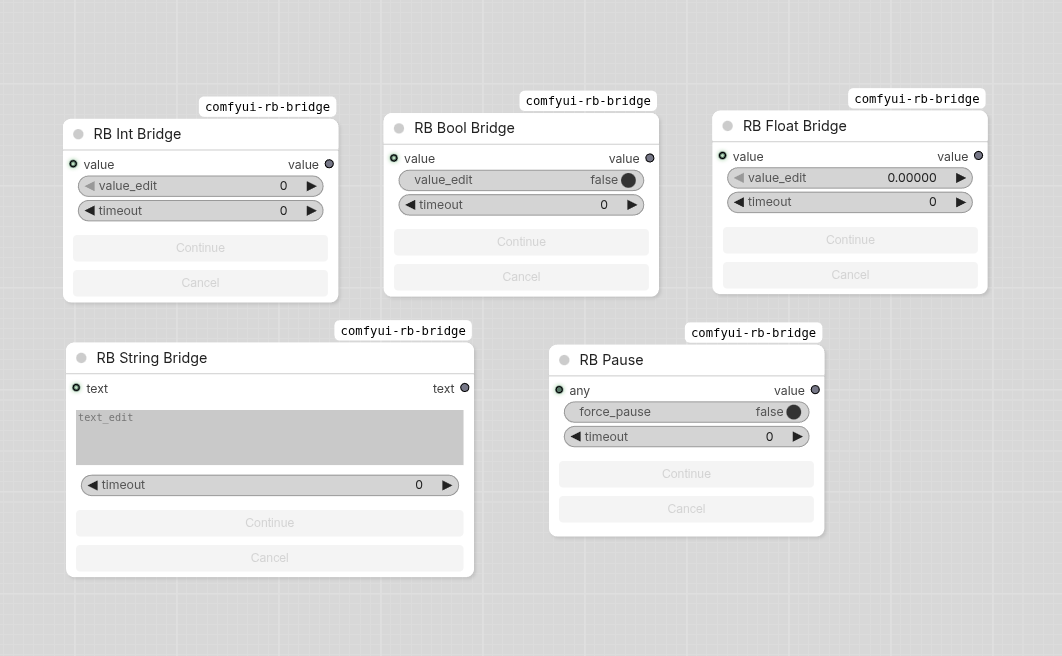
Nodes
Bridge Nodes (editable)
Pause execution and allow editing the value before continuing. The input port is optional — if unconnected, the edit widget value is used as the default.
| Node | Type | Edit Widget | Output | |------|------|-------------|--------| | RB String Bridge | STRING | multiline text | text | | RB Int Bridge | INT | number input | value | | RB Float Bridge | FLOAT | number input | value | | RB Bool Bridge | BOOLEAN | toggle | value |
RB Pause (passthrough)
A pure passthrough node that pauses execution without editing. Useful for inspecting intermediate results at any point in the workflow. Accepts and outputs any type (*).
Parameters
All nodes share these parameters:
| Parameter | Type | Default | Description |
|-----------|------|---------|-------------|
| action | enum | auto | Pause behavior: auto = navigate if in view else dialog, dialog = always show popup, focus = navigate to node, never = no action, just pause |
| force_pause | BOOLEAN | false (true for RB Pause) | When true, forces the node to pause on every execution even if the input hasn't changed |
| timeout | FLOAT | -1 | Seconds to wait. -1 = infinite, 0 = skip pause, >0 = auto-continue after N seconds |
Behavior Modes
action: auto (default)
If the node is visible in the current canvas, the view navigates directly to it. Otherwise, a modal dialog pops up.
action: dialog
Always shows a modal dialog with the edit widget and Continue / Cancel / Close and Focus buttons.
action: focus
Navigates the canvas to the node without showing a dialog. Useful when you want to edit values in-place.
action: never
no dialog, no navigation. The node still pauses; use the node's built-in buttons or timeout to continue.
Caching
Bridge nodes cache the last confirmed value and skip the pause when nothing has changed (same input value, same edit widget value, force_pause is false). Set force_pause: true to force a pause on every execution regardless.
Installation
Via ComfyUI Manager
Search for comfyui-rb-bridge in ComfyUI Manager and click Install.
Manual
cd ComfyUI/custom_nodes
git clone https://github.com/itribs/comfyui-rb-bridge.git
License
MIT