
Dynamic Python Script Executor (interpreter)
Python script executor, powerful control panel (resource monitor, models management), pipe any, switch any (branch/if), file reading, diagram display (Graphviz, Mermaid, PlantUML) and other useful tools.
Nodes (8)
The ComfyUI node that renders Mermaid and PlantUML — and won't draw you a picture
Read any text file from disk — and auto-reload when you edit it
The node that does nothing, on purpose
A pipe that's just a list — build it, pad it, unpack it
A random integer that's different on every run
Real Python inside your workflow — and a sandbox you shouldn't fully trust
An any-type switch that only runs the branch you pick
Pick a model by regex, not by squinting at a dropdown
comfyui_dynamic

1. Abstract
- Adds the following nodes for ComfyUI:
- Python script node (DynamicScriptNode)
- File reading node (DynamicLoadTextFileNode)
- Dynamic pipe node (DynamicPipeAnyNode)
- Dynamic switch node (DynamicSwitchAnyNode)
- Random number node (DynamicRandomNumberNode)
- None node (DynamicNoneNode)
- Universal selector node (DynamicUniversalSelector)
- Bundled resource monitor control panel (no nodes required, appears automatically on page load, see below)
- Plugin directory =
/comfyui_dynamic - LICENSE =
GNU Lesser General Public License v3.0
2. Introduction
comfyui_dynamic adds the following nodes
-
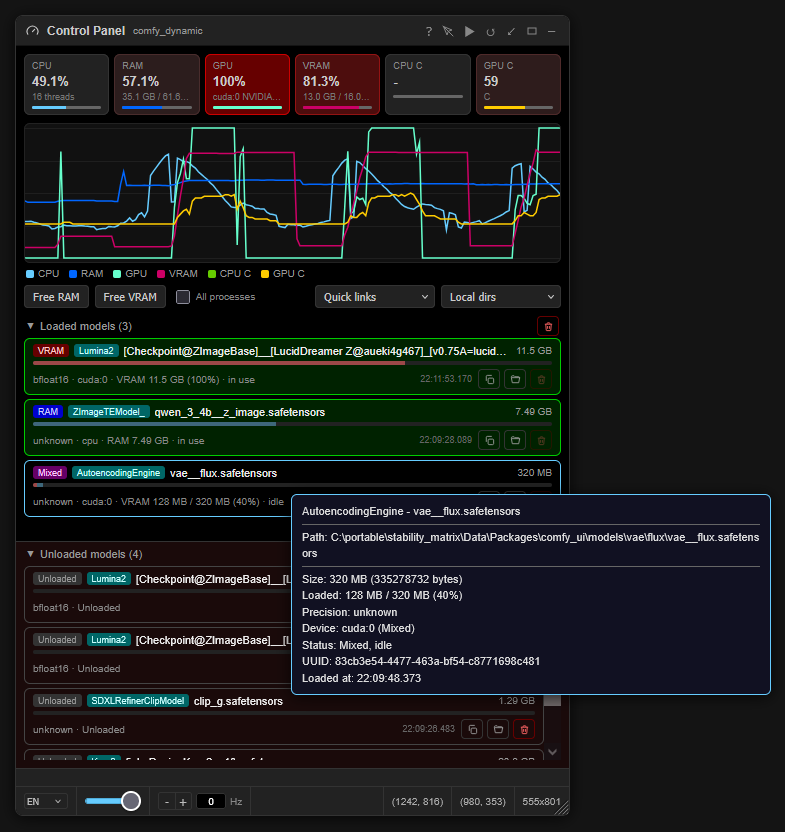
Control Panel (Resource Monitor)
- A floating resource monitoring and management panel in the browser, usable without any nodes (appears automatically when the page loads)
- Resource monitoring
- Stat cards: CPU / RAM / GPU / VRAM utilization and CPU / GPU temperature (temperature full scale = 100 C)
- Chart: recent history of the above six series (keeps 180 sample points, window length depends on the refresh rate), utilization is mapped to 0-100%, temperature to a 20-100 C window for better readability
- Cards fade to red above 50% usage
- Alerts: any temp above 90 C / VRAM almost full (free below max(2%, 512 MB))
/ RAM free below 10% / backend disconnected
- The header icon is a dashboard in normal state and turns into a red warning triangle on alerts; when the backend is disconnected, the subtitle shows the disconnection
- Model management
- Loaded model list: shows full details such as path / size / precision / device / status (in use or idle)
- Row buttons: copy full details / locate the file in the file manager / unload from RAM/VRAM (unavailable while a task is running)
- Green border means the model is in use, the bottom bar shows the model size relative to the primary GPU VRAM (red = resident in VRAM, blue = remaining in RAM)
- Unloaded model list: records of models released since page load (newest first, reference only), with single record removal or clear all
- Free VRAM: automatically deferred to after the current task when busy; RAM-resident models are not affected
- Free RAM: always runs immediately, even during a task; an optional "all processes" mode also trims working sets of other processes (Windows, may affect running programs)
- Loaded model list: shows full details such as path / size / precision / device / status (in use or idle)
- Panel interactions
- Drag by the header; dock/undock (bottom-left, undocking restores the previous floating position); minimize/restore (double-click the title); vertical maximize (fills the page height); reset (default size + dock)
- Automatically minimizes when a large dialog (settings/templates etc.) opens, and restores after it closes
- Adjustable opacity (30-100%); click-through support (the panel ignores mouse events, only the toggle button remains interactive)
- Refreshing can be paused; UI supports English and Chinese
- Quick links and local dirs: shortcuts to common websites, and direct access to model directories registered in ComfyUI
- All settings persist via ComfyUI settings (localStorage fallback)
- Environment notes
- GPU monitoring (utilization/VRAM/temperature) requires an NVIDIA GPU (via NVML)
- CPU temperature on Windows requires LibreHardwareMonitor or OpenHardwareMonitor running; without them it degrades to ACPI thermal zone temperature (reflects the motherboard zone rather than CPU cores, limited accuracy), and if none is available there is no data
- On Linux / macOS, CPU temperature is read via psutil sensors (hardware dependent)
-
DynamicScriptNodeAttention !!!!!
- When executing workflows containing
DynamicScriptNode, please be sure to check the security of the code in the node !!! - The code of this node can be passed in from other nodes, please be sure to pay attention !!!
- Package import restrictions can improve security to a certain extent, but code review is still required
- If you cannot determine the security of the code, you can try having an AI check it
-
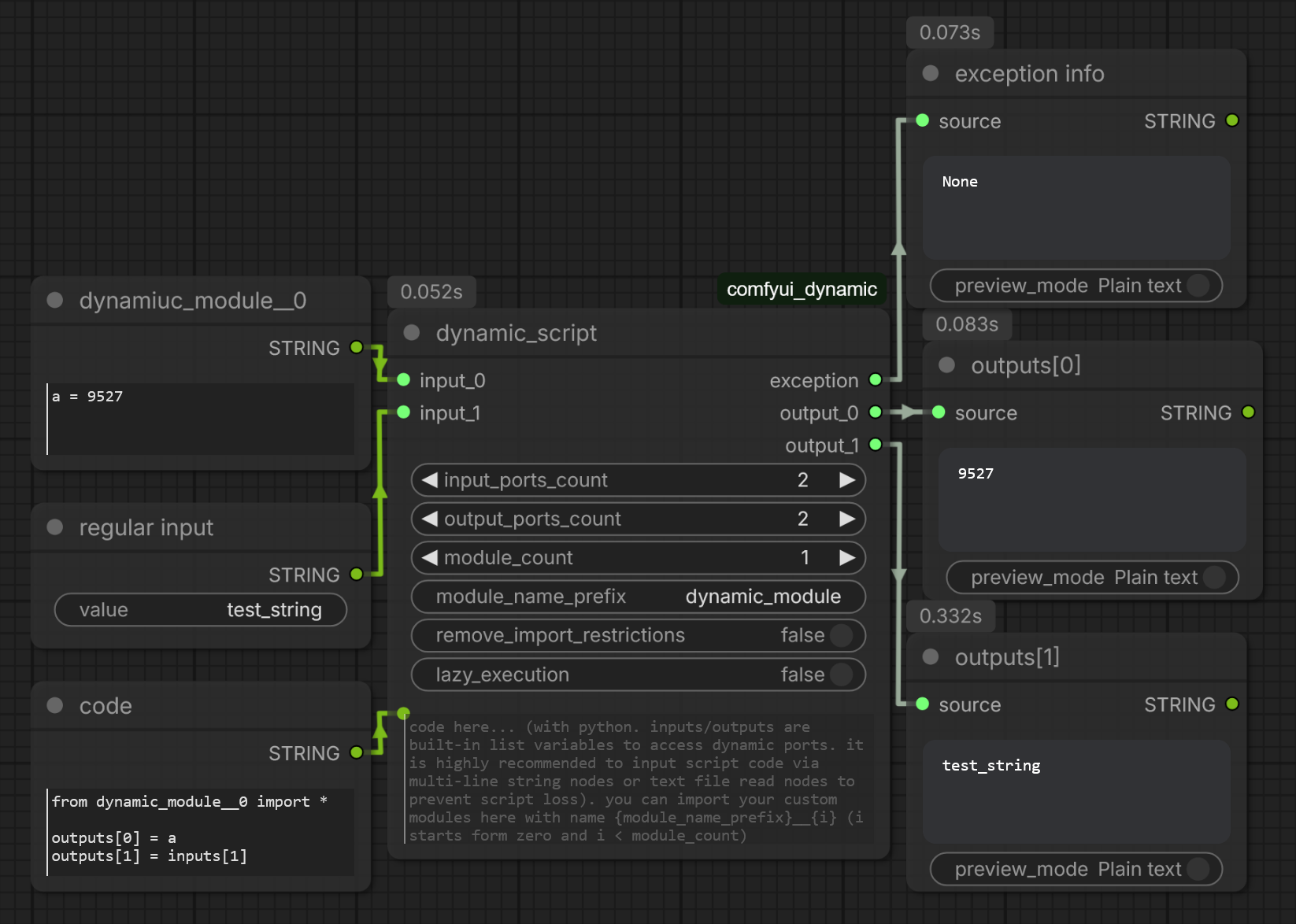
Used to dynamically execute Python code in workflows
- Can set a variable number of input and output terminals
- Has a fixed exception information output terminal (outputs None when there is no exception, otherwise outputs the exception object)
- Can use "Preview Any" and other nodes to display the content
- The execution environment is basically equivalent to the ComfyUI environment, can create nodes and execute, clear VRAM or perform any other operations
- By default, only some commonly used Python modules can be used
- After removing package import restrictions, any module can be used, and the node will turn red
-
Refreshing nodes in some versions of ComfyUI may cause code loss
- Try to avoid editing code directly in the node's text box
- Can use multiline string nodes or text file reading nodes to input code into this node
- Using VS Code to edit and save complete code files on your hard drive is a good choice
-
Now supports custom module import
- Through the new
module_name_prefixandmodule_countports - module_name_prefix: Used to define the module name
- module_count: Declares how many of the dynamic inputs are used as custom module code (0 means disabled)
- Through the new
-
Now supports cross-execution shared cache
- A global singleton dictionary named
cacheis injected into the script environment, accessible in code - Shared by all
DynamicScriptNodeinstances, can store computation-heavy values in it - The add, delete, modify and query of this dictionary are entirely the responsibility of your code
- This cache dictionary only exists in memory, and is cleared after ComfyUI service restart
- Note: When using
cache, the script is no longer a pure function, solazy_executionis generally not enabled, which can easily cause errors
# Example: Store computation-heavy values in cache if "heavy_value" not in cache: cache["heavy_value"] = expensive_computation(inputs[0]) outputs[0] = cache["heavy_value"] # ... del cache["heavy_value"] # Remove stored value - A global singleton dictionary named
-
Other properties
is_output_node= True
-
More details can be found in ComfyUI's built-in node documentation page ("Node Info" in the menu)
- When executing workflows containing
-
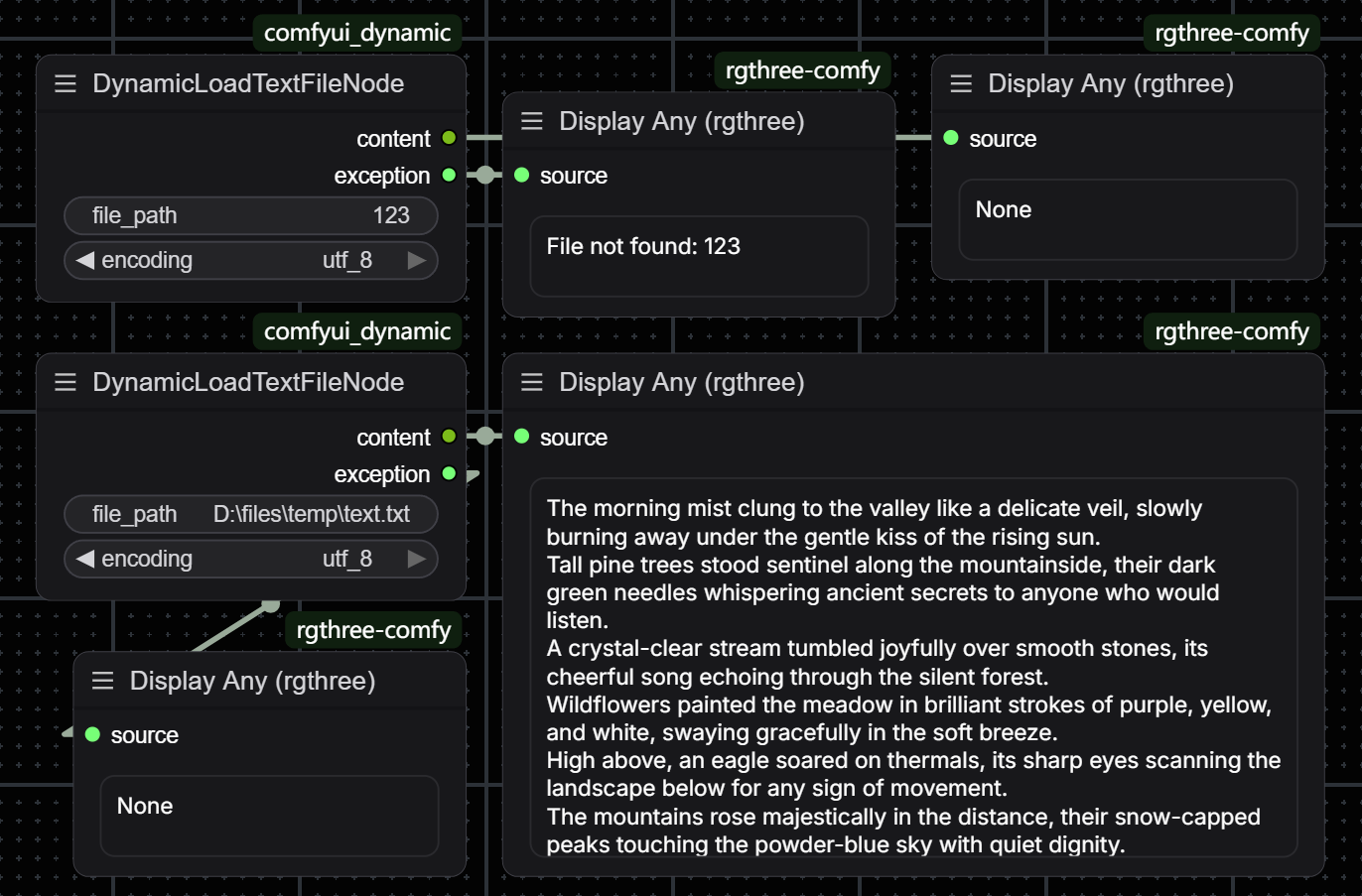
DynamicLoadTextFileNode- Reads text files on the hard drive via the provided path
- Supports selecting file encoding, with a built-in list of all available text encodings
- Has an exception information output terminal, outputs the exception object when reading fails instead of directly reporting an error and interrupting the workflow
- Supports file content change detection, the node will automatically re-execute when the file is modified (using MD5 checksum)
- Can be used with
DynamicScriptNodeto dynamically load code files and pass them into the script node for execution
-
DynamicPipeAnyNode- Dynamic pipe node, used to pack multiple data into a list (pipe) output, while also supporting unpacking
- Set the number of dynamic input/output ports via
ports_count(0 ~ 100) - Accepts a
pipeinput (can be a Python list or tuple):- If
pipelength is less thanports_count, automatically padded withNoneto the specified length - If
pipelength is greater thanports_count, automatically truncated to the specified length - If
pipeis not connected or the type is invalid, initialized to an all-Nonelist
- If
- Dynamic input ports
input_0,input_1, ... will override the corresponding position values inpipe - Fixed output port
pipeoutputs the complete list - Dynamic output ports
output_0,output_1, ... output each element in the list respectively - Other properties
is_output_node= True
-
DynamicSwitchAnyNode- Switch/branch node, selects and returns the corresponding input value based on index
- Set the number of dynamic input ports via
cases_count(0 ~ 100) - Specify the input index to return via
index, corresponding to dynamic input portscase_0,case_1, ... - Supports lazy execution: Only the selected
case_Nbranch is executed, unselected upstream nodes are not triggered - When
indexis out of range (less than 0 or greater than or equal tocases_count), returns thedefaultvalue defaultinput is optional, if not connected it is treated asNoneby default- All input ports support any type
-
DynamicRandomNumberNode- Random integer generation node
- Specifies the random number range via
min(inclusive) andmax(exclusive) - Generates a new random value each execution, can be used in scenarios requiring changing seeds in workflows
- This node refreshes every execution, ensuring a different random number each time
-
DynamicNoneNode- Null value node, always returns
None - Accepts an input
anyof any type, but this input is completely ignored - Can be used for placeholder, initialization or as a default value passed to other nodes
- Null value node, always returns
-
DynamicUniversalSelector- Used to quickly query various file/option names in the ComfyUI environment
- Supports querying by category
- Supports regex matching
- Returns a list of items matching the pattern
- Very useful when you need to get text for certain model files. Practical use cases:
- Workflows require text-based configuration
- Too many model files to manage conveniently
- Need to quickly view all valid sampler or scheduler options
-
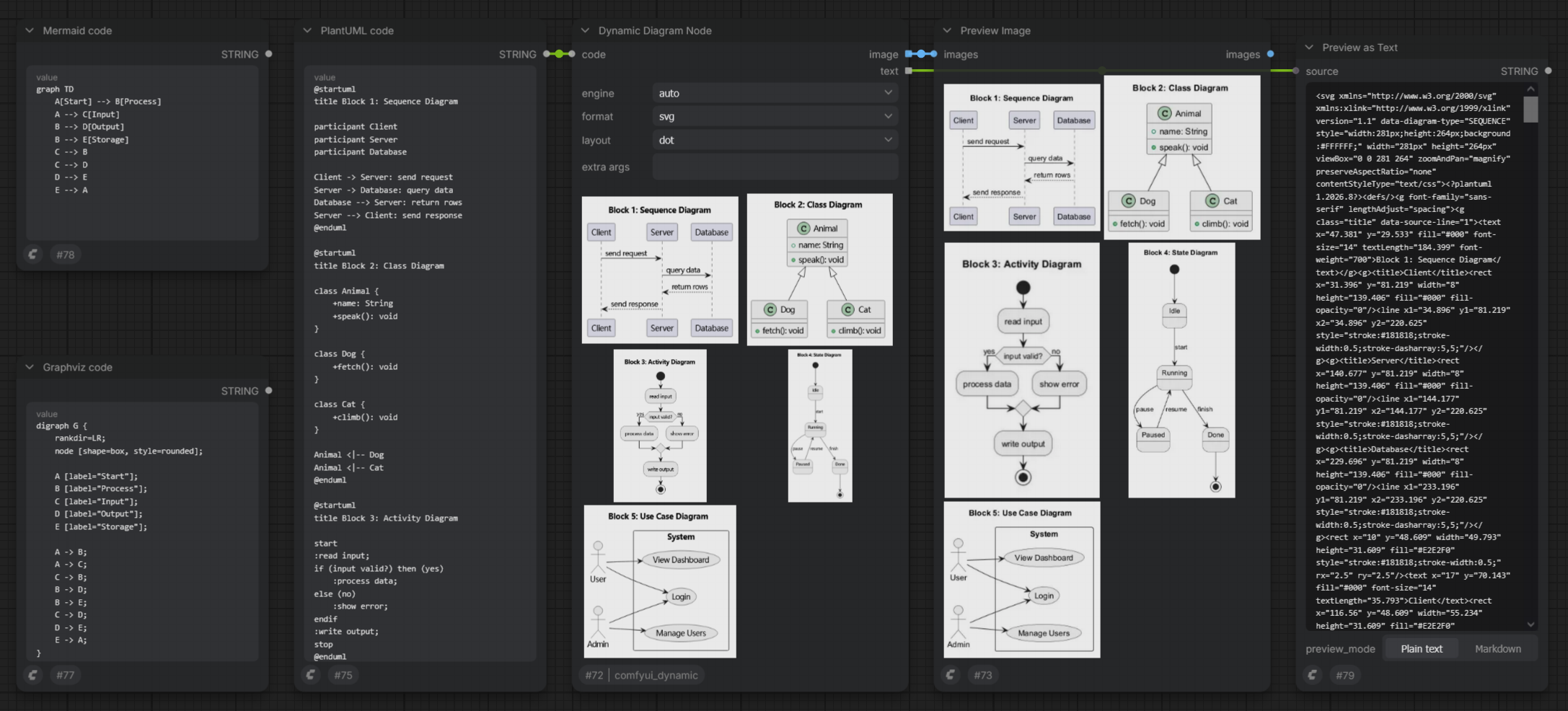
DynamicDiagramNode- Dynamic diagram node, renders PlantUML / Mermaid / Graphviz source code into images and shows them on the node
- Source code comes in through the
codeinput port (pair it with a multiline string node or a text file reading node)- Accepts a single string or a list of strings; each list item renders as an independent diagram group (a PlantUML item may still contain multiple @start* blocks)
- The whole list is processed in a single execution; non-string and blank list items are ignored, and an empty list renders nothing (zero images, no error)
- The
engineport selects the rendering engine (auto = heuristic detection per code item, so list items may mix engines) - The
formatport selects the output format (png / svg)
- The Graphviz layout engine (dot, neato etc.) is selected via the
layoutport, ignored by other engines - Outputs:
image(always png renders)text(SVG source per diagram in svg mode, empty strings in png mode)- Both are output lists; a PlantUML source containing multiple @start* blocks renders multiple images
- Note: do not use named @start blocks in PlantUML (e.g. "@startuml myname"), their outputs are written under custom file names and get lost; use a plain "@start*" instead
- Render failures (bad code / missing tools / timeout) raise an exception and terminate execution
- Error messages include a stderr summary of the tool
- The
extra argsinput appends custom command-line arguments to the target tool- Shell-like splitting, quote values containing spaces with double quotes
- Arguments are appended after the built-in ones; repeated flags typically take the later value and can override built-in behavior (e.g. graphviz's -K / -G / -N / -E)
- Notes:
- graphviz treats a repeated -T as additional output formats instead of an override; change
the format via the
formatport instead of passing -T - likewise avoid overriding mermaid's -i / -o (products would no longer be written to ComfyUI's temp directory and reading them fails)
- in plantuml.jar mode the arguments are consumed by PlantUML itself, not by the java launcher
- graphviz treats a repeated -T as additional output formats instead of an override; change
the format via the
- See section "4. Dependencies" for external rendering tool path configuration
3. Installation
-
Clone this repository into ComfyUI's
custom_nodesdirectory:cd path_to_comfyui/ComfyUI/custom_nodes git clone https://github.com/inkbottle-9/comfyui_dynamic.git -
Version requirement: This plugin has been migrated to the ComfyUI V3 node specification, requiring a relatively new version of ComfyUI
- Approximately requires versions after the second half of 2025, latest version is recommended
- For older ComfyUI versions, please use historical versions of this plugin, the last version using the old API:
-
de7b4914835994f91b5bb1863a65e384c648c932git checkout de7b4914835994f91b5bb1863a65e384c648c932 git switch --detach de7b4914835994f91b5bb1863a65e384c648c932
-
4. Dependencies
- Node features require no Python packages
- The control panel (resource monitor) requires the following Python packages
(installed automatically by ComfyUI when installing the plugin):
psutil: CPU / RAM statistics (already a dependency of the ComfyUI core, declared here explicitly)pynvml: GPU utilization and temperature (optional, degrades automatically when missing or on non-NVIDIA environments, only the monitoring feature becomes unavailable, the rest of the plugin is not affected)
- The dynamic diagram node (DynamicDiagramNode) requires the following external rendering tools:
Graphviz-
Website: https://graphviz.org/ (download: https://graphviz.org/download/)
-
Install:
-
The official installer
-
Package managers:
winget install --id Graphviz.Graphviz  # windows
scoop install graphviz
choco install graphviz
apt install graphviz                   # Debian/Ubuntu
brew install graphviz                  # macOS
-
-
Configure:
- Point
Graphviz pathto an executable (e.g.dot.exe) or the Graphviz installation directory (thebinsubdirectory is checked automatically) - Layout engines (dot / neato / fdp etc.) are selected via the node's
layoutport
- Point
-
Mermaid (mermaid-cli)-
Website: https://mermaid.js.org/ (CLI repository: https://github.com/mermaid-js/mermaid-cli)
-
Install: install Node.js first (https://nodejs.org/), then run
npm install -g @mermaid-js/mermaid-cli -
Configure: point
Mermaid pathto themmdcexecutable (typicallymmdc.cmdon Windows) or its directory
-
PlantUML-
Website: https://plantuml.com/ (download: https://plantuml.com/download)
-
Install (choose one):
-
Download
plantuml.jarfrom the website (requires a Java runtime, e.g. https://adoptium.net/) -
Download the Windows executable (
plantuml.exe) from the website -
Package managers:
winget install --id PlantUML.PlantUML  # windows
scoop install plantuml
choco install plantuml
apt install plantuml                   # Debian/Ubuntu
-
-
Configure:
PlantUML path- Point directly to
plantuml.jar/ theplantumlexecutable, or use the directory containing the file - When using the jar and
javais not on PATH, also setJava pathto the java executable or its directory
- Point directly to
-
- Notes:
- All of them are optional: missing tools only make the corresponding engine unavailable, the rest of the plugin is not affected
- Tool paths are configured in the ComfyUI settings under the "Comfy Dynamic / Diagram" category
- Changes take effect on the next execution without restart
- Common path rules:
- Absolute paths only, may point to a file or its directory
- Surrounding quotes are stripped automatically (Windows "Copy as path" is supported)
- When left empty, the tool is looked up on the system PATH
5. Settings
This plugin registers the following settings in the ComfyUI settings interface:
Warn when loading workflows with unrestricted import- When enabled (default): When loading workflows containing
DynamicScriptNodewith package import restrictions removed, a security warning will pop up, and the relevant nodes will remain restricted unless confirmed - When disabled: Loading workflows will no longer pop up this warning, nodes are loaded as saved in the workflow (at your own risk)
- When enabled (default): When loading workflows containing
Enable logging- When enabled (default): Information will be output to the log when executing certain nodes, viewable in the ComfyUI console
- When disabled: No log output
- Requires software restart after modification to take effect
- Recommended to enable,
DynamicScriptNodewill output exceptions in a readable form to the log when execution encounters errors
Dynamic Resource Monitor: Enabled- When enabled (default): The control panel is shown after the page loads
- When disabled: The panel is hidden and data polling stops, changes take effect immediately without restart
Dynamic Resource Monitor: Refresh rate (Hz, 0 = paused)- Data polling rate of the control panel (0-10, default 2), 0 means paused, changes take effect immediately
Dynamic Resource Monitor: Languageen(default) /zh, changes take effect immediately
Dynamic Resource Monitor: Panel opacity (30-100%)- Default 100%, changes take effect immediately
PlantUML path/Java path (for plantuml.jar)/Mermaid path/Graphviz path- External rendering tool paths for the dynamic diagram node (DynamicDiagramNode), see the "Dependencies" section for details
- Left empty, tools are looked up on PATH; changes take effect on the next execution without restart
6. Notes
- Migrated to the new ComfyUI API, now supports Node 2.0
- The plugin may have bugs, if problems are found during use, please be sure to submit relevant information on the issue page
- Your feedback is really needed
- If you have any suggestions for feature implementation, or need other features, please feel free to post an issue