
MiniMax Director
Direct MiniMax H3 on a timeline instead of cramming everything into one prompt box. Lay shots, camera moves and audio cues out on tracks, give every person, prop, place and look a card holding its reference picture, its description and its voice, and the node compiles the whole piece into the single structured prompt H3 actually reads -- the six-section reference format, task types, dialogue in the model's exact <d form, frame anchors and on-screen text -- then hands the sampler its conditioning and a clip length it will accept. Ships as a complete workflow with a live compiled-prompt view and a linter.
Nodes (4)
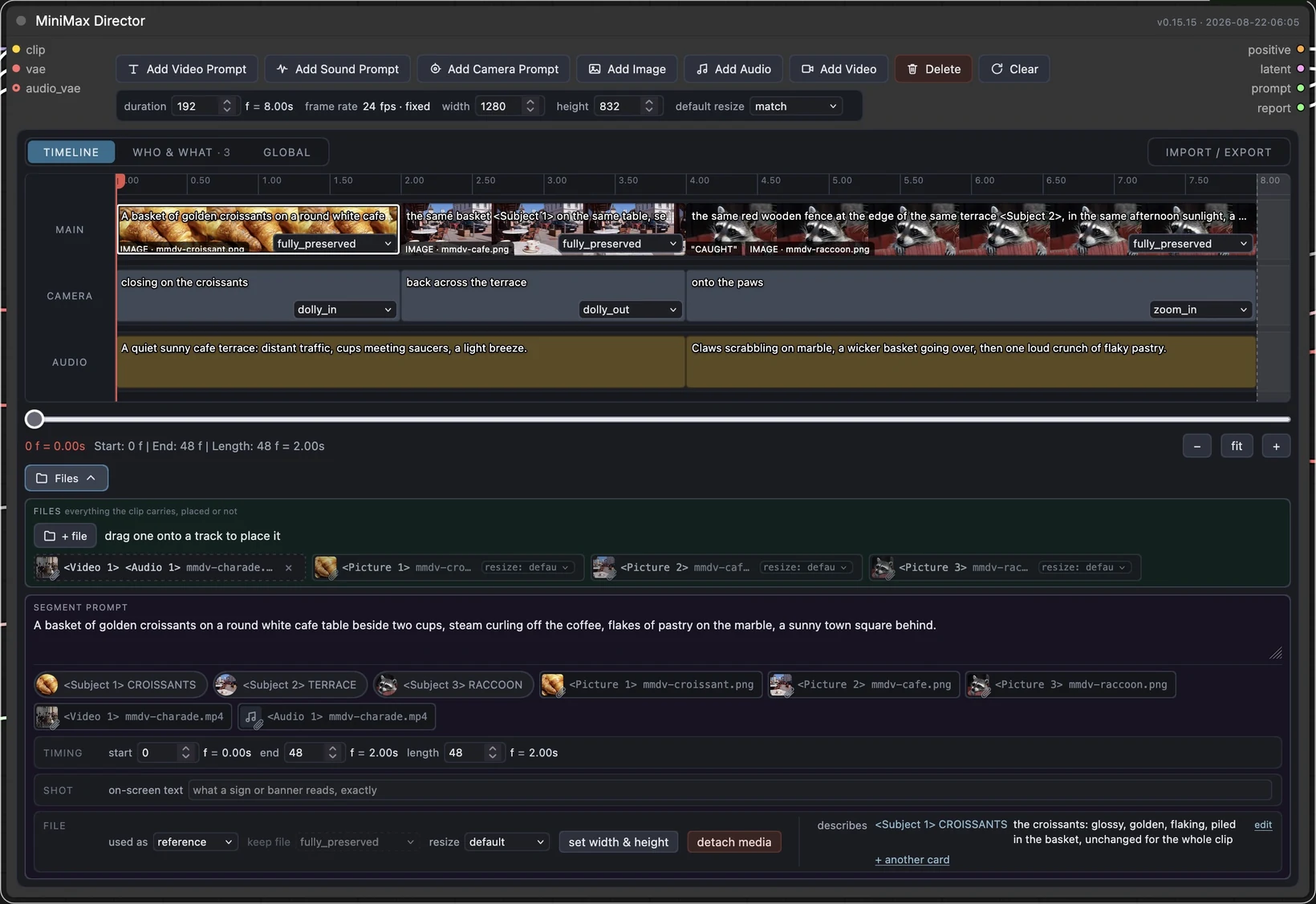
Direct on a timeline
Read the exact prompt H3 gets, while you're still typing it
The node that stops the upscale pass dying with a shape mismatch
Your MiniMax H3 linter, answering 'why did it do that' before you render
MiniMaxDirector
A timeline director for the MiniMax H3 video model in ComfyUI. Lay out shots, camera moves and audio cues on a track, and it compiles them into the single structured prompt H3 actually reads — then hands the model its conditioning and a clip length the sampler will accept.
Video tutorial — the whole workflow, every documented H3 feature, in order:
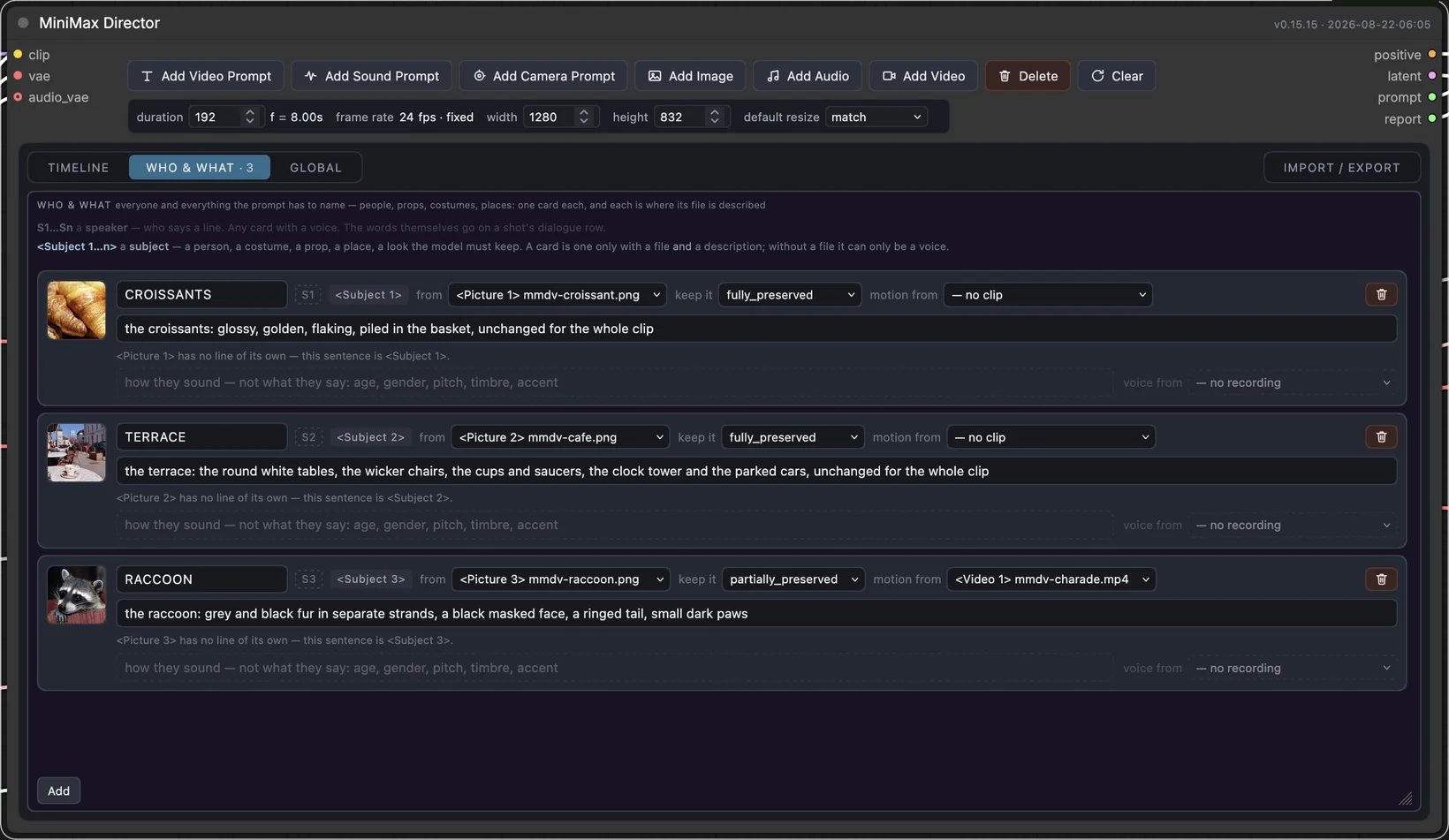
H3 makes the picture and the voices in one pass, so the editor has a WHO & WHAT tab: one card per thing the prompt has to name, holding its face, its voice, how much of it survives from a reference, and — for a face swap — who the face is carried onto, which folds the card into that person rather than adding a second one. Not only people: a costume, a prop, a place or a style out of the same photograph is a card too, and several cards may point at one file. A card can also take a person's motion from a video and their voice timbre from a recording — the guide's one-subject-several-assets case, and the same machinery a face swap now uses. A shot then only says who speaks and what they say.
A card is also the one place a file is described — there is no second description box on
the block, because a file used to define something is cited inside that thing's definition
rather than given a line of its own. Citing one in a shot is a click: the block's
SUBJECTS row is a chip per numbered card, and clicking it writes <Subject n> into the
shot's text at the caret, so the number is never typed and never wrong.
The compiler covers MiniMax's published prompt guides rather than a subset of them: the full camera vocabulary as motion type × amplitude × speed, voiceovers in the exact form the model was trained on, dialogue that crosses a cut or is cut off by the end of the clip, on-screen text quoted verbatim, storyboard references, the separate marker vocabulary audio uses, and a linter that checks the rules the guides state outright.
The editor is content-sized: the node is as tall as the panel you have open, and the card list is the only part with a height of its own — set by its grip or by the node's corner, stored on the node, restored with the workflow.
It ships as a whole workflow, not just a node pack:
example_workflows/minimax-director.json is a
complete graph — timeline, live compiled-prompt view, loaders, sampler, both VAE decodes
and video out. Install it, open it, start writing shots. See Install.
MIT licensed. The pack has no dependencies beyond ComfyUI itself; the workflow's optional Upscale switch is the one thing that asks for another pack, and it is off by default.
Where this came from
I loved LTXDirector. Directing a video by laying shots out on a timeline, instead of cramming everything into one prompt box and hoping, is the right idea — and WhatDreamsCost got there first and built it properly. Thank you for it.
MiniMaxDirector is that idea carried over to MiniMax H3. It is not a port: none of LTXDirector's code is here, and the two models want different things. LTX needs keyframes injected into latent space because it has no notion of a shot list; H3's text encoder is a 32B vision-language model that reads one itself, so the same idea comes out as a compiler rather than a guide injector. The debt is to the concept, and it is a large one.
If you work with LTX, use LTXDirector — it is more mature than this, and it is the original.
People searching for an LTXDirector for MiniMax H3 tend to land here, so to be clear: this is not that. It is a separate project, written from scratch for a different model, built on an idea LTXDirector had first.
Why a compiler rather than latent guides
H3's text encoder is a 32B vision-language model, and it parses a shot list on its own:
Neon-lit alley after rain, cyan and magenta signage, 35mm grain.

Timeline:
[0s-1s] Wide shot of the alley, puddles holding the sign reflections. The camera dollies slowly in.
[1s-2.5s] Close on <Picture 1>, rain beading on the collar.
So the interesting work is not injecting guides into latent space — it is producing that
text correctly, addressing wired inputs as <Picture 1> / <Audio 1>, and keeping the
clip on the frame lattice H3 requires. All of that is ordinary logic, which is why the
core of this project is pure Python with no tensors in it and runs in a fifth of a second
on a laptop.
The frame lattice
H3 only accepts clip lengths satisfying length % 17 == 5 at 24 fps — 5, 22, 39, 56, 73,
90, 107, 124, and so on. The model denoises a latent whose time axis is a row of slots, and
the video VAE packs 17 frames into 5 of them (after a 5-frame head worth 2); a length off
the lattice would need a fraction of a slot.
The editor lands on it while you build rather than at render time: a block that grows the clip takes the padding, and a typed duration snaps up on its own. So the timeline you arrange is the clip that is generated, with no frames on the end that no shot describes.
Nodes
| Node | Purpose |
| --- | --- |
| MiniMax Director | Timeline editor; outputs positive, latent, the compiled prompt, and a lint report. |
| MiniMax Director — Prompt | Shows the compiled prompt as the timeline is edited, without running anything. Wire the director's prompt output to it. |
| MiniMax Director — Report | Shows the linter's findings as the timeline is edited. Wire the director's report output to it. |
Three nodes, and the shipped workflow uses all three. There is no separate compile node,
no seconds-to-frames node, and no length output on the director: the timeline's own
clock reads the frame count in frames and seconds, the rounded length rides in the
latent the sampler receives, and the editor compiles and lints on every edit pause. Each
of the three was a second route to something already on screen.
The editor runs on both node renderers — the classic canvas and Nodes 2.0, ComfyUI's Vue rendering — from one code path, with no setting to pick. Drag the node's bottom-right corner to give it more room; the height is kept with the workflow, the node still grows when you add a prompt or a card, and Fit node to content in its right-click menu puts it back.
The director calls the core MiniMaxH3ImageToVideo / MiniMaxH3ReferenceToVideo nodes
rather than reimplementing them, resolving both by introspection so an upstream signature
change surfaces as a clear message instead of a stack trace. The path is picked automatically from the
timeline: no files and you get text-to-video, a block used as first frame or last frame
and you get image-to-video, any other attached file and you get reference-to-video. The
node has no reference or keyframe sockets of its own -- every file comes off the timeline,
which is the one place a file is also described.
Install
Three steps: the nodes, the weights, the workflow. The nodes on their own leave you with a
timeline and nothing to render it — the graph around them is the product, and it ships here
as example_workflows/minimax-director.json.
Requires ComfyUI 0.31.0 or newer. The nodes themselves work on 0.30.0, where the MiniMax
H3 nodes landed, but the workflow's Turbo switch needs ModelSamplingAV from 0.31.0 —
without it the audio is over-stepped at four steps and comes back distorted while the
picture looks fine.
1. The nodes.
cd ComfyUI/custom_nodes
git clone https://github.com/imbutus/ComfyUI-MiniMaxDirector.git
Restart ComfyUI.
2. The weights. Four files, all from
Comfy-Org/MiniMax-H3. These are the exact
filenames the example workflow asks for; ComfyUI matches loaders to files by name, so a
differently named copy shows up as an empty dropdown rather than an error.
| File | Goes in |
| --- | --- |
| minimax_h3_ref2va_pruned_int8_convrot.safetensors | models/diffusion_models/ |
| qwen3vl_32b_minimax_h3_nvfp4_awq.safetensors | models/text_encoders/ |
| minimax_h3_video_vae_fp16.safetensors | models/vae/ |
| minimax_h3_audio_vae_fp32.safetensors | models/vae/ |
Two VAEs is not a mistake. H3 generates picture and sound together, and they decode separately.
3. The workflow. Restart ComfyUI, then open Workflow → Browse Templates →
minimax-director. The pack ships the graph in example_workflows/, which ComfyUI serves as a
template, so there is nothing to download and nothing to drag. (If you would rather open the
file itself, drag example_workflows/minimax-director.json onto the
canvas — step 1 already put it on your disk. It is not in the Workflows sidebar; that lists
the workflows you have saved.) It wires up:
- MiniMax Director — the timeline you work in.
- MiniMax Director — Prompt — the compiled prompt, beside it, updating as you type.
- MiniMax Director — Report — the linter's findings, above it. Almost every "why did it do that" is answered by those two panels.
- the loaders, sampler, both VAE decodes,
CreateVideoandSaveVideo— everything needed to get an mp4 with sound out the other end. - two switches, both off by default: Turbo in the Speed group and Upscale in the Upscale group — described below, with what each one needs.
Select a block, describe what happens in it, queue.
Faster, when you want it. The Turbo switch in the workflow's Speed group swaps the sampler to a distilled four-step one: 4 steps instead of 20, so a draft costs roughly a fifth of the GPU time. Off by default — the graph renders exactly as it would without the switch there.
It needs one extra file in models/loras/,
lightx2v's Ref2VA 4-step LoRA
(minimax_h3_ref2v_turbo_4step_v0.1_comfyui_bf16.safetensors), and no extra node pack —
it loads through ComfyUI's own LoraLoaderModelOnly. Distilled at 544p on the shifts H3
already defaults to, so leave its strength at 1.0 and the scheduler on simple.
Ref2VA turbo is a v0.1 preview: audio and fast motion are its weak spots. Switch it off for a final render.
lightx2v has since published an 8-step Ref2VA
(minimax_h3_ref2v_turbo_8step_v1.0_768p_comfyui_bf16.safetensors). To try it, put it in
models/loras/, pick it in the Turbo LoRA dropdown and set steps — turbo to 8 —
the two go together, which is what those two node titles say. We have not measured it
against the 4-step one, so the graph still ships v0.1.
Bigger, when you want it. The Upscale switch in the workflow's Upscale group adds
a second stage: the finished latent is enlarged to the node's megapixels target and refined
there.
Off by default, and off it costs nothing — nothing below the branch runs.
Render first, look at it, and only then pay for the resolution. Flip Upscale on and queue the same graph again: nothing upstream changed, so ComfyUI serves the first pass from its cache and only the second one costs anything. That second pass is a real render at the larger size — it costs time and VRAM, not just the download.
megapixels is a budget of pixels — not a multiplier, and not a width. The node reads it
as megapixels × 1024 × 1024, spends that many pixels at the aspect ratio the render already
has, and rounds both sides to the nearest align. It is area rather than width, so doubling
the number makes the picture about 1.41× wider, not twice as wide. From the default 1344×768
canvas — 0.98 MP by that count:
| megapixels | you get | |---|---| | 2.0 | 1920 × 1088 | | 4.0 | 2720 × 1536 | | 7.0 | 3584 × 2048 | | 9.0 | 4064 × 2336 |
To aim at a size you already have in mind, divide its pixel count by 1,048,576: 3600×2024 is 6.95, so 7.0 — which lands on 3584×2048, because the shape stays the canvas's whatever number you type.
This is the one part of the graph that needs a second node pack:
cd ComfyUI/custom_nodes
git clone https://github.com/LBH-123-AI/Comfyui_Minimax_h3_latent_Upscaler.git
and minimax_h3_latent_upscaler_3d_fp16.safetensors (691MB) from
LBH-123-AI/Minimax_h3_latent_Upscaler
in models/latent_upscale_models/, the folder that pack registers.
Without the pack, ComfyUI opens the workflow with a Missing Node Types dialog and one red node. That is expected, not a broken download: the switch is off, nothing downstream of it is used, and the render works. Install the pack when you want the branch.
That pack is days old and still moving: on 2026-08-19 it renamed its nodes, and a graph
pointing at the old name stopped opening. This workflow tracks the current one,
MinimaxH3LatentUpscaler3D. If yours is older than that rename, git pull in the pack.
The upscaler works directly on H3's 24-channel latents, so nothing round-trips through the
VAE. H3's latent carries picture and sound together, though, and the upscaler takes the video
half alone — so the branch splits the audio off with core Separate AV Latent, upscales, and
rejoins with Concat AV Latent before the refine pass. A picture used as a first frame or
last frame is a keyframe, and H3 lays a keyframe out on the grid of the latent it is
sampling — so the refine pass takes its conditioning from refit the keyframes to the new
size (MiniMaxDirectorRefit), which encodes the same pictures again at the enlarged size;
without it the refine failed with a shape mismatch (issue #4). It is new and unproven at
large sizes — check a short clip before trusting it with a long one.
This is why the workflow is one file and not several. Turbo needs no pack at all; Upscale needs that one, and only when you switch it on.
Development
The parts worth testing need neither a GPU nor a single byte of weights.
python -m venv .venv && .venv/bin/pip install -e ".[dev]"
.venv/bin/pytest
For the graph itself, point COMFYUI_PATH at a ComfyUI checkout and the graph tests run a
real prompt through ComfyUI's own validator and executor — no server, no GPU, no model
files:
COMFYUI_PATH=~/dev/ComfyUI $COMFYUI_PATH/.venv/bin/python -m pytest tests/graph
The weight-bearing nodes are stubbed; CreateVideo and SaveVideo are not, so the run
ends with an actual mp4 on disk. The stubs record every prompt handed to H3, which makes
the one question that matters — what string reached the text encoder? — directly
assertable without renting anything.
The stubs live in tests/, not in the package, and they have to: ComfyUI snapshots its
built-in node names before loading custom nodes and refuses to let a pack replace any of
them (nodes.py, base_node_names passed as ignore). A test process has no such
restriction, because it owns the registry.
Documentation
- docs/GUIDE.md — how to use it: the tracks and buttons, the duration rules, reference tokens, the camera vocabulary, the frame lattice, and what to check when the output looks wrong. Start here.
- AGENTS.md — the same ground for a model reading the code cold: data flow, document schema, numbering rules, the invariants that break silently, and what has never been verified against real weights.
- docs/ARCHITECTURE.md — why the design is shaped this way.
Layout
__init__.py              ComfyUI entry point
src/minimax_director/
  lattice.py             frame arithmetic; the 17-frame rule
  timeline.py            the timeline document and its JSON
  compile.py             timeline -> prompt
  cast.py                the WHO & WHAT document, merged in before compiling
  lint.py                checks that run before sampling
  references.py          reference ordinals for wired sockets
  attachments.py         reference ordinals for files on the timeline
  core.py                adapter over ComfyUI's built-in H3 nodes
  nodes/                 the classes ComfyUI registers
web/                     the timeline widget: plain ES modules, no build step
example_workflows/       the ready-to-run workflow
tests/                   pure-Python tests and golden prompts
tests/graph/             in-process ComfyUI execution with the weights stubbed
AGENTS.md                how it all works, for contributors and coding agents