
Anima Safe PAG
A soft, Anima-friendly Perturbed Attention Guidance node for ComfyUI.
Nodes (1)
Anima Safe PAG
Anima Safe PAG is a ComfyUI node for applying a softer form of Perturbed Attention Guidance (PAG) to Anima/Cosmos/Predict2-style DiT models.
It creates a weak prediction by perturbing selected self-attention blocks, then
guides the final CFG result away from that weak prediction. Compared with
hard PAG, the attention perturbation is blended by perturbation_strength, so
the effect can be tuned more gently.
Cond, uncond, and PAG predictions are calculated in the same calc_cond_batch
pass. The extra PAG row is also kept padded outside the active
start_percent / end_percent range, which keeps the batch shape stable for
workflows that use cache, replay, or sampler-side optimization nodes.
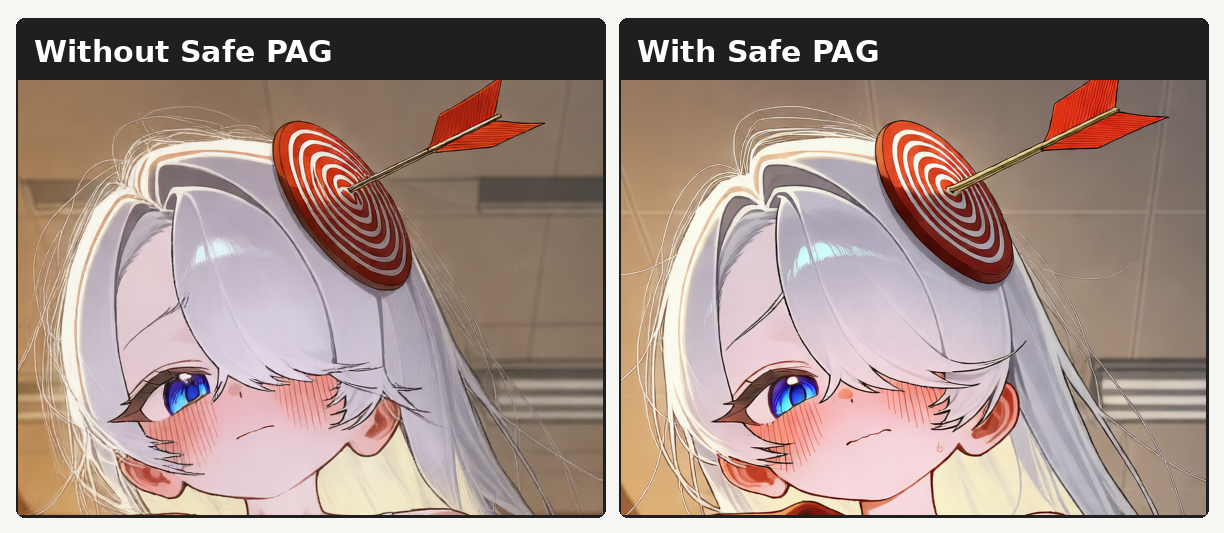
Comparison
Installation
ComfyUI Manager:
Manager -> Install Custom Nodes -> search "Anima Safe PAG" -> Install
Manual installation:
cd ComfyUI/custom_nodes
git clone https://github.com/iljung1106/comfyui-anima-safe-pag.git
Restart ComfyUI after installation.
Recommended Settings
scale: 4.0
block_indices: 18
perturbation_strength: 0.75
head_indices:
start_percent: 0.0
end_percent: 0.7
rescale: 0.20
rescale_mode: full
For 28-block Anima checkpoints, start with block indices greater than 14.
Later blocks usually affect local structure, line confidence, and small details
more cleanly than early blocks. 18 is a balanced starting point. Good nearby
tests are 16, 18, 20, and 18-20.
Parameters
scale
Strength of the PAG correction. Higher values push the result farther away from the perturbed prediction. Reduce it if edges become harsh or details start to break.
block_indices
Transformer blocks where self-attention is perturbed. Use a single index, a
comma-separated list, or a range: 18, 18,20, 18-20. For common 28-block
Anima checkpoints, values above 14 are recommended.
perturbation_strength
Blend amount between normal self-attention and the value/identity path.
0.0 leaves attention unchanged. 1.0 is closest to hard PAG. The default
0.75 keeps the weak prediction useful without making the perturbation too
aggressive.
head_indices
Optional attention-head filter. Leave it empty for normal use. On common
2048-channel / 16-head Anima checkpoints, heads are indexed from 0 to 15,
but selecting heads manually can make results less predictable.
start_percent / end_percent
Active sampling range expressed as progress, not raw sigma. 0.0 is the start
of sampling and 1.0 is the final step. The default 0.0 to 0.7 applies Safe
PAG from the early steps through the mid/late part of sampling.
rescale
Guidance rescale amount. It reduces excessive contrast, saturation, or energy
growth after the PAG correction. 0.0 disables rescaling. The default 0.20 is
mild.
rescale_mode
full rescales the full CFG result after Safe PAG guidance. partial rescales
against the positive prediction plus Safe PAG guidance. full is the safer
default.
Compatibility
Anima Safe PAG expects an Anima/Cosmos/Predict2-style model with
diffusion_model.blocks and block-level self_attn.compute_attention.
Existing model_function_wrapper behavior is preserved where possible, and no
separate post-CFG model evaluation is used. The node works well in workflows
with Anima Layer Replay Patcher, SPEED, or similar optimization nodes that rely
on stable model execution.