
ComfyUI-iterationNode
Combines prompts from multiple categories and automatically advances through every combination across queue runs for batch variation generation.
ComfyUI-iterationNode
A custom node for ComfyUI that combines prompts from multiple categories (characters, clothing, poses) and automatically advances through every combination across queue runs. Perfect for batch generation of variations without rebuilding the workflow each time.
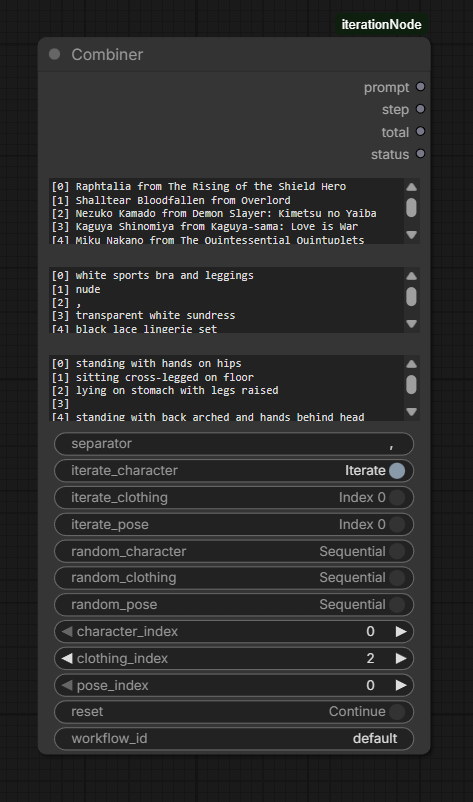
Features
- 3 independent prompt categories — characters, clothing, poses (one item per line).
- Per-category modes — each category can independently be set to
Iterate(sequential),Random, orFixed index. - Automatic advancement — each press of Queue Prompt outputs the next combination; no manual stepping required.
- Full Cartesian product — when multiple categories iterate, the node walks through every combination (e.g. 3×4×4 = 48 unique prompts).
- Stateful counter — keyed by
workflow_id, so multiple Combiner nodes in the same workflow don't interfere. - Status output — human-readable string showing current step, totals, and the active item from each category.
- Zero dependencies — pure Python, single file, no
pip installrequired.
Installation
Option A — Manual (recommended)
- Open a terminal inside your ComfyUI
custom_nodesdirectory:cd ComfyUI/custom_nodes - Clone this repository:
git clone https://github.com/ilia-zykov/ComfyUI-iterationNode.git - Restart ComfyUI.
- The node appears in the node menu under the category iteration → Combiner.
Option B — Download ZIP
- Click
Code → Download ZIPon the GitHub page. - Extract into
ComfyUI/custom_nodes/— you should end up withComfyUI/custom_nodes/ComfyUI-iterationNode/__init__.py. - Restart ComfyUI.
Option C — ComfyUI Manager
If you use ComfyUI Manager, open Install via Git URL and paste the repository URL.
No additional Python packages are needed. The node works on Windows, Linux and macOS.
Quick Start
- Add a node: right-click →
Add Node → iteration → Combiner. - Fill the three text fields (one item per line), for example:
- characters:
Tohru/Kanna/Lucoa - clothing:
maid outfit/school uniform/casual clothes - poses:
standing/sitting/lying down
- characters:
- Toggle Iterate on the categories you want to cycle through.
- Connect the
promptoutput to your CLIP Text Encode (or any string input). - Press Queue Prompt repeatedly — each run outputs the next combination.
To run all combinations automatically, set the queue size to the value shown in the total output (or to Auto Queue: instant in the ComfyUI menu).
Inputs
Required
| Input | Type | Description |
|-------|------|-------------|
| characters | STRING (multiline) | One character per line. Empty lines are ignored. |
| clothing | STRING (multiline) | One clothing item per line. |
| poses | STRING (multiline) | One pose per line. |
| separator | STRING | String inserted between parts. Default: ", ". |
Optional
| Input | Type | Default | Description |
|-------|------|---------|-------------|
| iterate_character | BOOLEAN | false | Cycle through the characters list, one item per queue run. |
| iterate_clothing | BOOLEAN | false | Cycle through the clothing list. |
| iterate_pose | BOOLEAN | false | Cycle through the poses list. |
| random_character | BOOLEAN | false | Pick a random character every queue run (overrides iterate). |
| random_clothing | BOOLEAN | false | Pick a random clothing item every run. |
| random_pose | BOOLEAN | false | Pick a random pose every run. |
| character_index | INT | 0 | Manual index used when both Iterate and Random are off. |
| clothing_index | INT | 0 | Manual index for clothing. |
| pose_index | INT | 0 | Manual index for pose. |
| reset | BOOLEAN | false | When true, resets the step counter to 0 on the next run. |
| workflow_id | STRING | default | Unique key for the internal counter. Use different IDs if you have several Combiner nodes. |
Outputs
| Output | Type | Description |
|--------|------|-------------|
| prompt | STRING | Combined prompt string for the current step (e.g. Tohru, maid outfit, sitting). |
| step | INT | Current step number, 1-based. |
| total | INT | Total number of unique combinations. 0 means "infinite" (any random toggle is on). |
| status | STRING | Human-readable summary: step counter and the chosen item per category. Useful for previews. |
Modes — How They Interact
Each category is independent and follows this priority:
Random ON  → pick a random item from the list
Random OFF + Iterate ON  → walk through the list sequentially
Random OFF + Iterate OFF → use the manual *_index value
If both Random and Iterate are on for the same category, Random wins.
If any category uses Random, the total output becomes 0 (the sequence is effectively infinite — there is no "end").
Iteration Order
When multiple categories iterate, they form a nested loop. The first category in the input order changes slowest, the last changes fastest.
Example with characters = [A, B], clothing = [X, Y], poses = [1, 2]:
| Step | Character | Clothing | Pose | |------|-----------|----------|------| | 1 | A | X | 1 | | 2 | A | X | 2 | | 3 | A | Y | 1 | | 4 | A | Y | 2 | | 5 | B | X | 1 | | 6 | B | X | 2 | | 7 | B | Y | 1 | | 8 | B | Y | 2 |
After step 8 the counter wraps to 1.
Usage Examples
1. Iterate poses only
characters: Tohru
clothing:   maid outfit
poses:      standing
            sitting
            lying down
            jumping

iterate_pose: ON
→ 4 steps, same character and outfit each time, only the pose changes.
2. Full Cartesian product
characters: Tohru / Kanna
clothing:   maid outfit / school uniform
poses:      standing / sitting

iterate_character: ON
iterate_clothing:  ON
iterate_pose:      ON
→ 2 × 2 × 2 = 8 steps, every combination produced exactly once.
3. Random character, fixed rest
characters: Tohru / Kanna / Lucoa
clothing:   maid outfit
poses:      standing

random_character: ON
→ Each run gets a random character; clothing and pose stay fixed. total output is 0 (infinite).
4. Manual selection (no iteration, no random)
characters: Tohru / Kanna / Lucoa
clothing:   maid outfit / school uniform
poses:      standing / sitting

character_index: 1   (Kanna)
clothing_index:  0   (maid outfit)
pose_index:      1   (sitting)
→ Always outputs Kanna, maid outfit, sitting regardless of how many times you run the queue.
State and Reset
- The step counter is stored in memory, keyed by
workflow_id. - It persists across queue runs within the same ComfyUI session.
- It is lost on ComfyUI restart.
- Set
reset: trueto force the counter back to 0 on the next run. - When the counter reaches
total, it automatically wraps back to 0.
If you have multiple Combiner nodes that should advance independently, give each one a different workflow_id (for example id_a, id_b).
Troubleshooting
The node always outputs the same prompt.
Make sure at least one iterate_* or random_* toggle is on. With all toggles off, the node uses the fixed *_index values and is therefore intentionally static.
I changed the inputs but the node still shows old fields. ComfyUI caches input definitions. Delete the node from the graph and add a fresh one.
The counter doesn't advance.
Verify that the node is actually re-executing on each queue run. The node returns IS_CHANGED = NaN to force this; if you wrap it in a custom node that caches outputs, advancement may stop.
Multiple Combiner nodes step in lockstep.
They share state via workflow_id. Set a different workflow_id on each node.
File Structure
ComfyUI-iterationNode/
├── __init__.py        # node logic
├── web/
│   └── line_numbers.js   # adds line numbers to the multiline text inputs
├── assets/
│   └── preview.png       # screenshot used in this README
└── README.md
License
MIT — do whatever you want, no warranty.